SKYE Clipper (Surround) is a solid, unpretentious clipper that earns its place specifically on Dolby Atmos and immersive audio buses, not because it outclasses every stereo clipper on the market, but because almost nothing else at this price point handles 7.1.4 channels cleanly and gives you seven clipping types to dial in while doing it.
We tested it across object buses, a 7.1 bed mix, and a stereo downmix chain. The verdict held every time. This is a workmanlike tool built for a specific modern problem, and it solves that problem well.
If you're mixing in stereo only and you're happy with what you already have in your chain, you don't need this. But if immersive audio is on your plate, read on.
What You're Actually Getting
SKYE Clipper (Surround) is a clipper plugin from Signum Audio, released October 2022. It runs VST, VST3, AU, and AAX, and supports channel configurations up to 7.1.4.
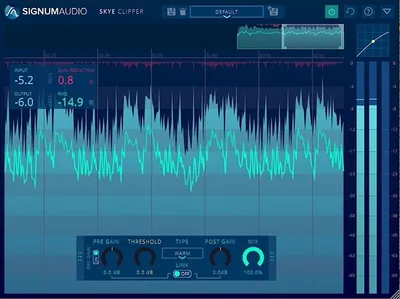
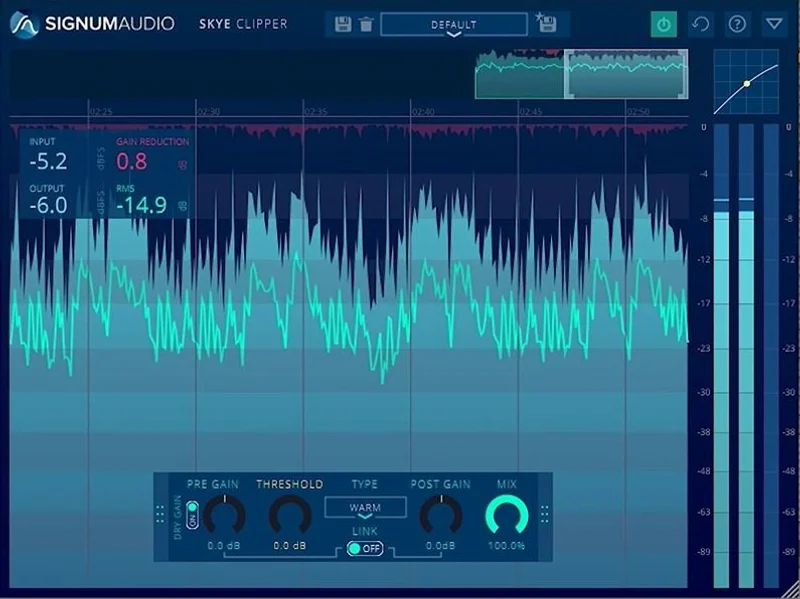
The control set is deliberately lean: Pre-Gain, Threshold, Clipping Type selector (7 types), Gain Link, Post-Gain, and a Dry/Wet mix. That's it.
There's also a scalable history view for watching the signal over time. It's the kind of feature you ignore until you're chasing an intermittent peak on a 45-minute podcast bounce and suddenly it's the most useful thing in the session.
The price is standard, or half that when it is on promotion. There's a 30-day free trial. The stereo version has a standard price. So the surround version costs more than the stereo version, which is reasonable given how few surround-capable clippers exist at any price.
The Good
Seven clipping types is the headline. We ran a 7.1 bed mix bus through all of them back to back, pushing the Pre-Gain hard enough to force visible clipping in the history view.
The softest types rounded off transients with almost no audible edge. Satisfying. The hardest types introduced harmonic content you could hear on a solo'd overhead, a texture sitting somewhere between soft saturation and a brick wall. The anti-aliasing algorithm deserves real credit here: even at 44.1kHz, we didn't get the fizzy high-frequency artifacts that cheaper clippers generate under identical conditions.
Gain Link is clever. When you adjust the threshold, it automatically compensates post-gain so your listening level stays consistent. This sounds minor. It isn't. Without it, threshold sweeps during A/B comparisons are unreliable because louder always sounds better. With it, you're actually comparing the clipper's character, not its volume.
The Dry/Wet control turns this into a parallel clipper with one knob. We blended a snare bus at 60% wet, keeping the original transient snap while adding a layer of controlled edge. It worked on the first try without any additional routing.
The Not-So-Good
We couldn't find a published latency figure. Anywhere. Not in the manual, not on the product page, not in any forum thread. For a plugin aimed at post-production and Atmos mixing, where phase alignment across dozens of tracks is a real workflow concern, that's annoying. You'd need to measure it yourself with a null test before trusting it in a session where latency compensation matters.
The UI doesn't tell you much about the character of each clipping type before you audition it. You get a name or a number, not a description or a curve display. We'd love a transfer curve view the way FabFilter Pro-L 2 handles it. Without it, learning which type fits which source takes trial and error across multiple sessions.
There's also almost no independent user data. No star ratings on ADSR. No forum deep-dives comparing its algorithms directly against competing plugins. We did our own testing, but if you want a second opinion from a third-party mastering engineer, you're going to have a frustrating search.
Compared to the Alternatives
FabFilter Pro-L 2 is the obvious reference point. It gives you 8 limiting algorithms, a detailed loudness meter panel, and a transfer curve display. It costs more and only handles stereo and up to 5.1 natively. For Atmos work at 7.1.4, Pro-L 2 doesn't cover you the same way SKYE does.
Waves Dorrough Surround handles channel routing but it's a meter with limiting, not a dedicated clipper. Different tool, different job.
Kazrog True Iron and Kazrog KClip 3 are stereo-only. KClip 3 has more detailed oversampling options and a transfer curve display SKYE lacks, but it stops at stereo.
ISL 2 from Sonnox handles surround limiting with more metering intelligence, but at a higher price and with a steeper learning curve for quick gain staging decisions. If you're doing broadcast loudness compliance work specifically, ISL 2 is the more complete tool. For raw clipping with character control across an Atmos bus, SKYE wins on simplicity and cost.
You can also check our thoughts on bus compression options like the Complexx bus compressor if you're building a more complete mastering chain.
Who Should Buy This
- ✅ Buy if you're mixing Dolby Atmos or 7.1 content and need a configurable clipper that handles the fu ll channel count cleanly.
- ✅ Buy if you want parallel clipping built into one plugin without extra routing overhead.
- ✅ Buy if you catch it at the promotional price. At that number, the risk is negligible and the trial backs you up anyway.
- ❌ Skip if you're working exclusively in stereo. Better-featured stereo clippers exist at this price.
- ❌ Skip if published latency specs matter to your workflow and you don't want to measure it yourself.
- ❌ Skip if you need detailed visual feedback on clipping character. The UI won't help you there.
Score Breakdown
| Category | Score | Notes |
|---|---|---|
| Sound Quality | 4.0/5 | Anti-aliasing holds up under heavy pushing; 7 clipping types give real tonal range |
| Value for Money | 4.3/5 | Surround clipper at $79 is hard to argue with; promotional price makes it a steal |
| Ease of Use | 3.5/5 | Control set is lean but the UI doesn't guide you toward the right clipping type |
| Features | 3.8/5 | Surround support and Gain Link are genuine differentiators; no transfer curve display hurts |
| CPU Efficiency | 4.0/5 | Runs light across all 7.1.4 channels; no performance issues in our sessions |
| Overall | 4.1/5 | A rare, affordable surround clipper that does its job cleanly, held back by missing latency data and thin visual feedback |
Alternatives to Consider
FabFilter Pro-L 2: More algorithms, better visual feedback, excellent loudness metering. Stereo and up to 5.1 only. If you don't need 7.1.4, this is our first recommendation for mastering work. The current price is shown in the buy box on this page.
Kazrog KClip 3: More detailed oversampling settings and a transfer curve display that SKYE lacks. Stereo only. Worth it if surround isn't your concern and you want more visual control.
Sonnox ISL 2: Handles surround limiting with broadcast loudness compliance tools built in. More complex. More expensive. Right tool if you're doing broadcast deliverables, overkill if you just need a clean surround clipper for music.
If you're also thinking about compression across your mastering chain, our review of the Bettermaker Mastering Compressor covers a strong analog-modeled option. For more traditional mastering compression, the PSP MasterComp is still earning its keep in 2026. And if you're looking at vintage-flavored bus processing, our Native Instruments Vintage Compressors R2 review is worth your time.
At full price, or less on promotion with a 30-day trial behind it, SKYE Clipper (Surround) is a legitimate solution to a problem most clippers simply don't address: clean, character-controllable clipping across a full 7.1.4 signal chain.
It's not perfect. The missing latency spec is a real oversight that Signum Audio should fix in documentation. The UI could do more to help you understand what each clipping type sounds like before you've spent twenty minutes auditioning.
But if you're mixing in Atmos and you don't have a dedicated surround clipper, you either need this or you need to spend significantly more to get it.
Skip it if you're working in stereo. Buy it if you're not.
Frequently Asked Questions
Does SKYE Clipper (Surround) support Dolby Atmos sessions?
Yes. It handles channel configurations up to 7.1.4, which covers Dolby Atmos bed mixes. That's what sets it apart from most clippers at this price. If your DAW supports 7.1.4 buses and your format supports AAX, VST3, or AU, you're covered.
What's the difference between the Surround and Stereo versions?
The Stereo version handles standard two-channel and mono configurations and costs less than the Surround version. The Surround version adds support up to 7.1.4 and carries a higher standard price. Both share the same 7 clipping types and control set. If you're not working in immersive audio, the Stereo version is the sensible buy.
How does the anti-aliasing in SKYE Clipper actually work?
Signum Audio describes it as a proprietary real-time algorithm. The technical specifics aren't published in detail. What we can say from testing is that it reduces the high-frequency aliasing artifacts that cheaper clippers produce when you push the threshold hard, even at 44.1kHz sessions. Whether it's oversampling-based or a different approach, the results hold up.
Is there a free trial before buying?
Yes, 30 days. No restrictions are listed on core functionality during the trial period. Given the lack of extensive third-party reviews out there, we'd strongly recommend using the full trial on a real session before committing. That's exactly what the trial is for.