
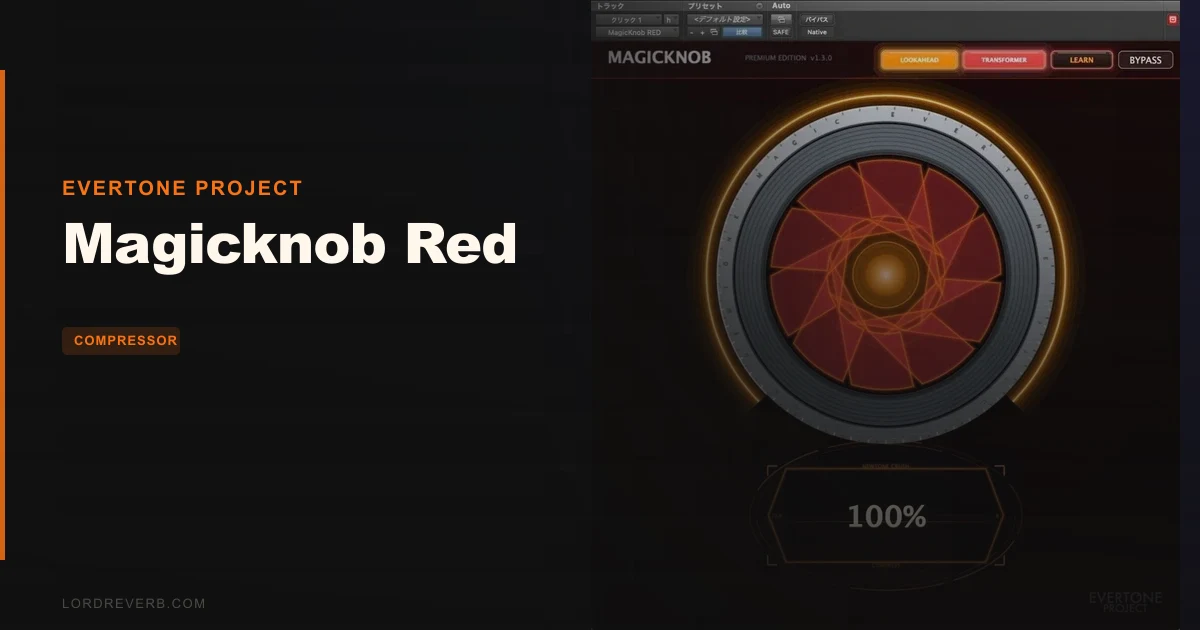
Magicknob Red is the wrong buy if you want a compressor with a threshold, ratio and attack you can set by hand, because it gives you one knob and a handful of buttons. For $27, it’s aimed at producers who’d rather turn one control and listen. If that sounds like a relief, keep reading. If it sounds like a straitjacket, skip it.
It’s built on the Evertone Compressor, and it keeps the same engine under a much simpler face.
Quick Verdict
We rate Magicknob Red 4.2 out of 5. At $27, it’s a smart pick for anyone who wants fast, musical dynamics control without menu-diving. It earns its score on speed and on how it handles transients. It loses points for a learning curve around the 50% mark and a hidden gain trim. Mostly positive, with real caveats.
The Catch Up Front
Start with the 50% split. Zero to 50% on the red arc applies transient rebound energy processing. From 50% onward, on the light orange arc, you get powerful compression across the whole signal.
Those are two different behaviours on one knob. Reviewers say that takes a learning curve to master, and the documentation around the colour-coding doesn’t help. People report confusion over what the threshold means.
Then there’s the output trim. It’s a hidden feature: you drag the centre of the % display. Owners say careful clicking in the number field is required, and an accidental drag is easy.
LOOKAHEAD adds 20ms of latency when you switch it on. Annoying if you’re tracking through it.
What You Get If You Clear It
The interface is one centre knob. Drag it and you set the amount of processing. Auto-level is active by default, so your loudness doesn’t jump around as you push.
LEARN is the clever bit. Hit it, play your track, and the plugin listens to the signal and sets itself up. Users praise it for keeping them away from extreme settings.
TRANSFORMER switches on a harmonic enhancement mode and adds presence to the sound. LOOKAHEAD gives you 20ms of look-ahead processing for when you want the plugin to see transients coming.
That’s the whole feature list. It’s short on purpose.
Where It Shines
Picture a dull drum bus that’s all sustain and no snap. Run LEARN while the loop plays, then pull the knob down into the red arc, under 50%. Owners report direct transient enhancement without the natural attack collapsing. The hit gets more bite and the body stays put.
That’s the part we like most. Plenty of tools sharpen a transient by mangling it. This one is described as leaving the attack intact.
Now take a flat, lifeless mix. One reviewer reports a 3D spatial improvement from this plugin. We can’t promise it on your material, but it’s the sort of result that makes one knob feel like enough.
Cross past 50% on a full mix bus and you’re into serious compression. Go easy. Push beyond the intended range and the mid-range flattens out. Ugly.
Against the Field
The obvious comparison is the Evertone Compressor itself, the full version this plugin is based on. If you want deeper control, that’s where you go. Magicknob Red trades that depth for speed.
Magicknob Blue is the expander version of the series. It’s the one to reach for when you want to open dynamics up instead of squeezing them.
The Evertone Expander is another tool from the same developer. Same logic: different job, different plugin.
Red wins when you want a result in seconds. The others win when you want to sculpt.
Who Should Buy This
✅ Buy if you want transient punch on drums without hand-tuning attack and release. ✅ Buy if you like letting LEARN set a sensible starting point and nudging from there. ✅ Buy if you find multi-parameter compressors slow and would rather trust your ears on one knob.
❌ Skip if you need manual control over threshold, ratio and timing. ❌ Skip if hidden or fiddly controls drive you up the wall. ❌ Skip if you want a plugin with a long list of modes to explore.
Specs & Technical Details
| Spec | Detail |
|---|---|
| Developer | Evertone Project |
| Price | $27 |
| Plugin Format | N/A |
| OS Support | N/A |
| Activation | N/A |
| CPU Usage | N/A |
| Trial Available | N/A |
| Version Reviewed | N/A |
Score Breakdown
| Category | Score | Notes |
|---|---|---|
| Sound Quality | 4.5/5 | Transient enhancement without attack collapse, per owners |
| Value for Money | 4.5/5 | One focused tool at $27 |
| Ease of Use | 4.0/5 | One knob, but the 50% split takes learning |
| Features | 3.5/5 | LEARN, LOOKAHEAD and TRANSFORMER, and little else |
| CPU Efficiency | N/A | Nothing verifiable on CPU load |
| Overall | 4.2/5 | Fast and musical, held back by a steep first hour |
Alternatives to Consider
- Evertone Compressor: the full version this plugin is based on. Pick it if you want more control than one knob offers.
- Magicknob Blue: the expander in the same series. Pick it if your problem is too little dynamic range, not too much.
- Evertone Expander: a separate expander from the same developer, for when you want a more hands-on approach.
Final Call
Buy Magicknob Red at $27 if you’d rather turn one knob than fight six. It’s quick, it keeps transients alive, and LEARN keeps you out of trouble.
Give it an hour to teach you the 50% split. After that it stops being a puzzle.
Skip it if you need hands-on compressor controls, or if a hidden trim parameter would make you want to throw your mouse. For you, it’s the wrong tool.
Frequently Asked Questions
What does the 50% mark on Magicknob Red do?
It splits the knob into two behaviours. From 0% to 50% on the red arc, the plugin applies transient rebound energy processing. From 50% onward on the light orange arc, it applies powerful compression to the entire signal.
Does Magicknob Red add latency?
Only when you enable the LOOKAHEAD button. That adds 20ms of look-ahead processing and the matching latency. Leave it off if you're tracking live.
How do I trim the output level?
It's a hidden feature. Drag the centre of the % display to adjust output. The gain trim feature risks accidental adjustment through careful clicking in the number field.
Can I push the knob all the way up?
You can, but users report that over-processing flattens the mid-range when settings go past the intended range. Use LEARN to find a sensible starting point, then back off if the mix starts to sound squashed.