
PSP Levelizer is worth $69 if you spend your days fixing vocal and bass levels by hand, and it’s a clear pass if all you want is a faster compressor.
It’s a gain-riding engine, not a compressor. That difference decides whether you’ll love it or return it.
Think of the vocal take where the singer drifts from a whisper to a belt inside one verse. Your compressor chokes on the loud bits and pumps on the quiet ones. You end up drawing fader automation for an hour. Levelizer exists to do that hour of work for you.
We rate it highly, with caveats. The missing output gain knob is irritating. The parameter names will confuse you for the first afternoon. Neither is a dealbreaker.
Quick Verdict
We give PSP Levelizer 4.4 out of 5 at $69. It suits engineers and producers who ride levels on vocals, bass and dialogue, and want that riding automated before the signal reaches a compressor. Skip it if you want a one-knob squash or a character compressor. It’s a precision tool for evening out level, and it does that well, with a handful of honest annoyances.
What You're Actually Getting
PSP Levelizer is a level-management processor with an automatic gain-riding engine. It follows the level of your signal and moves gain up or down to hold it near a target.
PSP Audioware describes the result as the precision of automation with the responsiveness of a dynamics processor. That’s a fair summary of the idea.
It ships in AAX Native, AU, VST2 and VST3 for Mac and Windows. Version 1.0.1 was a free update that added Automation Write and Read.
There are three reaction modes: Sharp, Normal and Smooth. Lookahead reaches up to 250ms. A brick-wall limiter sits inside, with adjustable drive, ceiling and release.
That’s a lot of machinery for one plugin. Most of it is useful.
How Does the Auto-Fader Engine Behave?
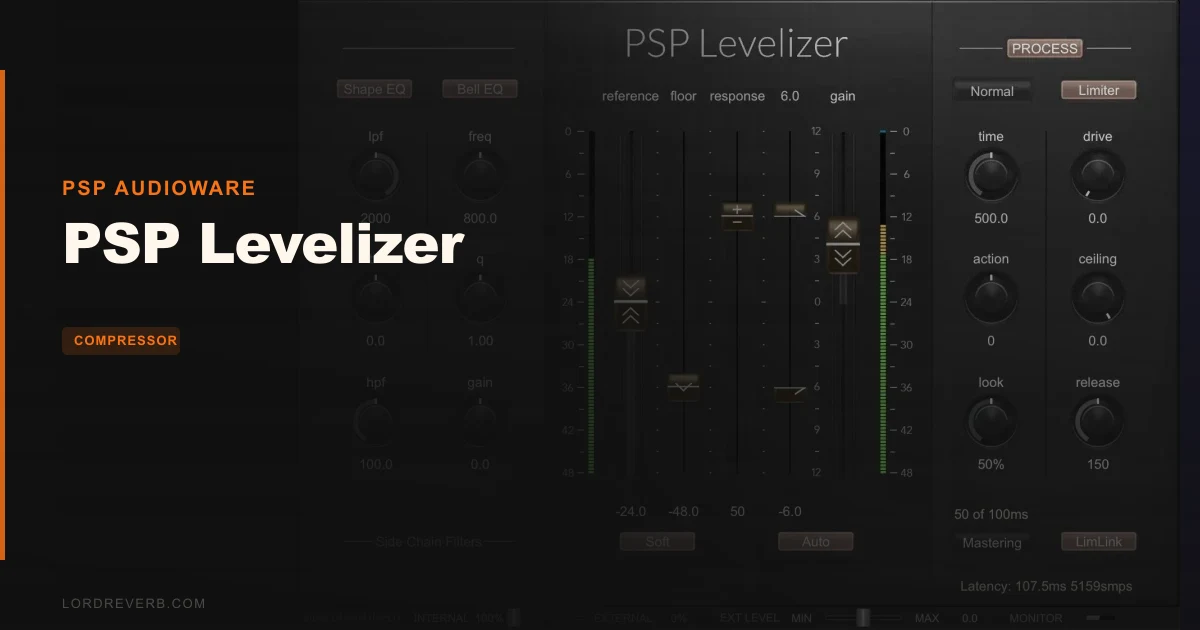
This is the heart of the plugin. The auto-fader keeps a signal centered around a target reference level while preserving natural dynamics.
You set where the level should sit. Levelizer rides toward it.
Three controls do most of the work: Reference, Floor and Range. Owners report that sound comes out natural with just a preset selection and a tweak of those three. That matches how the interface is laid out.
Range limits how far the gain can move, and the boundaries can be soft. That soft option matters. Hard boundaries make gain moves sound like a switch being thrown. Soft ones ease in.
Floor deserves attention. Set it carelessly and the plugin starts lifting breaths and room noise between phrases. Set it right and the gaps stay quiet.
Sharp, Normal and Smooth
The three reaction modes change how eagerly the engine responds. Sharp reacts quickly. Smooth moves slowly and politely. Normal sits between them.
Pick Smooth on a lead vocal that needs gentle correction. Pick Sharp on a bass that jumps note to note.
Rule of thumb: start Smooth, speed up only if the level wanders. Fast riding on a vocal can sound like someone nervously twitching a fader.
Lookahead up to 250ms
Lookahead lets the plugin see a loud phrase before it arrives and prepare the gain move. Several ranges are available, topping out at 250ms.
On a vocal, that means the start of a shouted word doesn’t slam through before the fader catches up. It sounds like a human riding ahead of the singer. That’s the entire point.
The cost is latency, so keep that in mind when you track through it. Mixing is fine. Tracking, not so much.
Why the Sidechain EQ Matters More Than You'd Expect
The sidechain section is where Levelizer pulls away from simpler riders. It includes Shape EQ and Bell EQ sections that shape what the detector listens to.
Why care? A detector hears everything. A boomy room, a bass bleed or a sibilant spike can drag the gain around for the wrong reasons.
Filter the sidechain and the detector focuses on the information you care about. Cut the lows out of the detector on a vocal and plosives stop triggering gain drops. Boost the midrange the detector hears and it follows the body of the voice instead of the hiss.
One reviewer called the sidechain EQ a huge addition, enabling much faster results even with a click track as the sidechain source. That detail is telling. It means the plugin can be pointed at an external control signal, and the EQ makes that practical.
Internal or external sidechain operation is supported. Use external when you want a track to follow something else.
Making One Track Follow Another
The plugin can make a track dynamically follow an external control signal. Picture a pad that should swell and fall with a vocal, or a guitar bed that ducks gently under a lead.
That’s mix-responsive level automation, and it’s the creative use that ordinary compressors can’t match. It takes setup. It pays off.
What Does the Built-In Limiter Add?
A brick-wall limiter is built in, with adjustable drive, ceiling and release. Stereo linking options are included for it.
The limiter catches the peaks the slower gain riding lets through. That’s a sensible pairing. Riding handles the macro level and the limiter handles the stray spikes.
Stereo linking matters when you run it on a stereo bus or a stereo vocal double. Linked, the stereo image stays put. Unlinked, each side limits on its own and the image can shift.
It isn’t the plugin’s main reason to exist. Treat it as a safety net.
Presets and the Interface
Owners call the factory preset collection particularly good, and we’d lean on it. Start from a preset close to your source, then adjust Reference, Floor and Range. Most jobs are done in that loop.
The interface is easy to read. Owners describe it as very easy to use. That’s a relief, because the underlying ideas aren’t.
A comprehensive preset management system is included, so saving your own starting points for lead vocal, bass and dialogue is simple. Do it. Future you will thank present you.
Automation Write and Read
Version 1.0.1 added Automation Write and Read. That means the gain moves Levelizer makes can be captured and then edited, a useful bridge between automatic riding and hand tweaking.
Let it ride, write it, then fix the two spots it got wrong. That’s a faster workflow than drawing every move yourself.
The Not-So-Good
Start with the obvious annoyance: there’s no output gain knob. A user asked for one, noting that an external gain plugin is an inconvenient workaround. We agree. After the plugin settles your level, you’ll often want to trim the result, and having to insert another plugin for that is ridiculous on a processor at this price.
The learning curve is real. Response, Action and Look don’t map onto Attack and Release, so your compressor instincts won’t help at first. Expect an afternoon of confusion before the controls click. The limited educational content doesn’t help.
It can’t read intent. Automatic level management can’t tell a deliberate whisper from a take that simply dipped. It will happily lift both. You still have to listen.
There’s a reported bug in AudioHijack. Bypassing the plugin there causes the timing setting to slow down until you adjust it. That’s niche, but it will bite anyone in that environment.
Early versions also had a problem. Version 1.0.0 had auto-fader response time initialization issues after loading sessions or stop/play operations. The fix arrived in v1.0.1, so make sure you’re on it.
How Does It Compare to the Alternatives?
Waves Vocal Rider takes a narrower route, built around a lead vocal workflow. If vocals are all you ride, it’s the simpler pick. Levelizer is broader.
Hornet AutoGain Pro focuses on general mix balancing, with less emphasis on dedicated riding behavior. Choose it for broad balancing. Choose Levelizer when you want deliberate riding with a tweakable detector.
Melda MAutoVolume offers advanced level automation for complex routing, with a higher learning curve. General-purpose rivals like it can follow fine changes too closely or produce unsteady volume movement if you don’t carefully match them to the material. Levelizer’s sidechain EQ and reaction modes give you more direct control over that behavior.
Melodyne’s Leveling Macro comes up often as the gold standard people measure against. It’s a useful yardstick for how natural the result should sound.
Where Does It Sit in Your Signal Chain?
Put it before your compressor. A reviewer reports that in that position the attack stands out more clearly and bass presence increases, with rhythm and groove becoming clearer.
That makes sense. Feed a compressor an even signal and it stops overreacting to the loudest notes. It can then do its job: color and control.
On vocals, performances that fluctuate enough to trouble downstream processors are the sweet spot. Levelizer evens them out first, so the compressor behind it works from a steadier signal.
Think of it as an assistant engineer. It handles the fader work so you can focus on the sound.
Who Should Buy This
✅ Buy if you ride vocal levels by hand and want that work automated.
✅ Buy if you want a leveler in front of a compressor on bass or vocals.
✅ Buy if you need a track to follow an external control signal.
❌ Skip if you want a character compressor with a distinctive sound.
❌ Skip if you won’t invest an afternoon learning Response, Action and Look.
❌ Skip if you only ever need a quick one-knob fix.
Specs & Technical Details
| Spec | Detail |
|---|---|
| Developer | PSP Audioware |
| Price | $69 |
| Plugin Format | VST3 / VST2 / AU / AAX Native |
| OS Support | Mac / Windows |
| Activation | N/A |
| CPU Usage | N/A |
| Trial Available | N/A |
| Version Reviewed | 1.0.1 |
Score Breakdown
| Category | Score | Notes |
|---|---|---|
| Sound Quality | 4.5/5 | Owners describe natural results from presets plus Reference, Floor and Range |
| Value for Money | 4.5/5 | Riding engine, sidechain EQ and limiter in one plugin |
| Ease of Use | 3.5/5 | Clean interface, but Response, Action and Look take time to learn |
| Features | 4.5/5 | Lookahead to 250ms, sidechain EQ, external sidechain, limiter |
| CPU Efficiency | N/A | No figure available, so we leave it unscored |
| Overall | 4.4/5 | Strong leveler with a few honest annoyances, chiefly the missing output gain |
Alternatives to Consider
Waves Vocal Rider is the simpler choice if lead vocals are your only target. Its workflow is narrower.
Hornet AutoGain Pro suits general mix balancing where dedicated riding behavior matters less.
Melda MAutoVolume handles complex routing with advanced level automation, but expect a steeper learning curve and some care matching it to your material.
The Final Call
Buy PSP Levelizer at $69 if hand-riding faders is eating your mix time. Put it ahead of the compressor, filter the sidechain, start from a preset and trust your ears on the rest.
Don’t buy it expecting a plug-and-forget fix. It’s an assistant engineer, and an assistant still needs direction.
Frequently Asked Questions
Is PSP Levelizer a compressor?
No. It's a level-management processor built around an automatic gain-riding engine. It evens out level rather than squashing peaks, and it works best placed before a compressor.
What plugin formats does PSP Levelizer support?
It comes in AAX Native, AU, VST2 and VST3. Versions exist for both Mac and Windows.
What does the sidechain EQ do?
It shapes what the detector listens to, using Shape EQ and Bell EQ sections. That lets you steer the gain riding toward the part of the signal you care about. One reviewer called it a huge addition that makes results much faster.
Does PSP Levelizer have an output gain knob?
No, and that's a fair criticism. A user asked for one, noting that an external gain plugin is an awkward workaround.
Can it follow another track?
Yes. It supports internal or external sidechain operation, and it can make a track dynamically follow an external control signal. That's handy for mix-responsive level automation.
Should I update from version 1.0.0?
Yes. Version 1.0.1 is a free update that added Automation Write and Read. It also fixed auto-fader response time initialization issues that appeared after loading sessions or stop/play operations in 1.0.0.