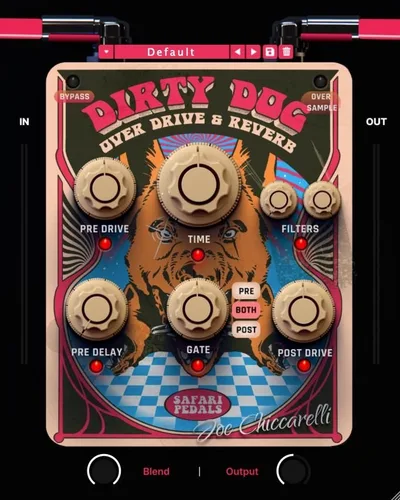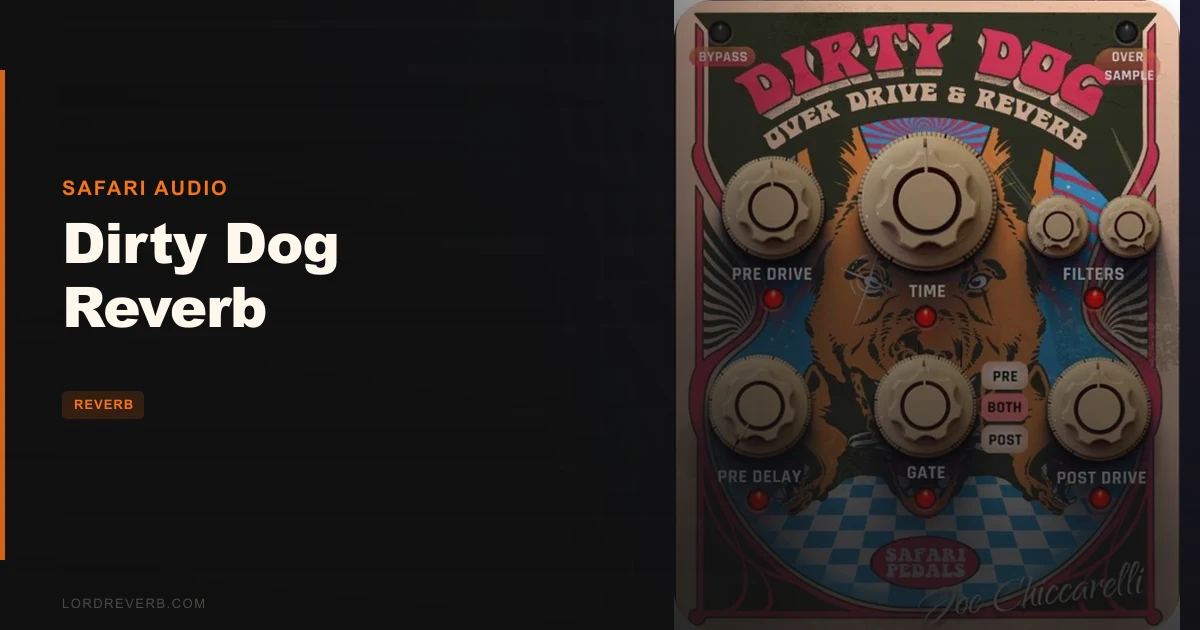
Is Dirty Dog Reverb worth $49 for dirty, aggressive reverb? Yes, if grit is the job. It’s a great fit for rock, indie and lo-fi producers, and a harder sell if you want a polished plate for ballads.
Safari Audio built it with Joe Chiccarelli, the producer and engineer behind records by The White Stripes, The Strokes and The Killers. The pitch is a reverb that distorts on purpose.
This review is based on the product page, the developer’s published feature list and general production knowledge. No free trial is mentioned in the material reviewed, so nothing here is a hands-on result. Anything we can’t verify yet is marked as such.
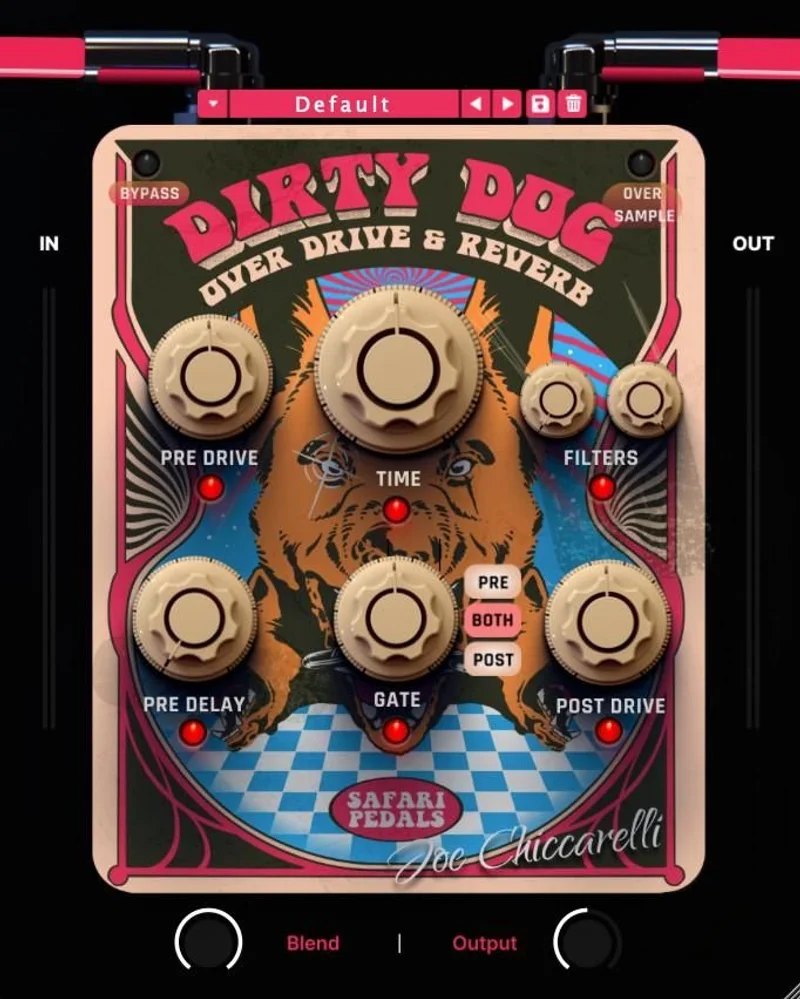
Think of it as an effects chain collapsed into one window. Reverb sits in the middle. Drive stages sit on either side. Filters and gates tidy up the mess.
The release is current at version 1.2.31, according to the retailer listing. It ships as VST3, AU and AAX.
Who Is Dirty Dog Reverb Actually For?
You have a vocal that sounds polite. You want it to sound like it’s shouting from the back of a concrete stairwell.
That’s the producer this was made for.
It also suits anyone who’s tired of building the same chain by hand: a reverb send, a distortion plugin before it, another one after it, a gate to stop the wash swallowing the snare. That’s four plugins and a lot of routing for one sound.
If your reverb needs are “make it sound like a nice room”, skip this. Your stock reverb already does that job.
What Dirty Dog Reverb Actually Does
The developer describes it as a “distorted reverb powerhouse”. That’s marketing language, so here’s the plain version.
Signal goes in. It can be overdriven before it hits the reverb. The reverb tail can then be overdriven again after it. Filters shape the tone. Gates control how much of the wash survives.
The result is a reverb that has teeth. The tail isn’t a soft blur behind the source. It pushes forward.
That’s an opinion about the design, not a measurement. But the signal path as documented makes sense. Distortion before reverb changes what the reverb has to chew on. Distortion after reverb grits up the tail itself. Those are two very different sounds.
Having both in one plugin is the whole point.
How Does the Blend Knob Work?
The Blend knob sets how much reverb you hear against the dry signal. The developer calls it “full control over reverb intensity”.
That’s the control you’ll touch first.
Because this is a distortion-heavy reverb, the Blend setting matters more than on a clean plugin. A clean reverb at 30% blend is forgiving. A dirty one at 30% can already feel loud, because the added harmonics make the tail more audible than the level suggests.
Start low. Push up until it’s too much. Back off a notch.
We like having one obvious knob for that job. It keeps the learning curve short.
What Do the Reverb Time and Pre-Delay Ranges Give You?
The documented reverb time runs from 140ms to 4000ms. Pre-delay runs from 1ms to 130ms.
Those are the developer’s figures, and they tell us something useful.
At 140ms, you’re in tight room and slap territory. That’s useful on drums and guitars where you want ambience that adds weight without adding length. At 4000ms, you’re in cavern territory. That’s a lot of wash to run through a distortion stage.
The 1ms floor on pre-delay is interesting. At that setting the reverb starts almost immediately, which glues it to the source. At 130ms, you get a clear gap between the dry hit and the tail. That gap is how vocals stay intelligible under a heavy effect.
A practical starting point for vocals: pre-delay around 60 to 90ms so the word lands before the grit arrives. That’s our suggestion, not a developer preset.
What Are the Two Overdrive Stages?
This is the feature that defines the plugin.
The developer lists “two distinct overdrive types (pre and post reverb)”. Two stages, placed on opposite sides of the reverb, with different characters.
Drive before the reverb
Distorting the signal before the reverb means the reverb processes a harmonically richer input. Every added harmonic gets smeared into the tail.
The tail comes out dense. It also comes out angrier.
This is the classic “dirty reverb” approach. You’d normally build it with a drive plugin on a send, feeding a reverb plugin. Here it’s built in.
Drive after the reverb
Distorting after the reverb works on the tail itself. Quiet decay tails get pushed up and crunched. The wash starts to pump and breathe.
That can sound fantastic on drums. It can also sound like a mess if you push it.
The developer doesn’t publish the circuit models or saturation curves behind either drive type in the material we reviewed. We can’t tell you whether they’re tube-style, diode-style or something custom. That’s a gap. We’d want to hear them before claiming anything about their harmonic content.
Auto Gain
Auto Gain is built into the overdrive section, according to the feature list.
We love this on paper. Distortion raises perceived loudness fast, and louder always sounds better until you A/B at matched levels. Auto Gain is meant to keep that honest, so you judge the tone instead of the volume.
We can’t verify how well it compensates across drive settings. That’s something to test in your own session.
Oversampling
Selectable oversampling options are listed. Distortion generates harmonics that can fold back as aliasing, which shows up as harsh, inharmonic fizz.
Oversampling reduces that. It also costs CPU.
The developer doesn’t publish which oversampling factors are on offer in the material we reviewed. Expect a trade: cleaner top end at higher settings, more CPU load. Use the lower option while writing and the higher one when you bounce.
Why Is the Dual Gate System the Sleeper Feature?
A gated reverb is a classic sound. A gated distorted reverb is a different animal.
The plugin includes a dual gate system with three modes: pre reverb, post reverb, or both. That’s three very different behaviours.
Gate before the reverb
The gate cleans up what feeds the reverb. If your source has bleed or noise between phrases, the gate stops it from being distorted and reverberated.
That matters more than people think. Noise through a drive stage gets louder and nastier.
Gate after the reverb
The gate chops the tail. The reverb hits, rings, then shuts off on a timer set by the gate.
That’s the gated snare sound, and it’s useful well beyond the 1980s. A short, aggressive, cut-off tail adds size to a snare without turning the chorus into soup.
Both
Running both gates is the most controlled option. Clean input, cut-off tail. You get the grit and the discipline.
We like that the choice is explicit. It’s a small design decision that saves a lot of routing.
Gate controls beyond the mode selector aren’t detailed in the source we reviewed. We can’t tell you whether you get threshold, attack, hold and release, or a simplified single control. Check that before you buy if gate precision matters to you.
What About the Filters?
The developer lists filters as part of the signal path, alongside reverb, overdrive and gating.
That’s all the documented detail we have. We don’t know the filter slopes, whether they sit before or after the drive stages, or whether they’re high-pass, low-pass or both.
That position matters a lot. A high-pass before the drive keeps low-end mud from being distorted. A low-pass after the drive tames harsh fizz.
Until we know where they sit, we can’t judge them. It’s the biggest hole in the documented feature set, and the one we’d most want answered.
Are the Presets Worth Your Time?
The plugin ships with handpicked presets from two engineers: Carlos de la Garza, whose credits include Paramore and Ziggy Marley, and Ken Sluiter, who has worked with James Blunt, Weezer and OK GO.
Presets on a specialist plugin are a real asset. A distorted reverb has a lot of ways to go wrong. Starting from a working setting teaches you the safe range faster than twisting knobs blind.
That said, presets from engineers with that range of credits will probably lean toward rock and pop. If you work in electronic or ambient, you’ll tweak more.
We’d use them as a tour, then save our own.
How Does It Handle Different Sources?
We haven’t run sources through this, so what follows is reasoning from the documented signal path, not results.
Vocals
Pre-delay is your friend. Set it long enough that the word lands clean, then let the dirty tail follow. Gate the post-reverb stage so the grit doesn’t smother the next phrase.
Light pre-drive, heavier post-drive is a sensible starting recipe.
Drums
Short reverb time, gate on the tail, drive after the reverb. That’s a snare that explodes and cuts off.
On a full kit bus, be careful. Distorted reverb on everything turns into a fog fast.
Guitars
Guitars already carry distortion, so the pre-drive stage may be redundant. Try post-drive only, with a medium reverb time. The tail becomes an extension of the amp tone.
Synths
This is where the plugin could surprise people. A clean pad through a distorted reverb turns into something industrial. Long reverb time, heavy pre-drive, filters doing the shaping.
That’s the part we’d most want to try ourselves.
How Heavy Is It on Your CPU?
System requirements listed are Mac OS X 10.15 or later and Windows 8 or later, with a 2GHz Intel dual-core processor as the minimum. That’s a low bar.
Reviewers and the retailer describe it as lightweight. We haven’t measured it, so we won’t give you a figure.
The variable is oversampling. Distortion plus oversampling plus a long reverb tail can stack up. Expect the load to rise at the highest oversampling setting, and plan to use the lighter one while tracking.
Formats are VST3, AU on Mac, and AAX on both platforms.
Where Dirty Dog Reverb Wins
It wins on workflow. One plugin replaces a send, two drive plugins and a gate.
That’s real time saved. Every plugin you don’t open is a decision you don’t make.
It wins on focus. This plugin has a point of view. It’s not trying to be a Swiss army reverb.
It wins on the pre and post drive placement. That’s the feature most reverbs don’t offer at all.
Reviewers rate it highly. The retailer listing shows a 4.9 out of 5 average from 26 verified reviews. That’s a small sample, so treat it as a good sign, not proof.
Where It Falls Short
It’s a specialist. If you want one reverb to cover everything, this isn’t it.
We can’t verify the character of the drive stages. No published circuit detail, no harmonic breakdown in the material we reviewed.
Filter and gate controls are thinly documented. That makes it harder to judge precision work.
No free trial is mentioned in the material we reviewed. For a plugin this subjective, that’s annoying. Distortion character is something you want to hear on your own material before paying.
Independent technical comparisons are scarce too. Most coverage reads as enthusiasm, not measurement. That’s not the plugin’s fault, but it means you’re buying partly on trust.
How Does Dirty Dog Reverb Compare to the Alternatives?
It’s not the first plugin to mix reverb and distortion. Plenty of producers have built this sound manually for years.
The closest competitor idea is the DIY chain: a reverb on a send with drive plugins around it. That’s more flexible and more work.
Another comparison is a general-purpose reverb with built-in saturation. Those get you gentle grit. Dirty Dog goes much further.
A third is a creative reverb with modulation and shimmer. Those chase beauty. This chases attitude.
One thing to clarify: the name overlaps with the Peavey Dirty Dog, a hardware distortion pedal. They’re unrelated products. Search results mix them up.
If you want to compare against clean, natural options, see our Eventide Spring review for a tank reverb with real character, or our CSR Room Reverb review for a more conventional room sound.
best reverb plugins
Pricing and Value
The plugin costs $49. No free trial is mentioned in the material we reviewed, and no discount is stated, so we won’t suggest one.
Is it good value? Think about it as time saved plus a sound that’s awkward to build.
If you’d use the dirty reverb sound weekly, $49 is easy to justify. If you’d use it twice a year, build the chain by hand instead.
The value case is strongest for producers who already use parallel distortion and reverb sends and want the shortcut.
Who Should Buy This?
- ✅ Buy if you make rock, indie, garage or lo-fi music and want grit built into your reverb.
- ✅ Buy if you already build distorted reverb sends by hand and want to stop.
- ✅ Buy if you want pre and post drive around the reverb in one window.
- ✅ Buy if you want presets from working engineers as a starting point.
- ❌ Skip if you want one reverb for everything, including clean plates and halls.
- ❌ Skip if you can't commit without a trial and demos.
- ❌ Skip if you need deep, documented control over every filter and gate parameter.
Specs & Technical Details
| Spec | Detail |
|---|---|
| Developer | Safari Audio |
| Price | $49 |
| Plugin Format | VST3 / AU / AAX |
| OS Support | Mac OS X 10.15+ / Windows 8+ |
| Activation | N/A |
| CPU Usage | Light (per developer and retailer; rises with oversampling) |
| Trial Available | N/A (none mentioned in the material reviewed) |
| Version Reviewed | 1.2.31 (per retailer listing) |
| Reverb Time | 140ms to 4000ms |
| Pre-Delay | 1ms to 130ms |
| Minimum CPU | 2GHz Intel dual-core |
Score Breakdown
These scores rest on the documented feature set and the developer’s published figures. We’ll revisit them after longer hands-on use.
| Category | Score | Notes |
|---|---|---|
| Sound Quality | 4.3/5 | Dual drive stages are the right idea, but character is unverified |
| Value for Money | 4.4/5 | Replaces a multi-plugin chain; no trial mentioned |
| Ease of Use | 4.5/5 | One Blend knob, clear signal path, useful presets |
| Features | 4.2/5 | Dual gate and pre/post drive stand out; filter detail is thin |
| CPU Efficiency | 4.2/5 | Described as lightweight; oversampling will add load |
| Overall | 4.3/5 | A focused, mostly convincing specialist reverb |
Alternatives to Consider
Eventide Spring
If you want character without the distortion, a tank reverb is the move. Our Eventide Spring review covers a spring emulation with real personality. It’s a different kind of dirty: boing and drip, not overdrive.
Fuse Audio Labs BUCKET-500
For gritty ambience through delay instead of reverb, read our BUCKET-500 analog delay review. It scratches a similar lo-fi itch from another angle.
IK Multimedia CSR Room Reverb
If you’d rather have a believable room you can drive yourself, see our CSR Room Reverb review. Pair it with a saturator on the send and you’ll get close to the Dirty Dog sound the long way round.
reverb plugin buying guide
The Verdict on Dirty Dog Reverb
Buy it if you want a reverb with attitude and you’re tired of building the same chain by hand. The pre and post drive stages and the dual gate are smart design, and the engineer presets give you a running start.
Skip it if you need a clean, general-purpose reverb. This plugin has one job, and it commits to it.
What we’d still want confirmed: the character of the drive stages, the filter positions and slopes, and how Auto Gain behaves across the range. A trial would settle all three.
It’s a reverb that growls. Worth it.
Frequently Asked Questions
Is Dirty Dog Reverb worth buying?
Yes, for producers who want distorted, aggressive reverb on vocals, drums, guitars or synths. It collapses a multi-plugin chain into one window. It's the wrong buy if you need a clean, natural reverb as your main tool.
Who made Dirty Dog Reverb?
Safari Audio developed it in collaboration with Joe Chiccarelli, an 11-time Grammy-winning producer and engineer. His credits include The White Stripes, The Strokes, Morrissey, Little Dragon and The Killers.
What plugin formats does Dirty Dog Reverb support?
The retailer lists VST3, AU on Mac, and AAX on both Mac and Windows. System requirements are Mac OS X 10.15 or later or Windows 8 or later, with a 2GHz Intel dual-core processor.
How long can the reverb tail be?
The developer lists reverb time from 140ms to 4000ms and pre-delay from 1ms to 130ms. That covers tight slap-style rooms up to long, cavernous washes. Long tails through the drive stages will be intense, so use them with care.
What does the dual gate do?
The gate can sit before the reverb, after it, or in both positions. Pre-reverb gating cleans up what feeds the effect. Post-reverb gating cuts the tail short, which is how you get a gated, aggressive reverb sound.
Is Dirty Dog Reverb the same as the Peavey Dirty Dog pedal?
No. The Peavey Dirty Dog is a hardware distortion pedal. Safari Audio's Dirty Dog Reverb is a separate software plugin that combines reverb, overdrive, filters and gating. The names overlap in search results, which causes confusion.
Does Dirty Dog Reverb have a free trial?
No free trial is mentioned in the material we reviewed. Check the retailer and developer pages for current demo availability before you buy. Distortion character is subjective, so hearing it on your own material first is worth the effort.