The real question with the Lexicon 224 Digital Reverb is whether a plugin based on 1978 firmware can compete in a session full of modern reverbs, and the honest answer is yes, but only if you want what it specifically does.
Quick verdict: At $49, this is a clever, frustrating, and satisfying piece of software that earns its keep when you need that specific warm, slightly gritty hall character that defined records from the late 1970s through the late 1980s. Score: 4.2/5. It's built for mix engineers who know what the Lexicon 224 sounds like and need it accessible without sourcing ageing hardware. If you want a general-purpose modern reverb, look elsewhere.
Does It Actually Deliver?
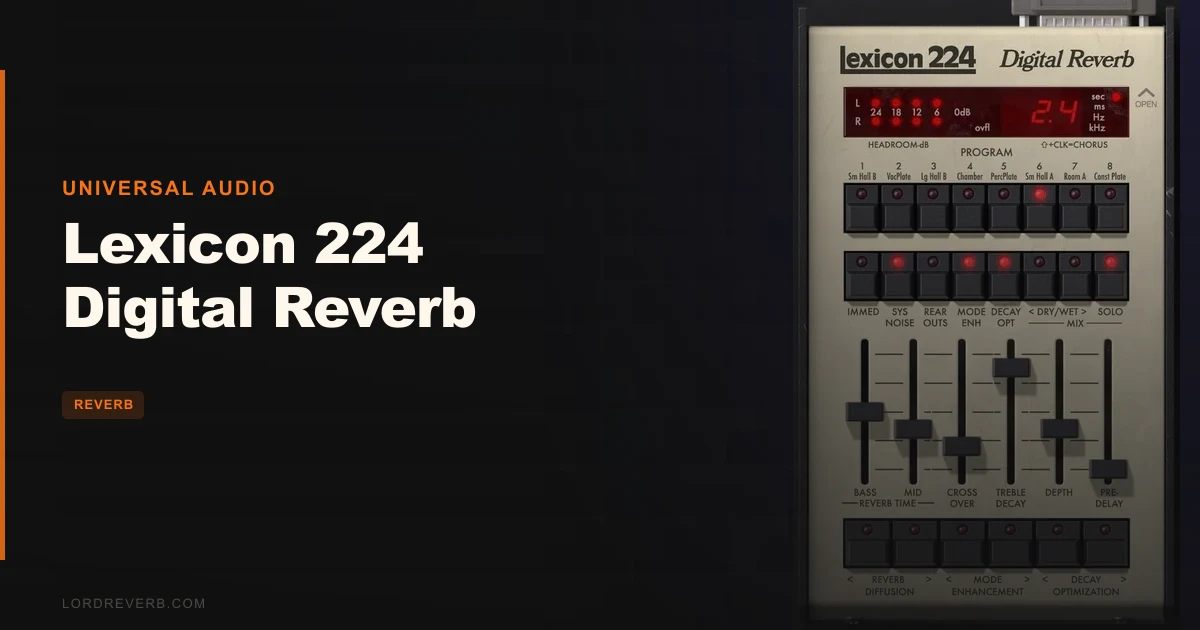
Universal Audio built this around the 224's final firmware version, 4.4. That means exact algorithm code, not a recreation from listening sessions. All eight reverb programs are here: Small Hall, Vocal Plate, Large Hall, Chamber, Percussion Plate, Room, and Constant Density plate. Plus one chorus program.
Every control from the original hardware gets its own slider or button. Bass/Mid split decay, Crossover from 100 Hz to 11 kHz, Treble Decay, Depth, Predelay, Diffusion. It's all there. No compromises in the feature set.
The 12-bit converter behavior and 20 kHz aliasing characteristic of the original hardware are preserved. That's not a bug. It's what gives the 224 its texture, and owners consistently say that texture sits in a mix without fighting transients the way cleaner modern reverbs sometimes do.
It runs as UAD Native on Mac or PC without UA hardware. Apollo Realtime and UAD-2 versions also exist for accelerated operation.
Where It Shines
What you get is a reverb that wraps the vocal without pushing it back in the picture. Owners describe the result as warm with real detail preserved. The Bass/Mid split lets you keep low-mid body in the decay without the mud you'd fight with a single decay time.
The Crossover control is underrated. Running it between 800 Hz and 2 kHz and setting a longer Bass Decay than Mid Decay gives you that hallmark 224 bloom underneath a tighter top end. That specific trick is why producers loved the hardware on string arrangements and piano.
CPU efficiency is genuinely good. Owners report running it alongside convolution reverbs in large sessions without hitting walls. That's a real argument for it.
The hidden Pitch Shift control combined with Pitch Shift produces a tail with rich harmonic content in the reverb itself, not just a longer decay. That's a harder result to dial in on cleaner algorithmic reverbs.
Where It Falls Short
The input gain bug is annoying. Not catastrophically annoying, but the kind of thing that will burn you at least once. The right input gain level doesn't save with your song file or preset. Reopen a session and you may get left-channel heaviness that wasn't there when you closed it. That's a workflow problem on a plugin at any price.
Some users report harsh, unmusical decay behavior in certain programs. It's not universal, and it may depend on source material and settings. But it's reported often enough to flag. You'll want to test the Hall programs carefully before committing them to anything with sustained elements.
It's fiddly. The learning curve is steeper than a modern reverb plugin has any right to be in 2026. If you've never touched the original hardware, expect time spent. That's not a dealbreaker, but it's real.
Nine programs with no expandability. That's the original hardware faithfully reproduced. Still worth saying out loud.
How It Stacks Up
ValhallaRoom gives you cleaner, more experimental sounds. If your sessions lean modern or you want algorithmic reverb that stays out of the way, ValhallaRoom is the smarter pick. The 224 has a grittier, more specific tone that won't suit every genre.
The UAD Lexicon 480L is a different beast sonically, even though it's the same brand. Owners note the 480L requires more tweaking for instant results where the 224 gets you there faster. The 480L has its own character. They're not interchangeable.
Bricasti sounds great and has its fans, but it doesn't chase Lexicon character. If that specific 1978-to-1988 sound isn't the target, Bricasti is worth a look. If it is the target, nothing in this list replaces the 224.
Is the Price Fair?
At $49, the question is whether you specifically need the Lexicon 224 character or just need a good reverb. If you need it, $49 is a ridiculous bargain compared to sourcing and maintaining hardware. If you don't have a clear use case for 1980s hall character, the price is irrelevant because you'd reach for something else every session anyway.
It's priced right for what it is. The workflow bug with input gain saving keeps it from being an obvious must-buy.
Specs & Technical Details
| Developer | Universal Audio |
| Price | $49 |
| Plugin Format | N/A |
| OS Support | Mac / Windows |
| Activation | N/A |
| CPU Usage | Light (efficient DSP usage reported by owners) |
| Trial Available | N/A |
| Version Reviewed | Based on firmware 4.4 |
Score Breakdown
| Category | Score | Notes |
|---|---|---|
| Sound Quality | 4.5/5 | 12-bit character and algorithm accuracy produce a texture that sits naturally in real sessions |
| Value for Money | 4.5/5 | Hardware equivalent costs many times more; the input gain bug is the only drag on this score |
| Ease of Use | 3.0/5 | Fiddly by modern standards; the learning curve is steeper than it should be |
| Features | 4.0/5 | Every original control is present; nine programs with no expandability is the ceiling |
| CPU Efficiency | 4.5/5 | Owners run it alongside convolution reverbs in large sessions without problems |
| Overall | 4.2/5 | A brilliantly accurate emulation held back by a frustrating preset-save bug and a steep learning curve |
Alternatives to Consider
ValhallaRoom is worth your time if your sessions are modern or genre-fluid. Cleaner sound, more experimental options, less specific character. It won't give you 1980s hall. It wasn't trying to.
UAD Lexicon 480L is the next step up within the same family. Same brand, different beast. More tweaking required, different sonic signature. If you love the 224 and want more programs and complexity, check what the 480L specifically offers before committing.
Bricasti emulations are worth considering if great reverb is the goal but Lexicon character isn't a requirement. Different tone, different approach, and it doesn't try to replicate any specific piece of hardware history.
If none of those scratch the itch for that specific warm-and-gritty 1978-algorithm texture, then none of them are actually alternatives. They're just other reverbs.
The Lexicon 224 Digital Reverb at $49 is the right buy if you've got a specific hole in your palette that needs exactly this sound. Load the Vocal Plate on a session vocal and explore the Crossover and Bass/Mid split decay adjustments to shape the reverb character. If that doesn't make something click in your brain, skip it. If it does, you'll wonder what took you so long to add it to your signal chain.
Frequently Asked Questions
Does the Lexicon 224 Digital Reverb require UA hardware to run?
No. The UAD Native version runs on Mac or PC with any soundcard, no UA hardware needed. Apollo Realtime and UAD-2 versions also exist for accelerated operation on compatible hardware, but they're not a requirement to use the plugin.
How many reverb programs does the Lexicon 224 plugin include?
Nine total: eight reverb programs and one chorus program. The reverb programs cover Small Hall, Vocal Plate, Large Hall, Chamber, Percussion Plate, Room, and Constant Density plate. There's no way to add programs beyond these nine.
Why does the plugin sound different from other modern reverbs?
The 224 incorporates the 12-bit converter behavior and 20 kHz aliasing of the original 1978 hardware. That's not a flaw. It's the texture that gives the plugin its character and lets it sit in a mix without clashing with transients the way cleaner algorithmic reverbs sometimes do.
Is there a known bug with the input gain settings?
Yes. The right input gain level doesn't save with song files or presets. When you reopen a session, the left and right channels can be imbalanced because the right input gain resets. It's a real workflow issue that you'll want to work around by checking gain balance every time you reopen a project.
Who should skip the Lexicon 224 Digital Reverb?
Anyone who doesn't have a specific need for 1980s hardware reverb character should look at more flexible modern options. If you want a general-purpose algorithmic reverb with a shorter learning curve and no preset-save quirks, there are cleaner and more intuitive choices at a similar price point.