PSP PianoVerb2 is the paid, expanded sequel to the freeware PianoVerb, and at $69 it’s worth buying if you want a reverb that behaves like sympathetic strings rather than a room. It’s a great fit for piano, guitar and synth work. It’s a harder sell if you want one reverb to cover everything.
Most people will compare it to a spring reverb, a plate, or the free original. We’ll land on this: it isn’t competing with any of them. It’s the thing you add after your normal reverb is already doing its job.
This review is based on the product page, the developer’s documentation and the documented feature set. It is not a hands-on test. Where something can’t be verified from that material, we say so.
What Is It Really Competing With?
The closest relative is the free PSP PianoVerb. Same core idea, twelve resonant filters imitating piano strings. PianoVerb2 keeps that sound and rebuilds everything around it.
The closest paid relatives are spring reverbs like PSP’s own SpringBox and Eventide Spring. Those model a physical tank. PianoVerb2 models a resonance, which is a different job.
Then there are the general algorithmic reverbs. Think of Valhalla-style rooms and plates, or the stock reverb in your DAW. Those simulate a space. PianoVerb2 simulates what a piano’s strings do when sound hits them.
That distinction decides everything about whether you should buy it.
What PSP PianoVerb2 Actually Does
Sing into an open piano with the sustain pedal down and the strings ring back at you. That’s the effect. PianoVerb2 recreates it with twelve resonant filters tuned like strings.
Feed audio in and the filters ring in sympathy. You get a sustained, pitched wash instead of a diffuse room tail.
The developer says you can transpose, tune and detune the set of strings. That’s what takes it from a piano trick to a creative reverb. Set the strings wide and it behaves like a traditional wide-spread reverb. Detune them and you get odd, unusual resonances.
The developer pitches it for adding natural resonance to a weak piano track, adding sustain to a lead guitar, or putting a unique tail on any track. We think that’s an honest list. It’s also a narrow one.
How Do the String Controls Shape the Sound?
The string section is the heart of the plugin. Everything else is built around it.
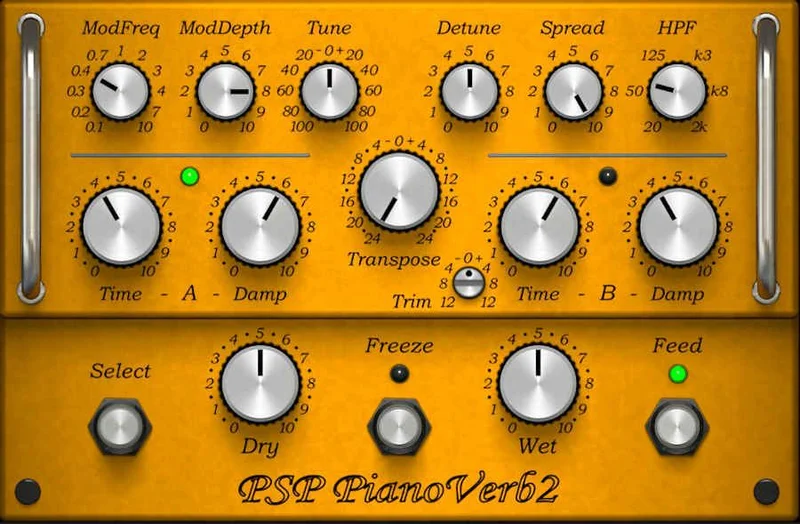
Transpose, tune and detune
Transpose shifts the whole set of twelve filters in pitch. Tune fine-adjusts it. Detune spreads the strings apart from each other.
The original freeware version listed transpose of plus or minus 24 semitones and tune of plus or minus 100 cents, with a separate detune control. We’d expect PianoVerb2 to keep that range, but confirm it in the manual before you rely on it.
The practical point is simple. This reverb has a pitch. Sit it in the key of the song and it blends. Leave it out of key and it clashes, sometimes on purpose.
That’s the part we love. It’s also the part that makes it unforgiving on a mix with moving harmony.
Decay and damping
Decay sets how long the strings ring. Damping controls how quickly the highs die off inside that tail.
Short decay with heavy damping gives a tight, woody bloom. Long decay with light damping gives a glassy shimmer that hangs.
The developer says you can store multiple time and damping settings and compare them through A/B. That’s a clever use of a comparison switch, and we’ll cover why below.
What Did PSP Add Over the Freeware Original?
The developer lists a redesigned GUI, a resizing feature, a new preset management system, a modulation section, a high pass filter, independent dry and wet controls, and a tail freeze control. That’s a long list of fixes for a free plugin that was already loved.
The resizing alone matters. The original had a fixed small window. A resizable GUI is a quality-of-life upgrade you notice every session.
Preset management matters more than it sounds. A creative effect lives or dies on how fast you can audition ideas. Browsing presets beats nudging twelve strings by hand.
If you already use the free version and love it, the question is whether these additions are worth $69. For most people who use it weekly, yes.
How Does the Modulation Section Change the Tail?
The modulation section is new in version 2. It adds movement to the resonance, with controls for modulation frequency and depth.
Static resonant reverbs can sound like a held organ chord. Modulation breaks that up. The tail drifts and breathes instead of sitting dead still.
Low depth gives a gentle shimmer. High depth pushes it toward chorused, wobbling territory that starts to feel like a synth effect.
We’d start with the depth barely up and listen for the moment it stops sounding like strings. That’s usually where you’ve gone too far.
What Does the Freeze Function Do?
Freeze holds the reverb tail so it keeps sounding after the input stops. That’s the developer’s description of the decay freezing and tail freeze feature.
It’s the most fun control on the plugin. Trigger a chord, hit freeze, and you have a drone made from your own playing.
Use it on a piano stab to build a pad under a verse. Use it on a guitar chord to create an ambient bed. Automate it for transitions.
The honest caveat: a frozen resonance is pitched and static. It works as a texture. It won’t replace a proper pad for a whole song.
Why Does the High Pass Filter Matter?
Resonant reverb loves low frequencies, and low frequencies cloud a mix fast. The new high pass filter lets you cut the rumble before it builds up in the tail.
That’s the right call. A mix engineer’s first move on any reverb return is a high pass, so having it built in saves an extra plugin.
As a starting point, try a cut somewhere around 150 to 250Hz on a busy mix, then raise it until the low end stops smearing. That’s our suggestion, not a spec from the manual. Your material will tell you the real number.
How Do the Dry/Wet Controls Work?
PianoVerb2 gives you independent dry and wet levels. That means you set each side separately rather than crossfading with one knob.
It sounds minor. It isn’t. On an insert, independent levels let you keep the dry signal at full strength while the resonance sits underneath it.
On a send, you’ll likely set dry to zero and treat it as a pure effect return. Either way, you get more control than a single mix knob allows.
Is the A/B Switch Just a Compare Button?
No, and that’s the clever bit. The developer says the A/B function lets you set up multiple settings of time and damping, and tie that into decay freezing.
So A can be a short, damped resonance and B can be a long, frozen one. Flip between them live.
That turns a utility feature into a performance tool. You can automate the switch for sudden shifts in space.
We like this a lot. It’s the kind of idea you only get from a developer who actually plays with the thing.
Quickstart: Getting a Usable Sound Fast
Here’s the fast route from a dry piano to a finished sound.
- Load PianoVerb2 on an aux send, dry level at zero.
- Pick a preset close to what you want, then tune the strings to the key of the song.
- Set decay to taste and pull damping up until the highs stop sizzling.
- Raise the high pass filter until the low end clears.
- Add modulation depth slowly, only until the tail starts to move.
- Blend with the send level, not the plugin's wet control.
That order matters. Tuning first saves you from chasing a clash with the track.
Key Controls at a Glance
- Transpose / Tune / Detune: sets the pitch and spread of the twelve strings.
- Decay / Damping: sets ring length and high-frequency loss.
- Modulation Frequency / Depth: adds movement to the tail.
- Spread: widens the stereo image.
- High Pass: clears low-end build-up.
- Freeze: holds the tail indefinitely.
- Dry / Wet: independent output levels.
- A/B: two stored states for comparison or live switching.
What About CPU, Latency and Formats?
Here’s the gap we spotted in other coverage, so let’s be direct about what we know and don’t.
The developer lists VST, VST3 and AAX on Windows 7 through Windows 11, and Audio Unit, VST, VST3 and AAX on macOS 10.14 through macOS 14 Sonoma. All hosts need to be 64-bit. That’s from the product page.
It does not publish a CPU figure or a latency number that we found. Twelve resonant filters plus modulation is a modest workload by modern standards, so we’d expect it to be light. Treat that as an expectation, not a measurement.
No specific latency is stated either. For an effect on a send return, that rarely matters.
How Does Activation Work?
It uses iLok. You need a free iLok user ID and the free iLok License Manager application. No hardware dongle is required.
The developer says you can activate the license in three separate locations. Each can be a computer or a second-generation or newer iLok dongle. You can move licenses with the License Manager software.
There’s also a 30-day trial mode. That’s the right way to buy a creative plugin.
The annoying part is the account. If you hate iLok, this won’t change your mind.
Specs and Requirements
| Spec | Detail |
|---|---|
| Developer | PSP Audioware |
| Price | $69 |
| Plugin Format | VST / VST3 / AU / AAX |
| OS Support | Windows 7 to 11 (64-bit), macOS 10.14 to macOS 14 Sonoma |
| Activation | iLok license, no dongle required |
| CPU Usage | Not published by the developer |
| Trial Available | Yes, 30-day trial |
| Version Reviewed | PianoVerb2 (documented feature set) |
Where PSP PianoVerb2 Wins
It does one thing no conventional reverb does. It rings in sympathy and it’s tunable. That’s not a feature gap you can close with a plugin chain.
The freeze and A/B tools make it a sound-design instrument. A static room can’t give you a held drone built from your own take.
The high pass filter and independent dry/wet levels remove the usual workarounds. You don’t need a separate EQ on the return.
And the upgrade over the free version is real. Resizable GUI, presets and modulation fix the exact things that made the original feel unfinished.
Where It Falls Short
It’s not a general reverb. You can’t put it on a vocal and expect a believable room.
It’s pitched. If your track modulates keys, you’ll fight it.
The trial needs an iLok account, which adds friction before you hear a note. We can’t verify the depth of the preset library from the page, so judge that in the trial.
If you only own one reverb, buy that reverb first. This is a second or third reverb.
How PSP PianoVerb2 Compares
Against the free PianoVerb, it’s the same idea with a better workflow and more tools. If the free one lives in your sessions already, the upgrade is easy to justify.
Against PSP SpringBox, they overlap only in being characterful and non-realistic. SpringBox models a tank. PianoVerb2 models tuned strings.
Against a plate like those in Can Clearmountain’s Spaces Review Change How You Reverb?, it’s a different category. A plate smooths and sits behind a vocal. PianoVerb2 colours and sings back.
It may not be the only plugin of its kind. We’re sure only about what we’ve described here. Compare it to other resonator-style effects in your own library.
Pricing and Value
It costs $69. That’s a modest outlay for a specialist tool.
The value case is the trial. Thirty days is enough to learn whether the sound earns a place in your templates.
If you’ll use it weekly on piano and guitar, it pays for itself in time saved chasing the same sound with stacked effects. If you’d use it twice a year, skip it.
Who Should Buy This
- ✅ Buy if you work with piano, guitar or synth and want sympathetic resonance.
- ✅ Buy if you like building drones and textures from your own playing.
- ✅ Buy if you already use the free PianoVerb and want the upgraded workflow.
- ❌ Skip if you want one reverb to handle vocals, drums and rooms.
- ❌ Skip if you refuse to use iLok.
- ❌ Skip if your songs change key constantly and you don't want to retune.
Score Breakdown
These scores rest on the documented feature set and published figures. We’ll revisit them after longer use.
| Category | Score | Notes |
|---|---|---|
| Sound Quality | 4.5/5 | Unique tuned resonance no room model reproduces |
| Value for Money | 4.0/5 | Fair for a specialist tool with a 30-day trial |
| Ease of Use | 4.5/5 | Resizable GUI and preset system streamline it |
| Features | 4.5/5 | Freeze, modulation, high pass and A/B go well beyond the original |
| CPU Efficiency | 4.0/5 | Expected light, but the developer publishes no figures |
| Overall | 4.3/5 | A superb second reverb, not a first one |
Alternatives to Consider
PSP SpringBox. PSP’s own spring reverb. Choose it if you want a vintage tank character instead of tuned strings.
Eventide Spring. A deeper spring model with real tank behaviour. Our take is in Eventide Spring Review.
Klevgrand Kleverb. A flexible conventional reverb that covers the everyday jobs this plugin can’t. See Can Kleverb Replace Your Stock Reverb in 2026?.
For something more room-focused, Can CSR Room Reverb Fix Dry Recordings in 2026? covers a more traditional approach. And if PSP’s other tools interest you, PSP Studio Modular Collection Review is worth a look.
The Verdict on PSP PianoVerb2
Buy it. At $69, PianoVerb2 gives you a sound you can’t get anywhere else, wrapped in a workflow that finally matches the idea.
It’s wrong for you if you want a single do-everything reverb. It’s wrong if iLok makes you angry before you’ve even heard it.
What we still want confirmed: CPU load on a big session and how deep the preset library really goes. Use the 30-day trial to settle both.
Treat it as the strings in your piano that nobody told you were listening.
Related reviews: SunBurnt 2026
Frequently Asked Questions
Is PSP PianoVerb2 worth buying?
Yes, if you want a creative resonant reverb for piano, guitar or synth. It's not worth it as your only reverb. Use the 30-day trial to confirm the sound fits your work.
What is the difference between PianoVerb and PianoVerb2?
PianoVerb is the freeware original. PianoVerb2 is the paid redesign with a resizable GUI, preset management, a modulation section, a high pass filter, independent dry/wet controls and a tail freeze control, according to the developer.
Does PSP PianoVerb2 need an iLok?
Yes. You need a free iLok user ID and the free iLok License Manager application. A hardware dongle is not required, and you can activate the license in three locations.
Which formats and operating systems does it support?
The developer lists VST, VST3 and AAX on Windows 7 to 11, and Audio Unit, VST, VST3 and AAX on macOS 10.14 to macOS 14 Sonoma. All require a 64-bit host.
Can PianoVerb2 replace my main reverb?
No. It simulates resonating piano strings, not a room or plate. Keep a conventional reverb for everyday work and add PianoVerb2 for colour and texture.
Is there a free trial for PSP PianoVerb2?
Yes. The developer offers a 30-day trial mode, which also requires an iLok user ID and the License Manager application.