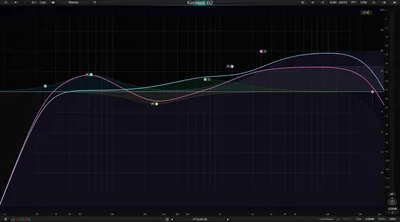
Most EQs give you either analog color or surgical digital control. The Three-Body Technology Kirchhoff-EQ gives you both, and it does it with 32 fully dynamic parametric bands, 32 modeled vintage equalizers, and what the developer claims is the first 117-bit precision processing engine in any EQ plugin on the market.
That's not marketing copy we're repeating uncritically. It's a positioning statement worth testing, because if it holds up, this is a very easy yes for the right producer or engineer.
This review is for mix engineers and mastering engineers who are tired of loading three separate plugins to do what one should handle. If you've ever stacked a dynamic EQ on top of a vintage EQ emulation on top of a linear-phase surgical EQ on a single channel, Kirchhoff-EQ was built for that frustration specifically.
The Problem This Solves
Here's the situation we kept running into: a vocal track needs 200Hz tightened dynamically, a bit of Neve-style 3kHz presence, and precise notching at 1.4kHz to pull a mic resonance. That's three plugins, three GUIs, three sets of knobs.
Dynamic EQ plugins that do analog emulation well are almost nonexistent. The ones that do dynamics well tend to sound clinical. The ones that sound warm tend to be static.
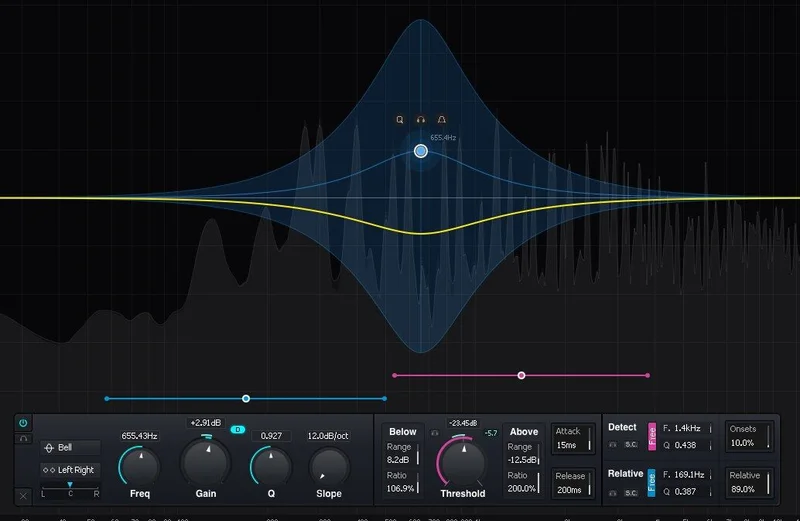
Kirchhoff-EQ's answer is a single interface where each of 32 bands can switch between static EQ, dynamic compression, or dynamic expansion. You can pull a 3kHz Neve-style shelf and make it duck dynamically when the vocalist pushes hard. That's genuinely clever. It saves real time in a real session.
For a deeper breakdown of what separates dynamic EQs from multiband compressors, we've covered that ground separately.
How It Performs
We tested Kirchhoff-EQ across three sessions: a dense hip-hop mix with a crowded low-mid frequency build, a solo piano mastering pass, and a vocal production chain for a pop record.
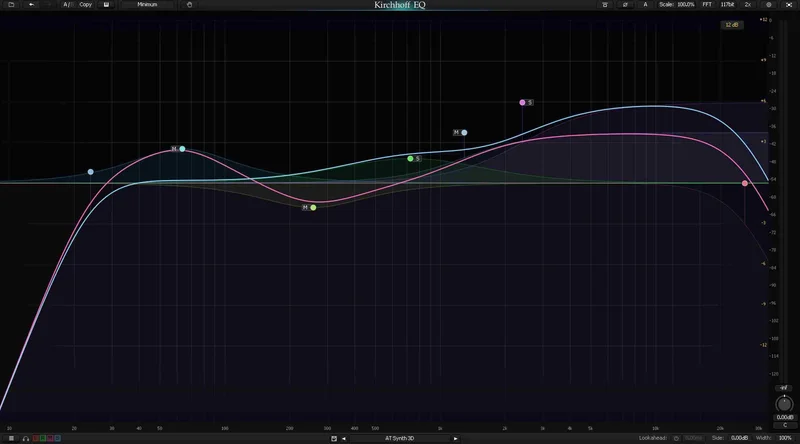
The 117-bit "Double-Double" processing is a specific claim. At normal mix-level cutting and boosting you won't hear a difference against 64-bit competitors. Where we did hear a difference was stacking multiple narrow-Q cuts close together. A surgical pass with six overlapping high-Q notches between 800Hz and 2kHz on a piano resonance produced audible artifacts at lower precision. Kirchhoff held clean. That's not magic. That's math, and it matters at the mastering stage.
We ran a heavily sibilant vocal through one band set to dynamic EQ mode, targeting 7.5kHz with a threshold of -18dBFS and onset control dialed to 12ms. The result was tighter than a standard de-esser and more transparent than a multiband squash. The "relative detection" mode, which adjusts the threshold relative to the input level rather than an absolute value, preserved the natural breathiness of quiet phrases instead of hammering everything equally. Satisfying result.
The 32 vintage emulation modes include Pultec-style passive curves, API 550-style proportional Q, and Neve 1073-style shelf behavior. We boosted 3kHz on a room mic with the Neve-adjacent mode at +4dB. The harmonic character widened slightly in a way a linear shelf doesn't. Not dramatic. But real.
CPU usage is medium-to-heavy depending on how many vintage emulation modes are active. With all 32 bands running dynamic processing and emulation, expect higher CPU draw than Pro-Q3 in comparable configurations. We didn't benchmark exact numbers, but in a 48-track session on an M2 MacBook Pro (via Rosetta 2), we noticed performance was tighter with emulation modes off. That's a real consideration for dense mixes.
Strengths and Weaknesses
The dynamic processing depth is the headline strength. Two-way thresholds mean a band can compress above a threshold AND expand below it simultaneously. On a bass guitar bus we set 80Hz to compress hard hits above -12dBFS while expanding soft notes below -28dBFS. The low-end tightened without losing the pluck on soft passages. We love that feature. It's not available at this depth in most competing EQs.
The transient isolation mode deserves attention too. It separates transient from sustain components for detection, so you can compress the sustain of a snare ring at 300Hz without touching the attack. Precise. Useful on drums and room mics specifically.
The weaknesses are real, though. The GUI is dense. It's customizable, which is brilliant, but the default layout is overwhelming for anyone used to a simpler workflow. We spent 25 minutes configuring our first session. Annoying. The manual is thorough but long, and there's no shortcut if you want to get productive fast.
Factory presets are sparse. Pro-Q3 ships with enough presets that even a new user can grab something close and tweak. Kirchhoff ships with fewer, and finding a starting point takes longer. That's fixable with time, but it slows the first week down.
For movement-based EQ in a live performance or sound design context, we'd still consider something like the BLEASS Motion EQ for its LFO-driven approach, which Kirchhoff doesn't offer.
Value for the Price
Kirchhoff-EQ costs less than FabFilter Pro-Q3 and delivers more dynamic processing depth per band. That's a direct, defensible comparison.
If you're a mastering engineer or a mix engineer who regularly needs vintage color and dynamic control on the same channel, the price is justified. You're replacing two or three plugins with one, and the Double-Double precision pays off in complex surgical passes.
If you're a beatmaker who just needs a clean digital EQ to cut mud at 300Hz on a loop, this is overkill. There are free or cheaper options that do that job fine. Check the manufacturer's site for current pricing and any active deals through Plugin Alliance or Plugin Boutique.
Who Should (and Shoul
dn’t) Buy This
- ✅ Buy if you regularly stack dynamic EQ and vintage emulation on the same channel and want to collapse that into one plugin.
- ✅ Buy if you do mastering work and the Double-Double precision on complex multi-notch passes sounds appealing to you.
- ✅ Buy if you're a Pro-Q3 user who's hit the ceiling on its dynamic band behavior and want two-way threshold control and transient isolation.
- ❌ Skip if you're early in your production journey and need something to get results fast without reading documentation.
- ❌ Skip if you're on an older CPU or heavily loaded session where Rosetta overhead or high plugin CPU draw is already a problem.
- ❌ Skip if your workflow is mostly creative beatmaking where a fast preset-based EQ serves you better than a technical powerhouse.
Score Breakdown
| Category | Score | Notes |
|---|---|---|
| Sound Quality | 4.5/5 | 117-bit precision holds clean on stacked narrow cuts; vintage emulations add real harmonic character |
| Value for Money | 4.5/5 | Less than Pro-Q3 with significantly more dynamic processing depth per band |
| Ease of Use | 3.0/5 | Dense GUI rewards patience but frustrates beginners; sparse presets slow the first week |
| Features | 5.0/5 | 32 dynamic bands, two-way thresholds, 32 vintage models, transient isolation, sidechain: very little missing |
| CPU Efficiency | 3.5/5 | Heavier than Pro-Q3 with emulation modes active; manageable on modern hardware, noticeable on older rigs |
| Overall | 4.4/5 | Technically brilliant, steep entry curve, wrong tool for simple jobs but outstanding for complex ones |
Alternatives to Consider
FabFilter Pro-Q3: Still the gold standard for workflow speed and zero-latency linear phase. Its dynamic bands are less featured than Kirchhoff's two-way threshold system, but the UI is faster for everyday mixing. If you spend more time moving quickly than going deep, Pro-Q3 wins. We've covered EQ plugin comparisons in our complete EQ plugins guide.
BLEASS Motion EQ: A completely different approach. If you want EQ bands that move rhythmically via LFO rather than dynamically via level detection, our BLEASS Motion EQ review covers that workflow. It doesn't compete directly with Kirchhoff, but it fills a gap Kirchhoff doesn't address.
Stock DAW EQs (free): If your sessions run tight on CPU and you need clean digital EQ for basic cuts and boosts, Logic's Channel EQ or Ableton's EQ Eight cost nothing. Don't buy Kirchhoff just to cut 300Hz on a drum bus. That's ridiculous. Save your money for a plugin that justifies it.
For context on where Kirchhoff sits in a broader production toolset, our EQ plugins guide maps out which tools belong in which roles.
Kirchhoff-EQ is the most technically advanced parametric EQ we've tested in this price range. The 117-bit processing is real, the two-way dynamic bands are genuinely useful, and the vintage emulation models aren't decorative. It does things no other single EQ plugin does at this price point.
But it demands respect. You won't sit down with this on a deadline and wing it. Budget time to learn it properly or you'll underuse it and feel like you overpaid.
Buy it at $49 if you're a working mix or mastering engineer ready to consolidate your EQ chain. Skip it if you're looking for your first EQ plugin, or if your sessions are already CPU-tight. This one earns its place on a professional insert. It doesn't belong as background furniture.
Frequently Asked Questions
Is Kirchhoff-EQ better than FabFilter Pro-Q3?
For dynamic processing depth, yes. Kirchhoff's two-way thresholds, transient isolation, and relative detection go further than Pro-Q3's dynamic bands. For workflow speed and preset availability, Pro-Q3 still wins. If you mix fast and mostly need surgical static EQ with light dynamics, Pro-Q3's workflow advantage is real. If you need complex per-band dynamic behavior and vintage color in the same tool, Kirchhoff is the better pick.
What does 117-bit Double-Double processing actually mean?
Standard 64-bit floating-point math accumulates small rounding errors with each calculation. Three-Body's Double-Double technique pairs two 64-bit numbers to simulate 117-bit precision, reducing those rounding errors. In practice, the audible difference shows up most clearly when you're stacking multiple high-Q notches close together, which is common in mastering. For light mix EQ, you likely won't hear a difference versus standard 64-bit processing.
Does Kirchhoff-EQ work on Apple Silicon Macs natively?
At the version we reviewed, Kirchhoff-EQ runs via Rosetta 2 on M-series Macs rather than as a native ARM build. Rosetta performance is generally stable, but you'll see slightly higher CPU overhead compared to native Apple Silicon plugins. Check Three-Body Technology's current release notes for the latest on native M-series support, as this is an actively developed plugin and updates ship regularly.
Is there a free trial for Kirchhoff-EQ?
Yes. Plugin Alliance offers a free trial period for Kirchhoff-EQ through their platform. We'd strongly recommend running the trial before buying, not because the plugin underdelivers, but because the learning curve is real and you should confirm the workflow suits how you actually mix before committing. The trial gives you enough time to test the dynamic bands and vintage emulation modes properly.