
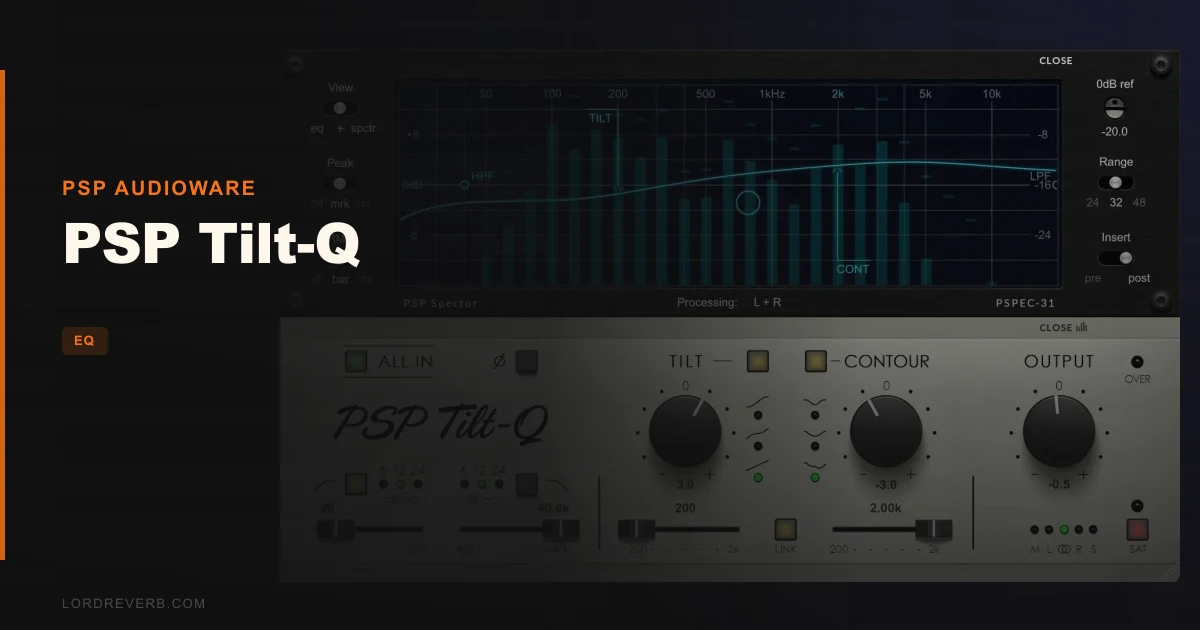
PSP Tilt-Q is a dual-band EQ and tone-shaping plugin from PSP Audioware that earns a place on a mix bus or master chain when you need broad tonal decisions fast, and it costs $69. It's built for the moment when your mix is sitting too dark, your master is reading too brittle, or your client says "can we just make it feel more open?" without meaning they want you to open a parametric EQ and start carving. If that's the problem you're solving right now, this is a strong answer. If you're trying to tame a honky 400Hz build-up or a 3kHz harshness, it won't help, and you should know that before you buy.
This is a plugin for people who think in terms of balance first and surgery second. Mastering engineers, mix bus processors, and producers who want a fast tone tool they trust will find it satisfying. People who want one plugin to do everything will find it frustrating.
What Tilt-Q Actually Does (and Where It Stops)
At its core, PSP Tilt-Q gives you three things working together: a Tilt equalizer, a Contour loudness equalizer, and high-pass/low-pass filters. The Tilt section pivots the frequency balance around an adjustable center frequency that sits anywhere between 200Hz and 2kHz. Three distinct curve shapes let you choose how aggressively the lows and highs trade energy as you rotate the control.
The Contour section does something different. It works more like a loudness-curve tool, pulling up the lows and highs together while shaping the midrange. There are three selectable response characteristics here too, so you can dial in how much mid suppression or bloom you get alongside the brightness or warmth.
Then you have the filters: high-pass and low-pass with slopes of 6, 12, or 24 dB/octave. That's a clean, functional set of options.
What it's not: a parametric EQ. There are no bell bands, no notch filters, no frequency-specific cuts for resonance problems. Owners are clear on this. The plugin rarely solves masking issues or harsh peaks. If you expect it to, you'll be disappointed.
There's also second-generation output saturation, a polarity toggle, and output gain. A 31-band spectrum analyzer with bar or curve display modes shows you what's happening before or after processing. The M/S processing is a standout feature, letting you apply everything to Left, Right, Mid, or Side channels independently.
Where It Fits in a Real Session
Picture this: you're two-thirds through a mix. The low end is where you want it. The drums are sitting right. But the whole thing sounds slightly underwater, like someone draped a thin cloth over the top end. You've tried nudging your mix bus high shelf. It's not quite right. You reach for Tilt-Q.
Drop it on the mix bus. Grab the Tilt control, set the center frequency somewhere around 700Hz, pick the gentlest of the three curve shapes, and rotate it toward the brighter end. The high-frequency content lifts, the low end eases back in proportion, and the whole mix breathes.
Now try the Contour section. The Contour control, according to owners, instantly reveals whether a mix is too bright or too dark. Push it and the lows and highs lift together, mid energy compresses slightly. Pull it and the picture flips. If your mix needs that kind of broad sculpting, this is a satisfying, fast tool.
The M/S processing is where Tilt-Q earns respect beyond the obvious use cases. If your stereo image is reading too wide and the sides are pulling energy away from the vocal, route the Side channel through Tilt-Q, tilt toward darker, and bring the Side energy back. The vocal stays centred and clear. Owners report exactly this kind of result: width adjustments that don't kill vocal clarity.
The built-in spectrum analyzer is genuinely useful here. Switching between pre and post-EQ display tells you whether what you're hearing matches what the tool is actually doing. The 31-band bar view is easy to read on a second monitor. The curve view gives you more resolution for detailed checking.
The automatic oversampling at sample rates below 50kHz is a quiet but clever feature. The 64-bit double-precision processing keeps cumulative errors low. You won't hear this directly, but it means you can stack Tilt-Q instances without the noise floor creeping up.
And it stacks easily. At 0.8% CPU on an M2 Mac, you could put this on twenty channels and not flinch.
The Saturation Question
The second-generation output saturation is optional. Push it and you get a soft saturation character at the output stage. Owners describe the harmonics as lovely, and the plugin has real versatility for creating broad, gentle curves with some warmth added at the top.
But one honest reviewer flag stands: the saturation engine doesn't carry the same weight and texture as transformer-style saturation in competing products. If you want that thick, magnetic, slightly dense saturation character, this isn't where you'll find it. The character here is cleaner. More polished. Depending on the material, that's either exactly right or not enough.
For mastering applications, clean saturation is often the better call. On mix bus processing for dense electronic music, owners report it works well. For tracks that need a rougher, more analogue-feeling grit, you'd need something else in the chain.
The Trade-Offs Worth Knowing
The biggest trade-off is scope. Tilt-Q does broad tonal shaping brilliantly. It does nothing else.
That's a deliberate design choice. The console-style interface keeps the control count minimal. There's no deep menu system, no complex modulation routing, no hidden band you need to unlock. What you see is what you get, and you can make a decision in seconds rather than minutes.
But the limit is real. The plugin cannot apply different Mid and Side settings within a single instance. If you want to Tilt the Mid one way and the Side a different way, you need two instances. Annoying, but workable.
The extended contour frequency range is a capability users have requested. If you want to push the Tilt pivot point into different territory, the current range between 200Hz and 2kHz covers most use cases but not all.
And the parametric EQ absence is a hard stop for certain workflows. Dense mix problems, resonant room modes, frequency masking between instruments: none of these are solvable with Tilt-Q alone. You'll need a separate EQ for that work, which may make $69 feel like a narrower investment if your sessions are built around surgical correction.
For mastering engineers who already have a parametric in the chain, this sits comfortably as the broad-strokes first step. For mixing engineers who run lean plugin chains, that second-plugin requirement is a genuine inconvenience.
Against the Field
Three products come up regularly in the same conversation.
Softube Tonelux Tilt is the comparison that matters most if transformer saturation character is important to you. The Tonelux Tilt has that weightier, more textured saturation that Tilt-Q doesn't match. If you're processing rock drums or heavily driven guitar buses and you want the saturation to feel like hardware, the Tonelux Tilt wins that fight.
TDR Slick EQ and Goodhertz Tiltshift both cover tilt EQ territory. Owners specifically report Tilt-Q handles the task better than both, with more flexibility. That's a reasonable case for the price, depending on what you're coming from.
PSP's own Infinistrip includes a comparable Tilt module. But the Infinistrip version lacks the dedicated filters and the M/S processing that Tilt-Q brings. If you already own Infinistrip and mainly need the Tilt module, you may not need Tilt-Q. If M/S processing and separate filter slopes are the missing piece, the dedicated plugin justifies the cost.
Value: What $69 Actually Buys You
This is a focused tool doing a focused job with very low CPU overhead, M/S processing, 80+ presets, and 64-bit double-precision internals. That's a reasonable exchange for what it delivers.
The frustrating part is that the one limit that matters most (no parametric EQ) means this almost always needs a companion plugin. If you're purchasing Tilt-Q as your only EQ, you're misreading what it is. If you're purchasing it to sit alongside a full-featured parametric, it's a clever, fast, low-overhead addition that handles the broad tonal decisions before your surgical tool touches anything.
For mastering engineers, that workflow is clever. Drop Tilt-Q first for broad balance, then move to a precision EQ for any specific problem areas. The M/S processing in Tilt-Q makes it more capable than most tools at that price in this category.
Is there a cheaper path? The Tilt sections in some channel strip plugins come close. But none of them combine the M/S processing, three selectable curve shapes, dedicated filter slopes, and saturation stage in one console-style interface at this CPU cost. That combination is the actual value proposition.
Specs & Technical Details
| Developer | PSP Audioware |
| Price | $69 |
| Plugin Format | VST / VST3 / AU / AAX |
| OS Support | macOS 10.15 or later / Windows 7 or later |
| Activation | iLok (3 activations) |
| CPU Usage | Light (0.8% on M2 Mac) |
| Trial Available | N/A |
| Version Reviewed | N/A |
Score Breakdown
| Category | Score | Notes |
|---|---|---|
| Sound Quality | 4.0/5 | Clean, accurate tonal shaping with lovely harmonic character from the saturation stage; not the weightiest saturation around |
| Value for Money | 4.0/5 | Focused tool at a fair price, but the no-parametric-EQ limit means most users need a second plugin alongside it |
| Ease of Use | 4.5/5 | Console-style interface makes fast tonal decisions genuinely quick; minimal learning curve |
| Features | 3.5/5 | M/S processing and three curve shapes are clever; absence of parametric bands and single-instance M/S limitation hold it back |
| CPU Efficiency | 5.0/5 | 0.8% on M2 Mac; stacks freely without concern |
| Overall | 4.0/5 | Smart, fast, low-overhead tonal balance tool that pairs well with a parametric EQ rather than replacing one |
Alternatives to Consider
Softube Tonelux Tilt is the pick if transformer-style saturation character matters more than M/S processing. The weight and texture of the saturation stage there goes beyond what Tilt-Q offers. Rock, metal, and anything that wants a denser analogue feel in the saturation will respond better to the Tonelux.
TDR Slick EQ covers tilt EQ territory and is a widely respected alternative. Owners put Tilt-Q ahead for flexibility, but Slick EQ remains a credible option, especially if your budget is tight or you're already in the TDR ecosystem.
PSP Infinistrip includes a tilt module and is worth looking at if you want a full channel strip workflow. The trade-off is that the Infinistrip's tilt module doesn't carry M/S processing or the dedicated filter slopes that Tilt-Q brings. If you need those specifically, the dedicated plugin is the right call.
The Real Verdict
PSP Tilt-Q is a brilliantly narrow tool. That narrowness is its strength and its only real weakness. If your sessions already have a parametric EQ for surgical work, this sits in front of it beautifully: fast, CPU-light, and genuinely useful for M/S tonal work that most tilt tools don't touch.
If you need one plugin to handle both broad shaping and precise correction, this isn't it. Buy it alongside a parametric, not instead of one.
Skip it if your mixing problems are mainly resonance, harshness, or masking. Buy it if your problems are mostly "this mix is too dark" or "the sides need to come back."
Frequently Asked Questions
Does PSP Tilt-Q work as a standalone mastering EQ?
It works well as a broad tonal shaping tool on a master chain, but it doesn't replace a parametric EQ. The Tilt and Contour controls handle big-picture balance decisions fast. For resonance issues, harsh peaks, or frequency-specific corrections, you'll need a parametric EQ alongside it. Most mastering engineers use it as the first stage before a precision EQ.
Can PSP Tilt-Q process Mid and Side signals independently?
Yes, but with a limitation. You can route processing to the Left, Right, Mid, Side, or full stereo channels. However, you cannot apply different settings to Mid and Side within a single plugin instance. If you want different Tilt settings on Mid versus Side, you need two separate instances of the plugin.
Is PSP Tilt-Q worth it if I already own PSP Infinistrip?
It depends on what you're missing. Infinistrip includes a comparable Tilt module, so the core tilt functionality overlaps. What Tilt-Q adds is dedicated high-pass and low-pass filters with selectable slopes, M/S processing across all channels, and the full Contour section as a standalone plugin. If those specific additions matter to your workflow, the dedicated plugin is worth the price. If the Infinistrip module already does what you need, you're probably covered.