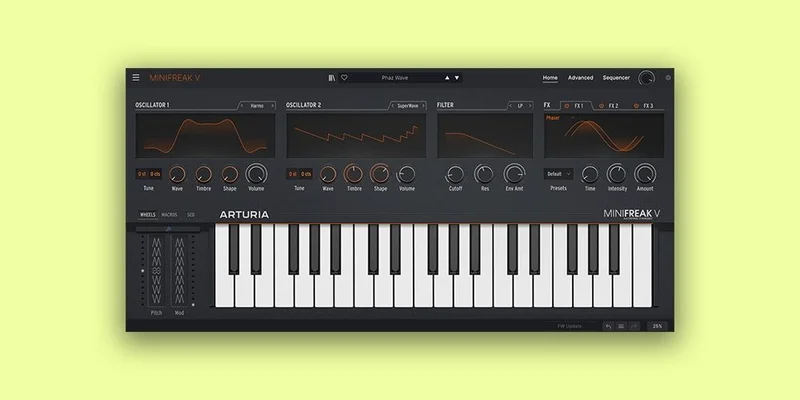
You want a modern hybrid polysynth in your DAW, not a 1970s Minimoog recreation, not a Prophet emulation you've already heard on a thousand records. MiniFreak V is exactly that: a 6-voice polyphonic software instrument built around dual digital sound engines and a modeled analog multimode filter, released by Arturia in late 2022 and still one of the more interesting synth plugins you can load in 2026.
It's available as a standalone instrument or in VST3, AU, AAX, and NKS formats. It comes with 256 factory presets, 256 user slots, and it's sold separately or inside V Collection X. This review is for producers deciding whether it's worth their money on its own merits.
The short answer: for the right person, yes. For DAW-only sound designers expecting software-native freedom, there are friction points worth knowing before you buy.
The Problem MiniFreak V Actually Solves
Vintage emulation fatigue is real. After a decade of Moog clones, Juno recreations, and Prophet-5 models, a lot of producers are sitting on a dozen "warm, analogue" softsynths that all push toward the same sonic zip code.
MiniFreak V doesn't go there. It's Arturia emulating their own 2022 hardware rather than a 50-year-old circuit. That means the starting point is FM basses that crunch into bit-crushed noise, wavetable leads running through a modeled analog filter, and a sequencer that blurs into an arpeggiator in ways that produce genuinely unpredictable patterns.
If your problem is that everything you make sounds like 1987, MiniFreak V is a useful disruption to your signal chain. It's also a solid entry point if you own the hardware and want to run multiple instances in your DAW without committing to audio.
How It Performs in Practice
We loaded MiniFreak V in Logic Pro on an M2 MacBook Pro and immediately went hunting for where the modeled filter earns its keep.
We pulled up a raw wavetable engine patch, opened the filter to around 60% cutoff, and started driving the resonance past 75%. The self-oscillation behaviour is satisfying in a way that most purely digital filter models aren't. It screams without turning brittle. That quality, "warm" in the way that means 2nd-order harmonic content stays present while harsh 6–8kHz transients get rounded, is what Arturia's modeling work actually delivers here.
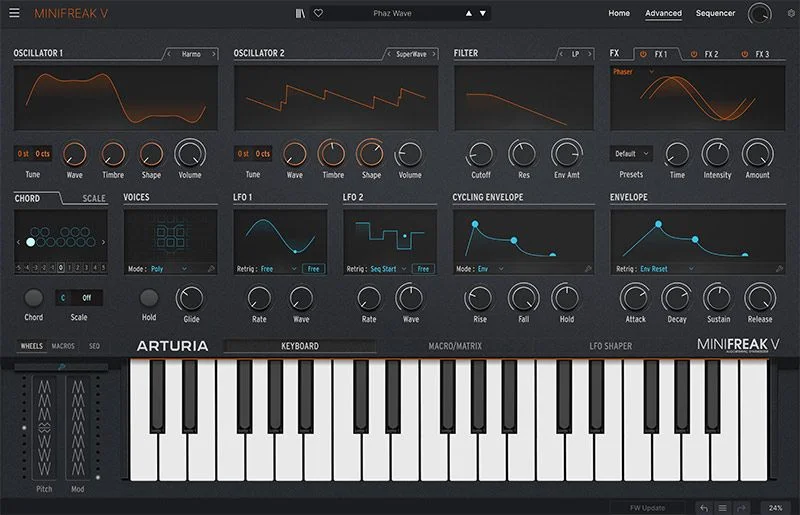
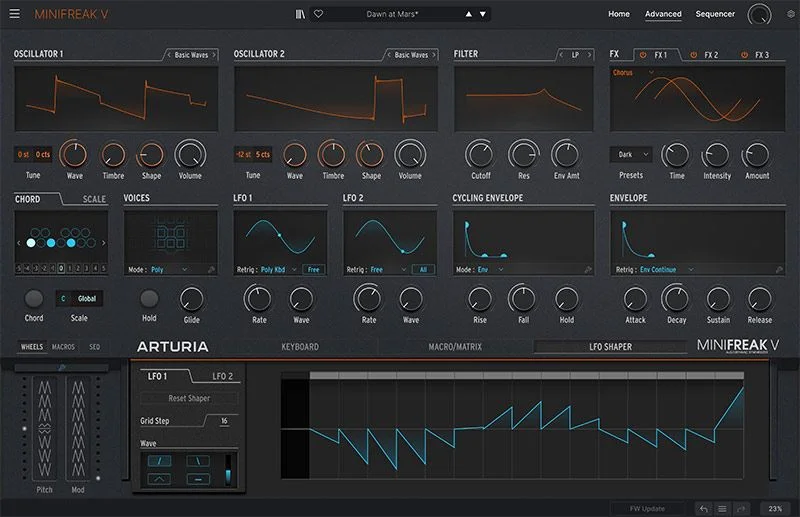
The dual engines are where the interesting work happens. You get 22 oscillator modes split across the two engines, covering wavetable, FM, harmonic, and more. We stacked a KarplusStrong engine against a superwave oscillator, blended them at roughly 60/40, and ran the combination through the filter with the cycling envelope modulating cutoff at 0.3Hz. The result sat in a mix like a textured pad that also functioned as a rhythmic element. It took about four minutes to dial in from scratch.
CPU is a real consideration. A single instance on Logic's performance meter sits around 8–11% on an M2. Stack three instances and you're past 30%. Arturia specifies a 4-core CPU at 3.4GHz minimum, and we'd treat that as a genuine minimum rather than a conservative estimate. On Windows machines near that floor, we saw audio dropout warnings at two instances with a complex patch running the 4-lane modulation sequencer.
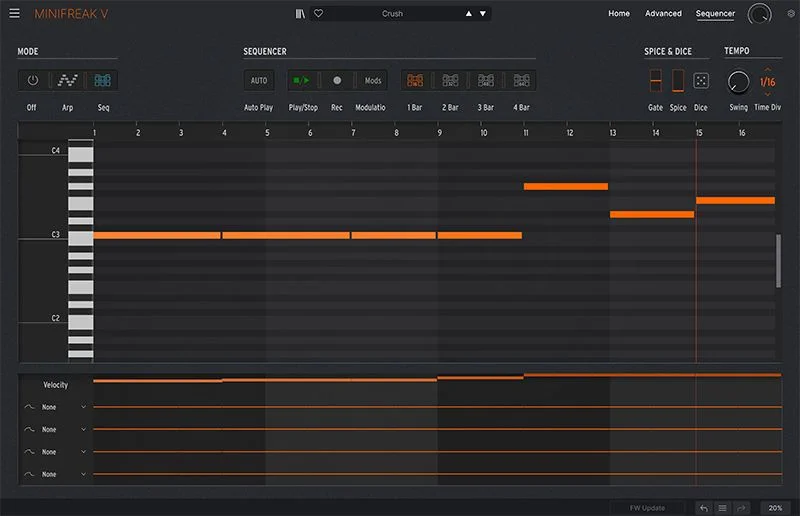
The 64-step sequencer with 4 lanes of assignable automated modulation is one of MiniFreak V's most underrated features. We used it to build a bass pattern where pitch ran on one lane and filter cutoff swept on a separate lane with a different step length. That kind of polyrhythmic modulation gets weird fast, in a good way.
Strengths and Weaknesses
The modeled filter is the headline and it delivers. Running a harsh FM patch through it and dialling back the cutoff to around 800Hz smooths the edge without killing the character. That's harder than it sounds for a modeled circuit.
The 256 factory presets are better than average. We'd estimate 60–70% of them are genuinely usable in a production context without heavy editing. That's a high ratio.
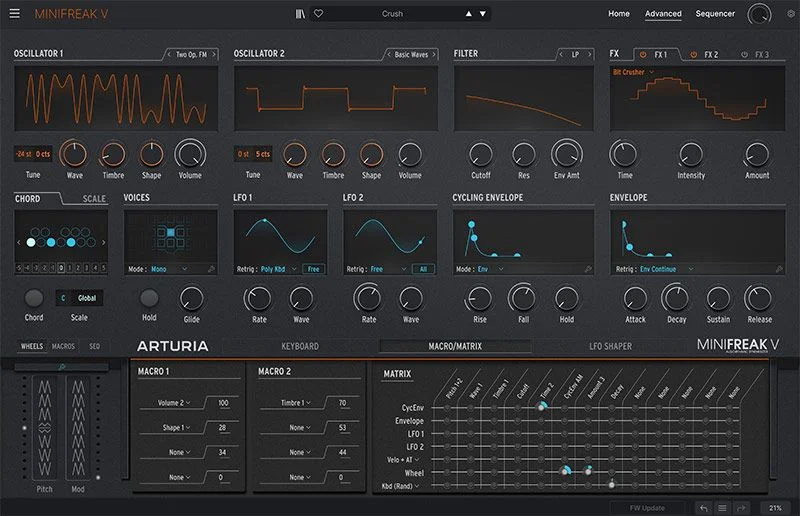
The weaknesses are real though, and if you're a DAW-only user they matter. The modulation matrix follows the hardware's panel logic. You get 7 modulation sources and a workable list of destinations, but you're working within a system designed around physical knobs. Software-native modulation in something like Arturia Pigments or a fully ITB synth gives you more routing flexibility with less friction.
One envelope per voice is frustrating for layered sound design. You also get one cycling envelope per voice, which helps, but if you're used to multi-envelope architectures this will feel tight. It's a hardware constraint carried directly into the software, and that's an honest limitation.
The interface also demands screen real estate. The advanced panel opens below the main panel, and on a 13-inch laptop screen, you're scrolling or squinting. Annoying, but manageable.
Value for the Price
Current pricing is in the buy box on this page. MiniFreak V is also included in V Collection X, so if you're building out a plugin library, the bundle context matters.
Judged on its own: you're getting a 6-voice polysynth with 22 oscillator modes, a convincing modeled filter, a capable sequencer, and 256 presets. That's a real instrument at a competitive price point for what it delivers sonically.
If you own the MiniFreak hardware, the software is close to essential. It integrates directly with the hardware for control, and running multiple ITB instances changes what you can do with those sounds entirely. For hardware owners, the value case is obvious.
For everyone else, compare it against what else is in your library before buying. If you already own several hybrid polysynths, be honest about whether you need another one.
Who Should (and Shouldn't) Buy MiniFreak V
- ✅ Buy if you own the MiniFreak hardware and want seamless DAW integration with multiple instances.
- ✅ Buy if you're bored of vintage emulations and want a modern hybrid with real sonic personality.
- ✅ Buy if you're picking up V Collection X anyway. MiniFreak V alone justifies part of that package cost.
- ❌ Skip if you want software-native modulation freedom. A fully ITB synth with deeper routing will frustrate you less.
- ❌ Skip if your machine is near the 4-core 3.4GHz minimum. You'll hit CPU limits fast on complex patches.
- ❌ Skip if you need complex multi-envelope sound design. One envelope per voice is a hard ceiling.
Score Breakdown
| Category | Score | Notes |
|---|---|---|
| Sound Quality | 4.5/5 | Modeled filter is convincing; dual engine combinations cover ground most softsynths don't reach |
| Value for Money | 4.0/5 | Solid standalone; better value inside V Collection X |
| Ease of Use | 3.5/5 | Simplified panel works fast; advanced panel is cramped on small screens |
| Features | 4.0/5 | 22 oscillator modes, 4-lane mod sequencer, and 256 presets are genuine strengths; single envelope per voice holds it back |
| CPU Efficiency | 3.5/5 | One instance is manageable; stacking multiple instances hits limits quickly |
| Overall | 4.1/5 | A distinctive modern hybrid that earns its place, with real caveats for DAW-only users |
Alternatives to Consider
Arturia Pigments: If you want Arturia sound design but with software-native routing freedom, Pigments is the honest answer. The modulation system is deeper, you get multiple envelopes per voice, and there's no hardware panel logic limiting your signal chain.
BLEASS Analog/FM Bundle: For producers who want FM character specifically without committing to MiniFreak V's full hybrid architecture, this is worth a look. Read our BLEASS Analog / FM Synth Bundle review.
BeatSurfing LOW: If your main use case is bass sounds and you don't need the full polysynth feature set, LOW punches hard in a narrow lane. Read our BeatSurfing LOW review.
MiniFreak V is a clever piece of software that does something specific well. It's not trying to be everything, and that focus is actually what makes it worth buying for the right producer.
If you make music that benefits from textures you haven't heard before, load the demo, go straight to the 4-lane sequencer with the cycling envelope modulating filter cutoff, and spend 20 minutes there. You'll know within that session whether this belongs in your toolkit. If you're mostly looking for familiar warmth on a budget, there are synth plugins that cover that ground more efficiently.
Buy it for the filter and the sequencer. Forgive it the single envelope. Know your CPU headroom first.
Related reviews: Strum GS-2 Review
Frequently Asked Questions
Is MiniFreak V identical to the MiniFreak hardware?
The sound engines, oscillator modes, modeled filter, modulation matrix, and sequencer all mirror the hardware directly. The key differences are in how you interact with it: the software opens an advanced panel for parameter access rather than physical knobs, and you can run multiple instances in your DAW simultaneously. You can also sync MiniFreak V to the hardware for hands-on control.
How much CPU does MiniFreak V use?
On an M2 MacBook Pro in Logic Pro, a single instance running a moderately complex patch sits around 8–11% CPU. Stack three instances with 4-lane sequencer activity and you're past 30%. Arturia specifies a minimum of 4 cores at 3.4GHz, and we'd take that seriously. If your machine is near that floor, limit simultaneous instances.
Does MiniFreak V work on Apple Silicon Macs?
Yes. Arturia lists Apple Silicon as a supported CPU type on Mac. The minimum OS requirement is macOS 10.13. Windows users should note that ARM processors are not supported on Windows.
Is MiniFreak V included in V Collection X?
Yes, MiniFreak V is included in Arturia's V Collection X bundle. If you're considering multiple Arturia instruments, buying the collection is almost always better value than purchasing MiniFreak V as a standalone. Check Arturia's site for current pricing on both options before deciding.