If you're stacking up the Emulator II V review against Omnisphere 2 or the Synclavier V in your browser tabs right now, here's where we land: Arturia's Emulator II V is the most focused of the three, and that focus is exactly what makes it the right buy for some producers and the wrong one for others. At $149, it doesn't try to be everything. It is a faithful, deeply playable emulation of the E-Mu Emulator II, one of the most iconic digital samplers of the 1980s, with enough modern DSP wrapping around it to make it genuinely useful in 2026 sessions.
This is the plugin for producers who want that specific 8-bit companding texture. The kind of grit Depeche Mode and Trent Reznor were pulling out of the original hardware. If that's your target sound, the Emulator II V gets you there faster and cheaper than sourcing and servicing a 40-year-old rack unit.
If you need a broad sonic toolkit with orchestral depth, modern synthesis layers, and a library that spans genres from scratch, Omnisphere 2 is the honest answer. But that's a different article.
Quick verdict: The Emulator II V earns a 4.3 out of 5. At $149, it's a smart buy for sound designers, lo-fi producers, and anyone building a palette around vintage digital sampling character. The 8-bit engine is satisfying, the effects routing is flexible, and the learning curve is lower than the interface first suggests. The two real complaints are that original hardware sample imports need full manual remapping, and you can't save per-effect presets. Neither is a dealbreaker. But know what you're getting into.
How It Compares Out of the Box
Synclavier V goes for a cleaner, more precise FM-adjacent texture. CMI-V leans into the Fairlight's cinematic, almost orchestral character. The Emulator II V sits in a different lane: it's warmer, noisier in the right ways, and built around that distinctive 8-bit companding sound running at 27.7 kHz.
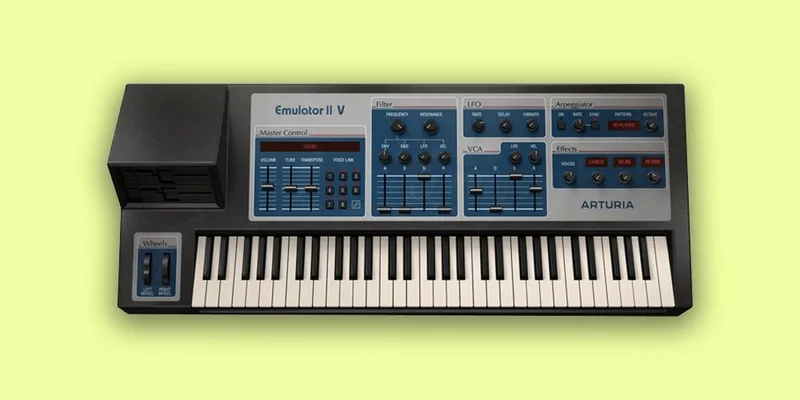
That sample rate is not a limitation Arturia is apologising for. It's the whole point. The original Emulator II sampled at 27.7 kHz with 8-bit companding, which introduced a specific harmonic texture that sits differently in a mix than clean 24-bit audio. It's the kind of character that takes 45 minutes to fake with a bitcrusher and EQ, and the Emulator II V just hands it to you.
Out of the box you get 250 presets pulling from a 300MB+ library that mixes original Emulator and Synclavier samples with modern selections. The preset browser filters by instrument type and musical style with keyword search, so you're not scrolling through 250 names hoping something clicks.
Against Omnisphere 2, the comparison isn't really fair in a head-to-head. Omnisphere is a hybrid sampler-synthesizer built for breadth. Emulator II V is built for depth in one specific sonic era. Picking between them is picking between a Swiss Army knife and a straight razor. Both cut. Only one has a corkscrew.
The 8-Bit Engine: What That Actually Means
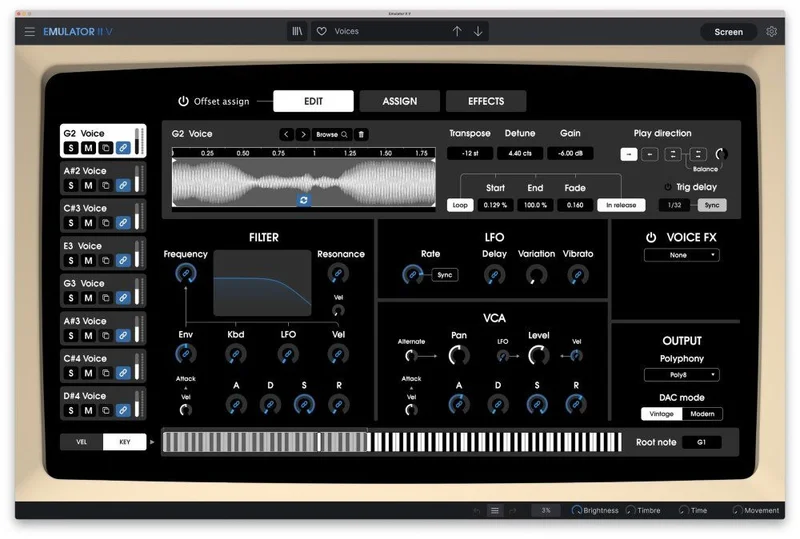
The core sample engine runs 8 voices, multitimbral, with up to 32-note polyphony. Each voice carries its own VCF with a full ADSR envelope, an LFO, and a VCA with its own ADSR. That's per-voice architecture at a level that lets you sculpt individual keyboard zones with completely different filter and amplitude behaviour.
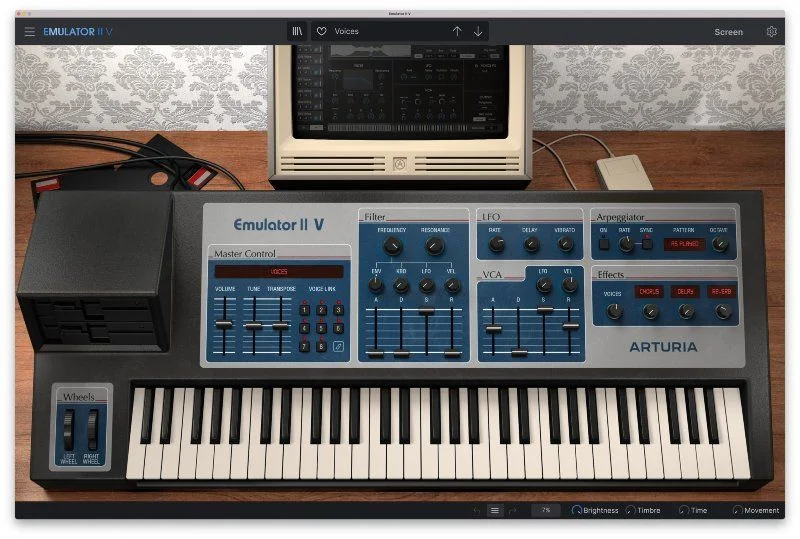
The choice between Modern DAC and Vintage DAC is worth spending time on. Modern DAC cleans up the output. Vintage DAC reintroduces the coloration of the original hardware's digital-to-analog conversion. Owners report the sounds can come across cleaner than the original hardware even on the Vintage setting, so if you're chasing true lo-fi roughness, the Bitcrusher effect in the effects chain is your friend alongside the Vintage DAC mode.
Polyphony is switchable all the way from mono to 32 notes. That range matters. Set it to mono for bass patches and lead lines that need to track one note at a time. Push it to 32 for lush, stacked pad work where notes cluster and blur in a way that works brilliantly on slow chord changes.
The Sample Layer Architecture
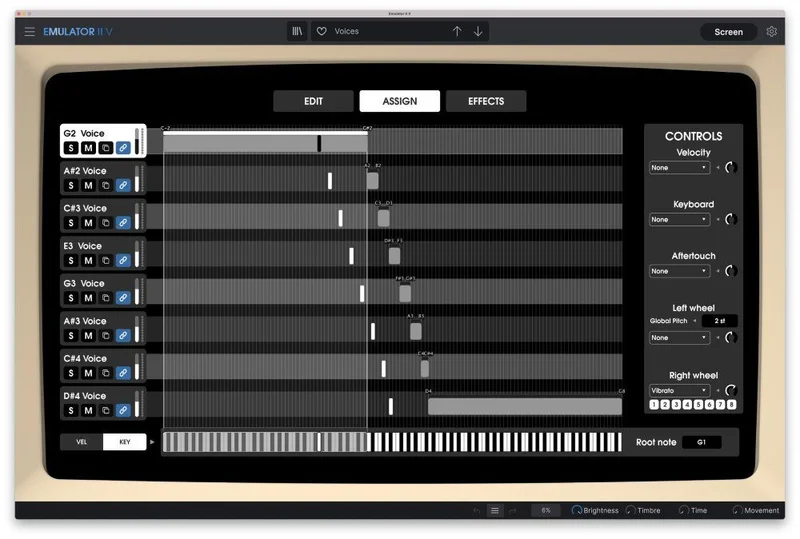
Up to 8 samples can run simultaneously across keyboard zones, and each of those samples gets its own filter, VCA, and LFO with polyphonic playback within its zone. Assigning samples to note ranges is done by dragging visually across the keyboard interface. It's one of those workflow decisions that sounds small until you're actually doing it, and then you realise how much faster it is than typing in note values.
Sample editing tools include transpose, loop settings, play direction, and trigger delay. Play direction means you can reverse samples inside the instrument without pre-processing audio files in a separate editor. Trigger delay lets you offset when a sample fires within a chord, which opens up staggered, harp-style voicings without any additional MIDI programming.
The import function accepts your own samples. That's a meaningful addition. But here's the frustrating part: if you're pulling samples from actual original Emulator II hardware, the patch information doesn't transfer. You're remapping and reprogramming from scratch. It works, but it's time-consuming in a way that's annoying if you have a large library of original patches to rebuild.
Modulation: 16 Destinations and Two Wheels
The modulation system covers keyboard velocity, keyboard tracking, and aftertouch, all routeable to 16 destinations. The two assignable expression wheels each handle 1 of those 16 destinations. That's a substantial modulation matrix for an instrument that presents itself as a hardware emulation rather than a fully modular synth.
LFO settings include rate sync to your DAW tempo, delay before the LFO kicks in, and variation for randomising the LFO slightly per note. That variation parameter is underrated. Apply a small amount to a pad filter LFO and the patch immediately sounds less static, more like a physical instrument that breathes rather than a loop cycling identically every bar.
If you're working with a KeyLab controller, the instrument maps seamlessly to Arturia's hardware, and those expression wheels become physical controls. That's the kind of integration that changes how you perform rather than just program.
Automation and macro response is solid, according to owners who've put it into sessions. That matters for producers who like to write modulation as arrangement moves rather than fixed patch settings.
The Arpeggiator
Six arpeggiator modes are on board, offering a range of note-sequencing patterns for rhythmic accompaniment. The arpeggiator locks to your DAW tempo via the LFO sync infrastructure.
Use it on the Emulator II V's pad textures and you get patterns that feel more like melodic sequences from early electronic records than the mechanical step sequences of a modern arpeggiator. The 8-bit character of the samples gives each repeated note a slightly different tonal edge depending on the key, which produces natural-sounding variation without programming anything.
The Effects Chain: 11 Algorithms, Serious Routing
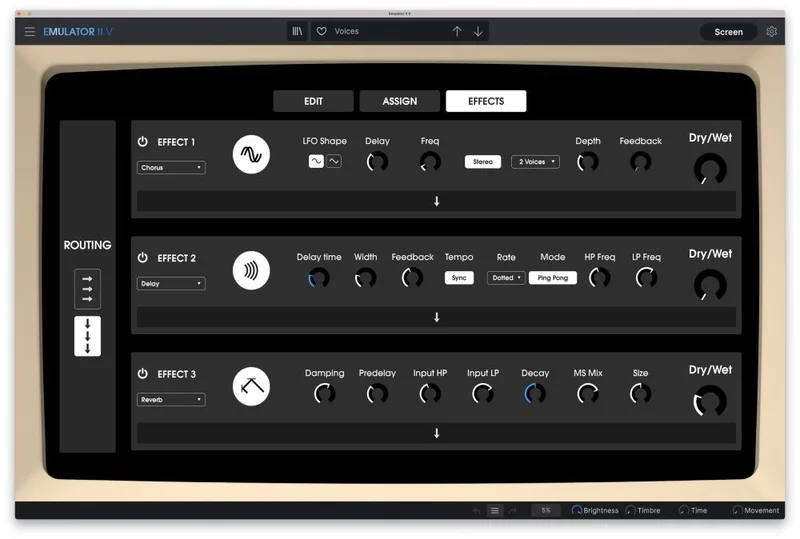
Eleven effect algorithms: Reverb, Delay, Chorus, Flanger, Phaser, Overdrive, Compressor, Bitcrusher, Multimode Filter, Parametric EQ, and Stereo Pan. That's a complete signal chain without leaving the instrument.
The routing options are where it gets interesting. Effects can apply to individual samples within the instrument, or up to 3 effects can run on the master output in series or parallel. That split matters. Apply the Bitcrusher to a single drum sample in a layered patch while keeping the pad samples clean. Or run Reverb into EQ into Chorus on the master for a full-texture processing chain.
The Parametric EQ inside the effects chain means you can fix frequency problems without routing to an external EQ. That's useful when you're using Emulator II V as a standalone instrument and want the patch to sit correctly in the mix without a separate EQ plugin inserted after it.
The one genuinely frustrating gap here: you can't save and reload presets for individual effects. If you dial in a reverb setting you love, you're writing it down or screenshotting it, because it doesn't save independently of the preset it's attached to. That's a workflow annoyance that feels like it should have been solved by now.
Presets, Browser, and the Factory Library
250 presets covering 300MB+ of samples is a solid starting point. The library blends original Emulator and Synclavier samples with modern selections, which means you get historical texture alongside sounds that sit in contemporary production contexts without heavy processing.
The preset browser filters by instrument type and musical style and supports keyword search. In practice, you can narrow down to what you need in a few clicks rather than scrolling through a flat alphabetical list. That's a small thing that makes a real difference when you're in the middle of a session and don't want to lose flow chasing a sound.
Owners report great results on lo-fi synths and drums especially. If you drop a drumkit preset into a beat that needs vintage digital character, you're likely to find something that lands without much tweaking. The filter and VCA controls let you adjust attack and release directly on the preset without rebuilding from scratch.
The in-app tutorials deserve a mention. The interface can feel overwhelming on first open. The tutorials walk through parameters and include sound designer tips, which is clever placement: you're learning how to use the tool inside the tool rather than switching to a manual or a YouTube tab.
Interface, Workflow, and Learning Curve
The GUI is resizable. On a laptop screen you can shrink it to fit alongside other open instruments. On a larger monitor or dual-screen setup, you expand it and have all the controls visible without hunting.
Owners say the feature-rich interface can feel overwhelming at first, then quickly becomes manageable once the layout clicks. The instrument type logic is consistent: samples on the left, envelope controls in the centre, effects on the right. Once that structure is in your head, navigating a new patch is fast.
The visual drag-and-drop zone assignment is the standout workflow moment. If you've ever tried to assign multisamples in a less visual instrument by typing in MIDI note numbers, you'll love how fast this is. Drag the sample to the zone you want. Done. Adjust the edge. Done. It respects your time.
What doesn't get solved by the design: the manual remapping issue on original hardware samples. You can import audio files, yes. But the mapping data from original E-Mu patches doesn't come across. That's a real limitation if you own a physical library. For producers building new patches from their own samples or working entirely within the factory content, it's not a problem at all.
System Requirements and Technical Notes
Mac needs OS 10.13 or later, 4GB RAM, a 4-core CPU at 3.4 GHz, 3GB free disk space, and an OpenGL 2.0 GPU. Apple Silicon is supported.
Windows needs Win 10 64-bit or later, the same RAM and CPU spec, 3GB disk space, and OpenGL 2.0. ARM processors on Windows are not supported. That's worth flagging if you're running a Surface Pro X or any Snapdragon-based Windows machine.
The plugin runs as Standalone, VST, AAX, Audio Unit, and NKS. 64-bit DAWs only. If you're still on a 32-bit setup, that's a different conversation.
Given the 8-voice architecture and 11 effects algorithms, load tests from your specific setup will give you a clearer picture of CPU use on a modern machine.
Where It Wins
The character of the 8-bit companding engine at 27.7 kHz is not something you get from a generic sampler or a bitcrusher plugin. It's a specific texture that comes from how the original hardware encoded and decoded audio, and Arturia has modelled it in a way that owners find immediately recognisable.
The per-voice architecture gives you modular depth without modular complexity. Each of the 8 zones can carry its own filter, envelope, and LFO, so a single Emulator II V instance can function as a complete layered instrument with parts that behave differently without any additional routing in your DAW.
The effects routing between individual samples and the master output is cleverly designed. It's not just a master effects chain bolted on the end. You have genuine signal routing decisions to make, and the results sound more purposeful than a one-size-fits-all master bus.
At $149, the combination of factory presets, sample import, and full effects chain makes it genuinely competitive against more expensive alternatives for producers whose sonic world lives in the vintage digital space.
Where the Competition Wins
Omnisphere 2 is broader. If you need synthesis capabilities layered under samples, wavetable options, granular processing, and a library that spans every genre and era, Emulator II V doesn't go there. That's an honest concession, and it's the reason these two tools aren't really competing for the same buyer.
CMI-V and Synclavier V both carry their own distinct character from different iconic machines. If your reference tracks use Fairlight textures or Synclavier precision, those instruments will get you closer to those sounds with less post-processing.
Pigments gives you custom sample manipulation inside a visual modular environment that the Emulator II V can't match for custom sound design flexibility. If your workflow is about building entirely original patches from scratch samples with deep modulation routing, Pigments is worth serious consideration.
And the lack of per-effect preset saving is a gap that some competitors handle better. It's not a reason to skip the instrument, but it's the kind of small oversight that you notice every session.
Who Should Buy Which
- ✅ Buy if you're a lo-fi, hip-hop, or electronic producer chasing authentic 1980s digital sampler texture and want it without sourcing vintage hardware.
- ✅ Buy if you build layered instruments from multiple samples and need per-voice filter and envelope control in a single plugin instance.
- ✅ Buy if you're already in the Arturia ecosystem on KeyLab hardware, because the seamless MIDI mapping is genuinely satisfying to perform on.
- ❌ Skip if you need broad synthesis capabilities beyond sampling, including wavetable, FM, or granular processing in the same instrument.
- ❌ Skip if you have a large library of original E-Mu hardware patches you want to import directly without manual remapping work.
- ❌ Skip if you're on a Windows ARM machine, since those processors aren't supported.
Specs & Technical Details
| Specification | Detail |
|---|---|
| Developer | Arturia |
| Price | $149 |
| Plugin Format | VST / AU / AAX / NKS / Standalone |
| OS Support | Mac (10.13+, Apple Silicon supported) / Windows (10+ 64-bit; ARM not supported) |
| Activation | N/A |
| CPU Usage | N/A |
| Trial Available | N/A |
| Version Reviewed | N/A |
| Polyphony | Up to 32 notes (switchable mono to 32) |
| Voices | 8-voice multitimbral |
| Sample Rate | 27.7 kHz (8-bit companding) |
| Effects | 11 algorithms (Reverb, Delay, Chorus, Flanger, Phaser, Overdrive, Compressor, Bitcrusher, Multimode Filter, Parametric EQ, Stereo Pan) |
| Factory Presets | 250 |
| Sample Library | 300MB+ |
| RAM (Min) | 4GB |
| CPU (Min) | 4-core at 3.4 GHz |
| Disk Space | 3GB free |
| GPU | OpenGL 2.0 compatible required |
Score Breakdown
| Category | Score | Notes |
|---|---|---|
| Sound Quality | 4.5/5 | The 8-bit companding character is distinctive and satisfying; Vintage vs Modern DAC gives you meaningful tonal range |
| Value for Money | 4.0/5 | At $149 the factory content, effects chain, and per-voice architecture represent solid value for the target use case |
| Ease of Use | 4.0/5 | Interface can feel dense initially but in-app tutorials and visual zone mapping reduce the friction fast |
| Features | 4.5/5 | Per-voice filter and LFO, 11 effects with flexible routing, and 16-destination modulation matrix punch above this price |
| CPU Efficiency | 4.0/5 | Specific figures not published; requirements suggest moderate load on a modern machine |
| Overall | 4.3/5 | A focused, characterful vintage digital sampler emulation that earns its place in any lo-fi or vintage electronic production toolkit |
Alternatives to Consider
Omnisphere 2 is the instrument to look at if you need broader sonic range. It's a hybrid sampler-synthesizer with far greater synthesis depth, a larger library, and capabilities that extend well beyond vintage digital character. The tradeoff is scope: Omnisphere is a tool you can spend years inside. The Emulator II V is more focused and faster to dial in for a specific sound.
Synclavier V is the closest sibling in the Arturia V Collection lineup. It draws from a different classic machine, with a sound that leans toward FM precision and cinematic orchestral textures rather than the warmer, grittier Emulator II character. If your references are more Synclavier than E-Mu, that's the instrument to try first.
CMI-V rounds out the trio of classic sampler emulations worth comparing. The Fairlight CMI sound has a very particular quality, one that sits brilliantly in ambient and cinematic work. Stack it next to the Emulator II V in a session and the character difference is obvious. Neither is objectively better. CMI-V goes orchestral and atmospheric; Emulator II V goes gritty and electronic.
Final Verdict
The Emulator II V is a love letter to a specific era of sound design, and it's a well-written one. The 8-bit companding engine, the analog filter, the per-voice architecture, and the 11-effect signal chain all add up to an instrument that earns its place in a lo-fi, hip-hop, or vintage electronic production setup.
It's not a wide-net tool. If you're building epic hybrid scoring libraries or modern pop patches with complex synthesis layers, this isn't your instrument. But if you want the texture of early digital sampling with workflow tools that belong in a 2026 session, Emulator II V at $149 is a clever, satisfying buy.
The two real complaints stand as stated: manual remapping for original hardware imports is tedious, and the missing per-effect preset save is the kind of oversight that gets annoying fast in a production workflow. Neither one is a reason to skip it. They're just reasons to know what you're buying before you click.
What it delivers, it delivers well. That gritty, warm, slightly imprecise texture of 8-bit companded audio sitting behind an analog filter is genuinely hard to replicate otherwise. The Emulator II V gets you there in minutes, not hours. For the right producer, that's worth every penny of the asking price.
Frequently Asked Questions
What is the Emulator II V and what does it emulate?
The Emulator II V is a software emulation of the E-Mu Systems Emulator II, a classic hardware sampler synthesizer from the 1980s used by artists including Depeche Mode and Trent Reznor. It replicates the original machine's 8-bit companding technology operating at a 27.7 kHz sample rate, combined with an analog filter and modern DSP additions like an 11-algorithm effects chain. The result is the distinctive lo-fi digital texture of the original hardware, available inside any 64-bit DAW.
Can I import my own samples into Emulator II V?
Yes, the instrument accepts user sample imports. You can assign your own audio files to keyboard zones using the visual drag-and-drop interface and apply the instrument's filter, envelope, and effects to them. The limitation comes with samples from original E-Mu hardware: patch information from the original machine doesn't transfer, so you'll need to manually remap and reprogram any patches you're importing from a physical Emulator II library.
What DAW formats does Emulator II V support?
It runs as a Standalone application and as VST, AAX, Audio Unit, and NKS plugins. It requires a 64-bit DAW on both Mac and Windows. Mac requires OS 10.13 or later, with Apple Silicon supported. Windows requires Win 10 64-bit or later; ARM processors on Windows are not supported.
How does the Vintage DAC mode differ from Modern DAC?
The Vintage DAC setting emulates the coloration of the original Emulator II hardware's digital-to-analog conversion, adding the sonic character of the original circuit to the output. Modern DAC cleans up that coloration for a more transparent sound. Owners report that even the Vintage setting can sound slightly cleaner than original hardware, so combining Vintage DAC with the on-board Bitcrusher effect is worth exploring if you're chasing maximum lo-fi roughness.
Is Emulator II V good for beginners?
It has a steeper-than-average first impression. The interface is feature-rich and can feel overwhelming when you first open it. That said, Arturia includes in-app tutorials that walk through parameters and sound designer tips, which significantly reduces the initial learning curve. Owners report it becomes intuitive quickly, and the visual zone mapping interface is one of the more approachable ways to build multisampled instruments across keyboard ranges. If you're new to sampling instruments, budget some time for the tutorials before expecting to move fast.