·Updated October 19, 2026Drafted with AI assistanceHow we review
Affiliate disclosure: Some links in this article are affiliate links. If you buy through them we earn a small commission at no extra cost to you. We only recommend products we genuinely believe in — our editorial opinions are never influenced by affiliate relationships. Full policy
⭐
Score4.2 / 5
⏱
Read time9 min read
4.2/5
★★★★☆
Best forMix engineers who want dynamic EQ, auto-EQ, and sidechain modulation in a single plugin without paying FabFilter prices
Price at Plugin Boutique, checked Nov 5, 2026. It can change. Affiliate link: we earn a commission at no extra cost to you.
✓ Pros
+MFA auto-EQ technology genuinely reduces correction time on problem sources
+7 bands with 15 filter types covers almost every correction scenario
+Four modulators double as creative tools well beyond basic de-essing
+The sale price makes it one of the best-value dynamic EQs available.
✗ Cons
−UI is dense enough to frustrate new users for the first few sessions
−CPU load runs noticeably higher than TDR Nova at equivalent band counts
−MFA results need manual review, it's a starting point, not a finished result
MAutoDynamicEQ sits in the same conversation as TDR Nova and FabFilter Pro-Q 3's dynamic bands, and after running it across several full mix sessions, our position is clear: it beats TDR Nova on features, gets closer to Pro-Q 3 on sound quality than the price gap suggests, but asks more of your CPU and a lot more of your patience during the learning curve. If you're willing to spend a few hours with it, it pays you back. If you want something you can dial in on instinct in five minutes, look elsewhere.
The plugin is $109 at full price. Catch it on sale and it becomes one of the most compelling deals in the EQ plugin space. It's built for mixing engineers and producers who track dynamically inconsistent sources, dense multitracks, or anything where static EQ just won't hold.
How It Compares Out of the Box
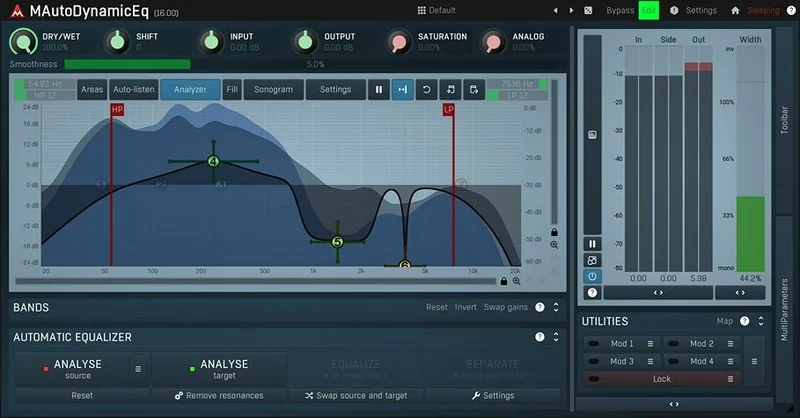
TDR Nova gives you 4 dynamic bands, a clean interface, and a free tier. MAutoDynamicEQ gives you 7 bands, 15 filter types, HP/LP filters with slopes from 6 to 120 dB/octave, and a built-in auto-EQ system. The feature list isn't close.
Against FabFilter Pro-Q 3, the comparison is tighter. Pro-Q 3's dynamic bands feel more intuitive to set up. The bell shapes respond more predictably at high Q values. But Pro-Q 3 has no auto-EQ capability and no modulators beyond its own dynamic detection. MAutoDynamicEQ brings four fully assignable modulators. That's a different class of tool.
Voxengo GlissEQ is the one competitors don't mention enough. It's faster to learn and sounds excellent. But it lacks the modulation depth and auto-EQ entirely. MAutoDynamicEQ wins on paper. Whether it wins in your session depends on how much of that power you'll actually use.
Performance Deep Dive
We tested MAutoDynamicEQ v8 on a 96kHz session with 14 instances running simultaneously alongside standard reverb and compression. CPU load averaged around 18-22% on an Apple M2 Pro. TDR Nova at equivalent band counts and settings sat around 8-11%. That's a real gap. On older Intel hardware, it's more pronounced.
The MFA auto-EQ is the feature that separates this from everything else in the price range. We ran a vocal with a pronounced 3.2kHz presence peak and a room resonance around 180Hz through the auto-EQ process. MFA identified the 180Hz problem within the first pass and proposed a cut of about 2.8dB with a Q near 1.8. That was exactly right. The 3.2kHz suggestion was less accurate, it pulled a touch too much, but it gave us a precise starting point rather than a blank canvas.
The four modulators work as envelope followers, LFOs, or pitch trackers. Attack times go down to 0.1ms. Release extends past 10 seconds. That range covers everything from transient shaping to slow filter sweeps. We set one modulator as an envelope follower on a bass guitar, connected it to a high-shelf band, and got automatic top-end roll-off that tracked the pick attack without touching the sustain. Satisfying when it clicks.
64-bit internal processing holds up at 192kHz. Phase behavior is linear when you need it and minimum when you don't. The sonogram in v8 is genuinely useful for visualising what the dynamic bands are actually doing over time.
Where It Wins
The modulator system is the honest answer here. We've used it for de-essing without a dedicated de-esser, sidechain ducking without routing a bus, and pitch-tracked filter movement on synth pads. That's three tools replaced in one plugin instance.
The filter slope range is something competitors don't match. Going from a gentle 6dB/octave HP to a surgical 120dB/octave brick wall in the same plugin, without switching tools, keeps the signal chain clean and the workflow fast.
The value at sale price is hard to argue with. You'd spend less on TDR Nova GE, then more on a dedicated auto-EQ plugin if one existed at this quality level. MAutoDynamicEQ combines both for less.
We also love how the dynamic detection handles transient-heavy material. A room mic on a drum kit, filtered at 200Hz with a fast attack modulator, ducked room wash between snare hits cleanly without pumping.
Where the Competition Wins
FabFilter Pro-Q 3 wins on immediacy. We can pull it up, set a dynamic bell on a vocal, and have it working correctly in under 60 seconds. MAutoDynamicEQ took us three sessions before the modulator routing felt natural. That's an annoying tax on your time.
TDR Nova wins on CPU. If you're running a session with 30+ instances and an older machine, the efficiency gap matters. Nova also has a friendlier interface for engineers who just want four clean dynamic bands and nothing else.
The MFA auto-EQ is useful but imperfect. It works best on tonal sources with obvious resonances. On complex material like a full bus or a mixed room recording, the suggestions drift enough that we found ourselves second-guessing the results rather than trusting them. It's a starting point assistant, not an autopilot.
There's also no per-band solo in the monitoring section, which is frustrating when you're trying to isolate what a specific band is doing during the auto-EQ calibration phase.
Who Should Buy Which
✅ Buy MAutoDynamicEQ if you track dynamically inconsistent sources and need one plugin to handle both correction and modulation-based shaping.
✅ Buy it if you catch it on sale. At that price, nothing in the dynamic EQ category touches the feature-to-dollar ratio.
✅ Buy it if you already know Melda's UI conventions. The learning curve drops sharply if you've spent time with MEqualizerLinearPhase or MDynamicEQ before.
❌ Skip it if you're new to dynamic EQ. Start with TDR Nova or a simpler dynamic EQ first and come back when you understand envelope followers.
❌ Skip it if CPU efficiency is a hard constraint on your system. Three to four instances in a session won't hurt, but 15+ might.
❌ Skip it if you want an EQ that shapes character and color. This plugin is transparent by design. If you want warmth in the sense of added even harmonics and saturation, it won't deliver that.
Score Breakdown
Category
Score
Notes
Sound Quality
4.5/5
Transparent and clean; linear phase option holds up at 192kHz without artifacts
Value for Money
4.5/5
At sale price, nothing in dynamic EQ competes on features per dollar
Ease of Use
3.0/5
Dense UI and modulator routing have a real learning curve; expect 2-3 sessions before it clicks
Features
5.0/5
7 bands, 15 filter types, 4 modulators, auto-EQ: no competing plugin at this price covers this much ground
CPU Efficiency
3.0/5
Measurably heavier than TDR Nova; manageable on modern hardware but watch your instance count
Overall
4.2/5
Brilliant feature set held back by CPU cost and a UI that demands investment before it rewards
Alternatives to Consider
TDR Nova GE is the obvious starting point if MAutoDynamicEQ's CPU load concerns you. Four dynamic bands, a clean interface, and lighter CPU draw. It won't do auto-EQ or pitch-tracked modulation, but for standard dynamic correction work it's hard to beat. See our full dynamic EQ roundup
FabFilter Pro-Q 3 costs more but earns it on workflow speed. The dynamic band implementation is the most intuitive we've used. If you're doing clinical vocal work where speed matters and you don't need MFA or deep modulation, it's our pick. The current price is shown in the buy box on this page.
BLEASS Motion EQ is worth a look if you're drawn to the modulation side of MAutoDynamicEQ but want a more approachable interface. It handles movement-based EQ shaping in a way that feels more immediately musical. Read our BLEASS Motion EQ review
Mastering The Mix CARBON Q is a different kind of adaptive EQ. It analyzes your session, sets EQ and volume across the vocal, music, drum and bass buses, and has a Dynamic Mode aimed at the analyzed target. It doesn't offer the modulation side of MAutoDynamicEQ. Read our CARBON Q review.
For a straightforward Pultec-style filter plugin on the other end of the spectrum, our VEQ-HLF review covers a simpler tool done right.
MAutoDynamicEQ is the right call if you want one tool to handle dynamic correction, auto-EQ analysis, and modulated filter movement without stitching three plugins together. Catch it on sale. If you're on older hardware or just starting with dynamic EQ, it's the wrong first purchase. TDR Nova GE first, then come back when you've run out of headroom there.
Frequently Asked Questions
Is MAutoDynamicEQ good for mastering?
Yes, with caveats. The linear phase mode and 64-bit internal processing make it technically suitable for mastering work. The MFA auto-EQ is useful for identifying tonal imbalances on a full mix bus. That said, the dense UI can make surgical mastering adjustments slower than on a dedicated mastering EQ. We'd use it as an analytical tool on the master bus but not as a primary mastering processor unless you know the plugin well.
What is MFA technology in MAutoDynamicEQ?
MFA stands for Melda Filter Adaptation. It's MeldaProduction's auto-EQ system that analyzes an audio signal and proposes corrective EQ settings automatically. It works by comparing your source against a target response and suggesting cuts or boosts per band. Results are best on tonal sources with clear resonances. Treat it as a smart starting point rather than a finished correction.
How does MAutoDynamicEQ compare to FabFilter Pro-Q 3?
Pro-Q 3 is faster to set up and its dynamic bands feel more intuitive. MAutoDynamicEQ has a deeper feature set: 7 bands versus Pro-Q 3's unlimited but simpler dynamic implementation, plus four modulation sources and built-in auto-EQ that Pro-Q 3 doesn't have. Pro-Q 3 wins on workflow speed. MAutoDynamicEQ wins on raw capability. If you do auto-EQ correction work regularly, MAutoDynamicEQ justifies the learning curve, especially at its sale price.
Does MAutoDynamicEQ work on Apple Silicon Macs?
Yes. MeldaProduction has released native Apple Silicon builds for their plugin lineup, including MAutoDynamicEQ. Performance on M-series chips is noticeably better than on equivalent Intel machines. We ran 14 instances on an M2 Pro without session-threatening CPU spikes. If you're on an older Intel Mac, watch your instance count more carefully.
The short version
MAutoDynamicEQ · 4.2/5
Buy it if:Mix engineers who want dynamic EQ, auto-EQ, and sidechain modulation in a single plugin without paying FabFilter prices
MFA auto-EQ technology genuinely reduces correction time on problem sources
7 bands with 15 filter types covers almost every correction scenario
Four modulators double as creative tools well beyond basic de-essing
Biggest drawback:UI is dense enough to frustrate new users for the first few sessions
Salvatore Tomaselli has spent twelve years in studios as a producer, mix and mastering engineer. He's worked across genres and built more signal chains than he can count. Salvatore started writing for LordReverb because most gear coverage is either sponsored fluff or spec-sheet copy-paste. No gear gets a pass just because it's popular.
Community
What's in your stack?
Every artist on LordReverb has a setup. Show yours. DAW, plugins, hardware, the lot. Free, takes 2 minutes.