
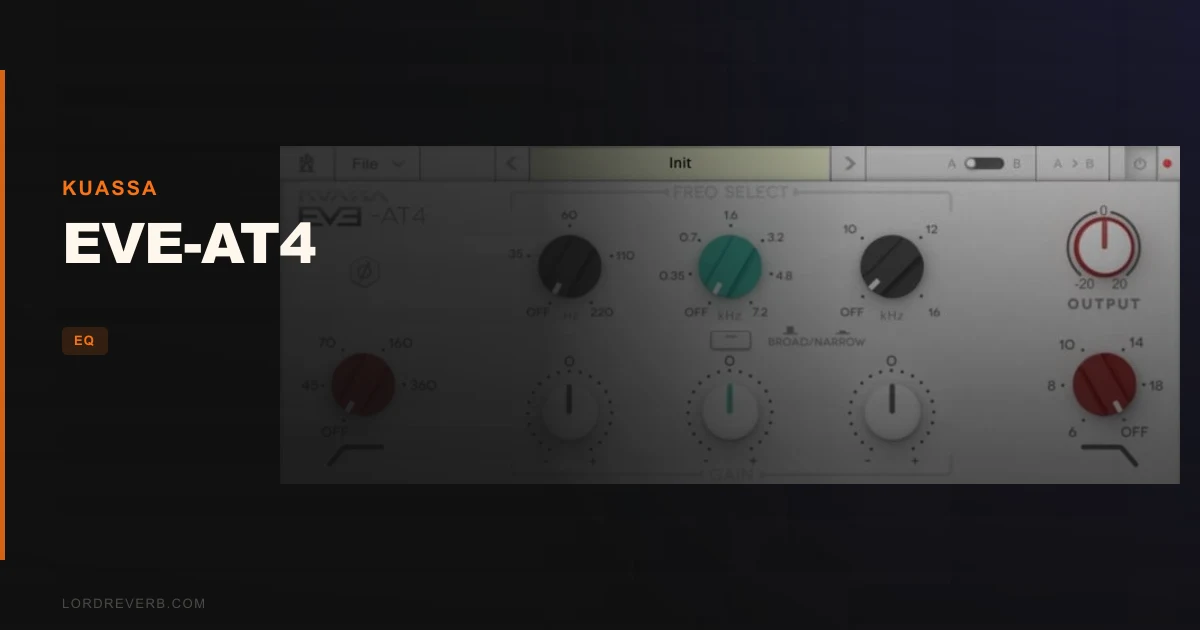
Yes, the EVE-AT4 is worth $39 if you want a Neve 1084-style EQ that adds character rather than correcting problems.
It's a great fit for producers who shape tone with broad moves on vocals, guitars, bass and the mix bus. It's a harder sell if you need dozens of frequency choices for surgical cleanup.
The EVE-AT4 is a three-band equalizer from Kuassa with an extra high-pass and low-pass filter. It's a tribute to the EQ section of the Neve 1084, the console module that followed the Neve 1073.
Kuassa sells it in VST, VST3, AU, AAX and Rack Extension formats, so it fits most DAWs.
One note on how this review was made. It's based on the product page, the developer's published specs and the documented feature set. We haven't run it through our own sessions, so anything we can't verify yet is marked as such.
Who Is the EVE-AT4 Really For?
It's for the producer who finishes a vocal take and thinks, "It's fine, but it's lifeless."
Kuassa pitches it at exactly that: add oomph, remove muddiness, give vocals a husky treatment, increase presence, remove rumble. Those are broad strokes, not scalpel work.
It also suits anyone building a 1970s-leaning sound. The developer says the tonal shape of the original design is a hallmark of many classic recordings from that decade.
That's the angle. We like it, because a character EQ that knows what it is beats a clean EQ that does everything politely.
What the EVE-AT4 Actually Does
Three bands of shaping, plus a high-pass and a low-pass filter. That's the whole signal path, and the simplicity is the point.
The Neve 1084 is known for a clear, smooth and very musical response, in Kuassa's words. The EVE-AT4 aims at that behaviour rather than a flat, textbook EQ curve.
The real draw is how the filters are implemented. Kuassa says this gives an idiosyncratic frequency response that its sibling, the EVE-AT1, doesn't have.
The sound comes from the shape of the curves, not from a pile of options.
The Gain Range: How Much Can You Push?
The developer lists roughly +/-18dB with the narrow Q setting and +/-12dB with the broad Q setting.
That's a lot of range for a character EQ. A narrow boost of 6dB reads very differently from a broad boost of 6dB, and the switch lets you decide how focused each move is.
Worth noting: the narrow setting has more gain available, which is typical of this style of design. Tighter bandwidth means you can lean harder without wrecking the surrounding frequencies.
The broad setting caps lower, and honestly that's a good thing. Broad boosts stack up fast, and 12dB of wide lift is already more than most mixes should take.
Broad and Narrow Q: Two Bandwidths, Not a Dial
Here's the first design choice we'd call out. You get a selectable broad or narrow Q, not a continuous bandwidth knob.
That's a real limit. It's also faster.
With only two choices, you stop fiddling and start listening. Broad for the brushstroke, narrow when you want a tighter lift.
The catch: if you want a very specific bandwidth, say a Q of 1.4 to carve 2dB out of a congested midrange, you won't find that precision here. Kuassa openly says the AT4 has fewer Q options than the AT1.
Shelf or Peak: The Filter Mode Switch
Each band can be set to shelf or peak mode, per the feature list.
A shelf lifts or cuts everything above or below a corner frequency. A peak boosts or cuts a bell around a centre frequency.
That choice matters more than it sounds. A shelf on the high band is the classic way to add air. A peak at the same frequency adds a presence bump instead.
Same frequency, different result. Having both modes on a three-band EQ keeps the flexibility without cluttering the interface.
The High-Pass and Low-Pass Filters
This is the part Kuassa says sets the AT4 apart. Both filters slope at -18 dB/octave.
The high-pass filter offers four fixed frequencies: 45Hz, 70Hz, 160Hz and 360Hz. That covers everything from sub rumble cleanup up to thinning a muddy low-mid.
The 45Hz setting is for stripping rumble and handling noise on full-range sources. The 360Hz setting is aggressive, the kind of move you'd use to push a guitar out of a bass part's way.
Four choices is limiting. If your problem lives at 100Hz, you're choosing between 70 and 160. That's the trade-off of a hardware-style design.
What the -18 dB/octave slope means
An 18 dB/octave slope is gentler than the 24 or 48 dB/octave filters in many modern EQs. It rolls off gradually.
That gentle curve is part of the vintage character. It avoids the abrupt, surgical cut of a steep filter and leaves more of the source's natural weight intact.
For corrective work it's less decisive. For musical filtering it's usually friendlier.
Low frequency options
Kuassa also lists low frequency selections at 35Hz, 60Hz, 110Hz and 220Hz.
That's the low band of the EQ, not the filter. It's where you add the bass weight the page keeps promising: the "oomph."
The spread is sensible. 60Hz and 110Hz cover kick and bass fundamentals, while 220Hz reaches into the low-mid warmth of a vocal or guitar.
Quickstart: Getting a Sound in Under a Minute
This is a workflow sketch based on the documented controls, not a recorded session of ours.
- Insert the EVE-AT4 on a vocal channel.
- Switch the high band to shelf mode and boost it with the broad Q for sheen.
- Engage the high-pass filter at 70Hz to clear rumble.
- Use the low band lightly for body.
- Hit the A/B button and compare your EQ with the bypassed starting point.
- Pull the output trim down so the louder version doesn't fool you.
The last step is the one people skip. Louder always sounds better, and the output trim is there to defeat that.
The A/B Compare and Copy Buttons
The research gap we were asked to address: most coverage barely mentions the A/B workflow. We'd call that a mistake, because it's one of the most useful features on the page.
There's an A/B compare button and an A/B copy button. You build one EQ setting in slot A, copy it to B, then tweak B and flip back and forth.
That turns "does this sound better?" into an actual test. You hear two versions of the same move, not a memory of the last one.
It's a small thing that changes how you make decisions. We love when an EQ builds the discipline in.
Output Trim and Phase Reverse
The output trim lets you match levels after boosting, so your ears judge tone and not volume.
The phase reverse button flips polarity. It's niche, but it's useful when you're combining mics or checking a signal against another source.
Neither is flashy. Both are the kind of practical control that makes a plugin easier to live with.
How It Sounds: What Reviewers Report
We're relying on published reviews here, not our own ears.
Reviewers describe the AT4 as excelling at broad brushstroke work. The pattern is adding sheen to vocals and guitars, boosting bass, and using it as a mix-bus sweetening EQ.
Computer Music Magazine gave it 9/10 for Performance and Value, per the research we were given. Users on the product page rate it 4.6 out of 5 across 16 reviews.
Sixteen reviews is a small sample. Treat the average as a pointer, not proof.
Where EVE-AT4 Wins
It wins on character. The tonal shaping is the product, and it's built around a console design that shaped a lot of records.
It wins on speed. Two Q choices, shelf or peak, and fixed frequencies mean you make decisions quickly and move on.
It wins on format coverage. VST, VST3, AU, AAX and Rack Extension means it works in Pro Tools, Reason and nearly everything else.
And it wins on the filters. A pair of -18 dB/octave filters with chosen frequencies gives you a musical clean-up that a generic EQ doesn't copy easily.
Where It Falls Short
Fixed frequencies are the obvious limit. If your problem sits between the available choices, you work around it.
Three bands isn't much. Complex tonal problems, such as a resonance in a vocal plus a harsh high-mid plus boxy low-mids, can need more bands than this offers.
It's also not the tool for narrow notch cuts. The narrow Q is narrower than the broad setting, but it's still a vintage-style bell, not a surgical filter.
What we can't verify yet
The CPU footprint and latency across DAWs aren't documented in the material we reviewed. The requirements list a Core2Duo-class minimum, with a recent Intel i3 or better recommended, which suggests modest demands. That's a hint, not a measurement.
We also can't verify a free trial from the product page. Check the developer's site before you buy.
And there are no published A/B comparisons against other Neve-style emulations that we could point to. Anyone claiming the AT4 beats a rival's 1084 model is guessing.
Specs and Requirements
| Spec | Detail |
|---|---|
| Developer | Kuassa |
| Price | $39 |
| Plugin Format | VST, VST3, AU, AAX, Rack Extension |
| OS Support | Mac / Windows |
| Activation | N/A |
| CPU Usage | Light to medium (inferred from the stated system requirements) |
| Trial Available | N/A (not stated in the material reviewed) |
| Version Reviewed | N/A |
| Windows | Windows Vista or later, 64-bit only. Core2Duo or AMD Phenom II X4 or better. 4GB RAM. |
| Mac | macOS 10.11 or later, Intel or Apple Silicon M1, 64-bit only. 4GB RAM minimum. |
| Notes | Pro Tools 11 or later required for AAX. Reason 7.1 or later required for Rack Extension. |
How EVE-AT4 Compares to the AT1 and the Competition
Start with the sibling. The EVE-AT1 is built for simplicity and clarity, with more bands, a bigger frequency palette and more Q options. Kuassa describes the AT4 as the strong character equalizer of the two.
Our take: pick the AT1 for versatility, and the AT4 for flavour. If you want one EQ to cover everything, the AT1 is the safer choice.
Against the wider market, the AT4 isn't the only Neve-style EQ. Universal Audio's Neve 1073 emulation and the 1073-style plugins from Pulsar and others are well-known options, and each takes its own approach to the circuit.
We can't say how the AT4 stacks up against them in a direct A/B, because we haven't seen one we trust. What we can say is that it's positioned around the 1084, not the 1073, and that its filter section is the selling point.
For more EQ comparisons, see our best EQ plugins for mixing.
Pricing and Value
The EVE-AT4 costs $39. That's firmly in impulse-buy territory for a plugin of this kind.
The value case is simple. You get a character EQ with a distinctive filter section in every major plugin format, for far less than a hardware-modelled flagship costs.
The risk is also simple. If you buy it expecting a do-everything EQ, you'll be disappointed. It's a flavour tool, and it earns its place only if you want that flavour.
See how other budget-friendly tools stack up in our best budget plugins.
Who Should Buy This
- ✅ Buy if you want broad, musical EQ moves on vocals, guitars and bass.
- ✅ Buy if you like a 1970s-style tonal character and a simple layout.
- ✅ Buy if you work in Pro Tools or Reason and need AAX or Rack Extension support.
- ✅ Buy if you want a gentle, musical high-pass for cleaning up rumble.
- ❌ Skip if you need surgical, narrow notch cuts at exact frequencies.
- ❌ Skip if you want a single EQ to handle every mixing job.
- ❌ Skip if you need a continuously variable Q or free frequency selection.
Score Breakdown
These scores are based on the documented feature set and published figures. We'll revisit them after longer use.
| Category | Score | Notes |
|---|---|---|
| Sound Quality | 4.5/5 | Reviewers praise the tonal character, but we haven't verified it ourselves. |
| Value for Money | 4.5/5 | A distinctive EQ in five formats at a low price. |
| Ease of Use | 4.5/5 | Two Q choices and fixed frequencies keep decisions fast. |
| Features | 3.5/5 | Three bands and fixed frequencies limit precision, though A/B and trim help. |
| CPU Efficiency | 4.0/5 | Modest system requirements suggest light demands, but nothing is measured. |
| Overall | 4.3/5 | A strong character EQ for broad tone shaping, held back by limited precision. |
Alternatives to Consider
If the AT4's limits bother you, look at these.
EVE-AT1 by Kuassa. The sibling with more bands, more frequencies and more Q options. It's the better pick if you want one EQ for general mixing. See our Kuassa EVE-AT1 review.
VEQ-HLF by Antelope Audio. A simple Pultec-style filter plugin if your goal is the classic low and high shaping rather than a Neve console flavour. Read our VEQ-HLF review.
BLEASS Motion EQ. A very different tool built for moving, animated EQ rather than static tone shaping. It's worth a look if you want movement. Read our BLEASS Motion EQ review.
The Verdict on EVE-AT4
Buy it. The EVE-AT4 does one thing well: it adds the broad, musical tonal shaping of a Neve 1084-style console to your tracks and your mix bus, for $39.
It's wrong for you if you want a surgical, do-everything EQ. Three bands and fixed frequencies won't fix a nasty resonance, and nothing in the documentation suggests otherwise.
We'd still like to see confirmed numbers on CPU use across DAWs, a trial option, and a trustworthy A/B against other Neve-style emulations. Until then, the score reflects the documented design and the reviews, not our own sessions.
Use it to add sheen, weight and a bit of 1970s attitude. Keep a cleaner EQ in the chain for the surgery.
Frequently Asked Questions
Is the EVE-AT4 based on a real Neve console?
Kuassa says it's modelled after the Neve 1084 and inspired by its design. It's described as a tribute to the EQ section of that console, which succeeded the Neve 1073. Treat it as an inspired emulation, not an official Neve product.
What's the difference between the EVE-AT4 and the EVE-AT1?
The AT1 has more bands, a larger frequency selection and more Q options, and it's built for simple, clear, versatile use. The AT4 has fewer of each but a distinctive filter implementation that gives it a stronger character. Pick the AT1 for flexibility and the AT4 for flavour.
What formats does the EVE-AT4 support?
It comes in VST, VST3, AU, AAX and Rack Extension formats. Pro Tools 11 or later is required for AAX, and Reason 7.1 or later for the Rack Extension. It runs on 64-bit Windows and macOS, including Apple Silicon.
What are the high-pass filter frequencies on the EVE-AT4?
The high-pass filter offers 45Hz, 70Hz, 160Hz and 360Hz. The low-pass filter and both filters use a -18 dB/octave slope. The low band frequencies are 35Hz, 60Hz, 110Hz and 220Hz.
Is the EVE-AT4 good for mastering or the mix bus?
Kuassa suggests using it on any track or on a mix just before final mastering, and reviewers describe it as an effective sweetening EQ on the mix bus. It suits broad tonal moves. For precise corrective work at mastering level, a more surgical EQ is a better fit.
Does the EVE-AT4 have a free trial?
The material we reviewed doesn't mention one, so we can't confirm it. Check Kuassa's website or your retailer before buying to see whether a demo is currently available.