
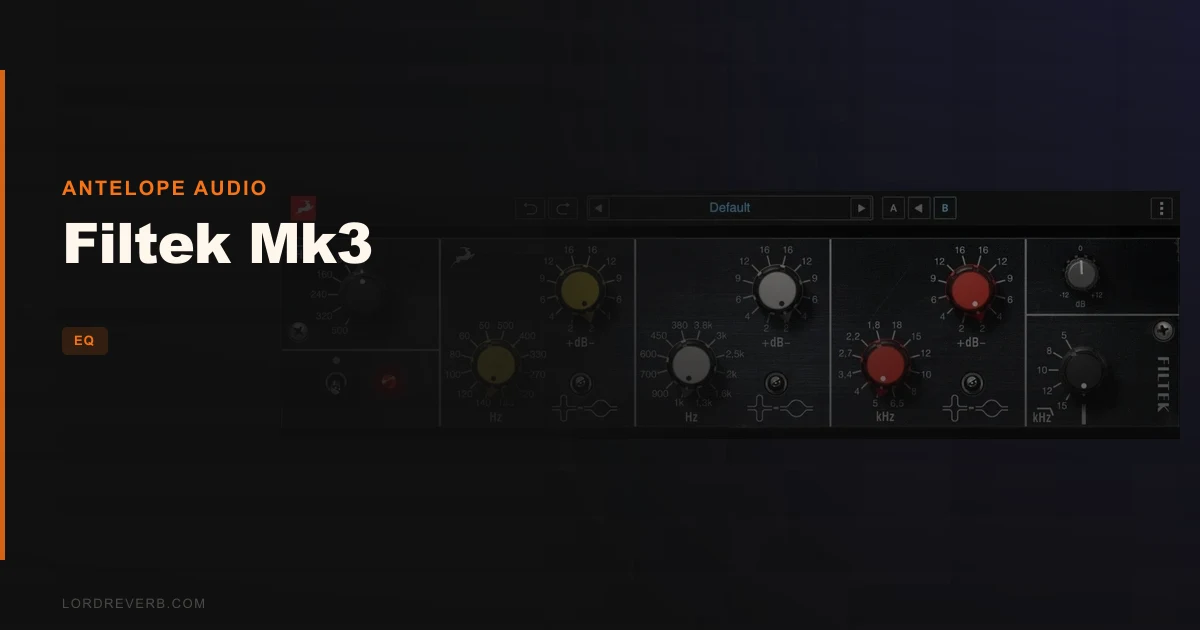
The Antelope Audio Filtek Mk3 is a plugin emulation of a 1970s Swiss broadcast EQ, and it earns its place on a master bus far more than most vintage-modeled equalizers at $199.
We were midway through a mastering session on a dense indie-rock record. The mix had too much weight sitting around 300Hz, and a slightly harsh upper midrange from some aggressive guitar compression. We needed a broad, musical lift above 8kHz without adding edge. Every modern parametric we reached for felt either clinical or too obviously hyped. Then we loaded the Filtek Mk3 on the stereo bus, set the high band to 10kHz, dialed in a +4dB boost with the narrow Q, and sat back. Clean. Present. Not harsh. That's the moment this plugin earned our attention.
This is built for engineers who work on full mixes, mastering chains, and bus processing. It's not a surgical tool for fixing a single bad resonance at 2.3kHz with a tight notch. It's a character EQ with real opinions about how audio should feel.
First Impressions: Opening a Vintage Broadcast Console on Your Desktop
Installation through Antelope's ecosystem is straightforward, though getting the Synergy Core version running requires compatible hardware. The native plugin loads without fuss.
The interface mirrors the hardware's stepped-switch logic. Each of the three bands gives you a rotary frequency selector with 12 positions, a boost/cut knob operating in 2dB increments up to ±16dB, and a three-way Q switch. The parallel mix control sits to the right. It's sparse. No curves displayed on a graph. No drag-and-drop nodes.
That sparseness is either brilliant or annoying depending on your workflow. We found it clarifying. You make decisions fast. There's no "just tweaking" because the steps force commitment.
Getting It Into a Real Workflow
We put the Filtek Mk3 across five different sessions over two weeks: a hip-hop mix, a podcast master, a film score stem, a solo piano record, and that indie-rock mix from the intro.
On the hip-hop mix, we ran it on a vocal bus. We boosted 3kHz by 4dB on the mid band with the wide Q. It added presence without the telephone-effect thinness you get from some EQs at that frequency. Satisfying result.
The parallel path is the sleeper feature. We set a +6dB cut-only pass on the low-mid band, then blended the dry signal back at around 40%. The effect was a reduction in muddiness that felt like it came from the mix itself rather than from EQ surgery. Clever design. The broadcast engineers who specified this unit clearly understood how people actually listen.
The friction point is real though: 2dB gain steps. On a mastering chain where you're reaching for 0.5dB or 1dB adjustments, the Filtek Mk3 makes you work around it. You end up using the parallel blend to approximate finer increments. It works, but it adds a step you shouldn't need.
The Synergy Core real-time mode is legitimately better. Zero perceptible latency in our tests with a compatible Antelope interface. If you're running an Orion or Galaxy, use that mode.
What It's Genuinely Good At
The transformer modeling is where the Filtek Mk3 separates itself. We pushed the output hard on a drum bus, adding about 8dB of boost across the top band, then compensating with the output trim. The saturation that came back was thick but not aggressive. It added harmonic density in a way that GML-style clean EQs simply don't. The GML 8200 is more accurate. The Filtek is more alive.
High-fidelity broadcast pedigree means this unit was designed to pass IRT standards. That engineering discipline shows in how the filters behave at extreme settings. Boosting the high shelf doesn't shriek. Cutting the low-pass doesn't create ringing artifacts. The Antelope VEQ-HLF handles Pultec-style passive EQ tasks, but the Filtek is the better all-rounder for full-mix duties.
The Q-switch mid-position bypass per band is underrated. You can isolate exactly which band you're listening to without needing to reach for solo buttons. Fast and genuinely useful on a busy session.
CPU usage on the native version is light. We ran six instances on a 2021 Apple M1 MacBook Pro without issues. Not CPU-hungry at all.
The Rough Edges
The 2dB stepped gain is the loudest complaint in forum discussions around this unit, and we agree. For tracking and mixing it's fine. For mastering it can feel like trying to thread a needle wearing oven gloves.
Twelve selectable frequencies per band sounds generous until you realize there's a gap between 6kHz and 10kHz in the high band. For modern pop and electronic music production where 7-8kHz air is often the target, you're picking the closest available option. It's annoying. The hardware had the same limitation, so Antelope stayed faithful, but fidelity to a 1970s constraint isn't always a virtue.
No visual frequency curve is a legitimate frustration for engineers who are used to seeing what they're doing. We adapted, but we kept wishing for it. The DRM-60 analog strip plugin from Antelope has a more modern interface, for comparison.
The Synergy Core limitation means not everyone gets the best version of this plugin. That's a structural problem, not a mixing problem.
Who This Is Really For
- ✅ Buy if you mix or master through a bus EQ and want transformer saturation as part of your chain.
- ✅ Buy if you own Antelope Synergy Core hardware and want a zero-latency vintage EQ option.
- ✅ Buy if you love the character of broadcast-era engineering and prefer stepped precision over continuous knobs.
- ❌ Skip if you need sub-1dB resolution for mastering work. This isn't that tool.
- ❌ Skip if you rely on visual EQ curves to work. There are no curves here.
- ❌ Skip if you're looking for a flexible modern parametric with variable Q and wide frequency coverage. Get a more surgical EQ plugin instead.
Specs & Technical Details
| Developer | Antelope Audio |
| Price | $199 |
| Plugin Format | VST3 / AU / AAX |
| OS Support | Mac / Windows |
| Activation | Antelope Audio account / Synergy Core hardware (for real-time mode) |
| CPU Usage | Light (native); offloaded to hardware in Synergy Core mode |
| Trial Available | N/A |
| Version Reviewed | Synergy Core / Native (2026 release) |
Score Breakdown
| Category | Score | Notes |
|---|---|---|
| Sound Quality | 4.5/5 | Transformer saturation is the real deal; high-band boost is genuinely non-harsh |
| Value for Money | 3.5/5 | Full value only realized with Synergy Core hardware; native version is good but not transformative at this price |
| Ease of Use | 3.5/5 | Sparse interface is fast once learned, but no visual curve and coarse steps add friction |
| Features | 4.0/5 | Parallel EQ path is a standout; limited frequency options per band hold it back |
| CPU Efficiency | 4.5/5 | Light on native; zero overhead on Synergy Core hardware |
| Overall | 4.1/5 | A musically honest broadcast-pedigree EQ with one foot in the 1970s and one foot on a modern mix bus |
Alternatives to Consider
If the Filtek Mk3's stepped architecture frustrates you, the Neve 1073 emulations from several developers offer more continuous control with comparable transformer character. We'd look at vintage-style EQ plugin comparisons if the Neve sound suits your sessions better.
For something from the same Antelope family with a more complete channel-strip approach, the DRM-60 review covers preamp, EQ, and compression in one unit. Worth a look if you want a fuller analog modeling workflow.
If you want a parametric EQ with no character goals and maximum precision, the GML 8200 emulations handle mastering work at 0.5dB increments and will feel more comfortable for fine adjustments. The Filtek beats them on color. They beat it on accuracy. Pick based on what your sessions actually need.
For sequencing and creative bus work that sits alongside EQ decisions, the SEQUND Lite plugin is worth exploring as a creative complement to character processing.
The Filtek Mk3 is a one-of-a-kind plugin with genuine broadcast engineering behind it. At $199, it's not a casual purchase, and it's wrong for engineers who need fine-grain mastering resolution. But if you're riding a mix bus or shaping a stem and you want analog thickness that doesn't shout about itself, this is one of the more honest vintage emulations we've had on the master fader. The 2dB steps will annoy you. The sound will keep you coming back.
Related reviews: VQP-BUNDLE Vintage Passive EQs
Frequently Asked Questions
What hardware was the Filtek Mk3 plugin based on?
The plugin models a 1970s Swiss-made broadcast EQ originally designed by Stefan Sulke to meet IRT (Institut für Rundfunk Technik) standards. The hardware was built for professional radio broadcast studios and later adopted by recording facilities worldwide. After acquisition, production moved to West Germany under the Siemens/BFE brand. The LAWO W995/7 and BFE MK3 are identical designs to the original unit.
Do I need Antelope hardware to use the Filtek Mk3 plugin?
No. The native plugin version runs on any compatible Mac or Windows system without additional hardware. However, the Synergy Core real-time mode, which runs with no perceptible latency, requires a compatible Antelope Synergy Core interface. If you own one, we'd recommend using that mode. If you don't, the native version still sounds strong.
Is the Filtek Mk3 suitable for mastering?
It's capable on a mastering chain, but the 2dB stepped gain increments are a real constraint for work where 0.5dB or 1dB adjustments are standard. Engineers can approximate finer control using the parallel mix path. For full mastering use, we'd pair it with a more precise parametric EQ rather than relying on it exclusively.
What's the parallel EQ feature and how does it work?
The parallel signal path lets you blend the processed (EQ'd) signal with the original dry signal. You're effectively running a New York-style parallel EQ setup within the plugin itself, without needing an external send or bus. This is particularly useful for pulling back heavy boosts or cuts to taste, and it makes the coarse 2dB gain steps feel more manageable in practice.