
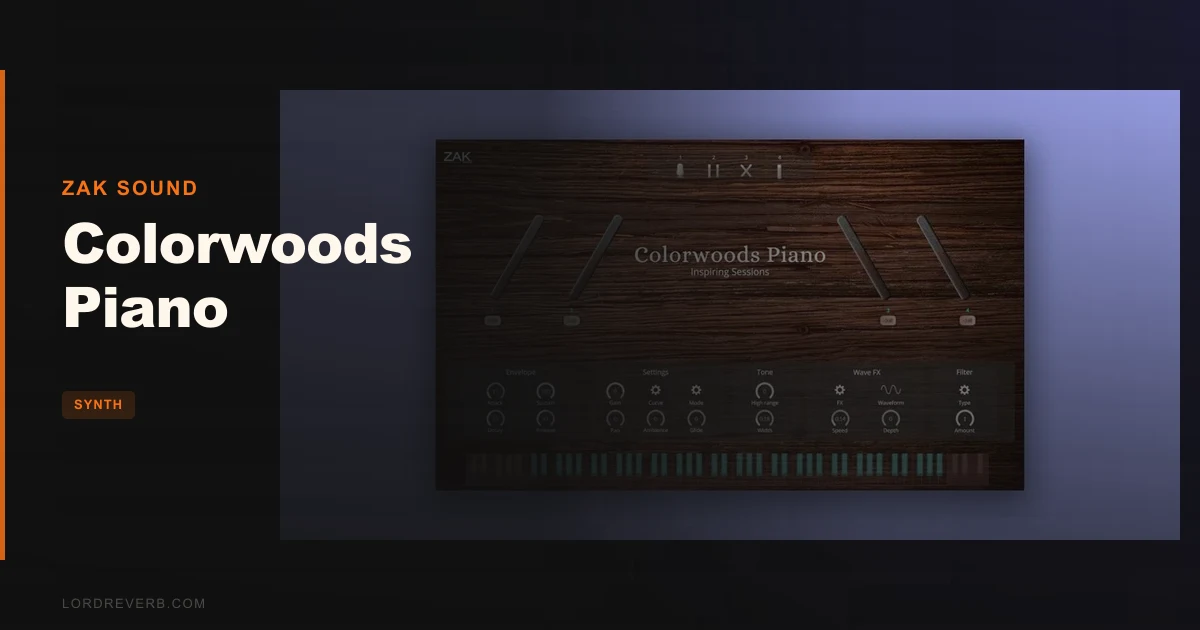
Colorwoods Piano sits in the same budget bracket as Spitfire Audio LABS Piano and the free tier of Native Instruments' piano offerings, and that's exactly where this review needs to start. For a 4.3GB multi-mic upright at a budget price, the question is not whether it is cheap. It is. The question is whether it sounds good enough to sit in an actual mix, or whether you're just buying a placeholder until you can afford Keyscape.
We tested it across three sessions: a solo piano arrangement, a lo-fi beat stack, and a dense orchestral mockup. Here's where it landed.
This one's for producers who want a real upright sound without committing serious money, and for composers who need something softer and more intimate than a concert grand.
How It Compares Out of the Box
Load it up next to Spitfire LABS Soft Piano and the first thing you notice is that Colorwoods is fuller. LABS Soft Piano is gorgeous but it's one sound. Colorwoods gives you four mic position controls across six physical microphones, and that changes the game immediately.
Compared to Native Instruments' free Una Corda, Colorwoods is brighter and more present in the mids. Una Corda sits further back in the room. Colorwoods sits closer to the hammers, which is either exactly what you want or slightly too immediate, depending on the track.
Against Keyscape's upright options, there's no contest on depth or detail. But Keyscape costs 20 times as much. $28 puts Colorwoods in a completely different weight class, and it wins that weight class.
Performance Deep Dive
We ran Colorwoods in Logic Pro 11.1 on an M2 MacBook Pro and in Ableton Live 12 on a Windows 11 machine with an i7-12700K. CPU hit was light on both. In Logic, we saw roughly 4-6% CPU on a single instance playing a sustained chord with all six mic positions active. That's competitive with LABS, which runs at a similar load.
The 5 velocity layers hold up across most of the dynamic range. We noticed a small but audible crossfade seam around the mezzo-forte to forte transition on the middle register. It's not ugly, but you'll hear it if you're working on a sparse arrangement where every note is exposed.
The LFO Wave FX section is a satisfying surprise. Rate and depth controls work cleanly on sustained notes. We used it at a low depth setting of around 15% on a slow-attack pad layer, and it added a believable shimmer without sounding like a plugin effect bolted on as an afterthought.
The lowpass filter rolls off predictably. We swept it down to about 800Hz on the front small-diaphragm pair while leaving the centered large-diaphragm condenser open, and got a genuinely useful telephone-piano tone without any phasing artifacts.
Where It Wins
The mic position system is the real story here. Four gain knobs controlling six microphones sounds simple, and it is. That's the point. You don't need to understand phase relationships or mic placement theory. Pull down the dynamic mic knob and the sound softens immediately. Push the XY pair and the stereo image widens. It's satisfying to dial in.
We loaded it for a lo-fi beat session and had a usable sound in under two minutes. No preset hunting. No sample library gymnastics. Just the mic balance, a touch of the highpass filter at around 120Hz to clear the low-end muddiness, and it sat beautifully under a dusty drum loop.
At $28, we would buy this ourselves without thinking about it. That's not a small thing to say. The price removes any legitimate reason to hesitate.
Native Apple Silicon support means no Rosetta overhead on M-series Macs. That matters for mobile sessions where every watt counts.
Where the Competition Wins
Velocity curve editing. This is where Colorwoods frustrates us. You get curve selection, which gives you a few preset response shapes. That's it. Keyscape lets you draw custom velocity curves. Even some budget piano plugins offer more granular control. If you're recording live keyboard takes and your playing dynamics are uneven, you'll wish you had more here.
The macOS ceiling at Monterey (12) is annoying in 2026. Most users will be running Ventura or Sonoma. ZAK Sound hasn't confirmed compatibility beyond Monterey, which means you're buying based on forum reports and crossed fingers if you're on a current OS. That's a real gap.
No AAX means Colorwoods doesn't exist for Pro Tools users. Not a flaw, but hard to ignore if that's your primary DAW.
And for genuinely expressive concert piano work, the 5 velocity layers aren't enough. Keyscape and Galaxy Vintage D use 8-16 layers. You'll hear the difference on slow, quiet runs.
Who Should Buy Which
- ✅ Buy if you need a flexible budget upright piano and you're working in Logic, Ableton, or a VST3-compatible DAW on Mac or Windows.
- ✅ Buy if you produce lo-fi, ambient, or indie folk and want mic position control to dial in intimacy without a complex interface.
- ✅ Buy if you're a student or hobbyist building a plugin library on a tight budget. At $28, the risk is zero.
- ❌ Skip if you're a Pro Tools user. No AAX, no access.
- ❌ Skip if you need a concert grand. This is an upright. The character is warm and close. It's not a Steinway emulation.
- ❌ Skip if you're on macOS Ventura or later and can't confirm compatibility. Wait for an update or contact ZAK Sound directly first.
Score Breakdown
| Category | Score | Notes |
|---|---|---|
| Sound Quality | 3.5/5 | Natural and close-mic'd upright character; velocity crossfade seam audible in sparse arrangements |
| Value for Money | 5.0/5 | A multi-mic, 4.3GB library at this price is genuinely hard to argue with. |
| Ease of Use | 4.0/5 | Four gain knobs and a clean UI; dialled in a usable sound inside two minutes |
| Features | 3.0/5 | Mic positions, LFO, filters are useful; limited velocity curve editing holds it back |
| CPU Efficiency | 4.5/5 | Light load on both M2 Mac and Windows i7; native Apple Silicon keeps it clean |
| Overall | 3.5/5 | A clever, honest budget piano that earns its price and knows its limits |
Alternatives to Consider
Spitfire Audio LABS Soft Piano (free): One mic position, one sound, zero flexibility. But that sound is stunning for ambient and scoring work. No comparison on configurability, but hard to beat on purity. Check out our thoughts on other budget-tier instruments in our Tape Synths Expansion review for a sense of what ZAK Sound's price bracket can actually deliver.
Native Instruments Una Corda (price may vary): More expressive, deeper velocity resolution, richer room sound. Costs nearly double. Worth it for solo piano compositions. Not worth it if you just need an upright to sit under a vocal or a lo-fi loop.
Keyscape by Spectrasonics: The correct answer if budget isn't a constraint. 36 keyboards, 500+ velocity layers on select instruments, and a level of detail that makes Colorwoods sound like a demo. But we're talking 10x+ the price. If you're comparing those two directly, you already know which one you need. For other plugins in this price conversation, our Audio Blast ABX3 Bundle review and LOW bass synth review cover what smart budget plugin buying actually looks like in 2026.
If you're building a wider instrument collection on a tight budget, our MiniFreak V review shows what happens when a budget-adjacent product actually punches up a weight class.
The Verdict on Colorwoods Piano
At $28, Colorwoods Piano is a legitimate tool, not a placeholder. The six-microphone setup with individual gain control is genuinely clever engineering for this price point. The LFO surprised us. The CPU load didn't.
What it won't do: replace a premium library for solo piano work. What it will do: sit in a lo-fi beat, breathe under a vocal, and give you a real upright character without 20 minutes of setup.
The macOS Monterey ceiling is a real concern in 2026, and we'd love to see ZAK Sound address that in an update. If you're on Ventura or Sonoma, verify compatibility before you buy.
But if your DAW supports VST3 or AU and you want a flexible upright piano that costs less than a round of drinks: buy it. The regret risk is basically zero at this price.
Related reviews: Does Emulation II+ Beat Every 80s Sampler Plugin in 2026? · Hand Clapper Review
Frequently Asked Questions
Is Colorwoods Piano compatible with Pro Tools?
No. Colorwoods Piano ships as VST3 on Windows and VST3/AU on macOS. There's no AAX version listed, which means Pro Tools users can't load it. If Pro Tools is your primary DAW, this one isn't for you.
Does Colorwoods Piano work on macOS Ventura or Sonoma?
The official system requirements list support up to macOS 12 (Monterey). ZAK Sound hasn't published confirmed compatibility for Ventura (13) or Sonoma (14) as of this review. We'd contact ZAK Sound directly before purchasing if you're on a current macOS version. Native Apple Silicon is supported within the listed OS range.
How many microphone positions does Colorwoods Piano have, and can you control them separately?
Six microphones across four controllable positions: a centered large-diaphragm condenser, a stereo XY pair of small-diaphragm condensers, a front-facing stereo pair of small-diaphragm condensers, and a single dynamic microphone. Each position has its own gain knob, so you can blend or isolate them to shape the character of the sound.
Is Colorwoods Piano worth buying if you already own Spitfire LABS Soft Piano?
Yes, and the reason is flexibility. LABS Soft Piano is one sound with one character. Colorwoods gives you four mic position controls, an LFO section, lowpass and highpass filters, and three playback modes. They serve different moments in a session. At $28, owning both costs less than most single premium piano presets.