The Kramer HLS Channel is a Helios console emulation plugin by Waves, built with input from Eddie Kramer, and it's worth buying if you want that specific 1970s rock grit on guitars, drums, or vocals, but it's not a full-service channel strip, and that distinction matters more than Waves' marketing admits.
We loaded it on a dry Stratocaster DI during a late session. The guitar was sitting nowhere, too clean, too polite, no body. We hit the HLS Channel, nudged the bass shelf to 120 Hz by about 4 dB, pushed the high shelf at 10 kHz up 6 dB, and pulled the Input fader until the preamp model started to breathe. The guitar moved forward in the mix without touching the fader. That moment was satisfying. It's the thing this plugin does better than almost anything at this price.
It's built for producers and engineers chasing the sound of the Helios console used in the Rolling Stones Mobile Studio in the early 1970s. If that sentence does nothing for you, you might be in the wrong aisle.
What This Plugin Actually Is (and Where It Stops)
The HLS Channel models the equalizer, preamp leveler, and input/output fader section from a specific Helios console. Not a generic "vintage British console." A specific unit with a documented recording history that includes Led Zeppelin, Jimi Hendrix, and early Beatles work.
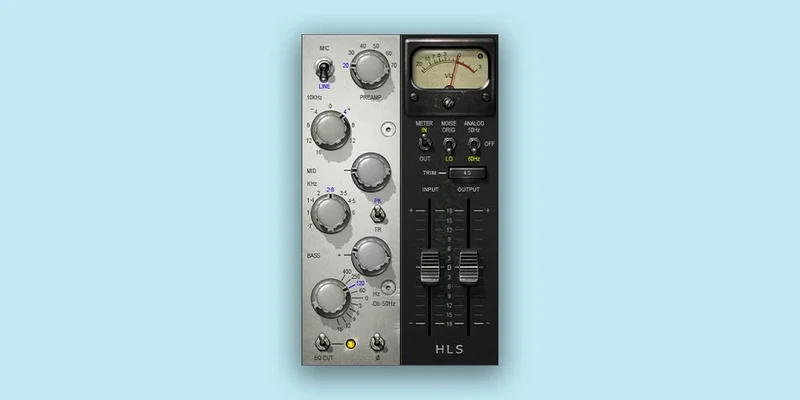
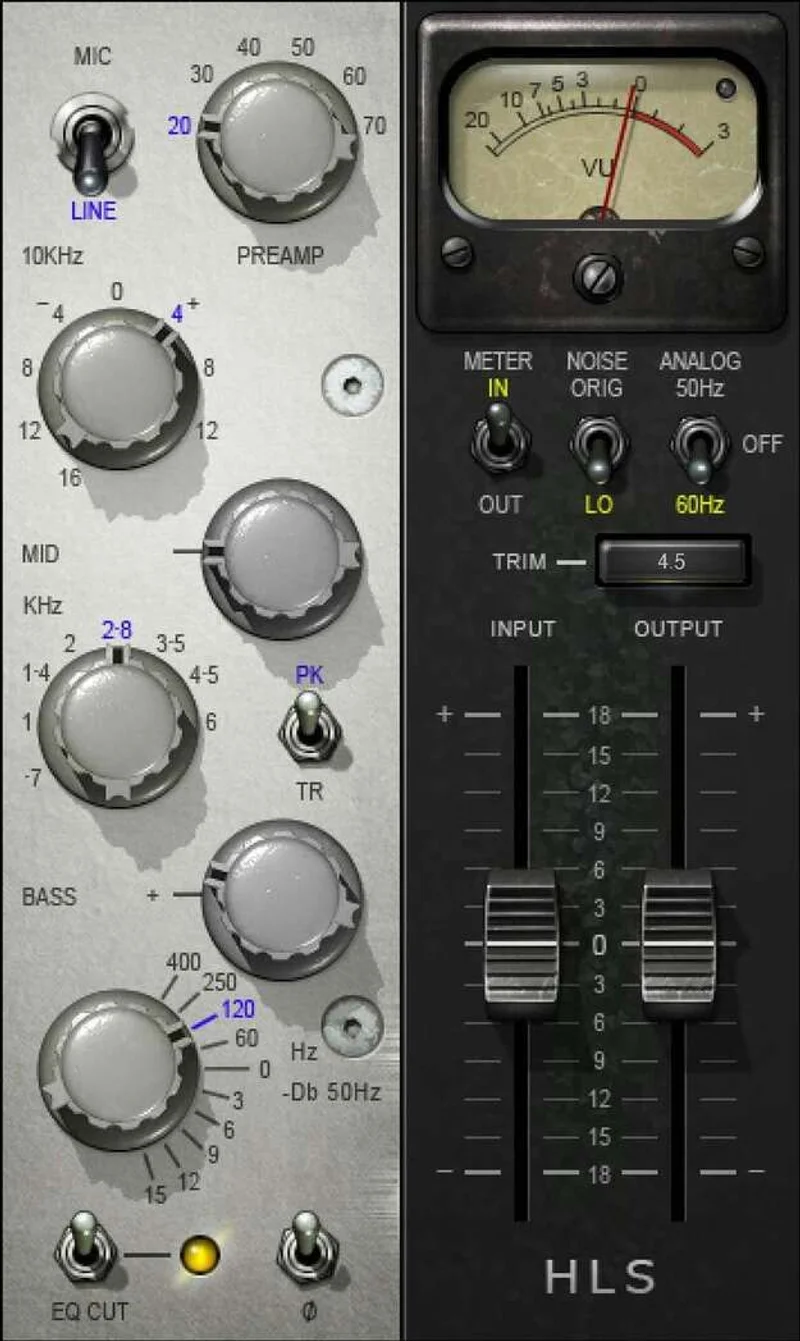
What it's not: a Swiss Army channel strip. There's no mid-band parametric here. The EQ is a shelving and cut tool only. Bass shelves boost at 60, 120, 250, or 400 Hz. The high shelf boosts up to 12 dB at 10 kHz. A high-pass-style bass cut trims 50 Hz by 3 to 15 dB. That's your EQ toolkit.
It's not for fixing a nasal vocal or scooping a congested mid. For that, you need something else in your signal chain. This is a coloration and shaping tool that works best when the source is already clean and you're adding character, not solving problems.
It supports AAX Native, AudioSuite, VST, AU, and SoundGrid. Resolution runs up to 24-bit 96kHz. That covers every serious DAW setup in 2026.
Living With the HLS Channel Day to Day
Setup is frictionless. Waves licensing has improved enough that this isn't the frustrating install story it used to be. Open it, it's there, it works.
The VU meter is a genuine pleasure. We know that sounds minor, but when you're gain staging into the preamp model, having a real-feeling meter tracking your input level changes how you use the plugin. You're not guessing. You're watching the needle respond and pushing until the saturation becomes audible, then backing off a hair. That workflow feels analog in a way that most digital meters don't.
We tested the mic versus line preamp modes on a close-mic'd acoustic guitar. Honestly, the difference is there, but it's small. Mic mode is marginally grittier in the upper mids around 3-5 kHz. Line mode is cleaner through that same range. If you're a-b'ing carefully, you'll hear it. In a full mix, you might not.
The bass frequency selector is where this plugin earns its keep. On a bass guitar, we set the boost to 60 Hz at +6 dB and paired it with the 50 Hz cut at 9 dB. The result tightened the sub while preserving fundamental body, a trick that takes three plugins to pull off messily elsewhere. Here it's two knobs.
CPU load is light. We ran 24 instances across a dense rock session on an M2 MacBook Pro without a single dropout. No complaints. This is not a CPU-heavy plugin to avoid situation.
The Real Trade-Offs
The HLS Channel's narrow EQ range is both its strength and its ceiling. Because the only options are shelves and a fixed-frequency cut, you get fast decisions and consistent character. But you'll hit the limit quickly. Try using this as your only EQ on a dense mix bus and you'll be frustrated within ten minutes.
The high shelf is the one we'd push hardest. 12 dB at 10 kHz sounds like it should be harsh, but the Helios character keeps it open rather than glassy. We pushed it to 9 dB on a drum room mic and it added air without turning the cymbals into ice picks. That's the plugin doing something a generic shelf wouldn't.
The lack of mid-band control is a genuine limitation, not just a stylistic choice. If you're trying to use this as a one-stop channel strip, it won't get you there. Pair it with a parametric mid-band, something like a flexible EQ plugin, and the HLS Channel becomes the color layer on top of that foundation.
The saturation is the most underrated part of this plugin. Push the Input fader into the red and the harmonic content that comes back is the Helios signature: second-order distortion that adds weight without muddying the low mids. It's not subtle once you're 3-4 dB into clipping. We love it on guitars. We'd skip it on orchestral strings.
Against the Field
The UAD Neve 1073 Legacy is the obvious comparison for vintage British console sound, but it's a different animal. The 1073 is tighter in the low end and more aggressive in the high mids. The HLS Channel is warmer and looser. Neither is better. They're different consoles.
The Lindell 69 Series models a similar Helios-adjacent sound. It has a three-band mid section the HLS Channel lacks, which makes it more flexible day to d
ay. But the Lindell costs more and, in our tests, the saturation character felt slightly cleaner. Whether that’s good or bad depends on what you’re chasing.
For the price, the closest competitor is free. The TDR Nova can do more technically. But it doesn't do what the HLS Channel does tonally, and technical flexibility isn't the same as the right sound for the right source.
If you're already deep in the Waves ecosystem, check how this sits next to the other Waves channel tools before buying. You might own something that overlaps.
The Real Verdict
The Kramer HLS Channel earns its place for one specific use case: adding Helios-style preamp color and broad shelving EQ to rock-adjacent sources. Guitars, drums, bass, and full mix buses with existing tonal balance all respond well.
It's wrong for you if you need mid-band surgical control, if you're working in jazz or classical where grit is a problem not a feature, or if you expect a channel strip that covers every job from cleanup to coloration.
For rock producers, session engineers doing throwback work, or anyone who's ever heard "When the Levee Breaks" and wanted to understand how that drum sound was built: this is a direct line into that world at a price that's genuinely hard to argue with.
Score Breakdown
| Category | Score | Notes |
|---|---|---|
| Sound Quality | 4.0/5 | Helios saturation character is the real thing; high shelf stays musical at high gain |
| Value for Money | 4.5/5 | $29.99 for a historically grounded console emulation is hard to argue with |
| Ease of Use | 4.5/5 | Five controls, clear labeling, VU meter makes gain staging intuitive |
| Features | 3.0/5 | No mid-band EQ is a real ceiling for daily-driver use |
| CPU Efficiency | 4.5/5 | Light enough to run in high counts without thinking about it |
| Overall | 3.9/5 | Brilliant for what it does; limited by design scope |
Alternatives to Consider
If you need a channel strip that covers EQ surgery alongside coloration, the TDR Channel Strip Bundle gives you parametric mid control, a high-pass filter, and more flexible routing. It doesn't have the Helios character, but it works for every genre without compromise.
For vocal-specific processing with vintage color, the Deluxe Vocal Bundle packs more dedicated vocal tools into a comparable price bracket. Different goal, but worth knowing about if vocals are your primary workload.
For producers who want waveshaping alongside analog-style tone shaping, the Sound Particles InShaper approaches harmonic coloration from a completely different angle and pairs interestingly with the HLS Channel in a dual-plugin setup.
The Lindell 69 Series is the most direct Helios competitor with a genuine mid-band section. It costs more. If your budget allows and mid control matters to you, that's where we'd look.
The HLS Channel's best role in 2026 is as a color insert on already-balanced sources. Buy it for that. Don't buy it to replace a full parametric EQ. That's not a knock on it. That's just knowing what you're paying for, and what you're paying for is the sound of a very specific room in 1971.
Frequently Asked Questions
Is the Kramer HLS Channel good for mixing vocals?
It works well on vocals that are already tonally clean and just need presence and air added. The 10 kHz high shelf at up to 12 dB is genuinely useful for breath and openness on close-mic'd vocals. But if your vocal has a nasal 2 kHz buildup or a boxy 400 Hz problem, the HLS Channel can't touch those frequencies with any precision. You'll need a parametric mid alongside it for problem-solving work.
How does the mic mode differ from line mode in the HLS Channel?
Mic mode adds a small but audible grit in the upper midrange, roughly in the 3-5 kHz region. Line mode through the same range is cleaner and more controlled. In a solo comparison you'll hear the difference. In a dense mix, it's subtle enough that most listeners won't distinguish them. We'd use mic mode for guitars and drums and line mode for bass and mix bus work.
Does the Kramer HLS Channel run on Apple Silicon natively?
Yes. Waves V14 and later include native Apple Silicon support, so the HLS Channel runs without Rosetta 2 on M1, M2, and M3 Macs. CPU usage is light enough that you can run multiple instances without it becoming a concern in typical session sizes.
How does the Kramer HLS Channel compare to UAD Helios emulations?
UAD's Helios-adjacent emulations require UAD hardware to run, which immediately changes the cost calculation. The HLS Channel runs natively on any compatible DAW without additional hardware. The UAD versions generally offer more detailed modeling of specific channel configurations, but for the price difference, the HLS Channel delivers the core Helios character, the saturation, the high shelf behavior, the low-end shelf options, without the hardware commitment.