
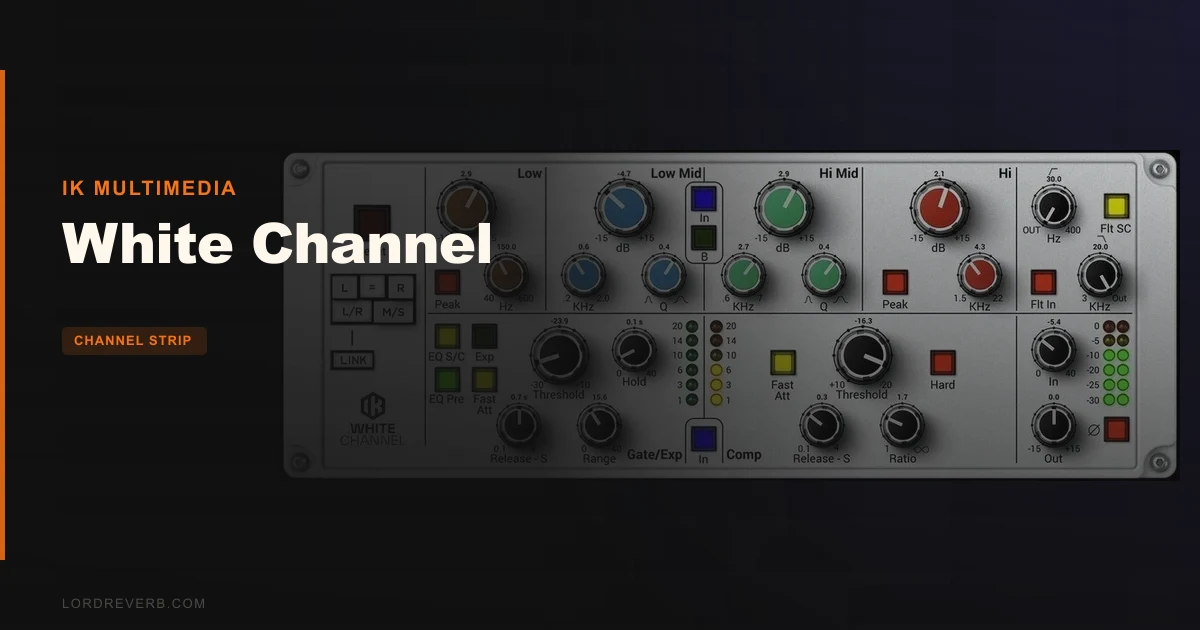
The White Channel review conversation almost always starts with one question: is it in the same league as Brainworx's SSL emulations or UAD's console strips? At $99.99, this IK Multimedia channel strip targets Hip Hop and R&B producers who need a modern, high-bandwidth console sound without paying hardware prices. It delivers that sound with some genuine strengths, but it also has a 600–1200 sample latency figure that will end the conversation for some of you before it even starts.
How It Compares Out of the Box
Stack the White Channel next to a Brainworx SSL emulation and the first thing you'll notice is how clean IK's EQ sits. No added grit. No hyped presence bump. The White Channel's circuit was designed with a modern approach to high bandwidth and signal-to-noise ratio.
Against UAD compressors, the compression story is subtler. Owners describe the White Channel's compressor as smooth, slightly warm on insertion before you've touched a control, and excellent on vocals. That's not a UAD-killer, but it's not embarrassing either.
What genuinely separates this plugin from both competitors is the dual-mode EQ. Black and Brown circuit designs, switchable on the fly. That's a workflow advantage that adds genuine value to the plugin.
Performance Deep Dive
The numbers here are where things get complicated. Standard mode sits at around 3% CPU for a single stereo instance. Load oversampling mode and you're looking at approximately 12%. But the stereo figure in full operation can climb to around 20% on some systems.
The latency is the harder conversation. Reports put PDC at 600–1200 samples at 48kHz. Your DAW's delay compensation will handle it on a frozen or printed track. But if you're trying to record through this plugin live, tracking vocals or guitar while monitoring through the strip, the high latency of 600–1200 samples PDC at 48kHz will impact real-time recording.
At least one user reported phase issues on insertion. That's not a universal experience, but it's worth testing carefully on stereo buses before you commit it to a mix.
Automation display has also been flagged in Reaper specifically. If Reaper is your DAW, check that early.
Where It Wins
Owners consistently describe the compression as subtle and clean, the highs as silky without being airy, the whole character as something that warms audio before you've dialled in a single setting.
The gate section is cleverer than it looks. You can use it in sidechain mode with the EQ or filter section, place it before or after the EQ, and push it into extreme settings to give percussive tracks a sharper attack. On a snare that's sitting too soft in a dense R&B mix, that gate snap can be the fix.
The dual-circuit EQ is the headline feature for a reason. Switching between Black and Brown modes on a vocal midrange notch gives you two genuinely different answers without loading a second plugin. That's satisfying to work with.
Where the Competition Wins
The White Channel's PDC numbers make real-time recording genuinely difficult.
The White Channel's compression is smooth, which is brilliant on acoustic guitars and vocals.
And the installation situation is a real complaint. You have to download the entire T-RackS suite to run this plugin. That's gigabytes of software you didn't ask for. Brainworx and UAD don't make you do that.
Who Should Buy Which
- ✅ Buy if you produce Hip Hop or R&B and want a clean modern console character on vocals and acoustic material
- ✅ Buy if you're already in the IK Multimedia ecosystem and the T-RackS suite download isn't a burden
- ✅ Buy if the dual-mode EQ switching is a workflow feature you'll actually use across multiple sessions
- ❌ Skip if you need to track vocals or instruments live through the plugin: the latency is a real problem
- ❌ Skip if you're running dense, track-heavy sessions where 20% CPU on a single stereo instance is not an option
- ❌ Skip if Reaper is your primary DAW until the automation display issues are confirmed resolved
Specs & Technical Details
| Developer | IK Multimedia |
| Price | $99.99 |
| Plugin Format | VST 2, VST 3, AAX (64-bit); Audio Units (Mac only) |
| OS Support | macOS 10.15 or newer (M1 requires macOS 11+); Windows 10 64-bit or newer |
| Activation | N/A |
| CPU Usage | Heavy (up to ~20% per stereo instance; ~3% standard mode) |
| Trial Available | N/A |
| Version Reviewed | N/A |
Score Breakdown
| Category | Score | Notes |
|---|---|---|
| Sound Quality | 4.0/5 | Clean, smooth, warm on insertion; dual-EQ circuits add real tonal range |
| Value for Money | 3.5/5 | Competitive at $99.99 but forced suite download and latency issues reduce that value |
| Ease of Use | 3.5/5 | Flexible signal chain is clever; installation friction and latency add unnecessary complexity |
| Features | 4.0/5 | Dual-mode EQ, reorderable sections, sidechain gate: genuinely useful feature set |
| CPU Efficiency | 2.5/5 | Up to 20% per stereo instance is prohibitive in heavy sessions |
| Overall | 3.5/5 | Strong sound with a real workflow tax; best on targeted, lighter sessions |
Alternatives to Consider
Brainworx SSL Emulations are where you go if tracking live through a channel strip is part of your workflow. The SSL character skews differently from the White Channel's high-bandwidth modern console tone, but for real-time use it's a more practical tool.
UAD Compressors (specifically their console compressor options) win when you want compression with more colour and push. The White Channel is cleaner and subtler; UAD gives you more attitude when the track needs it. The tradeoff is hardware dependency depending on which UAD format you're running.
IK Black 76 is worth looking at if what you actually want is a faster, more aggressive compressor inside the IK ecosystem.
The Verdict
The White Channel sounds better than its latency deserves. That's the honest summary of where it lands.
If your session is built on printed or frozen tracks and you're using this channel strip as a mix tool rather than a tracking tool, you get a genuinely clean, warm modern console character with a dual-mode EQ that earns its place in the signal chain. The compression on vocals is quietly impressive. The gate section gives you more control than most channel strips bother to offer.
But you're paying $99.99 for a plugin that asks you to download an entire suite, can eat 20% CPU on a single stereo instance, and clocks in at up to 1200 samples of latency at 48kHz. Those aren't minor caveats. They're workflow decisions you'll need to make deliberately before you buy.
If you track live through your plugins, skip this. If you mix ITB on dense sessions, test your CPU headroom first. If you're a Hip Hop or R&B producer working with printed vocals and acoustic material in a mid-sized session, the White Channel is a clever, underrated strip that earns its spot on the bus.
Frequently Asked Questions
Does the White Channel work well for real-time recording and monitoring?
Not comfortably. The plugin latency runs between 600 and 1200 samples PDC at 48kHz, which makes monitoring through it during live tracking feel noticeably sluggish. Your DAW's delay compensation will manage it on printed tracks, but for real-time use you'll want a lower-latency option.
What is the difference between the Black and Brown EQ circuit modes?
The White Channel offers two distinct EQ circuit designs, Black and Brown, that you can switch between on the fly. The low shelf knob changes colour to reflect which circuit is active. Each mode gives you a different tonal character from the same controls, letting you choose between two flavours without loading a second plugin.
Do I really need to download the entire T-RackS suite to use the White Channel?
Yes, and that's a genuine complaint from multiple owners. The installation package includes the full T-RackS suite rather than just the White Channel plugin. That means a significantly larger download and install footprint than the single plugin justifies. If bloatware concerns you, factor that into your decision before buying.