Tube-Tech Complete Collection 2 is worth the move from Tube-Tech Classic Channel only if you want the SMC 2B multiband and the Mk II generation of the channel strip, and you can live with a heavy CPU bill and a compressor that doesn't behave like the Mk I you already know.
The price is $249. For a Classic Channel owner, that's the real question: are the extras worth it?
Our short answer: for a narrow group, yes. For everyone else, hold off.
Quick Verdict
We score it 2.8 out of 5 at $249. The bundle is deep: a multiband compressor, an optical compressor, two tube equalizers and a full channel strip, all with legacy versions included. But owners report the Mk II compressor pumps easily, the CPU cost climbs fast, and the preset manager gets in your way. It suits Classic Channel owners who specifically want the SMC 2B and mid/side processing. Everyone else should audition first.
What You Are Upgrading To
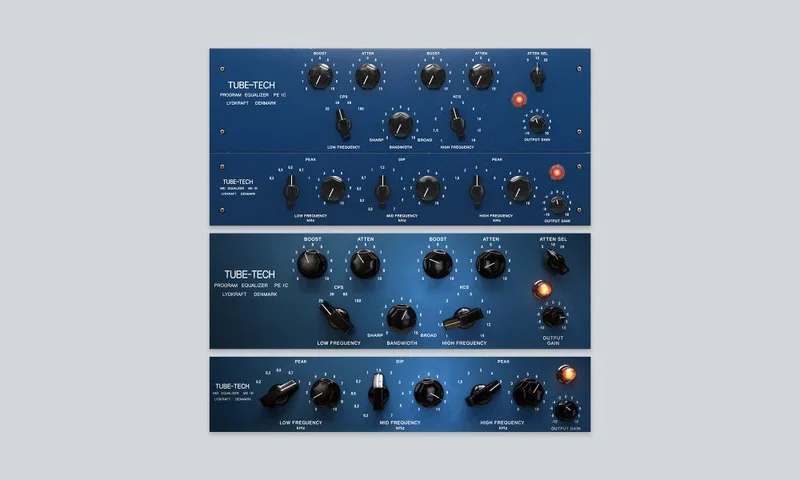
The collection bundles the SMC 2B Multiband Compressor, the CL 1B Mk II optical compressor, Classic Channel Mk II, and the Tube-Tech Equalizers Mk II, which are the PE 1C and ME 1B.
It also includes the legacy versions: CL 1B Mk I, Classic Channel Mk I, PE 1C and ME 1B.
That's the headline change from the original Classic Channel. You aren't just getting a refreshed strip. You're getting a multiband compressor you didn't have, a second generation of the optical compressor, and a mid/side channel strip.
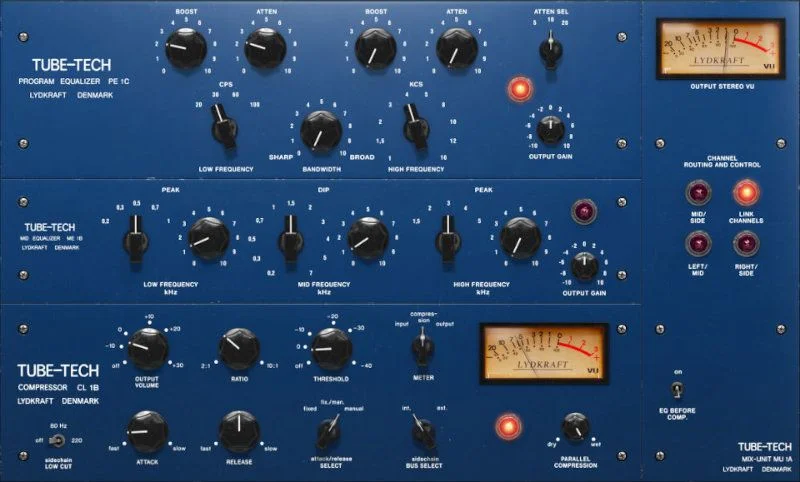
Classic Channel Mk II combines the CL 1B Mk II with two tube-driven passive equalizers. The new version adds mid/side processing.
The legacy inclusion matters more than it looks. Open an old session and you won't be forced onto the new sound.
Who Qualifies
This is the upgrade path for owners of Tube-Tech Classic Channel.
That's the group the $249 offer is aimed at, and it's the group whose old projects benefit from the legacy versions being bundled in.
Before you buy, check the practical conditions. You need a Softube account and an iLok account, and internet access to download installers and manage licenses.
On macOS you need Big Sur 11, Monterey 12 or Ventura 13. On Windows you need Windows 10 (64-bit) or Windows 11. Apple silicon runs natively.
On Windows the processor requirement is a quad-core Intel Core i3/i5/i7 or an AMD quad-core with SSE 4.2 support. If your machine is older than that, read the CPU section below twice.
The SMC 2B Multiband Compressor: The Real Reason to Upgrade
If you're a Classic Channel owner, the SMC 2B is the new toy here. A multiband compressor sits in a different place in your chain than a channel strip, and that's the point.
It handles stereo through linked or selectable Dual Mono modes. Linked keeps the image anchored. Dual Mono lets each side react on its own.
The developer calls its fidelity remarkable and says top engineers and mastering houses use it. That's marketing, so weigh it as marketing.
The owner reports are more useful. One user calls it the best multiband they've tried. Another says snare and kick punch through with fewer processing steps, and that it feels finished and characterful rather than generic.
Picture a drum bus where the kick is fine but the snare crack disappears behind the guitars. Split the band, compress the top gently, and leave the low end alone.
That's the job a multiband does that a single-band optical compressor can't.
Linked versus Dual Mono
Linked mode is your default on a bus. Both channels react together, so the centre doesn't wander when one side hits harder.
Dual Mono is for material where the sides really are different. Think wide stereo drum overheads where one side catches a loud cymbal.
It's a small choice, but it's the kind of control that saves you from reaching for a second plugin.
CL 1B Mk II: Smoother, But Harder to Set
The CL 1B Mk II is the optical compressor at the heart of the strip. It adds side-chain low-cut filters and a parallel blend control.
Both are useful. The side-chain low-cut stops bass from driving the compressor, and the blend gives you parallel compression without a send.
The developer says the CL 1B brings warmth through its tube stages, stays transparent on transients thanks to a quick attack, and levels smoothly because of its slow reset.
Owners largely back the Mk II on feel. They report it sounds noticeably smoother, punchier and more responsive than Mk I, with less distortion at fast attack times.
Now the complaints. And they're not small.
Some owners say the Mk II pumps wildly, with no harmonics, which suggests the tube amp modelling is missing compared to Mk I. Others say Mk II compression is difficult to set and pumps easily, while Mk I works painlessly like the hardware.
One more detail: the Mk II knee is reported as harder than the hardware unit. Mk I has a softer knee, though still not as soft as the real thing.
Put it on a vocal and push the compression until the gain reduction meter is dancing. If you hear the level breathing in a way that isn't musical, you've found the Mk II's weak spot.
That's frustrating when you're paying for a flagship.
The Generation Switch
This is the feature that rescues the situation. The Generation Switch toggles between the CL 1B Mk I and Mk II versions.
So you don't have to pick a side. If Mk II pumps on a source, flip to Mk I.
But there's no guidance on which generation suits which job. You'll be A/B-ing by ear every time, and that costs you time.
Classic Channel Mk II: The Whole Strip
Classic Channel Mk II is the full channel strip. It pairs the CL 1B Mk II with two tube-driven passive equalizers and offers mid/side processing.
Mid/side is the quiet headline for an upgrader. You can compress or shape the centre separately from the sides.
Try it on a stereo synth bus where the centre is crowding your vocal. Cut the mid, leave the sides, and the vocal opens up without you touching the synth's width.
It's a clever addition, and one that Mk I owners will actually use.
The strip also works in Console 1, as do the CL 1B Mk II and the Equalizers Mk II as native plugins. If you run Console 1, that integration is a real convenience.
PE 1C and ME 1B: The Tube-Driven Equalizers
The Equalizers Mk II give you the PE 1C and ME 1B, both tube-driven passive equalizers.
The developer calls them perfect for timeless analog tone-shaping. It describes the highs as smooth and gentle, the mid-range as airy and focused, and the lows as full and fat.
Users compare the passive EQ character to Waves Pultec emulations, which tells you what territory this lives in: broad, musical moves rather than surgical cuts.
Here's the practical irritation. Owners report an intrusive preset manager and no way to reorder the equalizers.
If you like to place the EQ before the compressor on one track and after on another, that's a wall. Annoying.
CPU: The Cost You Pay Per Instance
This is the biggest practical limit, and it's the one to take seriously.
Owners report CPU usage is reasonable for single-track use but adds up with many instances across large sessions. One user says two instances kill a 2015 iMac.
That last report is an extreme case on old hardware. But it signals the trend: these are heavy plugins.
Picture a 60-track mix where you've dropped Classic Channel Mk II on every channel. Your session will stutter long before you finish the vocal chain.
The fix is to be selective. Use it on the sources that earn it, and print or freeze the rest.
Users point to McDSP and Sonnox as lower-CPU alternatives for analog modelling. If your machine is modest, that comparison matters.
Formats, Hosts and Practicalities
The collection supports AU, VST, VST3 and AAX. Softube recommends VST3, because some features aren't present in the older VST format.
Officially tested hosts are Pro Tools, Logic Pro, Cubase, Ableton Live, Studio One and Reaper.
Sample rates run from 44.1 to 192 kHz, in mono and stereo.
On the legacy side, AAX DSP isn't in active development, and TDM, VENUE and RTAS are no longer supported. If you're a Pro Tools HDX user relying on DSP, that's a dealbreaker to check first.
Licensing runs through iLok, plus a Softube account. You'll need internet access to download installers and manage licenses.
The Value Case
At $249, the value depends entirely on what you already own and what you'll use.
If you bought Classic Channel and never wished for a multiband, the upgrade is mostly about Mk II and mid/side. That's a thinner case.
If you've been wanting a characterful multiband, the SMC 2B alone may justify it, and you get the legacy versions as a safety net.
The Generation Switch is the quiet value. You aren't betting on Mk II being better. You keep both.
But the collection isn't cheap relative to what's going wrong. The CPU load, the pumping Mk II and the clumsy preset manager all cost you time, and that's a real price too.
One point in its favour: owners say Softube is smoother and easier than Avid Titanium 33B, with a sound they prefer. If you were weighing it against that for master bus work, it holds up.
Who Should Skip It
Skip it if your machine is older or you routinely run huge sessions. The CPU cost will frustrate you.
Skip it if you loved the Mk I behaviour and expected the Mk II to improve on it. Owners say it doesn't always, and you already own Mk I.
Skip it if you rely on AAX DSP or any of the retired Pro Tools formats. Those aren't supported.
Skip it if you want one clear sound. The Mk I versus Mk II split means decisions, and the product gives you no guidance.
And skip it if you don't want an iLok account. It's required.
The Verdict
We'd call this a conditional yes at $249, and a hard pass for most.
Buy it if you own Classic Channel, you want the SMC 2B, and your computer can take the load. The Generation Switch gives you a safety net on the compression side.
Everyone else should audition before committing. The Mk II pumping, the CPU appetite and the preset manager are real.
It's a capable bundle with sharp edges.
Specs & Technical Details
| Spec | Detail |
|---|---|
| Developer | Softube |
| Price | $249 |
| Plugin Format | AU / VST / VST3 / AAX (VST3 recommended) |
| OS Support | macOS Big Sur 11, Monterey 12, Ventura 13 (Apple silicon native); Windows 10 (64-bit) or Windows 11 |
| Activation | Softube account and iLok account; internet access required |
| CPU Usage | Heavy at scale |
| Trial Available | N/A |
| Version Reviewed | N/A |
Score Breakdown
| Category | Score | Notes |
|---|---|---|
| Sound Quality | 3.5/5 | Owners praise SMC 2B and Mk II punch, but Mk II pumps easily |
| Value for Money | 2.5/5 | Strong for Classic Channel owners wanting the multiband, thin otherwise |
| Ease of Use | 2.5/5 | Mk II is hard to set, preset manager is intrusive, EQs can't be reordered |
| Features | 3.5/5 | Multiband, mid/side, parallel blend, Generation Switch, legacy versions included |
| CPU Efficiency | 2.0/5 | Fine on one track, punishing across large sessions |
| Overall | 2.8/5 | Narrow recommendation: Classic Channel owners who want the SMC 2B |
Alternatives to Consider
Waves Pultec Emulations
If the PE 1C and ME 1B are what you're really after, users compare them against Waves Pultec emulations for passive equalizer character. You'd get the broad, musical EQ without paying for a compressor bundle you may not use.
McDSP
Users name McDSP as a lower-CPU route to analog modelling. If your machine struggles with Softube's load, it's worth an audition.
Sonnox
Sonnox gets the same mention: lower CPU for analog modelling. It's the other name to try if session size is your constraint.
Avid Titanium 33B
For master bus compression, owners compare against the Avid Titanium 33B and say they prefer Softube's smoother, easier operation.
Buy or Skip?
Buy it at $249 if you own Classic Channel, you want the SMC 2B, and your machine can handle the CPU load.
Skip it if you run an older computer, depend on AAX DSP, or loved the Mk I and expected an upgrade that behaves the same way.
It's a solid bundle for the right owner and a frustrating one for the wrong one. Know which one you are before you click.
Frequently Asked Questions
Is Tube-Tech Complete Collection 2 worth upgrading to from Classic Channel?
Only if you want the SMC 2B multiband and the Mk II generation of the channel strip with mid/side processing. If you're happy with your Classic Channel, the case is thin. The legacy versions are included, so nothing you own is lost.
What's included in the collection?
You get the SMC 2B Multiband Compressor, CL 1B Mk II, Classic Channel Mk II, and the Tube-Tech Equalizers Mk II (PE 1C and ME 1B). It also includes the legacy CL 1B Mk I, Classic Channel Mk I, PE 1C and ME 1B.
What does the Generation Switch do?
It toggles between the CL 1B Mk I and Mk II versions. That lets you pick the compression behaviour per source, which matters because owners report the two sound and behave differently.
Does the Mk II compressor sound better than Mk I?
Opinions split. Some owners say Mk II is smoother, punchier and more responsive with less distortion at fast attacks. Others say it pumps easily and is harder to set, while Mk I works painlessly like the hardware. Audition both.
Is the CPU usage a problem?
It can be. Owners report reasonable load on single tracks but a fast climb across large sessions, and one user says two instances kill a 2015 iMac. Use it on the sources that earn it.
What do I need to run it?
A Softube account, an iLok account, and internet access for installers and licensing. On macOS you need Big Sur 11, Monterey 12 or Ventura 13. On Windows you need Windows 10 (64-bit) or Windows 11.
Which formats and hosts are supported?
AU, VST, VST3 and AAX, with VST3 recommended. Officially tested hosts are Pro Tools, Logic Pro, Cubase, Ableton Live, Studio One and Reaper. AAX DSP isn't in active development, and TDM, VENUE and RTAS are no longer supported.