VCS-1 gets compared to Scheps Omni Channel, bx_console and Townhouse, and this review lands in the middle: it beats Omni Channel on CPU, loses to the console emulations on attitude, and costs $29. That makes it a fair deal for the right person and a headache for the wrong one.
Fuse Audio Labs built it as an all-in-one strip: preamp, filters, EQ, compressor/limiter and gate in a single window. The pitch is instant signal shaping without stacking six plugins.
If you track vocals and guitars and want a fast chain you can drop on every channel, read on. If you want the thick, shoved-forward sound of a console emulation, we’ll save you the download.
Honestly? It depends. Here’s the full picture.
How Does VCS-1 Compare Out of the Box?
Open it next to bx_console or Townhouse and the difference is obvious. Owners describe those two as fuller and more aggressive. VCS-1 sounds clean until you engage the preamp saturation, and only then does it grow teeth.
That’s a design choice, and a defensible one. A strip that stays honest by default is easier to trust on a dense session.
Against Scheps Omni Channel the story is routing and weight. Both give you a flexible strip with a lot of options. Omni Channel pulls higher CPU than VCS-1 for similar routing features, so on a 60-track session the lighter plugin has the edge.
VCS-1 runs at zero latency. Track through it live and you won’t hear a smeared monitor mix.
The first thing that irritates you is the window. It’s big. We’ll get to that.
The Preamp: Three Topologies, Real Grit
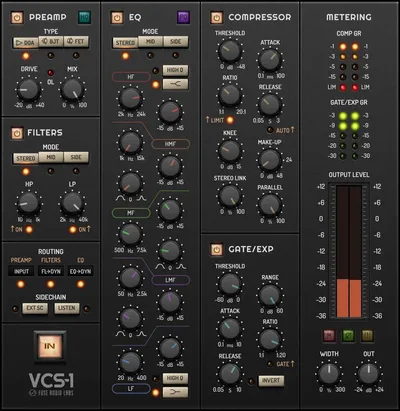
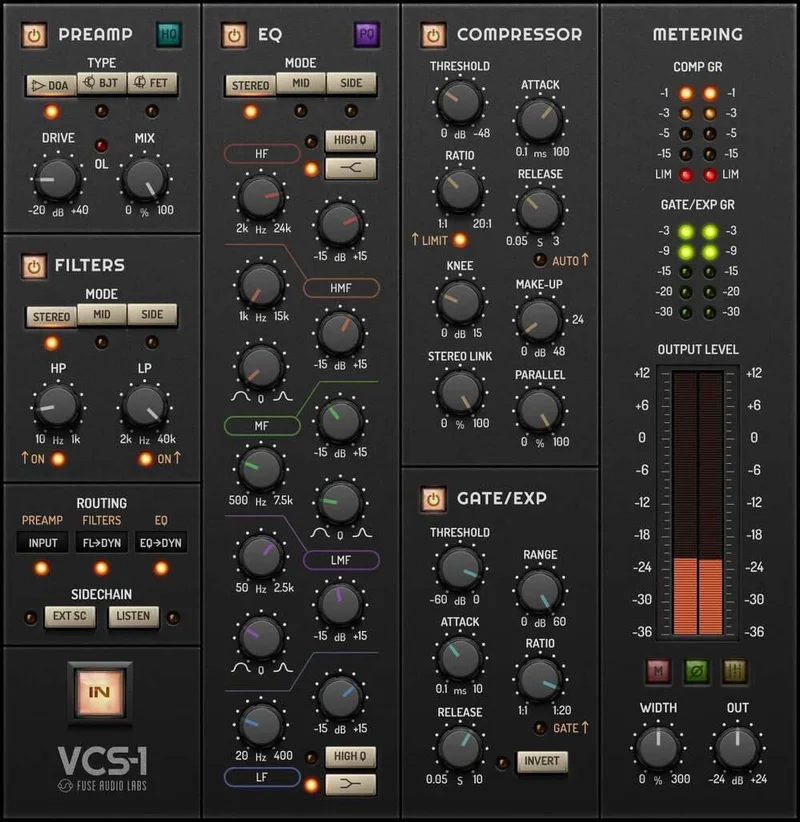
The front of the strip is a triple-topology preamp with selectable coloration styles. You pick the flavor, then decide how hard to hit it.
FET mode is the one to reach for when you want tube-like distortion. Push it on a bass DI and the lows thicken while the top edge turns gritty. Back it off and it fades into the background.
Owners say the saturating preamps sound pleasing when pushed, and that matches what the design promises. Leave them alone and the strip stays clean.
There’s one gap that bugs us. There’s no dedicated input gain control. On a strip, where gain staging decides how hard the preamp and compressor get driven, that’s an odd omission. Plan to trim upstream in your DAW before the plugin.
Filters and the 5-Band EQ: Flexible, but Fiddly
The high-pass runs from 10 Hz to 1 kHz. The low-pass runs from 2 kHz to 40 kHz. That’s a wide range, and the low end of the HPF is handy for clearing sub rumble without touching the body of a vocal.
The EQ is a full 5-band parametric. Filters and EQ can work in stereo or mid/side mode, which is useful when you want to tighten the mids of a stereo synth bus without wrecking the width.
The resonance quirk
Owners report the filters and EQs have peculiar resonances that differ from a simple EQ. Translation: it won’t behave like a clean digital curve. Some people will love that character. Others will chase a harsh bump and wonder why.
Mid/side, and the UI problem
Some owners are unhappy with how mid/side processing is implemented. We can’t tell you exactly where it falls short, so audition it on your own material before you count on it for mastering-style moves.
The EQ controls also lack clear visual distinction. When five bands look alike at a glance, you end up reading labels instead of mixing with your ears. That’s annoying at 2am.
Does the Compressor Earn Its Reputation?
This is the section’s best news. Owners report the compressor has great tone, and it’s the part most likely to make you keep the plugin.
The dynamics block pairs a compressor/limiter with a gate/expander. Put the gate on a close-miked tom and clamp the bleed before the compressor ever sees it.
The side-chain is more flexible than you’d expect at this price. It can be fed by the strip’s own filters and EQ, or by external control signals. Set the side-chain filter to cut the low end and the compressor stops pumping every time the kick note rings.
The mix stage
An integrated mix control gives you parallel compression right on board. No bus, no duplicate track. Slam the compressor on a drum room mic, dial the mix to taste and keep the transients from the dry signal.
It’s convenient. It’s also one of the quiet reasons the strip is faster to use than building the same chain by hand.
The limit: owners say there aren’t enough EQ and compressor flavors. If you want a drawer of classic models to swap between, this isn’t that.
Metering, Bypass, and Link Groups
A panel handles gain reduction and level metering, so you can see what the compressor is doing without a second plugin.
Every section can be bypassed on its own. That makes A/B checking painless. Kill the EQ, keep the compressor, hear exactly what each stage contributes.
Link groups are the sleeper feature. There are up to 16 of them, sharing parameters across DAW instances. Link every drum channel to one group and a single move hits them all.
It’s clever for drums and vocal stacks. It’s less useful if your sessions are mostly one or two sources.
Where VCS-1 Wins
It wins on weight and focus. The strip is zero-latency, lighter than Scheps Omni Channel on CPU, and complete enough that you can build a full channel in one instance.
The compressor tone is a genuine highlight. So is the parallel mix stage.
The price helps too. At $29, you’re getting preamp, EQ, dynamics and routing in one place.
The clean default sound is underrated. Plenty of strips color everything you feed them. This one stays out of the way until you tell it not to.
Where the Competition Wins
bx_console and Townhouse win on attitude. If you want that fuller, more aggressive console sound baked in, they deliver it and VCS-1 doesn’t.
Omni Channel is the heavier plugin, but we’d concede it the routing-obsessed crowd who live inside complex chains.
Stability is the bigger worry. Owners report VST3 crashes in Cubase 11 when adjusting parameters or using the mixer button, with partial interface freezing. Reaper users report VST3 crashes during knob adjustment too.
That’s a dealbreaker on a session you can’t afford to lose. Test the trial and save often.
The knob acceleration is another sore point. It runs too fast for precise moves, so a small turn overshoots. Frustrating.
Who Should Buy Which?
✅ Buy VCS-1 if you want a clean, full strip on every channel and care about CPU.
✅ Buy it if the parallel compression and side-chain routing would replace a few of your usual plugins.
✅ Buy it if you work on a large monitor and a stable host.
❌ Skip it if you mix on a small laptop screen, since the interface is oversized.
❌ Skip it if you need console-style aggression out of the box. Go bx_console or Townhouse.
❌ Skip it if you’re on Cubase 11 or Reaper with VST3 and can’t tolerate crashes.
Specs & Technical Details
| Spec | Detail |
|---|---|
| Developer | Fuse Audio Labs |
| Price | $29 |
| Plugin Format | VST2 / VST3 / AAX / AU (AU on Mac only) |
| OS Support | Mac (macOS 10.12+, Intel or Apple Silicon) / Windows (7+, 32- and 64-bit) |
| Activation | N/A |
| CPU Usage | N/A |
| Trial Available | N/A |
| Version Reviewed | N/A |
| System Requirements | 2GB RAM, 1280x1024 display or higher |
Score Breakdown
| Category | Score | Notes |
|---|---|---|
| Sound Quality | 3.8/5 | Clean by default, great compressor tone, pleasing saturation when pushed |
| Value for Money | 4.0/5 | A full strip with parallel compression for $29 |
| Ease of Use | 2.8/5 | Oversized UI, unclear EQ controls, twitchy knob acceleration |
| Features | 3.7/5 | Side-chain routing, mid/side, link groups, but no input gain |
| CPU Efficiency | N/A | Zero latency and lighter than Omni Channel per owners, but no hard figures |
| Overall | 3.4/5 | A capable, affordable strip held back by stability and interface problems |
Alternatives to Consider
| Product | Strongest point | Weakest point |
|---|---|---|
| VCS-1 All-In One Channel Strip | Clean sound, great compressor, zero latency | VST3 crashes, oversized UI |
| bx_console | Fuller, more aggressive console sound | Colors the signal more than some mixes want |
| Townhouse | Fuller, more aggressive console sound | Less clean if you want a neutral strip |
| Scheps Omni Channel | Deep routing flexibility | Higher CPU usage for similar routing features |
bx_console
Pick it when you want a console to do the coloring for you. It’s the fuller, more aggressive option.
Townhouse
Same story as bx_console. If attitude is the goal, it beats VCS-1 on first impression.
Scheps Omni Channel
Choose it if routing depth matters more than CPU. Just budget more processing power for it.
Which wins when? Console character: bx_console or Townhouse. Clean, light, fast strip: VCS-1. Maximum routing: Omni Channel.
Our Verdict
VCS-1 at $29 is a smart buy for a mixer who wants one clean, flexible strip across a whole session and can work around its flaws. It’s the wrong buy for anyone mixing on a small laptop, anyone on Cubase 11 or Reaper VST3 who can’t risk a crash, and anyone who wants a console sound that grabs you on the first note.
Treat the trial as mandatory, and let your own host decide.
Frequently Asked Questions
Is VCS-1 All-In One Channel Strip worth $29?
For the right user, yes. You get preamp, filters, 5-band EQ, compressor/limiter and gate in one plugin, plus on-board parallel compression. It's a poor fit if you need rock-solid VST3 stability in Cubase 11 or Reaper, or a console-style sound.
Does VCS-1 add latency?
No. It runs at zero latency, so you can track through it without a delayed monitor mix. That's a real advantage over heavier strips when you're recording live.
Why does VCS-1 crash in some DAWs?
Owners report VST3 crashes in Cubase 11 when adjusting parameters or using the mixer button, and in Reaper while turning knobs. If you hit this, test another format such as VST2 where your host supports it.
How does VCS-1 compare to bx_console and Scheps Omni Channel?
bx_console and Townhouse deliver fuller, more aggressive sound. Scheps Omni Channel offers similar routing but uses more CPU. VCS-1 sits in between: cleaner, lighter and less characterful than the consoles, and simpler than Omni Channel.