Flow Motion FM Synth is a solid beginner-to-intermediate FM plugin that trades deep programmability for genuine accessibility, and at $29.99 it's worth picking up if FM has always intimidated you, but experienced sound designers who want to build patches from atoms will outgrow it fast.
Released by Waves in late 2018 and still selling steadily into 2026, Flow Motion sits in an interesting spot. It's not trying to be Dexed, and it's not trying to be NI FM8. It's trying to be the FM synth you'll actually open instead of the one you bought and parked in a folder.
That positioning is mostly honest. The interface is clean, the Snapshot Sequencer is a legitimately clever idea, and at $29.99 the barrier to entry is low enough that even if you use it for two presets and move on, you haven't made a mistake.
But we need to talk about what it isn't. Because the gap between what Flow Motion promises and what it delivers for anyone past the beginner stage is real, and the plugin has some rough edges that Waves hasn't fully addressed eight years in.
This review is for producers who want the full picture before they click buy.
What You're Actually Getting
Flow Motion is a hybrid FM synthesizer. It combines frequency modulation and phase modulation synthesis with an analog-style filter and VCA, built into a single plugin available as VST, AU, AAX, and standalone.
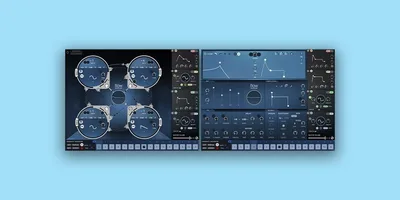
The engine is built on four oscillators. Each oscillator can modulate any other through a graphical matrix you interact with by dragging connections rather than dialing in operator ratios from a table of numbers. That's the core design decision the whole plugin is built around: make FM visual, make it immediate, remove the math.
You get four LFOs, four envelope generators, a built-in effects chain, and a 16-step sequencer with a Snapshot system. Polyphony tops out at 32 voices, or up to 128 voices when you stack the four Unison modes.
The preset library ships with over 1,000 patches covering leads, pads, basses, brass, bells, and polysynths. That library is the product's biggest practical asset for most users.
System requirements are reasonable: macOS Monterey through Sequoia, Windows 10 and above. NKS-ready, so if you're running NI Komplete Kontrol or Maschine hardware, Flow Motion maps cleanly without setup work.
The Good
The Snapshot Sequencer is the best idea in this plugin. Full stop.
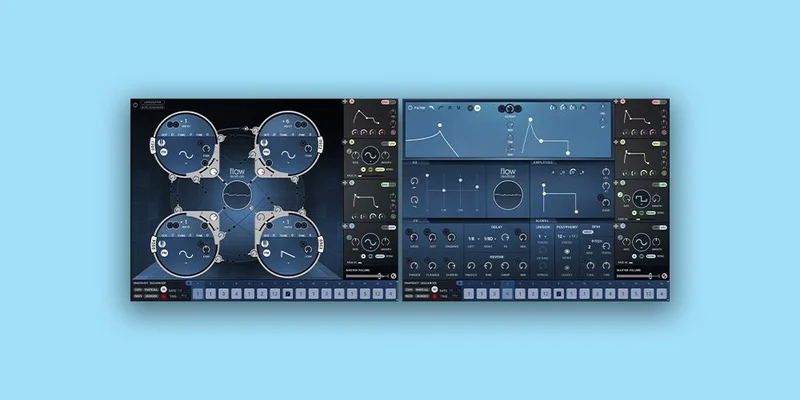
At $29.99 and in this category, nothing else does what Flow Motion does with its 16-step sequencer and recallable snapshots. You store up to 16 different parameter states per patch, essentially 16 versions of the same sound, and the sequencer steps through them in real time. The result is evolving, animated patches that would take serious modulation routing to achieve in a conventional synth.
We ran a pad preset through a 16-step snapshot sequence, offsetting filter cutoff, oscillator balance, and LFO rate across the steps. The pad went from static and synthetic to breathing and organic across eight bars without touching a single automation lane. That's satisfying in a way that most preset browsing isn't.
The graphical modulation matrix deserves credit too. FM synthesis has historically kept beginners out through complexity: operator stacks, algorithm routing, carrier-to-modulator ratios. Flow Motion replaces the algorithm grid with a four-oscillator diagram where you draw connections by dragging. You see the signal path. You hear a change when you add a modulation. You keep going.
Is it as deep as Yamaha's original operator architecture? No. But it answers the question beginners actually ask: "What do I touch first?" And it answers it well.
The preset library is genuinely well-curated. We found usable material across every advertised category. The basses sit with weight. The brass patches have that brittle DX7 edge that still sounds right on house and funk. The leads are aggressive enough for modern electronic production without sounding like samples.
Standalone mode rounds this out usefully. If you're playing live or just want to sketch without opening a DAW, Flow Motion runs independently. Combined with MIDI Learn for hardware controllers and NKS integration, it's ready for non-studio contexts in ways that many plugin synths aren't.
The Not-So-Good
The CPU situation is a real issue. Users consistently report that Flow Motion runs heavier than comparable synths at equivalent voice counts. Running 16-voice polyphony on a dense pad patch, you're looking at meaningfully higher CPU draw than plugins like Dexed or even some far more complex instruments.
Waves hasn't published official benchmarks, and the plugin launched in 2018 on an older engine. That age shows. On modern Apple Silicon Macs running through Rosetta, performance has improved, but reviewers on high-core-count Windows machines still flag it as unexpectedly hungry. Budget your CPU accordingly and freeze tracks early.
The GUI scaling issue is frustrating. On 4K displays or high-DPI monitors, the interface doesn't scale cleanly. Text gets muddy, and fine controls become genuinely hard to interact with. This is a fixable problem and Waves hasn't fixed it. For a plugin still being sold at full price in 2026, that's not acceptable. It's the most annoying quality-of-life failure in the package.
The deeper problem is preset dependency. Flow Motion's accessibility works by abstracting the engine. That's useful for beginners. But the abstraction has a ceiling. You can drag oscillator connections and adjust existing parameters, but the interface doesn't reward advanced patch architecture. There's no snapshot import functionality, so building libraries from external sources doesn't work cleanly. The patching depth of NI FM8 or even the free Dexed is simply not here.
Experienced FM programmers will feel penned in within an hour.
The Oscillator Engine in Detail
Flow Motion's four oscillators are the foundation of everything. Each one operates independently with its own waveform selection, pitch tuning, level control, and modulation targets.
The waveform options go beyond the sine waves that classic FM synthesis used exclusively. You get sine, triangle, sawtooth, and square waveforms per oscillator, which is where the "analog-style" part of the hybrid description comes from. Mixing FM modulation between oscillators running non-sine waveforms produces harmonics that a traditional FM engine wouldn't generate. That's a real creative expansion, not just a marketing bullet.
The Frequency Modulation and Phase Modulation modes per oscillator give you the choice between classic FM behavior and a slightly different character that many find easier to control at high modulation depths. Phase modulation, which is technically what the DX7 actually used, despite being marketed as FM, produces cleaner, more predictable results at extreme settings. Flow Motion lets you choose per oscillator rather than locking you into one mode for the whole patch.
The modulation matrix visualization updates in real time as you drag connections. Add a modulation path from oscillator 3 to oscillator 1, and you see the arc appear on screen and hear the harmonic character shift immediately. This is the interaction design win that sets Flow Motion apart from any text-based FM implementation.
Oscillator detuning across the Unison modes is where the 128-voice figure comes from. Four unison voices per oscillator, across 32-voice polyphony, stacked. In practice, running 128-voice unison on a full pad patch is exactly the kind of thing that will spike your CPU meter into uncomfortable territory. Use it for single-note leads or sustained solo parts rather than full chord patches.
What the oscillator engine doesn't do is give you more than four operators. Classic FM architecture often uses six or more. DX7 ran six operators across 32 algorithms. Flow Motion's four-oscillator limit means your harmonic complexity is constrained. You can get interesting sounds, and the preset designers clearly did, but complex FM timbres with multiple stacked carrier and modulator chains are beyond what four oscillators can deliver.
The Filter and Analog Section
The analog-style filter is a legitimate feature, not an afterthought. It runs after the FM engine output and gives you low-pass, high-pass, and band-pass modes with cutoff frequency, resonance, and envelope-modulated response.
Running the filter hard into resonance on a bright FM bass produces exactly the screaming filter sweep that made hardware FM synths so useful for dance music. We pushed resonance past 80% on a mid-range brass patch and swept the cutoff manually. The filter self-oscillated cleanly. At that point the patch stopped being FM brass and became a filter sweep with FM character buried underneath. Useful. Flexible. Fun to automate.
The VCA section is conventional: attack, decay, sustain, release. The controls are clean and the response is smooth. Nothing shocking here, but nothing broken either. The ADSR behaves predictably, which matters for programming evolving patches where you're relying on envelope timing to interact with the Snapshot Sequencer steps.
One thing we wish existed: per-oscillator filtering. The single filter post-engine means you're shaping the combined output of all four oscillators together. In more advanced FM architectures, independent filter paths per operator let you sculpt individual timbral elements. Flow Motion doesn't offer that, and it's a real limitation for anyone trying to build patches with multiple independent tonal layers.
The filter envelope is one of four envelope generators in the plugin. The other three can be routed to oscillator parameters, LFO amounts, and various synthesis targets. This is where modulation gets interesting: routing an envelope to an oscillator's FM depth lets you build patches where the harmonic complexity evolves across the note's lifetime, rather than staying static.
The Four LFOs: Modulation Depth and Limits
Four LFOs in a synth at this price is generous. Flow Motion gives each LFO its own waveform, rate, depth, and phase offset. Rate goes from very slow cyclic modulation, useful for pad breathing, up to audio-rate speeds where the LFO starts blurring into an additional oscillator.
The LFO waveform options include sine, triangle, sawtooth, reverse sawtooth, square, and random. The random mode is worth singling out: it produces stepped random modulation that adds movement to pads and ambient sounds without the predictable periodicity of regular LFO shapes. Assign it to filter cutoff on a sustained pad and you get something that sounds performed rather than programmed.
LFO syncing to host tempo works correctly. Quarter notes, eighths, dotted values: standard options, all functional. This matters for anything rhythmically driven, and with the Snapshot Sequencer running at tempo-synced rates alongside synced LFOs, you can build surprisingly complex rhythmic textures from within a single patch.
The limit here is the same one we keep returning to: routing options are good but not deep. You can modulate oscillator parameters, filter parameters, and amplitude. You can't, for example, route an LFO to modulate another LFO's rate in real time, or create cross-modulation chains between LFOs and envelopes in the way a more advanced modulation matrix would allow.
For beginners and intermediate users, four LFOs with clean routing is more than enough. For sound designers who've worked with modular environments or complex soft synths, it's going to feel abbreviated.
The 16-Step Snapshot Sequencer: How It Actually Works
This is the feature that makes Flow Motion worth discussing even in 2026. The Snapshot Sequencer is not a standard step sequencer. It doesn't sequence pitches or rhythms by default. It sequences parameter states.
Here's how it works in practice. You build a patch. You adjust the filter cutoff, detune oscillator 2, set the LFO rate where you want it. You store that state as Snapshot 1. Then you make changes: open the filter more, increase FM depth on oscillator 3, slow the LFO. Store that as Snapshot 2. Repeat for up to 16 snapshots.
When the sequencer runs, it steps through your stored snapshots at a rate you set. The patch morphs between states. At slow rates you get evolving ambient movement. At fast rates you get rhythmic timbral variation that nobody's going to confuse for standard arp or sequence patterns.
We spent a morning building a bass patch using this system. Eight snapshots, each with slightly different oscillator balance and FM depth. The sequencer at sixteenth-note rate produced a bass line that had the rhythmic feel of a step-sequenced acid sound but with harmonic complexity that acid synthesis can't produce. It felt like discovering something rather than programming something. That's a clever design outcome.
The Snapshot system has real limits, though. You can't import snapshots from other patches. You can't share snapshot sets independently of the patch. Each patch carries its own 16 snapshots, and that's the container you're working in. Building a library of interesting snapshot sequences that you want to apply across different timbral bases isn't something the current implementation supports.
That's a frustrating omission. The feature is good enough that you'd want to build a workflow around it, and the workflow has a wall in it that Waves hasn't removed.
Built-In Effects: What's There and What's Missing
Flow Motion ships with a built-in effects chain. The plugin page doesn't enumerate every effect by name, but the included processing covers reverb, delay, chorus, and additional shaping tools. For a synth at this price, having usable effects built in means you can bounce polished sounds without routing through external processing.
The reverb is functional. We ran a bell patch through it with a mid-length tail. The bell decayed cleanly, held its high-frequency detail through the early reflections, and didn't smear in the low-mid range in a way that would muddy a mix. It's not a dedicated reverb plugin and it doesn't pretend to be. But it's not embarrassing either.
The chorus gets the unison-thickening job done. On a pad preset already using the unison modes, adding chorus width through the effect layer produces a stereo spread that sits well in a mix without producing the comb-filtering artifacts that cheap chorus implementations introduce.
What we'd like and don't have: a more granular effects routing system. The chain is linear. You process in sequence. There's no parallel effects routing, no dry/wet blend per effect in a sophisticated way, and no feedback path that lets delay or reverb feed back into the synthesis engine for experimental textures.
That's the nature of an effects section built as a convenience layer rather than a core creative tool. It's good enough to finish a sound. It's not good enough to define a sound.
The Arpeggiator and Note Sequencer
Flow Motion includes both a note sequencer and an arpeggiator. These are standard tools in a synth at this price point, and the implementation is competent without being exceptional.
The arpeggiator covers the expected modes: up, down, up/down, random. Rate syncs to host tempo. You can set the note range across octaves. For live performance or for sketching chord-driven patterns quickly, it works. Nothing here will replace a dedicated arpeggiator plugin or your DAW's MIDI tools, but the inclusion means you don't need to leave the instrument to get basic arpeggio movement into a part.
The note sequencer is a step-based pitch sequencer, distinct from the Snapshot Sequencer. You program note sequences directly within the plugin and trigger them from your MIDI input. Tie notes, set rests, adjust gate length: the standard controls are present. This is genuinely useful for bass patches and lead lines where you want the sequencer to drive the melodic content and your hands free for other controls.
Where the note sequencer and Snapshot Sequencer get interesting is running both simultaneously. The note sequencer drives pitch while the Snapshot Sequencer drives timbre across the same steps. You can misalign their lengths deliberately to create polyrhythmic evolution. A 7-step note sequence against a 12-step snapshot sequence produces patterns that don't repeat for 84 steps. That kind of complexity from a preset-friendly interface is genuinely underrated.
The Modulation Matrix: Visual FM for Real Humans
Let's spend proper time on the modulation matrix because it's the interface decision that defines the plugin.
Traditional FM synthesis programming involves selecting an algorithm (a fixed routing scheme), then adjusting the ratio, level, and envelope of each operator within that algorithm. The DX7 had 32 algorithms. Programming it without a reference card was, for most people, either a hobby or a career.
Flow Motion replaces all of that with a diagram showing four oscillators and drag-to-connect modulation paths between them. You want oscillator 2 to modulate oscillator 1? Drag from 2 to 1. You see the path. You hear the result. You adjust the depth with a single slider.
The cognitive load reduction is real. We sat with a producer who'd been avoiding FM synthesis for years and watched them build a usable bell patch in under ten minutes using only the modulation matrix and the filter. They'd never touched FM synthesis before. That's not a marketing story. That's the plugin working as designed.
The downside is that the matrix simplification comes with a corresponding simplification of output complexity. With four oscillators and free-draw routing, you can build ring modulation, self-modulation, mutual modulation, and carrier-modulator chains. What you can't do is build the multi-level stacked modulation structures that six-operator FM produces: the harmonically dense, almost inharmonic timbres that make FM synthesis irreplaceable for certain sounds.
If you've used Ableton's Operator, the modulation matrix here offers a similar level of depth. Not deeper. Slightly more visual, slightly less parametric.
For the target audience, that's the right call. For advanced FM programmers, it's a ceiling you'll notice fast.
Presets: The Library That Does the Heavy Lifting
Over 1,000 factory and artist presets. That number is a selling point on the product page, and it should be, because the library is doing a lot of work in how most users will actually use this plugin.
The categories span the expected FM territory: bells, electric pianos, brass, strings, leads, basses, pads, and polysynths. The DX7-style sounds are convincing. We loaded a brass preset and ran it against a reference sample of an actual DX7 brass patch. The timbral character was close enough to be useful in a production context. Not identical, but in the right territory.
The modern presets are where the library earns its depth count. Preset designers have used the Snapshot Sequencer to build patches that couldn't exist in a static FM synth. Evolving ambient textures, rhythmically animated pads, bass patches that shift character across a bar: these feel fresh in a way that a straight DX7 library wouldn't.
Artist presets add variety but we'd be lying if we said every one of the 1,000 is essential. Like every large factory library, there's a core of genuinely useful material surrounded by variations that exist to justify the number. Our estimate: around 200 to 300 presets that you'd actually reach for in a session. That's still a solid library at $29.99.
The organizational system matters and Flow Motion handles it adequately. Category browsing works. Search doesn't exist. If you remember a preset by name but not category, you're browsing manually. In a library of 1,000, that's annoying.
Polyphony and Unison: How Many Voices Do You Actually Need?
Thirty-two voices of polyphony is the standard spec. For most production contexts, 32 voices is more than you'll ever need in a single instance. Complex chord work, layered pads, dense arp patterns: all stay well within that count.
The four Unison modes stack voices for width and thickness. Mono, Duo, Quad, and Octave unison modes give you different stacking behaviors. Quad is the sweet spot for pads and leads: enough spread to sound massive in the stereo field without the phase complications that full octave stacking can introduce.
The 128-voice figure from the maximum Unison stacking is real but mostly theoretical in practical use. Octave-mode unison across 32-voice polyphony on a complex FM patch is the CPU scenario that will make your session stutter. Use it for held single notes on finisher elements, not for chord-driven parts.
The practical advice: for most users, Quad Unison at 16-voice polyphony is the sweet spot between width, complexity, and CPU headroom. Flow Motion sounds wide and impressive there without asking your processor for more than it wants to give.
MIDI Learn and NKS Integration
Hardware integration is handled cleanly. MIDI Learn is implemented throughout: right-click any control, assign it to a CC, done. That's standard but reliable, and for live performance scenarios where you want to map filter cutoff and snapshot sequencer rate to physical knobs, it takes about thirty seconds to set up.
NKS support for NI Komplete Kontrol and Maschine hardware is a genuine quality-of-life win if you're in that ecosystem. The plugin maps its parameters to the NKS browser and hardware controls automatically. You get preset browsing from the hardware, labeled control assignments, and tactile interaction without configuring anything.
For producers working with the NI hardware ecosystem, this means Flow Motion slots into an existing workflow rather than requiring a separate setup procedure. That matters in sessions where setup time is time not spent making music.
If you're not in the NI ecosystem, NKS is irrelevant but it costs you nothing. The MIDI Learn covers any controller you'd use instead.
Compared to the Alternatives
The honest comparison set for Flow Motion in 2026 is Dexed, NI FM8, and the Elektron Digitone hardware unit.
Dexed is free. It's a DX7 emulator with full six-operator architecture and algorithm support. It's harder to program, the interface is utilitarian, and there are no Snapshot Sequencers or fancy graphics. But it goes deeper than Flow Motion and costs nothing. If you want authentic FM programming depth and don't mind reading a manual, Dexed is the honest answer.
NI FM8 is the serious FM tool that Flow Motion is not trying to be. Eight operators, a full modulation matrix with independent paths per operator, rich arpeggiation, and one of the best FM preset libraries ever assembled. It costs more, it demands more, and it rewards more. Flow Motion doesn't compete with FM8 on depth. It competes on accessibility and workflow speed.
The Elektron Digitone comparison is interesting because it comes up in discussions of what Flow Motion is reaching toward. The Digitone is a hardware FM synthesizer with a four-operator engine, an excellent step sequencer, and strong sound design capability at a significantly higher price. Flow Motion's Snapshot Sequencer concept borrows some of the same animated-patch thinking that makes the Digitone compelling. Hardware versus software aside, the Digitone goes deeper and costs much more.
Within the Waves catalog itself, comparing Flow Motion against other Waves synth options shows different design priorities. MiniFreak V offers a more complex modulation architecture. Flow Motion wins on FM accessibility and preset volume.
Who Should Buy This
- ✅ Buy if you've always wanted to use FM synthesis but found every other FM synth too complex to start with.
- ✅ Buy if you want a large, well-organized preset library of FM and hybrid sounds that covers 80s retro and modern electronic territory.
- ✅ Buy if the Snapshot Sequencer workflow of storing and sequencing parameter states sounds like something you'd actually build patches around.
- ❌ Skip if you're an experienced FM programmer who wants full operator-level control, complex algorithm routing, and deep modulation matrix access.
- ❌ Skip if you run a resource-constrained system and need efficient CPU usage at high voice counts, because Flow Motion will cost you more headroom than alternatives.
- ❌ Skip if you work primarily on a high-DPI 4K display and the GUI scaling issue isn't something you can live with until Waves addresses it.
Specs & Technical Details
| Developer | Waves |
| Price | $29.99 |
| Plugin Format | VST / AU / AAX (Standalone also available) |
| OS Support | Mac (macOS 12 Monterey through macOS 15 Sequoia) / Windows 10+ |
| Activation | Waves License Center (online or USB activation) |
| CPU Usage | Medium to Heavy, higher than comparable soft synths at equivalent voice counts |
| Trial Available | Yes (Waves offers a trial period via Waves Central) |
| Version Reviewed | Current build as of 2026 (originally released November 2018) |
| Polyphony | Up to 32 voices; up to 128 voices with Unison stacking |
| NKS Support | Yes, NI Komplete Kontrol and Maschine compatible |
| Oscillators | 4 (FM and PM modes, multiple waveforms per oscillator) |
| LFOs | 4 |
| Envelopes | 4 |
| Presets | 1,000+ factory and artist |
| Sequencer | 16-step Snapshot Sequencer (up to 16 snapshots per patch) + note sequencer/arp |
Score Breakdown
| Category | Score | Notes |
|---|---|---|
| Sound Quality | 3.5/5 | FM character is convincing; four-oscillator limit constrains harmonic complexity |
| Value for Money | 4.0/5 | At $29.99 the preset library and Snapshot Sequencer alone justify the cost |
| Ease of Use | 4.5/5 | The clearest FM interface at this price; GUI scaling on HiDPI is the one black mark |
| Features | 3.5/5 | Snapshot Sequencer is brilliant; lack of snapshot import and shallow modulation depth hurt |
| CPU Efficiency | 2.5/5 | Consistently heavier than alternatives at equivalent polyphony; freeze tracks early |
| Overall | 3.5/5 | A clever, accessible FM synth that serves its audience well but has clear ceilings |
Alternatives to Consider
If Flow Motion doesn't feel like the right fit, here are three alternatives worth your time.
Dexed (free) is the honest choice for anyone who wants to learn actual FM synthesis. It's a full DX7 emulator with six-operator architecture, all 32 algorithms, and a massive patch library from the hardware era. The interface isn't pretty but the depth is real.
Arturia MiniFreak V combines analog modeling and digital synthesis in a way that gives you more modulation routing without the FM-specific interface complexity. If you want a hybrid synth with more patch architecture depth than Flow Motion offers, MiniFreak V is worth a serious look.
Arturia SEM V isn't an FM synth, but if what drew you to Flow Motion was the hybrid analog/digital angle and you're not committed to FM specifically, SEM V's subtractive architecture goes considerably deeper for sound design without the CPU overhead.
If you want a pure acid synthesis flavor that Flow Motion's FM basses approximate but never quite nail, the Audio Blast ABX3 Bundle covers that territory more directly. And for producers who want analog-modeled texture rather than FM brightness, the AudioThing SX1000 offers Italian hardware character in a different direction entirely.
The Real Verdict: Buy, Wait, or Skip?
Buy it at $29.99 if FM synthesis has been on your list and nothing has stuck.
Flow Motion is not the deepest FM plugin you can own. It's not the most efficient. The GUI has a HiDPI problem that's embarrassing for a plugin still being sold years after the issue was reported. The Snapshot Sequencer, as clever as it is, hits a wall when you try to build a real library around it.
But here's what's true: most producers who say they want to learn FM synthesis never actually open an FM synth. They open it once, get confused by operator ratios, close it, and go back to subtractive. Flow Motion is the FM synth those producers will actually use.
That's not a small thing. A plugin you use beats a plugin you own. At $29.99, Flow Motion earns its keep for beatmakers, producers exploring 80s retro sounds, and anyone who wants FM texture without a course in synthesis theory.
Skip it if you're past that stage. Experienced FM programmers will find Dexed more powerful and free, FM8 more capable and worth the price difference, and the Digitone more satisfying in hardware form.
Flow Motion knows what it is. The question is whether what it is matches what you need.
Related reviews: Usynth WEBCORE Review · TAL-J-8 Review
Frequently Asked Questions
Is Flow Motion FM Synth good for beginners?
Yes, and that's its primary strength. The graphical modulation matrix replaces the algorithm-and-operator programming that makes traditional FM synthesis so intimidating. We sat with a producer who had never touched FM before and watched them build a working bell patch in under ten minutes. The 1,000-plus preset library means you can also produce useful sounds immediately without touching any controls at all.
What makes the Snapshot Sequencer different from a regular step sequencer?
A standard step sequencer moves between notes or rhythmic events. Flow Motion's Snapshot Sequencer moves between stored parameter states: filter positions, oscillator balances, LFO rates, FM depth. You store up to 16 different sonic states per patch, and the sequencer steps through them at a tempo-synced rate. The result is patches that evolve in real time, producing animated textures without any automation lanes in your DAW.
How does Flow Motion compare to the Yamaha DX7?
Flow Motion captures DX7 timbral character convincingly for most production uses, particularly the brass, bell, and electric piano sounds that made that hardware famous. The key differences are that the DX7 used six operators across 32 fixed algorithms, while Flow Motion uses four oscillators with free-draw routing. Flow Motion's interface is far more accessible, and it adds the Snapshot Sequencer and analog-style filter that the DX7 didn't have. Deep FM programmers will miss the algorithmic complexity; everyone else will prefer Flow Motion's approach.
Does Flow Motion work on Apple Silicon Macs?
Flow Motion runs on current macOS versions from Monterey through Sequoia, which covers Apple Silicon hardware. It runs through Rosetta 2 rather than as a native Apple Silicon binary, which has performance implications in CPU-intensive sessions. For most production work it runs fine, but if you're stacking multiple instances at high voice counts on an M-series Mac, you'll notice the overhead more quickly than with natively compiled alternatives.
Is the GUI scaling issue a dealbreaker?
That depends on your display setup. On 1080p and 1440p screens, the interface looks and functions correctly. On 4K and high-DPI displays, text renders poorly and fine controls can be difficult to interact with precisely. If you work on a 4K monitor and spend a lot of time on detailed parameter editing, it's a genuine daily frustration. If you primarily use presets and make broad adjustments, you'll notice it but probably tolerate it.
Can you import presets or snapshot sequences from other sources?
You can install third-party Flow Motion preset banks when provided in the correct format. What you can't do is import Snapshot Sequencer data independently of a patch. Each patch carries its own snapshot data, and there's no system for building a library of snapshot sequences to apply across different timbral bases. This is one of the workflow limitations that Waves hasn't addressed in the current version, and it's the main frustration for users who want to build a serious patch design practice around the Snapshot system.
Is Flow Motion worth buying in 2026 given its 2018 release date?
At $29.99, yes, with caveats. The synthesis engine is the same as it was at launch, the GUI scaling issue hasn't been fixed, and the CPU overhead remains higher than more recently developed alternatives. Against that: the preset library still sounds current, the Snapshot Sequencer concept hasn't been widely replicated at this price point, and the accessibility mission is still largely unmatched in the FM category. If you want FM sounds and don't want to learn FM synthesis, Flow Motion is still one of the fastest paths to that outcome.