
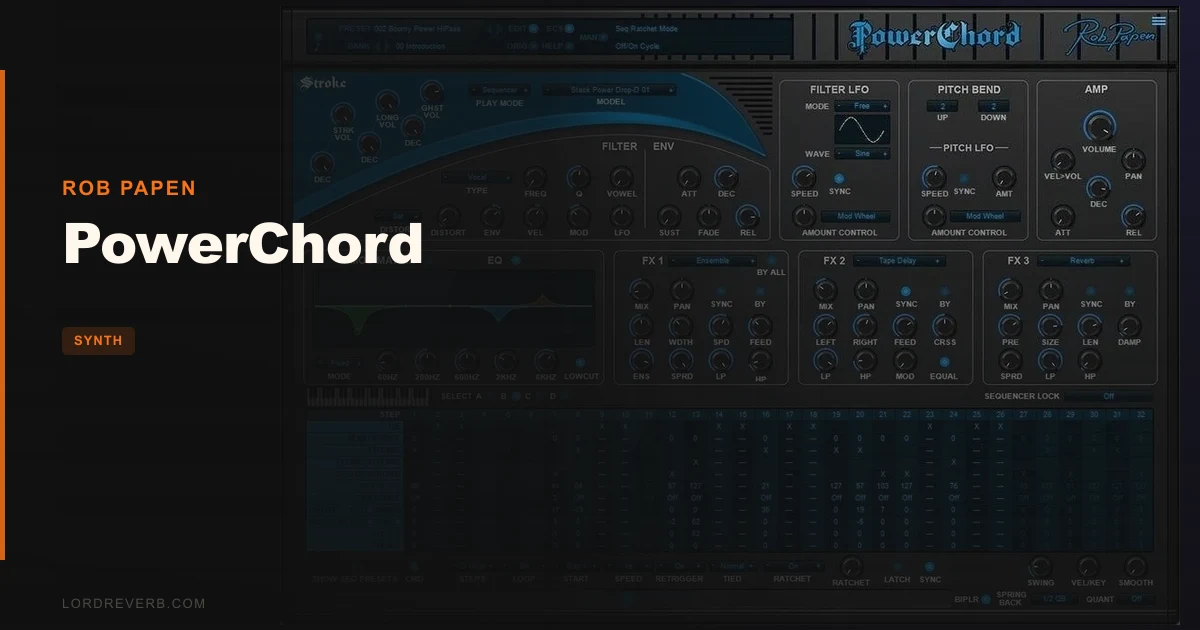
Rob Papen says PowerChord will never replace a real guitar player, and that claim holds up completely. What doesn't hold up is any assumption that "not a real guitar" means "not useful." PowerChord is a guitar synthesizer built for producers who think in sequences and patterns, not for guitarists hunting for a convincing strum sample. If you go in with the right expectations, it delivers. If you don't, you'll be frustrated inside ten minutes.
This PowerChord review is for electronic producers, beatmakers, and synth-heads who want guitar-flavored textures they can sequence, mangle, and push through 34 different effects types without ever loading a loop. It is also an honest warning to the guitarists reading over their shoulder: this tool is probably not for you.
The competition matters here too. Applied Acoustic Systems' STRUM exists in the same conversation, and so does Rob Papen's own predecessor plugin, RG. We'll put all three in context.
The Claim: A Guitar Synth That Goes Where Real Players Can't
Rob Papen's pitch for PowerChord is that it creates unique sounds a real guitar player cannot replicate. That's a confident line. The developer is explicit that it won't replace a human guitarist, and equally explicit that the reverse is also true: a human guitarist cannot replace what PowerChord does.
That framing matters because it sets the tool's whole purpose. PowerChord isn't pretending to be a guitar. It's a synthesizer built around guitar-shaped sound sources: 53 models covering everything from standard PowerChord shapes to Drop-D, Drop-A, Grunge voicings, and RG-style tones. You drive those models through a groove sequencer with up to 32 steps, 25 character filter types, 11 pre-filter distortions, and a full effects chain. The result is a sound design tool that happens to taste like a guitar. That distinction is the whole ballgame.
So does the claim hold? Mostly, yes. The unique-sounds angle is real. The "guitar players will be envious" line is a stretch, but owners do report exactly that reaction to certain groove presets. The gap between the promise and reality shows up in a different place, which we'll get to.
The Guitar Models: 53 Voices, Wildly Different Results
Fifty-three guitar models is a lot. Break it down and it's 12 single solo guitar sounds plus 41 stacked sounds built by layering those solos together. The 12 solo models are where you pick your character: PowerChord, Drop-D tuning, Drop-A, Grunge PowerChord, RG PowerChord, and PowerNote are among them.
The stacked models are where things get interesting. Layering changes the weight, width, and harmonic density of the sound considerably. Some of the stacked presets feel massive in a way a single guitar source never could. Push the drive up on a stacked Drop-A model and the low end gets physically heavy in a way a sample library rarely achieves without EQ surgery.
What they don't do is sound like a recording of a real guitarist. The attack transients are synthesized, the note release is controlled, and the dynamics behave like a synth responds to velocity rather than the way a pick hits a string. For anyone building an orchestral mock-up or trying to fool a client into thinking they hired session players, that's a problem. For anyone building industrial beats, synthwave tracks, or guitar-flavored electronic textures, it's completely beside the point.
Realism-seekers will be annoyed. Producers will find the palette satisfying.
The Groove Sequencer: The Heart of the Instrument
The sequencer is where most of your time goes, and where the instrument either clicks or frustrates you.
PowerChord gives you 4 selectable zones spread across a C1-to-C5 keyboard range. Each zone covers 12 MIDI notes. Each zone runs its own sequencer with up to 32 steps. So you can have a different groove pattern triggered by different keyboard regions, which opens up genuinely creative live performance possibilities if you're the type to map that out in your session.
Each step row goes deep. You get Step on/off, Semi Offset, Stroke, Long Stroke, Velocity, Ratchet, Filter Decay/Release, Amp Decay/Release, and two Free rows (Free 1 and Free 2). That's a lot of per-step control. The Semi Offset row lets you shift individual steps by semitones, which means you can create melodic movement inside a single zone without touching your MIDI keyboard or drawing notes in a piano roll.
The Stroke and Long Stroke steps are where the guitar illusion lives. Toggle a step to Stroke and it behaves like a quick pick hit. Long Stroke holds the note out. Combining them in a 16 or 32-step pattern at the right tempo gets surprisingly close to a picked riff feel, especially through a bit of amp simulation on top.
Ratcheting is a smart touch. When ratchet is on for a step, that step subdivides itself. The effect is a rapid-fire burst inside a single step slot, like a pick tremolo. It sounds great on guitar-synth material because it leans into the artificial nature of the instrument rather than fighting it.
The global sequencer controls include Swing, Vel/Key, Smooth, Speed, Retrigger, Tied Mode, and Ratcheting. Swing is what you'd expect. Vel/Key ties velocity to key position, which is clever for expressive playing across the keyboard. Smooth blends between steps rather than clicking between them. Speed adjusts how the sequencer rate relates to your DAW tempo.
Now for the honest part. Owners describe the sequencer interface as "wacky." That's their word, not ours. It takes time to understand how the zones stack with the step rows and how the mod matrix interacts with what the sequencer is already doing to filter and amp envelopes. You will spend a confusing afternoon with this before it makes sense. That's not a dealbreaker, but it's a real time cost.
If you sit down expecting to dial in a groove in five minutes, you'll be frustrated. If you give it a few hours, the logic becomes legible and the depth starts feeling like a feature.
Filters, Distortion, and the Character Engine
Twenty-five character filter types is a headline number worth unpacking. These aren't just standard lowpass, highpass, and bandpass shapes. The character filters include ring modulation and amp modulation modes, which means they can do things standard synth filters don't. Run a Drop-A stacked model through a ring modulation filter and it stops sounding like any guitar you've ever heard. That's the point.
The 11 pre-filter distortions run before the character filter in the signal chain, allowing the filter to shape a dirty signal rather than a clean one. This ordering creates a different texture than post-filter distortion: more embedded grit, less topical crunch.
The dedicated filter envelope gives you Attack, Decay, Sustain, Fade, and Release. The Fade control is worth calling out specifically because it's not standard on most filter envelopes. Fade controls how the envelope signal decays after the sustain level, adding a second decay stage that can shape the tail of a note in ways a standard ADSR can't. It's a thoughtful detail that shows up in the more organic-sounding presets.
The AMP section handles velocity control, pan control, and its own Attack, Decay, Release envelope. Velocity control in the AMP section determines how hard your keyboard input affects the output amplitude, which is separate from the Vel/Key setting in the sequencer. Getting those two interacting correctly is one of the things that takes time to understand. But once you dial it in, dynamic expressiveness opens up considerably.
The Mod Matrix: 8 Slots, No Handholding
Eight modulation slots. The mod matrix doesn't get a lot of attention in the marketing, but it's what separates a usable performance tool from a preset player.
Map an LFO to filter cutoff and you get the standard animated filter sweep. Map a step sequencer output to pitch semi-offset and you get automated melodic movement that the sequencer itself isn't directly controlling. The two Free rows in the sequencer step grid connect to the mod matrix, which means you can draw any per-step value into any mod destination. That's a genuinely clever design.
The depth here does require reading the manual or watching a tutorial. It's not intuitive on first contact. But if you're comfortable with modulation routing in other synths, the logic maps across without too much trouble.
EQ Section: Two Options, One Strong
PowerChord gives you two EQ options. The fixed RG-style EQ and a 5-band parametric with a low-cut filter.
The RG-style EQ is a character tool. It colors the signal in a specific way and you either want that color or you don't. If you're using PowerChord primarily for guitar-flavored textures in an electronic context, the RG EQ is a quick way to get a consistent tone without tweaking five bands.
The 5-band parametric is where you do real shaping work. With a low-cut filter included, you can keep the low end clean on stacked sounds that tend to get muddy. The EQ sits before the effects chain, so what you shape here feeds directly into the amp and cabinet simulation.
The Ribbon Controller
The ribbon controller is an underrated performance tool in this instrument. It supports tempo-based spring back, quantized spring back, and both unipolar and bipolar modes.
In practice: assign the ribbon to filter cutoff in bipolar mode and you get a physical way to sweep up and down through the filter range in real time. The tempo-synced spring back means when you release the ribbon, it snaps back to center in time with your project tempo. That's a thoughtful detail for live use.
Quantized spring back is the other option. Instead of a smooth return, it snaps to defined positions. Use that with pitch assignments and you get a whammy-bar style effect that lands on musical intervals rather than drifting through microtonality.
It won't replace a physical ribbon controller. But as an in-plugin performance surface, it's more considered than most.
Effects: 34 Types, Three Serial Blocks
Three HQ effects blocks, running in serial, with 34 FX types to choose from. That's a comprehensive chain built into the instrument itself, which matters for workflow. You can get a finished, produced sound out of PowerChord without routing it through external plugins.
The list covers what you'd expect: Mono Delay, Stereo Delay, Tape Delay, Reverb, Chorus, Tape Chorus, Chorus/Delay, Ensemble, Flanger, Tape Flanger, Phaser, Tape Phase. Then it gets more unusual: Ring Modulator, Shift FX, TalkBox, AutoWah, WahWah/Delay, Bass Enhancer. The Comb Filter is in there too, which opens up metallic, resonant textures that push the guitar models further into synthesis territory.
Distortion types in the FX chain include Low Fi, Waveshaper, Clipper, and a Multi-distort with 11 of its own types. That's separate from the 11 pre-filter distortions in the main engine, so your total distortion options are considerable.
The amp simulator has 5 models. The cabinet simulator has 5 models. For a guitar synthesizer that isn't trying to perfectly recreate a physical amp, that coverage is enough. The amp and cab sims complement the synthetic guitar sounds.
MIDI tempo-based settings work in most of the effects, so delays and modulation sync to your DAW without manual BPM entry. You can bypass the whole FX chain at once or toggle individual blocks. Both are essential for A/B comparisons and mix decisions.
The Interface: UI Scaling and Global Settings
Four UI scale options: 100%, 125%, 150%, and 200%. On a modern high-DPI display, 150% is comfortable. On a standard 1080p monitor, 100% is usable but dense.
The control menu in the upper right corner handles global settings and version downloads. The back panel holds additional global options. That back panel exists in a few Rob Papen instruments and it's always slightly annoying to discover that a setting you're hunting for is literally on the other side of the UI. It works. It's just not the most elegant navigation choice.
Owners consistently report the interface as user-friendly. That tracks for the front panel: the main synthesis and sequencer controls are logically laid out once you've spent time with them. The "wacky" label owners apply is specifically to the sequencer step rows and how they interact, not to the instrument layout overall.
The bank manager handles preset organization. Abundant presets are there to get you started without the terror of a blank preset. If you're the type who works from scratch, you'll probably ignore most of them. If you're new to this kind of tool, they're a genuinely good starting point.
What Holds Up Against the Marketing
The unique sounds claim is true. PowerChord's groove sequencer applied to stacked guitar models through the character filter and amp sim produces generative results rather than recorded samples. Every note, velocity, ratchet, and stroke interaction creates a sound that wasn't captured in a studio. That's the genuine argument for this tool.
The "guitar players will be envious" line holds for preset results. Some of the groove sequences are clever and would take real effort to recreate manually. That's satisfying to hear. It's not a universal reaction, but it's not pure marketing either.
Rob Papen's customer support reputation is real and consistent across owner reports. That matters for a tool with a learning curve. If you get stuck on the sequencer logic or an activation issue, the support is there.
The workflow freedom compared to sampled loops is real too. You're not locked to a specific key, tempo, or feel that someone else decided on a studio session. You shape it. Owners describe this flexibility as fostering creativity.
What Doesn't Hold Up
The guitar realism ceiling is low. Owners who play guitar themselves report that the models lack depth and authenticity. That's not a surprise given what PowerChord actually is: a synthesizer using guitar sounds as its oscillator material. Positioning PowerChord as a guitar replacement for realistic mockups oversells its capabilities.
The sequencer learning curve is real and annoying. "Wacky" is a charitable word for it. The step rows interact with the mod matrix and the zone system in ways that aren't immediately obvious. Expect to invest genuine time before you're routing the Free rows into the mod matrix with any confidence.
No NI NKS support yet is a friction point for anyone running a Native Instruments setup. It's not a dealbreaker, but it's a limitation worth knowing before you buy.
Two-system activation is tight. If you work across a studio desktop, a laptop, and a third machine, that limit bites.
Seasoned producers who want manual control over every element may find the reliance on the sequencer and preset system alienating. It's brilliant for creative flow. It's frustrating if you want to build from zero without the sequencer in the way.
Who It Suits
You'll get the promised result if you produce electronic music and want guitar-flavored textures that move and groove without hunting through loop packs. That's the sweet spot. Synthwave, industrial, lo-fi, cinematic electronic, beat-driven genres where guitar sound is a texture rather than a performance: PowerChord is built for those contexts.
Beginners to this type of instrument will find the preset library genuinely welcoming and the groove results rewarding. It's a good entry point into guitar-synthesis territory without the complexity of building sounds from raw oscillators.
Skip it if you're a guitarist wanting a realistic digital double of your playing. Skip it if authenticity to recorded guitar sound is the requirement. Skip it if you work across more than two machines and can't afford the activation limits.
PowerChord evolved from Rob Papen's RG with deeper sequencer capabilities. The DNA is similar, the sequencer is the upgrade.
PowerChord vs. The Competition
Two products come up consistently alongside PowerChord: Applied Acoustic Systems' STRUM and Rob Papen's own RG.
| Product | Strongest Point | Weakest Point | Best For |
|---|---|---|---|
| Rob Papen PowerChord | 32-step groove sequencer with per-step ratchet, stroke, and filter control | Guitar realism is low; sequencer has a steep learning curve | Electronic producers wanting generative guitar textures |
| Applied Acoustic Systems STRUM | Pattern library covers many real strumming styles | Users report its pattern library feels like just pressing Play; limited creative control | Songwriters wanting ready-made strumming patterns quickly |
| Rob Papen RG | Predecessor to PowerChord; simpler interface, faster learning curve | Less sequencer depth than PowerChord; fewer sound-design options | RG-style guitar sounds without deep sequencer work |
STRUM's pattern library is the tool's strength for certain songwriting contexts. But owners who've compared both describe STRUM's approach as restrictive for anyone who wants to build their own grooves. It tends toward preset dependence in a way that feels passive. PowerChord's sequencer puts creative control back in your hands, even if that means more setup time.
RG is where PowerChord came from. If you've tried RG and found it limiting for groove work, PowerChord is the logical upgrade. If you found RG's simpler layout preferable, the added complexity of PowerChord's sequencer may feel like a step in the wrong direction.
The honest answer: PowerChord wins for producers who want to build sequences. STRUM wins for producers who want to press play on something that sounds finished immediately. Neither wins for authenticity. That's a different category of tool entirely.
The Verdict
PowerChord at $79 is a focused tool that does its specific thing well. That thing is generative guitar-flavored synthesis with a deep sequencer and enough sound-design muscle to push far beyond anything resembling a real guitar. If that's what you need, it's worth buying and worth the time investment to learn the sequencer properly.
If you came here hoping for a shortcut to realistic guitar sound in your productions, this is the wrong tool and $79 is the wrong spend. The realism ceiling is low by design. That's not a flaw, it's a choice. The developer says so themselves.
The sequencer learning curve is a genuine friction point; owners consistently report the interface is wacky and requires time to understand. The two-machine activation limit is worth checking against your setup before you commit. And the missing NKS support is a real gap for some workflows.
But the creative ceiling for the right producer is high. The groove results can be genuinely surprising, the effects chain is deep enough to finish sounds inside the plugin, and Rob Papen's support reputation means you're not on your own when the sequencer baffles you. This is a clever instrument that earns its place in an electronic producer's toolkit. Just know exactly which problem you're buying it to solve.
Love the concept, respect the depth, but go in with both eyes open about what it isn't.
Specs & Technical Details
| Developer | Rob Papen |
| Price | $79 |
| Plugin Format | VST / VST3 / AAX / AU |
| OS Support | Windows 7 or higher (64-bit) / Mac OS 10.13 or higher (64-bit); M1, M2, M3 ARM compatible |
| Activation | Serial / license system; online or offline activation; 2-system limit |
| CPU Usage | N/A |
| Trial Available | N/A |
| Version Reviewed | N/A |
Score Breakdown
| Category | Score | Notes |
|---|---|---|
| Sound Quality | 3.5/5 | Unique and usable for electronic contexts; realism is low |
| Value for Money | 3.5/5 | Fair for the feature depth; only pays off if the sequencer workflow suits you |
| Ease of Use | 3.0/5 | Front panel is manageable; sequencer interaction has a real learning curve |
| Features | 4.0/5 | 53 models, 32-step sequencer, 34 FX types, mod matrix: genuinely comprehensive |
| CPU Efficiency | N/A/5 | No data available |
| Overall | 3.5/5 | Strong creative tool for the right producer; too specialized to recommend broadly |
Alternatives to Consider
Applied Acoustic Systems STRUM: If you want strumming patterns fast and don't need deep sequencer control, STRUM's pattern library gets you there quicker. The tradeoff is creative flexibility: users who've compared both report STRUM feels passive once you've exhausted the preset patterns. It suits songwriters more than it suits producers who want to build grooves from scratch.
Rob Papen RG: The predecessor. Simpler layout, less sequencer depth, the same DNA. If you tried RG and liked the sound but wanted more groove control, PowerChord is the upgrade. If you tried PowerChord's sequencer and found it overwhelming, going back to RG is a legitimate option. The two instruments serve different workflow preferences, not different quality levels.
There's no single alternative that covers all of PowerChord's ground in a simpler package. That's both its strength and the reason it demands a specific buyer.
Frequently Asked Questions
Is PowerChord a realistic guitar plugin?
No, and Rob Papen doesn't claim it is. PowerChord is a guitar synthesizer: it uses guitar-shaped sounds as its source material but processes them through synthesis engines, groove sequencers, and character filters. The results are unique sounds that don't exist in real guitar playing. Guitarists looking for digital authenticity should look elsewhere. Producers looking for guitar-flavored textures in electronic music are the target audience.
How hard is PowerChord to learn?
The front panel is manageable after a few sessions. The groove sequencer is where owners consistently report a learning curve. The step rows, zone system, and mod matrix interaction takes genuine time to understand. Expect a few hours of confusion before the logic becomes clear. Rob Papen's customer support is widely praised, so if you get genuinely stuck, help is available.
Can you use PowerChord without the groove sequencer?
Yes. You can manually play strokes, long strokes, and ghost strokes from your keyboard or MIDI controller. The sequencer is the instrument's main workflow tool, but it isn't mandatory. If you prefer playing notes directly and shaping them through the filter and effects chain, that path is open. The sequencer just unlocks the deeper groove-building capability.
Does PowerChord work on Apple Silicon Macs?
Yes. The Mac version is compatible with M1, M2, and M3 ARM processors. It requires Mac OS 10.13 or higher and runs in 64-bit AU, VST3, AAX, or VST formats. If you're on a current Apple Silicon machine, compatibility isn't a concern.
How many computers can PowerChord be installed on?
Two. The serial and license system allows installation on 2 computer systems, with online or offline activation available. If you work across more than two machines regularly, that limit is worth factoring into your decision before you buy. Offline activation is there for studio machines without internet access.
How does PowerChord compare to Rob Papen's older RG plugin?
RG is the predecessor that PowerChord evolved from. PowerChord adds considerably more sequencer depth: up to 32 steps per zone, 4 selectable zones, per-step ratchet and stroke control, and the full mod matrix integration with sequencer Free rows. If you found RG limiting for groove work, PowerChord is the upgrade. If you preferred RG's simpler approach, the added complexity of PowerChord's sequencer may not suit your workflow.