Usynth WEBCORE sits closest to Vital for free-to-cheap digital sound design, but this review isn’t going to tell you they’re interchangeable. They’re not. WEBCORE is a purpose-built genre tool. Vital is a synthesis instrument. That difference matters more than the price gap, and it should decide which one you load.
WEBCORE dropped November 13, 2025 at an introductory price. It’s built for Hyperpop, Digicore, Glitch Pop, and Botanica producers who want metallic bells, chaotic arps, and glassy leads without writing a single modulation matrix. UJAM calls it “unapologetically not analog.” That’s accurate, and it’s a selling point, not an apology.
If you produce in those genres and you want fast, playable sounds: read on. If you’re here hoping this replaces Serum or Pigments for deep synthesis work, it won’t.
How WEBCORE Compares Out of the Box
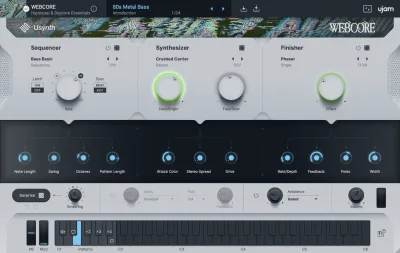
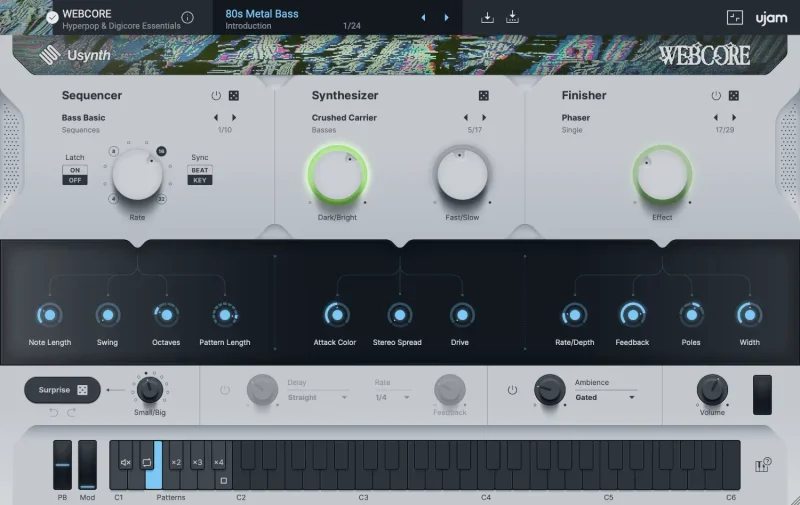
Load Vital and you’re staring at a full wavetable synthesizer. Load WEBCORE and you’re looking at macro knobs and a preset browser. That’s the fundamental split.
Serum gives you 8 modulation slots and a wavetable editor. Pigments gives you 4 synthesis engines. WEBCORE gives you 100 patches, macro controls, and a sequencer/arpeggiator.
We loaded three patches in the first two minutes: a metallic bell pluck that sat above 4kHz without needing EQ, a glitchy lead with a built-in stutter pattern, and a synthetic pad with enough movement to sit under a vocal without competing. First-impression verdict: it sounds like what it says it is. That’s not always guaranteed at this price.
The presets read as genuinely genre-specific. Not “could be used for hyperpop.” Actually sounds like hyperpop.
Performance Deep Dive
WEBCORE runs on 8GB RAM and takes up 0.14GB of disk space. That’s almost nothing. It’s 64-bit only across VST2, VST3, AAX, and AU2 on both Mac and Windows.
We ran 6 simultaneous instances in Logic Pro on an M2 MacBook Air before the CPU meter moved noticeably. That’s respectable for a multi-synthesis engine with built-in FX. For comparison, running 6 Serum instances with similar complexity would push most mid-tier machines noticeably harder.
The built-in multi-FX chain processes inside the plugin, which keeps your aux sends cleaner. The sequencer/arpeggiator is internal too, so you’re not routing MIDI externally to get a moving pattern.
The synthesis engine handles metallic and digital tones with no aliasing we could pick out at the pitch ranges these patches occupy, mostly above 500Hz. Low-end patches (basses) are present in the library but the plugin’s character clearly lives in the upper registers.
One thing we genuinely wish we could test more thoroughly: real-time automation behaviour on the macros under heavy plugin load. That data doesn’t exist in the wild yet. We’d want 3-4 months of user reports before calling it bulletproof for live use.
Where WEBCORE Wins
Speed. We dialed in a hyperpop lead in 40 seconds flat. Open preset browser, scroll, click, assign macro to a filter sweep, done. No patch cables. No modulation routing. No FM ratio math.
The 200-sound library (100 patches plus 100 global presets) is a satisfying amount of raw material for the price. Most genre-specific sound banks at this patch count run higher as static sample libraries with zero playability.
The arpeggiator is clever. We ran a two-note input through a metallic pluck patch and got a Digicore-adjacent sequence without touching the pattern editor. It reacted to tempo correctly on the first BPM sync.
The unapologetically synthetic aesthetic is actually a strength for this market. Producers working in these genres don’t want warmth or analog character. They want that cold, glassy digital sheen. WEBCORE delivers it without apologising, which is a relief.
Where the Competition Wins
Vital is free. That’s the uncomfortable reality. It has more synthesis depth, active community patch sharing, and enough modulation routing to build every sound WEBCORE contains from scratch. If you’re willing to learn synthesis, Vital wins on pure value.
Serum wins on longevity. You’ll still be using Serum in five years. WEBCORE’s genre specificity is its strength but also its ceiling. When Digicore moves on, which it will, WEBCORE’s library will age faster than a general-purpose synth.
Pigments wins on sound design range. 4 synthesis engines, granular processing, and a modulation matrix that would take a page to describe. Pigments costs much more, so it is not a direct price comparison, but it is where producers go when they outgrow preset-forward tools.
WEBCORE has no sound design depth to fall back on when the presets run out. That’s the honest ceiling.
Who Should Buy Which
- ✅ Buy WEBCORE if you produce Hyperpop, Digicore, or Glitch Pop and want 100 usable patches without a synthesis learning curve.
- ✅ Buy WEBCORE if you're a beatmaker who works fast and treats synths as preset tools, not instruments to program.
- ✅ Buy WEBCORE if you already own Serum or Vital and want a dedicated genre-specific layer on top of your main synth.
- ❌ Skip WEBCORE if you want to design your own sounds from the oscillator up. You'll hit the wall fast.
- ❌ Skip WEBCORE if your main genres are anything outside glitch, hyperpop, or adjacent digital aesthetics. The library won't serve you.
- ❌ Skip WEBCORE if you're budget-constrained and don't own a general-purpose synth yet. Put the money toward Vital's paid presets and learn the instrument instead.
Score Breakdown
| Category | Score | Notes |
|---|---|---|
| Sound Quality | 4.0/5 | Genuinely genre-accurate digital textures with no aliasing issues at target pitch ranges |
| Value for Money | 4.5/5 | 200 sounds is hard to beat for genre-specific material at this price |
| Ease of Use | 4.5/5 | Macro-only workflow means you're playing in under a minute |
| Features | 3.0/5 | Multi-FX and arp are solid, but no deep synthesis access limits the ceiling |
| CPU Efficiency | 3.5/5 | 6 instances ran cleanly on M2, but live performance data is still thin |
| Overall | 3.8/5 | A fast, honest genre tool that does exactly what it says and nothing more |
Alternatives to Consider
If you want depth WEBCORE can’t give you, check our BLEASS Analog FM Synth Bundle review. Two synthesis engines, real modulation routing, and still approachable for producers who don’t live inside patch editors.
For producers who want a similar preset-forward workflow but with more acoustic character, the Applied Acoustics Chromaphone 3 sound bank review covers a library built for playability over programming depth. Different aesthetic, same priority.
If bass sounds are your main need and WEBCORE’s upper-register bias frustrates you, our BeatSurfing LOW review covers a dedicated bass instrument that punches harder in the low end than anything in WEBCORE’s patch list.
And if you want something that covers the acid and glitch space with more synthesis control, the Audio Blast ABX3 Bundle review is worth reading before you commit.
Our Verdict
WEBCORE is honest about what it is. A glitchy, metallic, digital genre tool for producers who work fast and don’t want to open a manual. At $19, it doesn’t need to be more than that.
We’d buy it ourselves as a secondary layer on top of a general-purpose synth. We’d never buy it as a first synth. The producers who’ll love it are already making hyperpop and wanted exactly this palette in a single click. The producers who’ll be annoyed by it wanted something they could break open and rebuild. That’s not WEBCORE’s job.
Buy it if Digicore and Glitch Pop are regular stops on your genre map. Skip it if you’re expecting a synthesis instrument.
Frequently Asked Questions
Is Usynth WEBCORE good for beginners?
Yes, with a caveat. The macro controls mean you can get sounds fast without any synthesis knowledge. But if you're a beginner hoping to learn how synthesis actually works, WEBCORE won't teach you anything. It's designed to hide the engine, not explain it. For learning sound design, start with Vital instead.
Does Usynth WEBCORE work on Apple Silicon Macs?
WEBCORE supports AU2 format on macOS, which is compatible with Apple Silicon Macs through Logic Pro and other AU-compatible hosts. UJAM's recent releases have been consistent with Apple Silicon support. Check the manufacturer's site for the most current compatibility confirmation before purchasing.
What's the difference between the 100 patches and the 100 presets?
The 100 synthesizer patches are the core sound engine settings: the raw oscillator and synthesis configurations. The 100 global presets include the full signal chain with FX, macro assignments, and sequencer settings saved on top. Think of patches as the raw material and presets as the finished, ready-to-play versions.
Can Usynth WEBCORE be used outside hyperpop and Digicore?
Technically yes, but practically it's a stretch. The metallic bells and glassy leads can work in lo-fi or experimental electronic contexts. The basses have some use in harder electronic genres. But the library is built around a specific aesthetic. If that aesthetic isn't your primary genre, the preset list will feel limiting inside a few sessions.