
We were three hours into a synthwave session when we loaded the TAL-J-8 for the first time. We needed that specific Jupiter-8 thing: the wide, slowly-breathing pad that sits behind everything without eating the high-mids. Within four minutes of opening the plugin, we had it. That almost never happens.
TAL-J-8 is the most convincing Jupiter-8 software emulation we’ve tested. Developer Patrick at TAL Audio modeled it against his own hardware Jupiter-8, circuit by circuit, using PSpice technology for component-level accuracy. The result is a virtual instrument that earns its price before you’ve finished the first session. It’s built for producers and sound designers who want the analog character of a vintage Roland polysynth without the hardware price tag or the maintenance bill.
First Impressions: It Looks Right Because It Is Right
Download is fast. Installation is straightforward. The plugin appears in your DAW and you’re looking at a faithful recreation of the Jupiter-8 front panel.
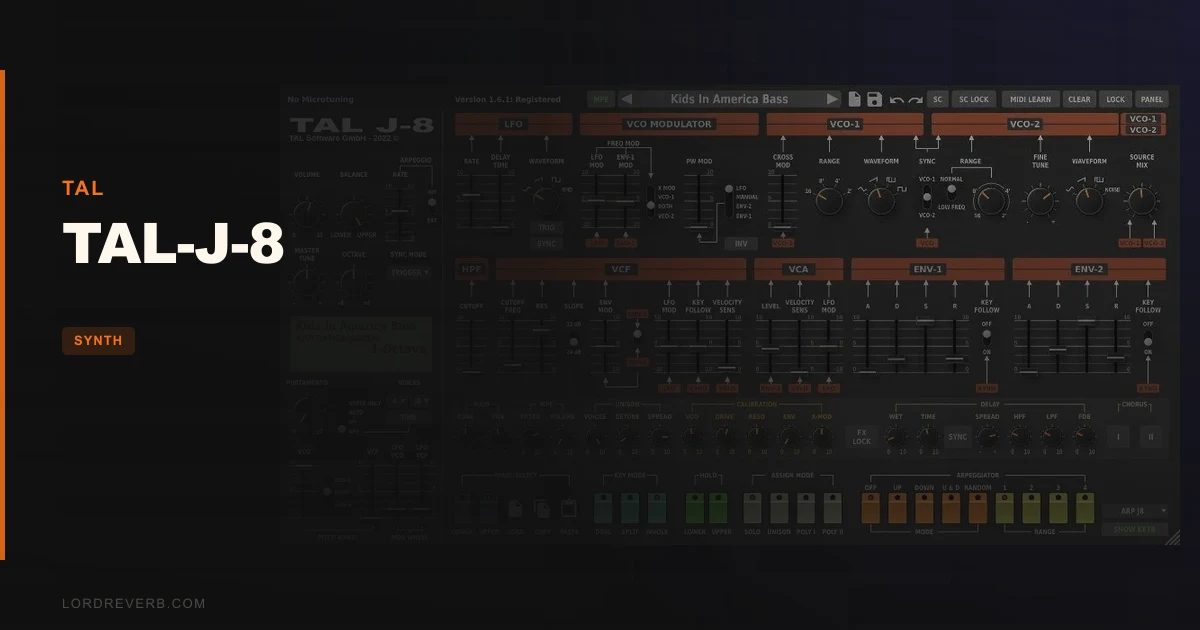
The skeuomorphic interface is satisfying in a way most modern synth UIs aren’t. Every knob is where you expect it. If you’ve ever touched a real J-8, your muscle memory takes over immediately. The GUI is also resizable, which matters more than it sounds: at 150% scale on a 27-inch monitor, every parameter is readable without squinting.
There’s no bloated splash screen. No account login. It just opens.
Getting It Into a Real Workflow
We ran TAL-J-8 through three different sessions: a synthwave production, an ambient record, and a pop arrangement that needed a retro poly lead.
In each case, the plugin loaded cleanly into Ableton Live and Logic Pro without conflicts. MIDI mapping is supported, so we had the filter cutoff on a hardware knob within two minutes. The full stereo signal path means you’re not fighting to get width in the mix later.
The friction point is the preset browser. It’s a drop-down menu. That’s it. No search. No tagging. No drag-to-favorite. If you’re flicking through 300 presets mid-session trying to find the right texture, you’ll feel the frustration. It’s the one area where the plugin’s age shows clearly.
CPU usage scales with polyphony. We didn’t hit problems running a single instance at 8 voices, but stack three instances with full polyphony and you’ll want to freeze tracks. TAL hasn’t published specific CPU benchmarks, which is annoying when you’re trying to plan a dense arrangement.
The calibration section is a brilliant addition. Pushing the resonance there gets the filter to scream in a way that’s more hardware-believable than the equivalent moves in most competing emulations. We used it to get a Juno-adjacent acid line that sat perfectly without additional distortion.
What It's Genuinely Good At
The oscillators are the headline. Two VCOs per voice with LFO and dual ADSR envelopes, modeled individually at the component level. The result is that each voice behaves slightly differently from the others, exactly like the hardware. You can hear it on wide chords: there’s a slow, natural movement between voices that no static wavetable engine can fake.
We played an 8-voice pad through a reference track of actual Jupiter-8 recordings. The harmonic content matched closely enough that we had to check the channel strip twice to confirm which was which.
The unison mode with stereo spread is the other standout. Stack all voices in unison and the width fills a mix without phase issues. We set the spread to about 60%, ran it through a send with a small room reverb, and it sat behind a vocal like it was always supposed to be there.
MPE support is genuinely unexpected at this price point. If you’re playing through an Expressive E Osmose or a Roli Seaboard, TAL-J-8 responds to pressure and slide per note. That is a feature set you would expect from a much pricier instrument. Microtuning support via .tun file import and MTS Client adds further flexibility for producers working outside standard Western tuning.
The 300+ factory presets are the work of several designers including Solidtrax and Electric Himalaya. Quality is high across the board. The pads are immediately usable. The leads have edge without harshness.
The Rough Edges
The preset browser needs a redesign. We said it once but it deserves the space: for live performance, navigating presets through a drop-down is close to unusable. If you’re doing any kind of real-time switching between sounds on stage, this will frustrate you every time.
There’s no onboard arpeggiator. That’s a hardware omission the software inherited without correcting. You’ll need your DAW’s arp or a third-party MIDI plugin to fill the gap.
CPU documentation is absent. TAL’s site and the plugin itself give no guidance on polyphony-to-CPU ratios. This isn’t a dealbreaker, but it’s an oversight that makes planning larger sessions harder than it should be.
Compared to U-He Diva, which offers broader filter algorithm choices, TAL-J-8 is intentionally narrow in scope. That’s a design choice, not a flaw. But if you want Jupiter-8 plus five other vintage architectures, Diva covers more ground.
Who This Is Really For
- ✅ Buy if you want the most hardware-accurate Jupiter-8 emulation available at an affordable price
- ✅ Buy if you work with MPE controllers and want a vintage polysynth that responds properly
- ✅ Buy if you're producing synthwave, ambient, or cinematic music where Jupiter-8 textures are central to the sound
- ❌ Skip if you need a live-performance-ready synth with fast preset switching
- ❌ Skip if you want a broader analog emulation library beyond the Jupiter-8 architecture
- ❌ Skip if CPU budget is tight and you're already running dense sessions with many instances
For context on how TAL-J-8 compares to other plugin synths doing interesting things right now, our Arturia MiniFreak V review covers a very different approach to virtual synthesis that’s worth reading alongside this one.
Score Breakdown
| Category | Score | Notes |
|---|---|---|
| Sound Quality | 5.0/5 | Per-voice component modeling calibrated against real hardware; oscillator character is the genuine article |
| Value for Money | 4.5/5 | MPE, microtuning, and 300+ presets at this price is hard to argue with |
| Ease of Use | 4.0/5 | Hardware-faithful UI is intuitive; preset browser is genuinely awkward |
| Features | 4.0/5 | MPE and calibration section are standouts; no arpeggiator is a miss |
| CPU Efficiency | 3.5/5 | No published benchmarks; polyphony-heavy use demands freeze discipline |
| Overall | 4.5/5 | The best Jupiter-8 emulation in software, a few workflow irritations don't change that verdict |
Alternatives to Consider
Roland Cloud Jupiter-8 is the official software version from the original manufacturer. It has Roland’s name behind it, but most engineers we trust rate TAL-J-8 as the closer-sounding emulation. Roland Cloud also requires a subscription rather than a one-time purchase. Worth demoing both before committing.
U-He Diva covers the Jupiter-8 filter architecture plus modules from the Minimoog, Juno-6, and several others. If you want a broader vintage analog toolkit, Diva wins on scope. It’s heavier on CPU and costs more, but the flexibility is real. Our best analog emulation plugins roundup has more context on where Diva fits.
Arturia Jupiter-8 V inside Analog Lab V is a strong alternative with a better preset browser and Arturia’s full modulation matrix. It sounds slightly more polished and slightly less raw than TAL-J-8. If “raw” is what you’re after, that difference matters.
For producers wanting something completely different in the analog space, the BeatSurfing LOW review covers a bass synth that punches well above its price.
The Verdict
We’d buy TAL-J-8 ourselves. We did buy TAL-J-8. That’s the clearest recommendation we can make.
The preset browser needs a proper redesign, and we wish the CPU documentation existed. But neither of those things touches the core reason you’d buy this plugin: it sounds like a Jupiter-8. Not “inspired by”. Not “based on the character of”. Like one.
If you’re a live performer who needs fast preset switching and an onboard arp, look at Arturia’s version instead. For everyone else, this is the one to get.
Check TAL Audio’s site for current pricing. At whatever it costs right now, it’s the most honest value in vintage polysynth emulation.
Related reviews: Padshop 2 Review
Frequently Asked Questions
Is TAL-J-8 better than Roland's official Jupiter-8 software?
Most engineers who've compared both rate TAL-J-8 as the closer-sounding emulation. Roland's version has the brand heritage, but TAL's circuit-level modeling calibrated against real hardware produces oscillator behavior that's hard to beat. Roland Cloud also requires a subscription; TAL-J-8 is a one-time purchase. We'd recommend downloading demos of both and comparing on your own system before deciding.
Does TAL-J-8 work with Apple Silicon Macs?
Yes. TAL-J-8 ships as a Universal Binary 2 plugin with native Apple M1 support. It runs without Rosetta 2 translation, which means better performance and lower latency on M1, M2, and M3 machines. Mac OS X 10.9 or higher is required.
How many presets does TAL-J-8 include?
TAL-J-8 ships with over 300 factory presets designed by several sound designers including Solidtrax, emptyvessel, and Electric Himalaya. The quality across the library is high. The frustration is the drop-down browser you have to navigate them through, not the presets themselves.
Does TAL-J-8 support MPE controllers?
Yes, and that's one of the plugin's underrated strengths. Full MPE support means per-note pressure, slide, and pitch expression when played through compatible controllers like the Expressive E Osmose or Roli Seaboard. Microtuning is also supported via .tun file import and MTS Client, which makes TAL-J-8 useful for producers working with alternative tuning systems.