Element 2.0 sits closest to U-He Diva in the conversation, and this review is going to tell you that it’s a reasonable substitute for a specific type of producer, but not a replacement for most. If you’re comparing the two because Diva is wrecking your CPU and you want something lighter that still sounds analog, Element 2.0 is worth your time. If you’re expecting feature parity or the same depth of character, you’ll be frustrated.
Waves released Element 2.0 back in 2015. It still sells, still gets patched, and currently sits at a 4.7 average from 268 ratings on the Waves site. It runs on macOS Monterey through Sequoia and Windows 10 and up, in VST3, AU, and AAX. Check the manufacturer’s site for current pricing, as it does go on sale from time to time.
It’s built for producers who want mono synth grit and poly warmth from the 70s and 80s without hardware costs or Diva’s CPU toll.
How It Compares Out of the Box
Diva sounds bigger on first load. That’s the honest truth. Its oscillators have a weight and drift that Waves hasn’t fully matched here.
But Element 2.0 loads faster, opens in one window, and doesn’t ask you to pick a component architecture before you hear a note. That accessibility matters when you’re sketching ideas at 11pm and don’t want to build a synth from modules.
Compared to the Waves Codex, Element 2.0 sounds dirtier and more characterful. Codex leans wavetable and modern. Element leans analog and gritty. Same company, clearly different briefs.
Against Arturia’s MiniFreak V, Element is less flexible architecturally but more immediately vintage in tone. MiniFreak V does more. Element 2.0 does one thing with less friction.
Performance Deep Dive
We loaded eight instances of Element 2.0 in a session alongside Kontakt, Serum, and two instances of Diva. Element barely moved the CPU needle compared to Diva. That’s not hyperbole. Diva with its high-quality mode running regularly hits 15-25% per instance on a modern M-series Mac depending on voice count. Element 2.0 with full polyphony sat around 4-6% per instance in the same session. It’s a real-world difference.
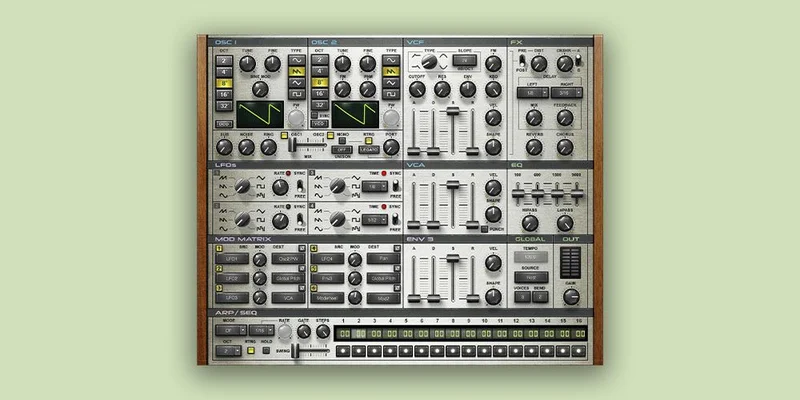
The architecture is two main oscillators, four LFOs, four ADSR envelopes, and a 16-step sequencer with arpeggiation. The modulation matrix handles routing without making you open submenus. That’s clever design.
The “Punch” button adds harmonic saturation to the output. We ran a sustained pad through it with the filter half-closed. Without Punch: clean, slightly thin. With Punch: the low mids thickened noticeably, probably 2-3dB of harmonic content around 200-400Hz. It sounds warmer because there’s literally more energy in the lower registers.
The built-in effects cover delay, reverb, and distortion. They’re usable but not the reason you’d buy this. We found ourselves bypassing the reverb and using our own.
Where It Wins
The single-window layout is genuinely satisfying. Everything is visible. Oscillators, filters, envelopes, LFOs, sequencer: all on one screen. We spent zero time hunting through tabs.
The preset library skews toward usable rather than demo-flashy. We loaded a vintage mono bass preset, dropped it two octaves, pushed the filter cutoff to about 60%, and it sat in the mix without fighting the kick. That’s a good sign.
Four LFOs for one synth at this price is underrated. We assigned LFO 2 to the filter cutoff at a slow rate synced to 1/4 notes, and LFO 4 to pitch with a subtle amount for vibrato. It sounded alive without any extra processing.
Standalone mode works for stage use. Load your presets, connect a MIDI controller, play. No DAW required. That’s a real feature, not a checkbox.
The MIDI Learn implementation covers every control. We mapped a filter sweep to a hardware knob in under 30 seconds.
Where the Competition Wins
Diva wins on sound depth. Its component-level modeling adds physical imperfection: tuning drift, filter nonlinearity, the slight chaos of real analog circuitry. Element 2.0 doesn’t have that. It sounds analog. It doesn’t sound alive the same way.
The sequencer is frustrating if you need 303-style bass lines. No slide between notes. No accent per step. You can sequence pitches and you can arpeggiate, but you can’t recreate that slippery, accented acid bass pattern without external workarounds. That’s a real omission.
MiniFreak V has a deeper synthesis engine overall. If you want hybrid digital-analog architecture with more modulation destinations, MiniFreak V wins that comparison.
For lo-fi and tape character, something like the Tape Synths expansion delivers textures Element can’t touch.
Who Should Buy Which
- ✅ Buy Element 2.0 if you need a low-CPU virtual analog for a busy session and Diva is causing dropouts.
- ✅ Buy it if you want a hardware-feel interface without hardware prices, especially for live use with standalone mode.
- ✅ Buy it if you're new to analog synthesis and want a readable single-window layout to learn from.
- ❌ Skip it if you need 303-style acid sequencing with slide and accent. It won't do that.
- ❌ Skip it if sound quality is the absolute priority over CPU. Diva sounds better. Full stop.
- ❌ Skip it if you need VST2 support for an older host. Windows users are VST3-only here.
Score Breakdown
| Category | Score | Notes |
|---|---|---|
| Sound Quality | 4.0/5 | Convincingly analog, but Diva's component modeling sounds more alive |
| Value for Money | 4.5/5 | At sale pricing, hard to argue against it for what you get |
| Ease of Use | 4.5/5 | Single-window layout with MIDI Learn is about as fast as synth design gets |
| Features | 3.5/5 | Four LFOs and four envelopes impress, sequencer's lack of slide and accent disappoints |
| CPU Efficiency | 4.5/5 | Runs light even with multiple instances, real advantage over heavier emulations |
| Overall | 4.1/5 | A solid, fast, affordable virtual analog that earns its place in a busy session |
Alternatives to Consider
U-He Diva is the honest benchmark here. It sounds richer and more physically real. It also costs more and eats more CPU. If your machine can handle it, Diva is worth every cent. If it can’t, Element 2.0 is a reasonable trade.
Arturia MiniFreak V offers a deeper synthesis engine with hybrid digital-analog architecture and more modulation flexibility. Read our full MiniFreak V review to see if that extra depth is worth the learning curve.
Audio Blast ABX3 Bundle is worth a look if acid bass lines are your focus. Our ABX3 bundle review covers how it handles slide and accent where Element 2.0 falls short. For low-end work, Beatsurfing LOW is also a strong option in this price bracket.
The Bottom Line
We used Element 2.0 on a funk track recently. Loaded the vintage mono bass preset, pushed the filter to about 65% open with LFO 2 modulating it at a slow 1/8th note rate, hit the Punch button, and had a usable bass tone in under two minutes. No menu diving. No CPU spike. The thing just worked.
That’s Element 2.0’s best case. Fast, light, sounds good enough.
At sale pricing, it’s an easy yes for producers building out a plugin library on a budget. At full price, you’d want to compare it more carefully against MiniFreak V or even a basic Arturia Collection subscription.
Skip it if you need slide and accent in your sequences. Skip it if you’re chasing Diva’s depth. Buy it if you want an analog-sounding workhorse that won’t slow your session down.
Related reviews: Multiphonics CV-3 + Packs Review 2026 · Can Colorwoods Piano Replace a Pricier Plugin in 2026?
Frequently Asked Questions
Is Element 2.0 a good alternative to U-He Diva?
For CPU-limited sessions, yes. Element 2.0 runs at roughly 4-6% per instance on modern hardware compared to Diva's 15-25% in high-quality mode. You trade some of Diva's physical realism and depth for a plugin that doesn't cause dropouts. If sound quality is your absolute priority and your machine can handle Diva, Diva wins. If you need to run multiple instances without your session choking, Element 2.0 is a legitimate workaround.
Can Element 2.0 do 303-style acid bass lines?
Not convincingly. The 16-step sequencer handles pitch sequencing and arpeggiation, but it has no slide between notes and no per-step accent control. Those two features are the core of classic 303 acid programming. You can get close with manual automation in your DAW, but it's not the same. For proper acid sequencing, look at something built specifically for that sound.
Does Element 2.0 work as a standalone plugin for live performance?
Yes. Standalone mode is a real implementation, not an afterthought. You can load presets, connect a MIDI controller, and perform without opening a DAW. MIDI Learn covers every control, so mapping hardware knobs and faders takes under a minute. We'd treat it as a viable live option, especially for producers who don't want to run a full DAW setup on stage.
What formats does Element 2.0 support and are there compatibility issues to watch for?
On Mac, it runs VST3, AU, and AAX. On Windows, it's VST3 and AAX only. No VST2 on either platform. If you're on an older Windows DAW host that hasn't added VST3 support, that's a problem. Most modern hosts are fine, but it's worth checking your specific software before buying. Mac users on Monterey through Sequoia have the full format selection available.