
You've found a perfect one-shot sample of a solo cello, or a struck kalimba, or a bowed wine glass recorded in a cathedral. You own that sample. But you can't play it as an instrument across your entire MIDI range without it turning into a chipmunk screech at the top or a subterranean rumble at the bottom. Standard samplers need every note recorded. Kontakt libraries cost hundreds. And repitching a single sample destroys the timbre the moment you go more than a tone or two in either direction.
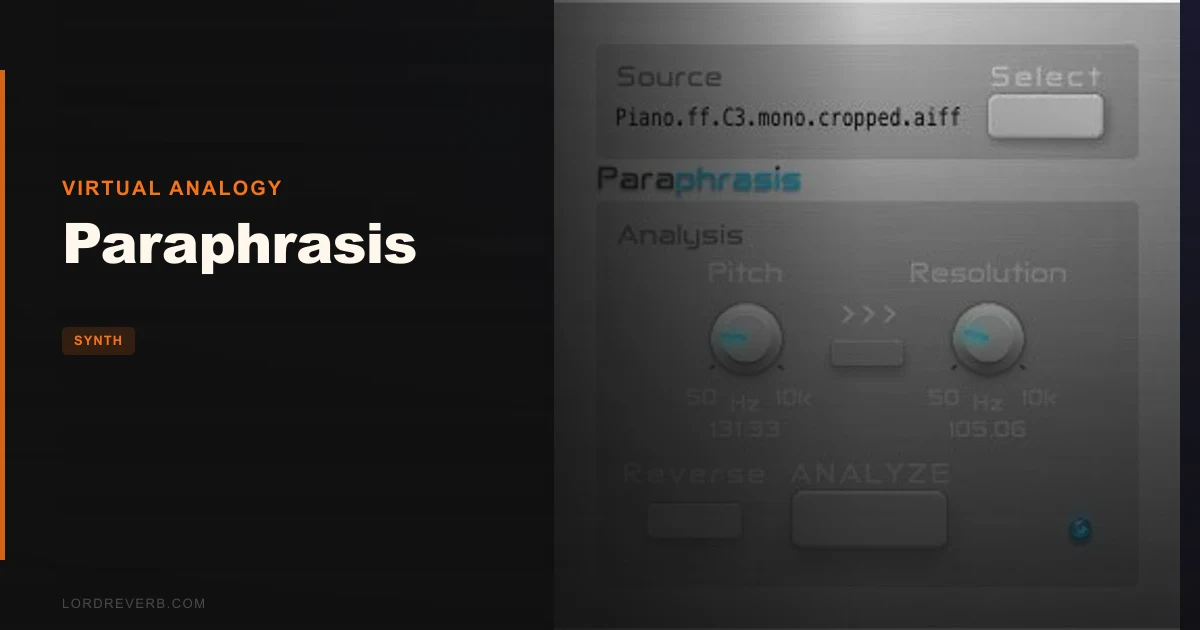
That's the specific frustration that Paraphrasis, a free open-source spectral modelling synthesiser from Virtual Analogy, is built to fix. Load one sample, tell it the pitch of that sample, and it builds a playable, polyphonic instrument from the spectral data inside that single file. No multisampling. No synthesis programming. No cost.
This review is for producers on Mac who have interesting samples they can't make playable, sound designers chasing odd timbres on zero budget, and anyone who's wondered whether spectral modelling is worth exploring before committing to something expensive.
The Specific Problem Paraphrasis Was Built to Solve
Spectral modelling as a concept has been around for decades. The idea is simple: analyse a sound's frequency content over time, then use that spectral data as the basis for synthesis rather than replaying raw audio. What you get is an instrument that can reproduce the character of a sound across a pitch range, rather than just stretching the waveform.
The problem is that proper spectral modelling tools are rarely accessible. They're buried inside expensive software suites, require significant technical setup, or demand you record full chromatic sample sets anyway to get convincing results.
Paraphrasis cuts that down to two numbers. You give it one sample and one pitch value. It does the spectral analysis and hands you back a 16-voice polyphonic instrument you can play immediately from any MIDI keyboard. That's the whole promise, and it's a real one.
For producers working with field recordings, unusual acoustic instruments, or found sounds, this is a genuinely underrated workflow. You don't need a full sample library. You need one good recording and about thirty seconds of setup time.
The frustrating part is the platform limitation. Mac only, Audio Unit hosts only. If you're on Windows, the conversation ends right here. That's a hard cut that eliminates a massive portion of the people who'd benefit most from a free tool like this.
How the Spectral Engine Actually Performs
We loaded a short recording of a struck metal bowl, about two seconds of sustain. Pitched it at 220Hz in the interface. Paraphrasis analysed it, and within a few seconds we had a 16-voice polyphonic instrument we could play across the full MIDI range.
The low register sounded dense and slightly hollow, which tracked with the original sample's character. The mid range sat closest to the source material, as you'd expect. Up around C5 and above, the spectral model started to thin out, but it didn't collapse into noise or aliasing. It stayed musical. That's the win.
Standard repitching on the same sample through a basic sampler gave us something usable only between roughly A2 and E4, maybe a major seventh in either direction before the timbre became recognisably wrong. Paraphrasis extended that usable range substantially. We'd call it two to three octaves of convincing playability, which is a real improvement over zero.
The frequency resolution parameter, automatically set to 80% of the pitch value you enter, controls how finely the spectral analysis carves up the frequency content. You can adjust this manually. Lower values give a coarser, grainier result. Higher values capture more spectral detail but don't always translate to better-sounding output.
We found that the default 80% setting works well for most sources. Percussive sounds with clear fundamental tones responded best. Noisy or broadband sources like white noise or room recordings produced less predictable results, which makes sense given how spectral modelling works. It needs something to lock onto.
Polyphony holds at 16 voices cleanly. We played full chords and encountered no obvious voice-stealing artifacts at that count. CPU usage stayed moderate. Nothing alarming, nothing you'd notice in a normal session context on a modern Mac.
The Reverse Mode: Where It Gets Interesting
The Reverse option is the one feature in Paraphrasis that made us stop and actually spend time experimenting rather than just testing functionality.
What it does is analyse the sample backward. The spectral content is read in reverse order, which means the attack characteristics of the original sound become the release shape of the synthesised instrument, and vice versa. You end up with an instrument that has the sustained character of your sample but approached from the wrong direction temporally.
We ran a piano note through this. The original sample had a sharp transient and a long decay. Reversed, the synthesised instrument swelled in slowly and died quickly. Not a piano. Something closer to a bowed instrument impression, or a reversed tape sound that still tracked pitch cleanly.
That specific moment is where Paraphrasis justified its existence for us as a sound design tool rather than just a utility plugin. The reverse mode turns a limitation, having only one sample to work with, into a feature. You're not just making that sample playable. You're generating a related but different instrument from the same source material.
Layering forward and reverse instances of the same sample in your DAW, tuned to the same note, produced pads with an unusual phasing quality that we haven't heard out of anything else at any price point. Satisfying result. Worth trying on anything with a clear pitch and an interesting decay shape.
The Interface: Minimal Is One Thing, Sparse Is Another
Two parameters. That's the whole interface.
We're not opposed to minimal design. Some of the most useful tools in a signal chain are single-knob affairs. But there's a difference between minimal because the tool does something complex simply, and minimal because development stopped early.
With Paraphrasis, we'd love at least a basic envelope section. Attack, decay, sustain, release. The instrument currently plays with whatever amplitude shape the spectral model produces from the sample, and while that's often fine, you can't shape the notes at all after loading. A slow-swelling pad sound becomes tricky if your source sample has a sharp attack baked in, because you have no way to soften the onset.
A filter would also be welcome. Not a sophisticated one. Just something to roll off harshness above a certain frequency, or thin out the low end for a cleaner keyboard register. Without it, some sample sources produce instruments that need additional processing in your DAW before they're usable.
We also wish there were a way to preview the spectral analysis before committing. You enter a pitch value and click analyse, and you hear the result. If it's not right, you adjust the pitch value and try again. On unfamiliar source material, that trial-and-error loop gets annoying quickly when you're not sure what fundamental frequency the sample actually contains.
A tuning detector or spectrum display would fix this. Neither exists.
To be fair, this is free and open source. The baseline expectation has to adjust accordingly. But the interface limitations are real and they affect the workflow, so we're naming them.
Loading Samples and Setting Pitch: The First Five Minutes
The workflow is direct. You drag a sample into the plugin or use a file browser, depending on your host. Then you enter the fundamental frequency of the sample in Hz. Then you hit analyse. That's it.
The pitch entry is the step that trips most people up early on. Paraphrasis wants a frequency value, not a note name. A3 is 440Hz. C4 is 261.63Hz. If you don't already know the frequency of your sample, you need to check it elsewhere first. A spectrum analyser or a tuning plugin in a separate track works fine for this.
Once you know the frequency and enter it accurately, the analysis result is usually good on the first try. Entering a wrong value, even by 10-15Hz on a low-pitched source, produces a noticeably degraded instrument. The spectral model needs the correct fundamental to build from.
We tested this with samples we'd pre-tuned to known frequencies, and those produced cleaner results than samples where we had to guess. If you're recording source material specifically for use in Paraphrasis, tune your instrument before you record. That step alone will save you significant troubleshooting time.
The file format support covers common audio types. WAV and AIFF both loaded without issue in our testing. Very short samples, under half a second, produced thinner spectral models. Two to four seconds of sustained tone gave the best results in our sessions.
Polyphony and Playability
Sixteen voices is enough for almost anything. Full jazz chords, cluster voicings, held pads with running melodic lines on top. We didn't find a playing scenario that pushed past that limit in normal use.
The instrument responds to MIDI velocity, though the response is generated from the spectral model rather than from layered dynamics samples. Loud velocities produce a brighter version of the sound, and quieter ones are softer and slightly duller. It's not as nuanced as a well-sampled instrument with multiple velocity layers, but it's not flat either. There's expressiveness there.
Pitch bend works. Mod wheel response depends on your host's implementation rather than anything internal to Paraphrasis. We routed the mod wheel to vibrato via MIDI mapping in Logic and got a usable result, though it required host-level configuration rather than anything inside the plugin itself.
The transient response varies significantly by source material. Instruments with clear, fast attacks, like a struck bar or a plucked string, produced the most immediately playable results. Sounds with slow onsets, like a bowed note or a swelled pad, produced instruments that felt slightly disconnected from the key press at fast tempos.
That's not a flaw in the synthesis so much as a natural consequence of spectral modelling from a single sample. The attack characteristics are baked into the model. They're not adjustable. Which brings us back to the envelope issue.
Strengths and Weaknesses
The strengths here are real and specific. A free spectral modelling synthesiser that takes one sample and produces a 16-voice polyphonic playable instrument is a genuinely useful thing, and it works. The reverse mode produces sounds we haven't heard anywhere else. The CPU footprint is reasonable for what it's doing under the hood.
We loaded a recording of a singing bowl, something with a clear fundamental and a long, complex overtone series. The result in Paraphrasis was an instrument we actually used on a track. It sat in the mix in a register where we needed a subtle, pitched texture that didn't compete with the pads underneath. A Kontakt library would have given us something slicker. Paraphrasis gave us something ours.
The weaknesses are also real. Mac AU only cuts the audience in half, at minimum. The interface is too sparse for practical sound design beyond the initial load-and-play workflow. No envelope control is a genuine limitation. No filter is annoying. The pitch entry process requires external tools to do properly on unknown source material.
Documentation is sparse to the point of being almost absent. There's no manual in the traditional sense. New users are mostly on their own, relying on experimentation and community knowledge to figure out what input values produce what results.
The open source nature means there's no dedicated support channel. If something breaks with a new OS update, you're waiting on community fixes.
Value for the Price
Paraphrasis is free. The value calculation is therefore not about whether it's worth the money. It's about whether it's worth the time to learn and the space in your plugin folder.
That answer is yes, with a clear condition. If you're on Mac and working in an AU host, installing Paraphrasis costs you about ten minutes of setup. The potential return is a new category of sound that costs nothing to access. For that equation, the answer is always install it.
If you need Windows support, VST3 format, or AAX for Pro Tools, Paraphrasis can't help you at any price. The platform restriction is non-negotiable, and we won't soften that.
For producers who do fit the compatibility window, this belongs in your toolkit the same way any free, functional, unique-sounding tool does. You won't use it on every session. But when you need what it does, nothing else at this price does it.
Specs and Technical Details
| Developer | Virtual Analogy |
| Price | Free |
| Plugin Format | AU only |
| OS Support | Mac (OSX 10.7 and later) |
| Activation | None required |
| CPU Usage | Light to medium |
| Trial Available | N/A (fully free) |
| Version Reviewed | Current release |
| Polyphony | 16 voices |
| Key Features | Spectral modelling from single sample, Reverse mode, frequency pitch input, resolution control |
Who Should and Shouldn't Buy This
- ✅ Buy if you're a Mac producer working in Logic, Ableton Live, or any AU host who wants to turn single samples into playable instruments without spending anything.
- ✅ Buy if you work with field recordings or unusual acoustic sources and want a new way to extract pitched, playable instruments from them.
- ✅ Buy if you're exploring spectral synthesis as a sound design approach and want a free entry point before committing to something more complex.
- ❌ Skip if you're on Windows. Full stop. It won't run.
- ❌ Skip if you're a Pro Tools user who needs AAX format. Paraphrasis has no AAX build.
- ❌ Skip if you need a fully featured sample-based instrument with envelope shaping, filtering, and modulation. Paraphrasis isn't that. Look at something like Applied Acoustics Chromaphone 3 instead for a more complete sound design environment.
Score Breakdown
| Category | Score | Notes |
|---|---|---|
| Sound Quality | 3.5/5 | Spectral model sounds convincing across a wide range; some sources work better than others |
| Value for Money | 5.0/5 | It's free. This category has one answer. |
| Ease of Use | 3.0/5 | Two parameters sounds simple, but pitch entry requires external tuning knowledge |
| Features | 2.5/5 | No envelope, no filter, no modulation. Sparse even for a minimal tool. |
| CPU Efficiency | 4.0/5 | Handles 16-voice polyphony at a reasonable CPU cost on modern Macs |
| Overall | 3.5/5 | A free, functional, genuinely unique tool with real platform and feature limitations |
Alternatives to Consider
If Paraphrasis doesn't fit your setup, or you want more control over the synthesis, these are worth looking at.
Arturia MiniFreak V
Arturia MiniFreak V covers spectral and digital synthesis alongside more traditional subtractive approaches. It's a paid product, but it gives you envelope control, modulation, and effects that Paraphrasis doesn't have. If you're ready to invest in a synth that can go further with unusual textures, MiniFreak V is a serious option.
Applied Acoustics Systems Chromaphone 3
Applied Acoustics Chromaphone 3 takes a physical modelling approach rather than spectral, but the goal is similar: making unusual acoustic timbres playable across a pitch range. It's more controllable than Paraphrasis and sounds brilliant on percussive and resonant sources. Different workflow, overlapping use case.
Arturia SEM V
If what you actually want is a synth with real character and a full feature set, Arturia SEM V is worth considering. It won't model your samples, but it'll give you sounds with real analogue-emulation depth and far more control over the result than Paraphrasis can offer.
AudioThing SX1000
For producers interested in unusual sound sources being turned into playable instruments with a more polished interface, AudioThing SX1000 is worth a look. Different category but overlapping curiosity about non-standard synth voices.
None of these are free. That's the trade. Paraphrasis wins on cost every time. They win on depth, platform support, and reliability of output.
Our Verdict: An Underrated Tool With a Hard Platform Wall
Here's the honest summary. Paraphrasis does something specific, does it for free, and does it in a way that produces sounds you won't get from anything else without significantly more effort and money.
We loaded a field recording of a struck metal railing, something we'd never figured out how to use musically before. Paraphrasis built a playable instrument from it in under a minute. We used that instrument as a textural pad on a track the same afternoon. That's the case for installing this plugin.
The case against is equally clear. No Windows build. No VST3. No AAX. No envelope. No filter. Almost no documentation. It's an unfinished tool that works well within narrow parameters and requires you to work around its gaps with external processing.
If you're a Mac producer in an AU host, install it right now. The download takes longer than the decision should.
If you're on Windows or Pro Tools, we genuinely wish we had better news. Paraphrasis can't help you. Don't waste time on a workaround that doesn't exist.
The one thing we'd tell you to remember: identify your sample's fundamental frequency before you load it. That single step, which takes about thirty seconds with a spectrum analyser, is what separates a clean, usable result from an annoying troubleshooting session with a two-parameter interface that gives you very little feedback about what went wrong.
Get that right, and Paraphrasis might become one of the more interesting things in your plugin folder, even though it costs absolutely nothing.
Frequently Asked Questions
What exactly does Paraphrasis do?
Paraphrasis is a spectral modelling synthesiser. You load a single audio sample, enter its fundamental frequency in Hz, and the plugin analyses the spectral content of that sample to build a fully playable polyphonic instrument. It doesn't replay the audio. It models the sound's frequency characteristics and synthesises new versions of that timbre across the pitch range. The result is a 16-voice instrument you can play from any MIDI keyboard.
Is Paraphrasis really free?
Yes. Paraphrasis is free and open source. There's no paid tier, no feature unlock, no subscription. You download it, install it in an AU-compatible host on Mac, and that's it. The only cost is that it's Mac AU only, which limits who can access it.
Does Paraphrasis work on Windows?
No. As of our testing, Paraphrasis only runs as an Audio Unit plugin on Mac, starting from OSX 10.7. There is no VST, VST3, or AAX version available. Windows users and Pro Tools users cannot run it in its current form. That's a hard limit, not a workaround situation.
What types of samples work best with Paraphrasis?
Samples with a clear, stable fundamental pitch produce the best results. Struck or plucked instruments, singing bowls, tonal percussive sounds, and single sustained notes from acoustic instruments all respond well. Broadband or noisy sources like cymbals, room recordings, or atonal textures give the spectral engine less to work with and tend to produce less musical output. Two to four seconds of sustained tone is the sweet spot for sample length.
Can I shape the sound after loading a sample, like with an envelope or filter?
Not within Paraphrasis itself. The plugin has two parameters: the sample's fundamental frequency and the frequency resolution of the spectral analysis. There's no envelope section, no filter, and no modulation routing inside the plugin. If you need to shape the attack, release, or tonal character of the output, you'll need to process it with external plugins in your DAW's signal chain after the instrument.
What is the Reverse mode and should I use it?
Reverse mode analyses the loaded sample backwards before building the spectral model. This means the temporal characteristics of the sound are flipped: a sound that originally had a sharp attack and long decay becomes an instrument with a slow swell and a quick cutoff. It's a creative sound design feature rather than a correction tool. We'd recommend trying it on any source material you load, because the reversed version often sounds like a completely different instrument and can produce textures that are hard to generate any other way.