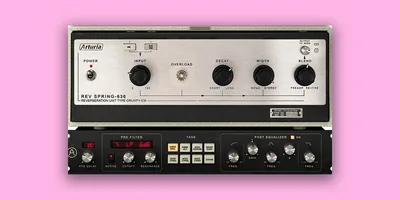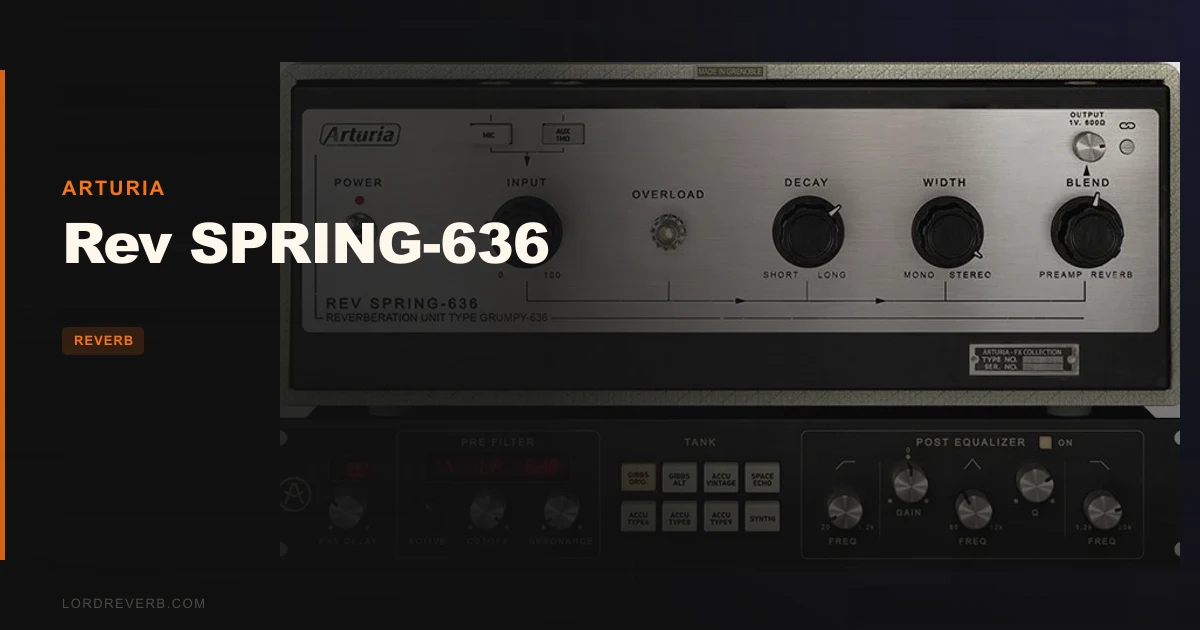
If you’re building a dub track, a ska skank or a guitar part that needs an amp-style drip, Rev SPRING-636 at $99 is the spring reverb to audition first, and the CPU bill is the reason it won’t be everyone’s pick.
It’s Arturia’s virtual take on the Grampian 636. The developer says the original was used by Pete Townshend and by Lee Scratch Perry, and that it’s a cornerstone of reggae and ska.
That history isn’t a gimmick. It tells you what the plugin is for.
This is a character reverb. It wants to be heard, not hidden.
Owners say it sounds good with almost any combination of settings, so sound is not the issue. The questions are the 20-25% CPU per instance and how much spring you really need. We’ll go through both sides evenly.
Where It Belongs
Start with a clean electric guitar part that sounds too polite. Send it to Rev SPRING-636 and the polite part disappears.
Owners who play guitar say it replicates amp-type spring reverb well. They describe the right amount of twang and drip to sound realistic. That’s the plugin’s home turf.
Dub is the other obvious fit. Throw a snare, a rimshot or a skank chord into the tank, crank the Reverb Length, and let it splash. The developer calls the sound vibrant, slappy and squelchy. That’s accurate for what the controls are built to do.
Ska and reggae follow the same logic. Offbeat guitar, organ stabs and a spring tail that you can hear around the edges.
You can also use the Germanium pre-amp as a saturation tool. Owners report using the front end to drive the spring harder, or blending it in parallel as saturation. That’s a smart way to use a reverb, and it widens what the plugin is good for beyond guitar.
Where It Doesn't
Don’t reach for this on a lush ballad vocal. A spring tank is the wrong shape for that job.
Springs have a splashy, boingy character by design. If you want a smooth, invisible tail behind a piano or strings, you’ll fight the plugin the whole way.
Big sessions are the second problem. At 20-25% CPU per instance, three or four copies and you’re freezing tracks. Owners flag this as the main limit for larger projects.
Older machines are out too. You need 4 cores at 3.4 GHz or Apple Silicon, 4 GB of RAM and an OpenGL 2.0 GPU. On Windows, ARM processors aren’t supported at all.
And it’s 64-bit only. If you’re on a 32-bit DAW, skip it.
The Eight Spring Tanks
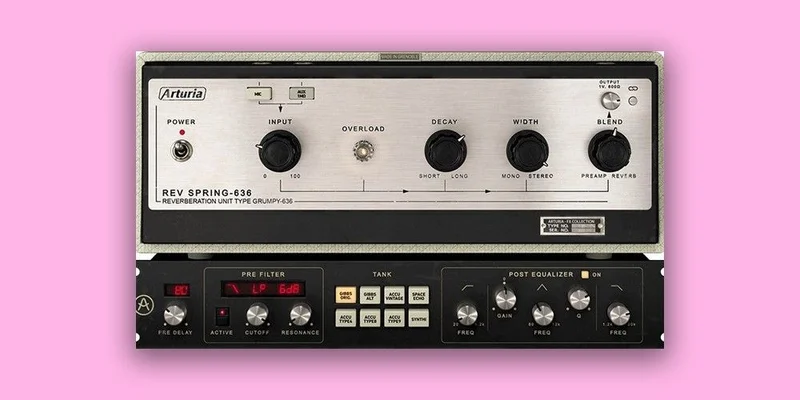
The core of the plugin is eight swappable spring reverb tank models. Each has its own spring sound and its own kick.
That “kick” matters. It’s the thump you get when a transient hits the spring and the tank answers with a splash. Different tanks give you different amounts of it.
This is where the plugin earns its keep. You’re not stuck with one character.
Swap tanks while a loop plays and the personality shifts. One suits a snare, another sits better under a strummed chord.
The developer says Phi® modelling captures the spring’s physical nature and the resonance effects of the tank. We can’t verify that against a real Grampian ourselves. What owners report is that the springs sound realistic rather than like a generic reverb with a spring label stuck on.
That’s the payoff of having eight models. You audition, pick and move on.
The Germanium Pre-Amp and the Two Preamp Types
Before the signal hits the spring, it goes through a Germanium pre-amp. It warms the signal, and it distorts when you push it.
There are two preamp types, each with its own sonic colour. Use them to decide how much grit the reverb carries.
Here’s a scene. You’ve got a thin guitar loop and a reverb that sounds polite. Push the input gain until the pre-amp starts to bite, then listen to what the spring does with that dirtier signal. It gets angrier. It gets more interesting.
Owners like this approach. They use the pre-amp to drive the spring, or they blend it in parallel as saturation.
The input-output gain link switch helps here. Link them and you keep your level steady while you push the drive. Unlink them when you want the drive to change the loudness on purpose.
It’s a clever bit of design. A reverb that doubles as a saturation stage is more useful than a reverb that only does one thing.
Reverb Length, Mix and Pre-Delay
Reverb Length runs from long to tight and snappy. That’s your decay control.
Short settings give you the snappy, slappy spring that sits behind a drum. Long settings turn the tank into a wash that you can ride for dub throws.
The Mix control sets the dry/wet balance. Owners note it can change on the fly, so you can automate it for a throw without a click.
Pre-delay sets how quickly the reverb starts after the dry signal. A bit of pre-delay keeps a vocal or a lead line clear of its own tail. Without it, the spring smears right on top of the note.
None of these controls are exotic. That’s fine. They’re the three you reach for first, and they’re where you’d expect them.
The catch is that owners say it’s easy to overdo things. A spring this characterful, with this many ways to push it, will happily bury your mix if you let it.
The Pre-Filter and Built-In EQ
This is where the plugin gets practical. The pre-filter is a multimode tool that carves out specific parts of the signal before it goes to the reverb.
Think of what that solves. You send a full-range drum bus to a spring and the low end turns to mud while the top gets harsh. Filter before the tank and only the part you want gets the splash.
Then there’s the 3-band parametric EQ inside the plugin for tone shaping. It works on the reverb itself.
Having both is smart. One shapes what goes in, the other shapes what comes out.
It also saves you a plugin slot. You don’t need a separate EQ on the return.
That matters when CPU is already your problem. Every extra plugin on the chain adds to the load, and this one already pulls 20-25% per instance.
Presets, Tutorials and the Resizable Window
There’s a comprehensive set of presets. Use them as starting points, not finished sounds.
Integrated tutorials are included too. That’s a nice touch for anyone who hasn’t worked with a spring tank before. Owners do flag a learning curve risk for less experienced users, so the built-in help is a real asset.
The window is resizable, which is welcome on a laptop screen or a big monitor.
Owners call the design user-friendly. They also report interface design complaints and tone smearing concerns. Both things can be true. The layout is easy to read, and some people still don’t love how it looks or how the tail behaves.
Be honest with yourself about which camp you’ll land in. Open the demo, if you can, and spend ten minutes with it.
What It Costs to Run: CPU and Loading
This is the weak spot. Owners report 20-25% CPU per instance.
Do the maths on your own machine. Two instances and you’ve used up nearly half of a modest system’s budget on reverb alone. That’s frustrating.
Loading is the next complaint. Owners say the plugin file installation is time-consuming and loading times are slow.
Open a project with a few instances and you’ll feel it. You wait. You make a coffee.
The fix is workflow, not hardware. Use one instance on a send, not one per track. Bounce your spring-drenched parts to audio once you’re happy.
That’s a perfectly good way to work. But it’s a workaround for a limit, and you should know that going in.
If you work on big sessions with lots of reverb sends, this plugin will annoy you. If you run lean projects with one or two spring sends, you’ll barely notice.
Is It Worth $99?
Here’s the value case, with the strengths and weaknesses weighted evenly.
For $99 you get eight tank models, a Germanium pre-amp with two types, a pre-filter, a built-in 3-band EQ, tutorials and a full preset library. That’s a lot of feature for one reverb. Few spring plugins give you this much control over what goes into the tank.
What you pay on top is CPU, slow loads and a time-consuming install. Those aren’t free.
When is it enough to go cheaper? If you only want a bit of amp-style spring on a guitar, a simpler spring plugin will do the job with less overhead. You don’t need eight tanks for that.
When is paying justified? When spring reverb is a sound you use as a signature, in dub, ska, reggae or guitar-heavy work. Then the tank variety and the pre-amp saturation earn their keep.
It’s a good deal for a specialist. It’s a questionable one for someone who wants a spring sound twice a year.
Against the Field
Three names come up when people compare it.
Pulsar Primavera: some users prefer it for more authentic spring reverb emulation. If realism is your top priority, audition it.
u-he Twangstrom: noted as a top alternative in the spring reverb category.
AudioThing Springs: also noted as a top alternative in the same category.
Where does Rev SPRING-636 win? On the pre-amp and the built-in tone tools. Few rivals give you a Germanium drive stage and a pre-filter and an EQ in one window. That’s our pick for people who want to shape the sound hard.
Where does it lose? CPU, by owner reports, and the question of authenticity for some users. If you want the most faithful spring and don’t care about extras, look at Primavera first.
Specs & Technical Details
| Spec | Detail |
|---|---|
| Developer | Arturia |
| Price | $99 |
| Plugin Format | Standalone / VST / AAX / Audio Unit / NKS (64-bit DAWs only) |
| OS Support | macOS 10.13+ / Windows 10+ 64-bit (ARM not supported on Windows) |
| Activation | N/A |
| CPU Usage | Heavy (typically 20-25% per instance) |
| Trial Available | N/A |
| Version Reviewed | N/A |
Score Breakdown
| Category | Score | Notes |
|---|---|---|
| Sound Quality | 4.0/5 | Owners report realistic twang and drip that sounds good across almost any settings |
| Value for Money | 3.5/5 | Deep feature set for $99, offset by the CPU and load-time cost |
| Ease of Use | 3.5/5 | User-friendly layout, but easy to overdo and a learning curve for beginners |
| Features | 4.0/5 | Eight tanks, Germanium pre-amp, pre-filter and 3-band EQ |
| CPU Efficiency | 2.0/5 | 20-25% per instance is hard to live with in bigger projects |
| Overall | 3.4/5 | Characterful and flexible spring reverb held back by a heavy CPU bill |
Alternatives to Consider
Pulsar Primavera
Some users prefer it for more authentic spring reverb emulation. Pick it if realism matters more than extra tone tools.
u-he Twangstrom
Noted as a top alternative in the spring reverb category. Worth a demo before you commit.
AudioThing Springs
Also noted as a top alternative in the same category. A sensible comparison if you’re weighing up your options.
The Bottom Line
Buy Rev SPRING-636 at $99 if spring reverb is part of your sound. Guitarists, dub producers and anyone working in ska or reggae will get real use out of the tanks and the Germanium drive.
Skip it if you run big sessions on a modest machine. At 20-25% CPU per instance and with slow loads, it’ll fight you.
Skip it too if you only want a touch of spring now and then. A simpler plugin will do.
For the right person, it’s a genuinely fun, flexible tank. For everyone else, the CPU bill is the price of admission, and it’s a steep one.
Frequently Asked Questions
What is Rev SPRING-636?
It's Arturia's virtual recreation of the classic Grampian spring reverb. It has eight swappable tank models, a Germanium pre-amp, a pre-filter and a 3-band parametric EQ. The developer says the original was used by Pete Townshend and Lee Scratch Perry.
How much CPU does Rev SPRING-636 use?
Owners report around 20-25% per instance. That makes it a poor fit for large projects with many instances. Using one instance on a send helps.
What plugin formats does it support?
It works as Standalone, VST, AAX, Audio Unit and NKS, on 64-bit DAWs only. 32-bit systems are not supported.
What are the system requirements?
On Mac you need OS 10.13+, 4 GB RAM, 4 cores at 3.4 GHz or Apple Silicon, 1 GB disk space and an OpenGL 2.0 GPU. On Windows you need Windows 10+ 64-bit with the same RAM, CPU and GPU needs. ARM processors are not supported on Windows.
Is it good for guitar?
Owners who play guitar say it replicates amp-type spring reverb sounds effectively. They describe the right amount of twang and drip to sound realistic.
Is it worth $99?
It depends on your work. If spring reverb is a signature sound for you, the eight tanks, pre-amp and built-in tone tools justify it. If you only want a bit of spring occasionally, a simpler plugin is enough.