
We loaded a dry spoken-word vocal into Space on a Tuesday afternoon, dropped one of Venus Theory’s foley impulses onto it, and the room disappeared. Not cleaned up. Disappeared. What came back was the sound of that voice bouncing off something between a corrugated metal sheet and a cathedral pipe, with a tail that kept evolving for four seconds after the word ended.
That moment told us exactly what Space by Lunacy is: a creative convolution reverb built for producers who want rooms that don’t exist. It’s not a Lexicon 480 replacement. It’s not trying to be. At $24, this is a sound design instrument wearing reverb’s clothes, and if you need it for that, you’ll love it.
What Space Is (and What It Definitely Isn't)
Space is a dynamic convolution reverb plugin from Lunacy Audio. It ships with 204 impulse responses designed by Venus Theory and Benn Jordan, two sound designers known for textural, left-of-centre work. The IR library covers halls and rooms, but it leans hard into foley, synthesized spaces, cabinets, and texture-first categories that traditional convolution plugins ignore.
It is not a mix-transparent room emulator. If you’re tracking vocals and want them to sound like they’re in a world-class live room, this is the wrong tool. Go look at Apogee Clearmountain’s Spaces review instead.
Space is for producers who want the reverb itself to be a sound. That’s a legitimate and underserved use case. Just be clear going in.
Living With Space Day to Day
Setup is clean. VST3, AU, and AAX formats install without friction on both Mac (10.15+, M1/M2 recommended) and Windows 10+. The plugin sits in your DAW like any send effect. Activation needs an internet connection, which is mildly annoying for studio machines kept offline, but it’s a one-time process.
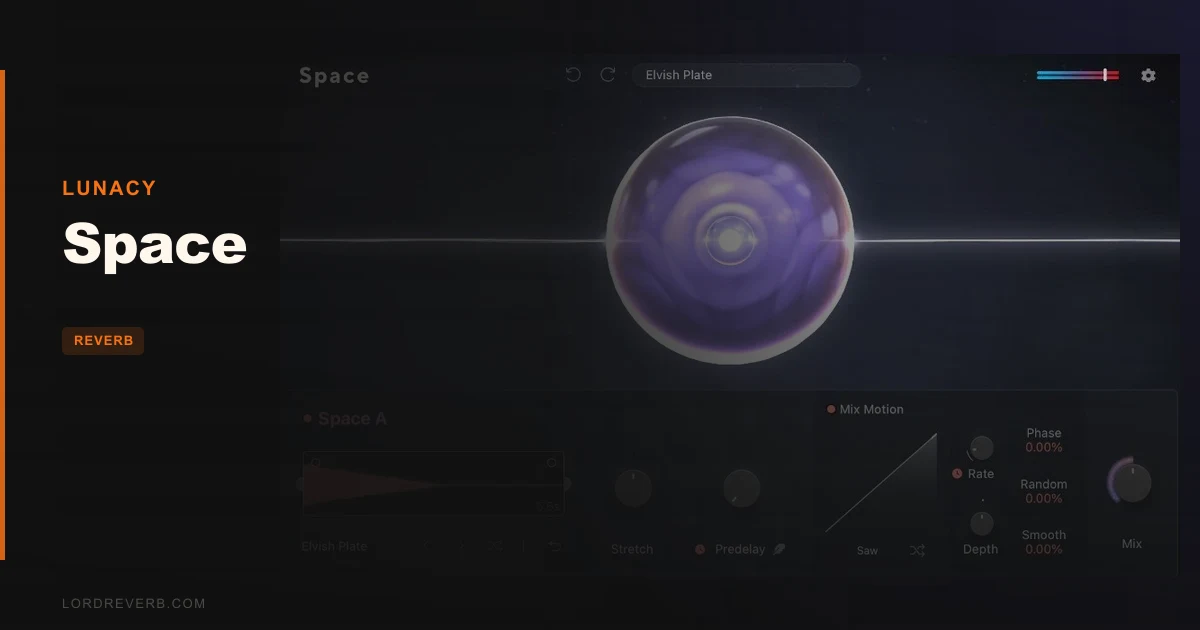
The interface is spare and clear. You get your IR browser on the left, the impulse editor controls across the middle, and the LFO section on the right. We found the 50 modulation tables for the mix parameter to be one of the most satisfying details in the whole plugin. Drop a pulsing LFO shape onto the wet signal and a pad suddenly breathes. A drum hit gets a rhythmic reverb envelope. It changes how you think about the effect.
The impulse editor is where the real time disappears. We stretched a 1.2-second hall IR to 400% and sent a hi-hat through it. The result was a five-second evolving texture we exported as a sample. We did this three times that session. That’s either a feature or a problem, depending on your deadline.
RAM is the one honest friction point. The 8GB minimum is firm. We tested on a machine with 8GB and noticed load times on larger IRs were slow enough to interrupt flow. 16GB is the real minimum if you’re running this alongside a busy session.
The Trade-Offs You Should Know Before Buying
The bespoke IR library is the headline, and it earns that billing. But 200-plus IRs means you’ll spend meaningful time browsing before you know where things live. There’s no tagging system beyond broad categories. You learn the library by using it, not by searching it. That’s fine if you treat it as exploration. It’s frustrating if you need a specific texture fast during a session.
The LFO modulation is brilliant on paper and mostly brilliant in practice. Where it gets awkward is precision editing. You can draw your own LFO shapes, but the editor is small and finicky. We found ourselves accepting one of the 50 preset tables rather than wrestling with a custom curve.
The BEAM integration is a genuine bonus if you already own that platform. Three Space nodes in serial or parallel is a meaningfully different creative tool. If you don’t own BEAM, you won’t miss it. But it’s worth knowing the plugin sits inside a broader Lunacy ecosystem that adds value over time.
CPU load sits in the medium range on our M2 Mac. Heavier IRs with stretch applied pushed usage noticeably. Not session-breaking, but worth watching if you run three instances simultaneously.
Against the Field: How It Sits
For straight acoustic emulation, Clearmountain’s Spaces wins on realism. That’s not the contest Space is entering.
For ambient and texture work, Space competes directly with Baby Audio Spaced Out. Spaced Out leans more toward shimmer and pitch-modulated textures. Space leans into convolution specificity. If you want a reverb that sounds like a specific physical object, Space wins. If you want generative shimmer, Spaced Out edges ahead.
For producers building depth through reverb and delay combinations, our delay plugins guide covers how Space slots into a wider signal chain. It pairs well with a pre-delay on the send, particularly when you’re using modulated mix LFOs.
Valhalla’s Shimmer and UberMod exist in adjacent territory but aren’t convolution-based. Different tool, different result.
The Real Verdict on Space
Space is underrated as a creative instrument. The IR library alone is worth serious attention, and the impulse editor with 10% to 400% stretch capability makes it genuinely versatile beyond what most convolution plugins offer.
We’d buy this. But we’d buy it knowing exactly what it’s for.
It’s wrong for you if you need transparent, mix-ready room emulation for tracking. It’s wrong if you’re on an 8GB RAM machine that’s already stressed. And it’s wrong if you want quick-dial presets rather than an exploratory tool.
For everyone else in the business of building spaces that don’t exist, this is a clever and deeply stocked plugin.
Score Breakdown
| Category | Score | Notes |
|---|---|---|
| Sound Quality | 4.5/5 | Bespoke IRs sound distinct and high-quality; not a realism tool but excellent at what it does |
| Value for Money | 4.0/5 | Strong IR count plus impulse editor and LFO make the price defensible |
| Ease of Use | 3.5/5 | Interface is clean but the IR library takes time to learn; LFO editor is fiddly |
| Features | 4.5/5 | Impulse stretch, custom LFO shapes, drag-and-drop IR support, and BEAM integration are all legitimate differentiators |
| CPU Efficiency | 3.5/5 | Medium load baseline; stretched large IRs push usage noticeably |
| Overall | 4.1/5 | A genuinely creative convolution reverb for producers who want texture, not transparency |
Alternatives to Consider
Apogee Clearmountain's Spaces is the pick if you need realistic acoustic environments for tracking and mixing. Read our full review to see where it wins over creative convolution tools like Space.
Baby Audio Spaced Out covers the ambient and texture lane with a different approach: pitch-modulated shimmer and generative effects rather than convolution specificity. Our Spaced Out review breaks down where each plugin belongs in your signal chain.
Lunacy BEAM is worth considering if Space catches your ear. Owning BEAM gives you Space included, plus the ability to chain up to three Space nodes in parallel. It's a different value calculation but one worth running.
If you're building spatial depth through reverb and delay together, our delay plugins guide covers how convolution reverbs like Space fit into a wider processing chain.
Space earns its place in any producer's toolkit who builds sounds rather than just records them. If that's you, stop reading and go load the demo. If you need acoustic realism for a live session, look elsewhere. The wrong tool for the right producer is still the wrong tool.
Frequently Asked Questions
Is Lunacy Space good for mixing vocals and acoustic instruments?
Not if you want transparent, realistic room emulation. Space's IR library skews toward textural and synthesized spaces rather than neutral acoustic environments. For standard vocal reverb on a mix, you'll get more predictable results from a purpose-built algorithmic or realistic convolution reverb. Space works brilliantly for vocal sound design where you want the reverb itself to be a creative element.
Do I need BEAM to use Space?
No. Space runs as a standalone VST3, AU, or AAX plugin in any major DAW without BEAM. The BEAM integration is an added option, not a requirement. If you do own BEAM, you already have Space included and can chain up to three instances in serial or parallel inside that environment.
Can I load my own impulse responses into Space?
Yes. Space supports drag-and-drop loading of custom IR files and folders, which you can save for repeated use. This is a solid long-term value feature. It means your investment in third-party or personally sampled IR libraries works directly inside the plugin.
How does the impulse stretch feature work in practice?
The impulse editor lets you set start, end, fade in, and fade out points on any IR, then stretch the entire result from 10% of its original length up to 400%. A 1-second room IR stretched to 400% becomes a 4-second evolving tail with completely different character. It's one of Space's strongest features for sound design and sampling workflows.