
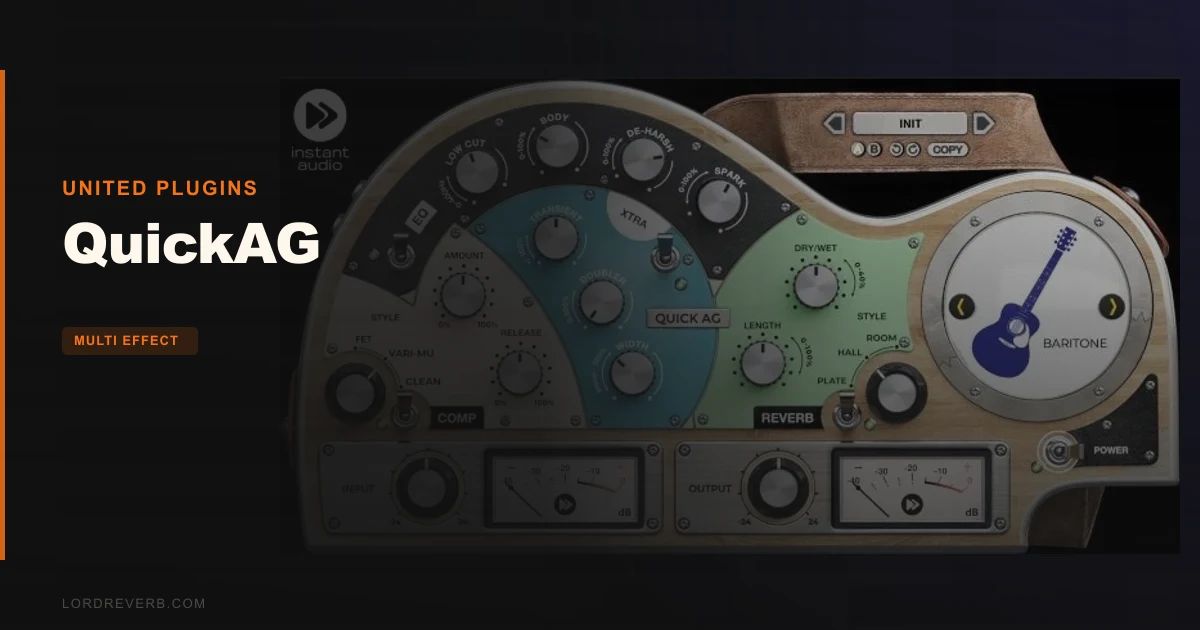
QuickAG is a single-channel acoustic instrument processor built by Instant Audio under the United Plugins umbrella, and it earns its place on the shortlist for home studio producers who spend more time performing than tweaking. At $107, it's a focused tool: EQ, compression, reverb, and a width/size section, all pre-calibrated per instrument. It's not a Swiss Army knife. It's a scalpel for one specific job, and it does that job well enough that we'd recommend it to the right person without hesitation.
The wrong person? A mix engineer used to building acoustic chains from scratch who wants full parametric control. This plugin will frustrate you. We'll get to that.
What Opening QuickAG Actually Feels Like
Install is painless. No iLok, no dongle, no internet check-in during activation. You get a licence file, drop it in, done. That alone earns goodwill from us.
The GUI loads as a photorealistic hardware panel. It's busy in a deliberate way, like someone designed it to feel tactile. Resizable by dragging the corner arrow, which is a genuinely useful detail on smaller screens. The instrument selector sits front and centre: Baritone, Steel-string Guitar, Nylon Spanish, Ukulele, Mandolin. Five options. You click one and the hidden EQ and compressor parameters recalibrate underneath.
We loaded it on a dry steel-string recording, clicked the Steel-string preset, and heard an immediate difference before touching anything else. That's the promise. The first impression holds up.
Getting It Into a Real Workflow
We had a folk session: two acoustic guitars, a mandolin, and a ukulele, all tracked direct into an Apollo interface. The guitars were good takes but dry and slightly boxy, that 250-300Hz honk you get from a condenser sitting a little too close to the body.
We dropped QuickAG on the steel-string bus. The preset EQ had already pulled some of that body resonance back. The "Spark" control brought upper-mid presence forward without the track getting brittle. We didn't need to open a separate EQ to fix what QuickAG had already addressed. That was satisfying in the way that good tools always are.
The mandolin track was where it got interesting. We switched the selector to Mandolin. The compressor internals shifted. The FET mode gave it snap, and we blended in roughly 30% Vari-mu to round off the attack slightly. The blend control is one of the cleverer ideas here. You're not choosing one compressor type and living with it. You're mixing character.
The friction came later. We wanted to cut a narrow notch around 180Hz on the ukulele. QuickAG's EQ isn't built for that. You get Body and Spark controls, plus a Low Pass and De-Harsh switch. There's no frequency display, no Q adjustment, no surgical options. For a recording that's generally clean, that's fine. For a room that fought you on the way in, you'll need a separate EQ upstream.
What It's Genuinely Good At
The reverb section is the standout. Three algorithms: Plate, Hall, and Room. You set the tail length and the blend amount. That's it. No pre-delay adjustment, no diffusion sliders. What you get instead is three algorithms that are voiced for acoustic instruments specifically, and blending them is where the magic lands.
We ran a nylon guitar through 60% Plate and 40% Room at a 1.4-second tail. The result sat behind the instrument without washing it. The plate added air at the top, the room kept the low-mids grounded. Reviewers consistently report the reverb section as the plugin's best feature, and we'd agree. It's hard to make it sound wrong.
The 64-bit internal processing at sample rates up to 192kHz is no marketing fluff, either. At 96kHz sessions, we heard no artefacts, no aliasing on the De-Harsh filter, no graininess in the reverb tail. It's clean where it needs to be clean.
Users running high-track-count sessions report reasonable CPU behaviour. It's not featherweight, but it's nowhere near the CPU-hungry end of the spectrum. We ran six simultaneous instances without the session sweating.
The Rough Edges
The XTRA section is thin. Stereo width and "size" are the two controls. That's it. We wish there was at least an air band or a saturation amount dial. As it stands, it feels like a section that got cut down in development and was never finished.
There's no mid-side mode. For acoustic guitar in a pop or folk mix where you want to preserve the mono body while widening the room, that's a real miss. You'd need to reach for a separate M-S tool.
The lack of parallel compression routing is annoying. Blending compressor types is a smart workaround, but it's not the same as running a dry/wet blend on the entire compression stage. Experienced engineers will feel the ceiling quickly.
And honestly? The GUI, while impressive-looking, takes up screen real estate that its feature set doesn't quite justify. It's a wide panel for three sections and a selector.
Who This Is Really For
- ✅ Buy if you track acoustic guitar, ukulele, or mandolin regularly and want a chain that's dialled in before you touch a single knob.
- ✅ Buy if you're producing singer-songwriter or folk content where the acoustic needs to sound natural and present without complex processing decisions.
- ✅ Buy if you're newer to mixing acoustic instruments and want a safety net that makes it hard to destroy a good take.
- ❌ Skip if you're a seasoned mix engineer who builds instrument chains from scratch. The simplified controls will frustrate you within an hour.
- ❌ Skip if your recordings come back with real acoustic problems: room modes, proximity effect, resonant peaks. QuickAG can't fix a bad recording.
- ❌ Skip if you need to process piano, strings, or orchestral instruments. The five presets are acoustic instrument-specific. There's nothing here for a string section.
Specs & Technical Details
| Developer | United Plugins / Instant Audio |
| Price | $107 |
| Plugin Format | VST2 / VST3 / AU / AAX |
| OS Support | Mac (10.10+, M1 supported) / Windows 8-11 |
| Activation | Licence file, no iLok or dongle required |
| CPU Usage | Light to medium |
| Trial Available | Yes, 15-day unlimited |
| Version Reviewed | Current release (2025) |
| Internal Processing | 64-bit at up to 192 kHz+ |
| Instrument Presets | 5 (Baritone, Steel-string, Nylon Spanish, Ukulele, Mandolin) |
| Reverb Algorithms | 3 (Plate, Hall, Room) |
| Compressor Types | 3 (FET, Vari-mu, Clean), blendable |
Score Breakdown
| Category | Score | Notes |
|---|---|---|
| Sound Quality | 4.0/5 | Reverb and compressor blending sound musical; EQ is limited but voiced well |
| Value for Money | 3.5/5 | Solid at sale price; harder to justify at full price against more flexible tools |
| Ease of Use | 4.5/5 | The instrument selector concept genuinely works; near-zero learning curve |
| Features | 3.0/5 | XTRA section is thin; no M-S, no parallel blend, no surgical EQ |
| CPU Efficiency | 4.0/5 | Six simultaneous instances without strain; well-optimised for what it does |
| Overall | 3.8/5 | A genuinely useful tool for its specific audience, with a real ceiling for anyone beyond that |
Alternatives to Consider
If you want more surgical EQ control over your acoustic tracks, a dedicated acoustic guitar EQ plugin gives you the parametric depth QuickAG intentionally removes. FabFilter Pro-Q 4 is the standard we'd measure against here: the dynamic EQ bands alone handle acoustic resonance problems that QuickAG's Body and Spark controls can't touch.
For compression with more character options, best compressor plugins for acoustic guitar covers tools that give you full threshold, ratio, and attack control. UAD's 1176 or the Waves CLA-2A both offer more hands-on shaping than QuickAG's blended compressor, though neither ships with instrument presets.
United Plugins' own catalogue is worth a look if you like the QuickAG workflow. We reviewed the United Plugins Bass Bundle, which applies a similar instrument-targeted philosophy to low-end processing. If you like how QuickAG thinks, you'll probably like how that bundle thinks too.
For a full-featured acoustic multi-effect that handles piano, strings, and orchestral sources as well as guitar, best acoustic instrument plugins for home studios covers tools with broader instrument coverage than QuickAG's five presets.
QuickAG earns its score because it genuinely does what it says. Pick the right instrument preset, blend the compressors, dial in the reverb tail, and your acoustic track is closer to finished in thirty seconds than it would be after ten minutes with a generic channel strip. For a singer-songwriter tracking at home or a producer who handles acoustic instruments as a secondary skill, that speed is worth real money. But if acoustic guitar is your primary instrument and you're serious about the sound, you'll hit QuickAG's ceiling within a month and want more. The 15-day trial is unlimited for a reason. Use it before you buy.
Related reviews: InShaper Review
Frequently Asked Questions
Does QuickAG work on instruments other than guitar?
It ships with five instrument presets: Baritone, Steel-string Guitar, Nylon Spanish, Ukulele, and Mandolin. You can technically load it on any track, but the EQ and compressor internal calibrations are voiced for acoustic stringed instruments specifically. Using it on piano, strings, or synths means you're bypassing the core intelligence of the plugin and just using a simplified EQ and reverb, which isn't the best use of your money.
Is QuickAG worth buying at full price versus on sale?
That depends on your workflow. At sale pricing, it's a straightforward recommendation for acoustic-focused producers. At full price, we'd say try the 15-day unlimited trial first and weigh it against what you're currently doing on acoustic tracks. The feature ceiling is real, and if you're already comfortable with a parametric EQ and compressor combination you like, QuickAG may not add enough to justify the cost.
How does the compressor blending work in QuickAG?
QuickAG gives you three compressor types: FET, Vari-mu, and Clean. Rather than choosing one, you can blend between all three using a single dial. The FET adds snap and transient punch, the Vari-mu smooths attacks with analogue warmth, and Clean keeps the dynamics transparent. The blend point shifts continuously, so you can land anywhere between character and transparency. It's one of the more thoughtful design decisions in the plugin.
Does QuickAG require an iLok or internet connection to activate?
No. Activation uses a licence file, which you store locally. No iLok hardware, no dongle, no internet check on every launch. You can run it on multiple computers simultaneously as long as you're the registered user. For touring producers or anyone working across a home studio and a laptop, that's a real advantage over iLok-locked alternatives.