
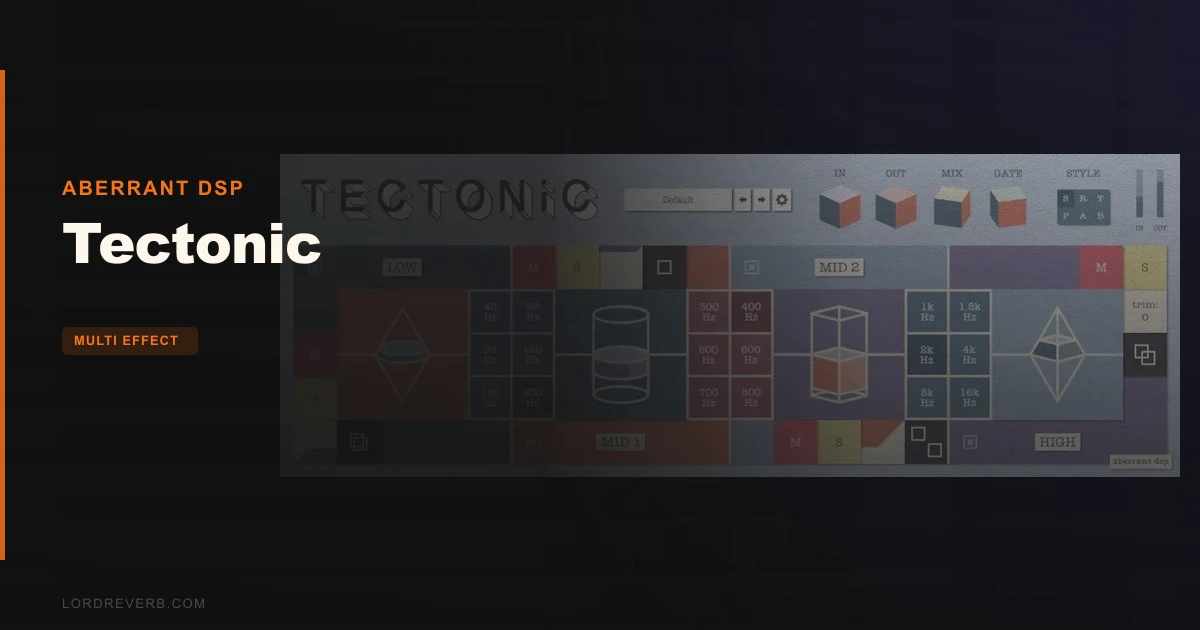
Most people putting Tectonic in their search bar are coming from Aberrant DSP's own Shapeshifter, or they've hit the ceiling of what Ableton's OTT does and they're wondering if there's a smarter move at $16. There is. Tectonic is a 4-band channel strip that combines upward and downward compression with per-band mid/side panning, and the combination does things OTT simply can't touch. It's got real complexity to it, and a UI that reads as overdone to many first-time users. If you stick with it, you'll find one of the more interesting tone-shaping tools in this price range. If you hate learning curves, there are smoother options.
This review is aimed at producers and mix engineers who already work with multiband compression and want to know whether Tectonic earns its place over simpler alternatives. The short answer is yes, with caveats.
How It Compares Out of the Box
Shapeshifter, Aberrant DSP's single-band plugin, is the obvious sibling here. Shapeshifter adds transient and saturation controls that Tectonic doesn't have. Tectonic trades those for four independent bands with selectable crossover frequencies and per-band mid/side positioning. That's a meaningful trade-off, not just an upgrade.
OTT is the other name that keeps coming up in forums. OTT is free, fast to load, and most producers know exactly what it does: aggressive multiband upward and downward compression with a single mix knob. Tectonic covers that same conceptual ground but hands you individual band controls, six style selections for dynamics character, and that mid/side panner per band. OTT doesn't touch stereo imaging at all.
First-impression difference is real. OTT clicks in thirty seconds. Tectonic takes longer. The abstract UI reads as overdone to a lot of first-time users, though it becomes more intuitive once you understand the boosting and cutting mechanics. That's a fair reaction. It does get more intuitive once you understand that boosting a band triggers both upward and downward compression, while cutting applies only downward.
Performance Deep Dive
The mechanics of Tectonic are worth sitting with. Each of the four bands has a trim gain range of -12 dB to +12 dB. Boosting pushes both upward and downward compression simultaneously. Cutting engages only downward. That means a boost doesn't just make a frequency range louder: it also pulls up the quiet parts of that range and clamps the loud parts. The result is a kind of density that simple EQ won't give you.
The six style selections adjust the feel and intensity of the dynamics processing. Think of them as different compression characters rather than presets. How aggressively the processing responds shifts based on which style you're in.
Owners describe Tectonic as surprisingly effective on reverb tails and ambience tracks. Bring those long-tail frequencies forward and then hit the mix control at 5-10%. Even at that low blend, extreme settings shape the character of the reverb without making it feel processed. That's a satisfying workflow once you've dialled it in. Drum busses are another consistent win reported by users: the per-band compression density adds glue in a way that single-band processing struggles to replicate.
Phase shifting has surprised some users. There's no detailed technical information available about Tectonic's phase behaviour, so if your session is phase-sensitive, that's worth checking before you commit to it in your chain.
Where It Wins
Put Tectonic on an ambience return and you'll understand what owners mean about finding useful results fast. The 65 factory presets cover a wide range, and the better ones for reverb and spatial processing get you somewhere interesting within minutes.
The per-band mid/side panner is the feature that genuinely separates this from OTT and most competitors near $16. You can narrow the low-mids to centre while widening the highs. You can push the body of a drum bus inward while letting the top end breathe outward. That's a lot of imaging control without reaching for a separate plugin.
Upward compression on a specific frequency range is also underrated as a mixing move. Pull up the quiet parts of your low end while keeping the loud parts controlled. It sits in the mix differently than a standard compressor and EQ in series.
Where the Competition Wins
Shapeshifter has transient and saturation controls that Tectonic drops. If you need saturation in your signal chain and want to keep things to one plugin, Shapeshifter is the better single-band option. Tectonic doesn't replicate it.
OTT wins on simplicity and zero cost. If you're not using mid/side processing and you don't need per-band control, OTT does the core job faster and with no learning curve.
Stability is also a real concern. The state-save problem in Bitwig is annoying. The crash reports in Cantabile and Studio One on Windows 10 are more serious. These look like VST3/DAW compatibility issues rather than Tectonic-specific bugs, but they're your problem if they happen on your system. And the requirement to restart your DAW before loading it to a project is a small friction point that adds up across a session.
Who Should Buy Which
- ✅ Buy Tectonic if you process reverb and ambience tracks regularly and want per-band density shaping at $16
- ✅ Buy Tectonic if mid/side imaging per frequency band is something you'd otherwise reach for a separate plugin to handle
- ✅ Buy Tectonic if you work on drum busses and want more control over multiband compression character than OTT provides
- ❌ Skip Tectonic if you need saturation or transient control built in: Shapeshifter handles that in a single band
- ❌ Skip Tectonic if you're running Bitwig as your main DAW and session-state reliability matters to your workflow
- ❌ Skip Tectonic if you want something with no learning curve: OTT is still free
Specs & Technical Details
| Developer | Aberrant DSP |
| Price | $16 |
| Plugin Format | VST3 / AU / AAX (64-bit) |
| OS Support | macOS 10.12 Sierra through macOS 13 Ventura (Intel & Apple Silicon) / Windows 10 or later |
| Activation | N/A |
| CPU Usage | N/A |
| Trial Available | N/A |
| Version Reviewed | N/A |
Score Breakdown
| Category | Score | Notes |
|---|---|---|
| Sound Quality | 4.5/5 | Upward and downward compression per band produces density and tone-shaping that straightforward EQ or single-band compression doesn't match |
| Value for Money | 4.5/5 | Per-band mid/side imaging plus multiband compression at $16 is a genuinely clever offer |
| Ease of Use | 3.5/5 | Abstract UI has a learning curve; DAW restart requirement adds friction; becomes intuitive after acclimation |
| Features | 4.5/5 | Four bands, six style selections, mid/side per band, 65 presets, mute/solo/bypass per band: that's a full toolkit |
| CPU Efficiency | N/A | No data available |
| Overall | 4.2/5 | Clever concept, real results on reverb and drum busses, held back by stability reports and a UI that asks for patience |
Alternatives to Consider
Aberrant DSP Shapeshifter is the single-band version of this concept. It adds transient and saturation controls. If your main goal is one-band density shaping with character, Shapeshifter is a tighter tool with fewer moving parts.
Ableton OTT covers multiband upward and downward compression in a plugin that most producers already own. It does the basic job faster and with no learning curve. What it doesn't do is per-band stereo imaging, and it gives you one compression style rather than six. If imaging control matters to you, Tectonic is the better pick. If it doesn't, OTT is hard to argue against.
TDR Limiter 6 sits in the conversation as a complementary tool rather than a direct replacement. Producers running Tectonic for tonal shaping often pair it with TDR Limiter 6 for final gain-staging and limiting. They're not competing for the same job in the chain.
There's no clean winner across all three. OTT wins for speed and zero cost. Shapeshifter wins if you need saturation. Tectonic wins when you want per-band imaging alongside multiband compression and you're willing to learn the interface.
At $16, Tectonic is a genuinely clever piece of work for ambience processing, drum busses, and any mix situation where you want to push frequency ranges inward or outward without touching a second plugin. The stability issues in some DAWs are real, the UI takes patience, and the DAW-restart requirement is the kind of small annoyance that accumulates. But if your workflow fits it, there's a lot happening inside that interface worth digging into. If you're on Bitwig or a Windows setup that matches the reported crash conditions, wait for a fix first.
Frequently Asked Questions
What does Tectonic do differently from standard multiband compression?
Each of Tectonic's four bands combines upward and downward compression with a mid/side panner. Boosting a band applies both upward and downward compression, pulling up quiet content and clamping loud content simultaneously. That combination of dynamics shaping and per-band stereo control in one plugin is what separates it from a standard multiband compressor.
Is Tectonic stable on Windows?
Crashes have been reported in Cantabile v3 and Studio One 5 on Windows 10. These appear to be related to VST3 and DAW compatibility rather than Tectonic itself, but the reports exist. If you're running either of those hosts on Windows 10, it's worth checking for updated compatibility information before buying.
What's the best use case for Tectonic in a mix?
Owners consistently report strong results on reverb and ambience tracks and drum busses. The mix control lets you blend in extreme settings at 5-10% for subtle but real character shifts on reverb tails. The per-band mid/side panner is also useful on full mix busses where you want to narrow specific frequency ranges without touching the whole stereo image.
Do I need to restart my DAW before using Tectonic?
Yes. The developer requires a DAW restart before loading Tectonic to a project. On macOS, some hosts may also require a full computer restart for the plugin to appear. It's a known friction point in the workflow and worth accounting for the first time you install it.