
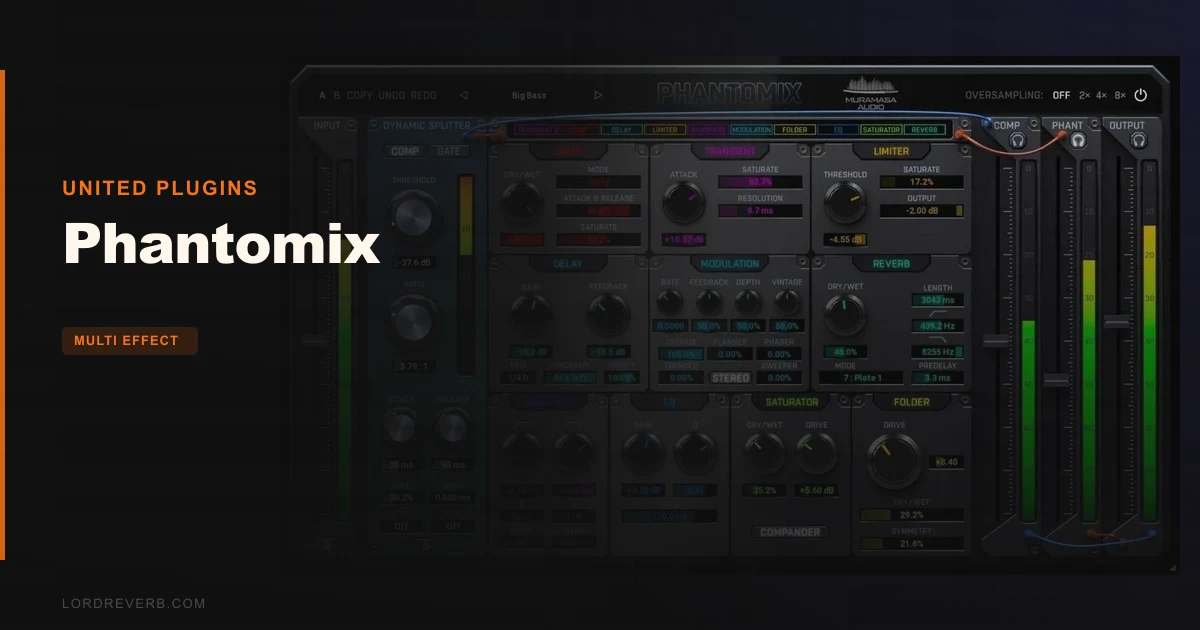
Phantomix is a dynamic multi-effects processor that does something most compressors refuse to do: instead of crushing the parts of your signal it doesn't want, it splits them out and sends them somewhere useful. At $79, it's priced for working producers who want creative results without patching together five separate plugins, and it earns that price more often than not.
Released in September 2025 by United Plugins through their Muramasa Audio imprint, Phantomix sits in a category that doesn't have a clean name yet. It's not a compressor. It's not a multi-FX rack. It's closer to a dynamic router with effects attached, and that framing is the whole key to understanding why it works.
We'd buy this for any producer who spends too much time solving "this part needs reverb but that part doesn't." If that's never been your problem, you probably don't need it. If it's your Tuesday, keep reading.
What You're Actually Getting
The core mechanic is a dynamic splitter. It isolates the prominent or subtle parts of your signal and routes them separately before any effect touches either path.
That means you can send only the transient crack of a snare into saturation while the body passes clean. Or push only the quiet, breathy tail of a vocal into reverb without smearing the consonants. It's a workflow that normally requires parallel processing, sidechain tricks, and a lot of fussing around in your DAW's routing view.
Phantomix handles all of that internally. The effect suite covers reverb, delay, saturation, distortion, chorus, flanger, phaser, tremolo, EQ, and filters. There are 90+ factory presets arranged across six categories: Bass, Creative, Drums, Guitar, Piano, and Voice. Internal processing runs at 64-bit, and there's a smart bypass that's latency-compensated, so no clicks and no phase surprises during automation.
The GUI is resizable and 3D-rendered, which sounds like a marketing line but actually matters when you're working across a laptop screen and a wide monitor in the same session.
The Good
The dynamic splitter concept is clever, and more importantly, it holds up in practice. We loaded it on a drum bus with a preset from the Drums category and pulled up the "prominent" threshold to isolate just the transients. Then we pushed those into saturation while the room sound stayed clean. The difference between that and a standard parallel compression setup was immediately audible: tighter, with the grit exactly where we wanted it and nowhere else.
Reviewers report the same pattern across genres. Users keep running into moments where a single Phantomix instance does the job of three chained plugins, and that's not hyperbole. It's just what the routing architecture makes possible.
The preset library is well-organised. Six categories, real production use cases, not a shelf of abstract names you'd have to demo for 20 minutes to decode. We found the Voice and Bass categories especially dialled in for immediate use without tweaking.
The CPU sleep mode is underrated. A plugin that stops drawing CPU when your track isn't playing audio is a small thing that matters a lot at the tail end of a 60-track session.
64-bit internal processing means the audio stays clean even when you're stacking saturation and modulation. We didn't hear any artefacts on hard settings, which is satisfying on a processor this busy.
The Not-So-Good
Here's the annoying part: United Plugins don't publish CPU load benchmarks. We can't tell you whether this is light, medium, or heavy in practice, because the data isn't there. That's a real gap when you're spec-checking plugins for a session with a tight buffer size.
Plugin format compatibility is similarly absent from official documentation. VST3, AU, AAX all appear to be supported based on United Plugins' standard distribution, but we'd want confirmation in the product page before buying for a Pro Tools session.
No trial version is confirmed at time of writing. That's a harder sell at $79. If you're buying blind based on a preset demo, you're taking a gamble on whether the routing philosophy fits your workflow. It will fit some producers perfectly. Others will find it redundant to what they already do in their DAW manually.
The learning curve isn't steep, but the dynamic splitter takes a session or two to stop feeling counterintuitive. It's not hard. It's just different enough from standard compression that the first hour can feel like you're working against it.
Compared to the Alternatives
The closest direct competitor in concept is iZotope Neutron's transient shaper and dynamic EQ combination. Neutron does more overall, costs significantly more, and requires more CPU. If you're already in the iZotope ecosystem, Phantomix probably doesn't replace it. But if you're not, Phantomix is a more focused tool for less money.
Trackspacer by Wavesfactory is another parallel processor worth mentioning. It's narrower in scope: it carves space for one track against another. Phantomix doesn't do sidechain carving the same way. Different tool, different job.
FabFilter's combination of Pro-MB and Saturn 2 will outperform Phantomix on surgical control and sound quality per-band. But that's two plugins, a more complex signal chain, and a higher combined price. Phantomix wins on speed and workflow, not on ceiling.
For everything United Plugins makes, the United Plugins Bass Bundle review gives you a sense of how their plugins behave across a fuller set. Phantomix fits that pattern: good sound, solid workflow, occasionally thin on published technical detail.
Who Should Buy This
- ✅ Buy if you regularly spend time setting up parallel processing chains and want a faster path to the same results.
- ✅ Buy if you produce across Bass, Drums, or Voice-heavy content and want a preset library that starts in the right territory.
- ✅ Buy if you want creative multi-FX that responds dynamically to the audio, not just static effect settings.
- ❌ Skip if you need published CPU specs before committing to a new plugin in a CPU-sensitive session.
- ❌ Skip if you're already deep in iZotope, FabFilter, or another multi-band processor and happy with the results.
- ❌ Skip if you need a confirmed trial before buying. Not having one at this price is a real friction point.
Specs & Technical Details
| Developer | United Plugins / Muramasa Audio |
| Price | $79 |
| Plugin Format | VST3 / AU / AAX |
| OS Support | Mac / Windows |
| Activation | N/A (not published) |
| CPU Usage | N/A (not published; CPU sleep mode included) |
| Trial Available | Not confirmed at time of writing |
| Version Reviewed | 1.0 (September 2025 release) |
Score Breakdown
| Category | Score | Notes |
|---|---|---|
| Sound Quality | 4.5/5 | 64-bit processing keeps the chain clean; no artefacts on heavy saturation settings |
| Value for Money | 4.0/5 | Good value if the dynamic splitter concept fits your workflow; harder to justify without a trial |
| Ease of Use | 4.0/5 | Well-organised presets and clean GUI; splitter logic takes a session to click |
| Features | 4.5/5 | Full modulation suite plus EQ, saturation, reverb, and delay in one routed interface is genuinely useful |
| CPU Efficiency | 3.5/5 | Sleep mode is a smart addition; no benchmarks published so we can't rate it higher |
| Overall | 4.2/5 | A clever, well-executed processor that earns its place in the right producer's toolkit |
Alternatives to Consider
iZotope Neutron is the broadest comparison. It covers dynamic EQ, transient shaping, and spectral processing in a single plugin with AI-assisted suggestions. It costs more, uses more CPU, and does more. If you want the full picture, it's worth reading a full iZotope Neutron review before deciding.
FabFilter Pro-MB is the surgical multi-band option. Paired with Saturn 2 for saturation, it goes deeper than Phantomix on per-band control. Check our FabFilter Pro-MB review if precision processing is your priority over workflow speed.
Trackspacer by Wavesfactory shares the "parallel-aware processing" philosophy but targets sidechain carving specifically. It's a narrower tool, but it solves one problem brilliantly. Our best parallel compression plugins roundup covers both if you're still deciding which approach fits your sessions.
Phantomix at $79 is a legitimate option. Not the only one. But a smart one if the brief matches your workflow.
The dynamic splitter is the whole argument here. If splitting your signal by dynamic content before hitting effects sounds like something you'd use every session, Phantomix will earn back its price fast. If that sounds like a feature you'd turn on once and forget, you're buying the wrong plugin. Know which producer you are before you check out.
Related reviews: Rift Feedback Lite Review · QuickAG
Frequently Asked Questions
What does the Phantomix dynamic splitter actually do?
The dynamic splitter separates your audio signal into its prominent (louder, transient) and subtle (quieter, sustained) components before any effects are applied. You can then route each part to different effects, so saturation hits only the transients while reverb trails behind the body. It's a form of parallel processing handled internally without needing to build a sidechain setup in your DAW.
Is Phantomix suitable for beginners?
The 90+ factory presets make it accessible without deep knowledge of dynamic processing. You can get useful results quickly by browsing the category-sorted preset list. The dynamic splitter takes a few sessions to feel natural, but reviewers report that it's not a steep learning curve, just a different way of thinking about compression and effects.
Does Phantomix work in all major DAWs?
Based on United Plugins' standard distribution, VST3, AU, and AAX formats are expected to be supported, covering most major DAWs including Ableton Live, Logic Pro, Pro Tools, Cubase, and FL Studio. We'd recommend confirming compatibility with the developer's product page before purchasing, especially for AAX/Pro Tools use cases.
How does Phantomix compare to a standard compressor with sends?
A compressor with parallel sends gives you similar control but requires manual routing, multiple plugin instances, and careful gain staging across busses. Phantomix handles all of that internally with a single instance. It's faster to set up and easier to recall in a mix. The trade-off is less granular control per band than a purpose-built multi-band compressor would give you.