The UFX Delay loyalty upgrade is worth it if you already own any paid UJAM product and want a fast, preset-led delay for $39, and it’s a skip if you want to program every parameter by hand or hate an always-online plugin.
That’s the short answer. The longer one depends on how you work.
This is a crossgrade price, not a new-customer price. Any paid UJAM product unlocks it. If you’re already in that club, the question isn’t “is this a good delay?” It’s “do I need another delay, and does this one earn its slot?”
We think it earns a slot for a specific kind of producer. Someone who wants a sequence of tape echoes, a filtered ricochet or a grainy swell in about ten seconds. Someone who’d rather audition presets than build a patch from scratch.
If you want a scalpel, keep reading, because we’ll tell you where this one gets blunt.
Quick verdict
We score UFX Delay 3.9 out of 5. For $39, owners of any paid UJAM product get 20 delay modes, 40 Filter effects, 50 Finisher effects and over 150 presets in one plugin. It’s quick, creative and easy to dial in. It also needs an internet connection, gives you less fine control than tweakers want, and does overlap with free delays. Buy it if speed and character matter more than depth. Skip it if you live in parameter menus.
What are you actually upgrading to?
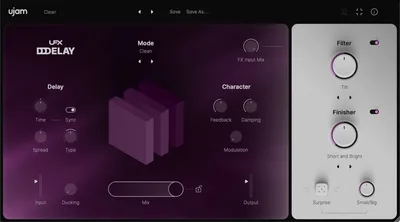
UFX Delay is UJAM’s delay, built around the idea that you shouldn’t stop the session to make an echo. The developer’s pitch is a delay that delays your tracks without delaying your workflow. That’s a decent line, and the plugin mostly backs it up.
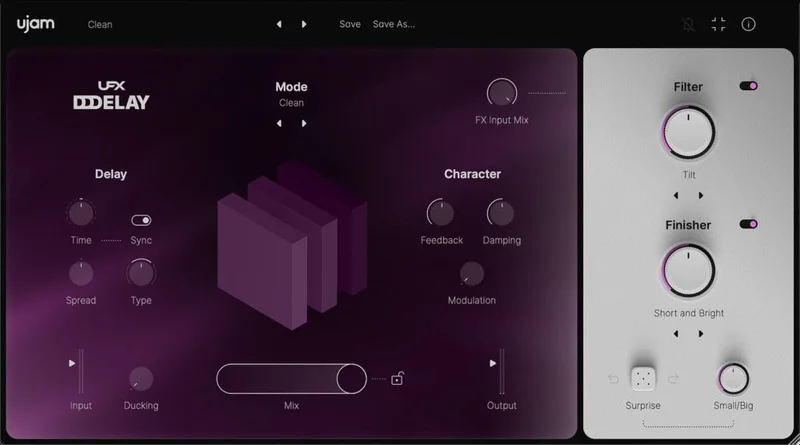
Under the hood you get 20 delay modes. Some are the ones you’d expect: Classic, Doubling, Digital, Tape, Warm. Others lean experimental: Dirty, Low Bandwidth, Diffuse, Grain, Random Pitch, Oct Up, Oct Down, Filter Up, Filter Down and Filter Complex.
On top of that sit rhythmic patterns: Flam, Ricochet, Ricochet Filt, Staccato Boost and Sequencer. Then two multi-effect sections, Filter and Finisher. Then ducking. Then a randomizer.
That’s a lot for one window, and the whole thing is built so you don’t have to touch most of it.
Who qualifies for the loyalty price?
You need to own any paid UJAM product. That’s the condition, and it’s a wide door. It isn’t limited to one plugin family or one purchase tier.
If you’ve never bought anything from UJAM, this deal isn’t for you. You’ll pay a different price, and the value maths changes.
Check your account before you check out. If you own a paid UJAM product, you’re in.
Also worth knowing: UFX Reverb is a companion plugin at similar loyalty pricing. If you’re already weighing a UJAM effects pair, that’s a natural pairing to think about.
What do the 20 delay modes actually sound like?
Twenty modes sounds like padding until you start sorting them by job.
The workhorse modes
Classic, Digital and Tape are your everyday echoes. Classic is the clean repeat you reach for on a lead vocal. Digital stays tight and bright. Tape is the one that turns darker on every repeat, the way a real tape loop loses top end as it recirculates.
Warm is the gentle option. Put it on an acoustic guitar and let the repeats tuck behind the dry signal rather than compete with it.
Doubling is a short thickening effect. Use it on a vocal when you want width without an obvious echo.
The character modes
Dirty and Low Bandwidth are the ugly ones, and we mean that as praise. Run a drum loop into Low Bandwidth and the repeats turn narrow and lo-fi, like a radio half-tuned. It sits under the dry hit instead of fighting it.
Diffuse smears the repeats until they stop sounding like discrete echoes. That’s a pad-and-ambience move.
The pitch and filter modes
Grain, Random Pitch, Oct Up and Oct Down are where it stops being a polite delay. Oct Up on a plucked synth gives you a shimmer trail. Oct Down gives you a slow, heavy shadow. Random Pitch wobbles the repeats off key in a way that’s either brilliant or unusable, depending on the track.
Filter Up, Filter Down and Filter Complex sweep the repeats through filter movement. Pop a Filter Down on a snare delay and the tail darkens as it fades. Simple. Satisfying.
We’ll be blunt: you won’t use all 20. Most producers settle on five or six. That’s fine. The rest are there when a track needs something odd.
How do the rhythmic patterns work?
This is the section that separates UFX Delay from a basic echo.
Flam and Ricochet
Flam doubles the hit with a tight offset, giving you that smeared-snare feel. Ricochet bounces the repeats in a pattern that sounds like a ball skipping off walls. Ricochet Filt adds filtering to that bounce so each hit changes colour.
Try Ricochet on a clap or a vocal chop. It turns one hit into a small rhythm figure without any programming.
Staccato Boost
Staccato Boost gives the repeats a clipped, punchy character. It suits rhythmic parts where you want the echo to feel like part of the groove instead of a wash behind it.
Sequencer
Sequencer is the deepest of the patterns. It lets you shape the delay as a rhythmic sequence. If you’re building a stuttering, gated echo on a hi-hat bus, this is where you’ll spend your time.
The controls for customising all of this are time, spread and modulation. That’s a short list. Not a complaint on its own, but it’s why the plugin feels quick and why some users want more.
What does the ducking do?
Ducking suppresses the wet signal when the dry signal is loud. Simple concept, big payoff.
Picture a vocal with a long echo. Without ducking, the repeats pile up in the gaps and muddy the words. With ducking, the echo stays quiet while the singer’s singing and blooms in the spaces between phrases.
The developer’s line is that ducking allows more echo with a pristine input signal. We agree with that. It’s the feature that lets you push the delay louder than you’d dare otherwise.
If you mix vocals regularly, this alone saves you from building a sidechain routing by hand.
What are the Filter and Finisher sections?
This is the part UJAM leans on hardest. Two multi-effect sections, 40 Filter effects and 50 Finisher effects.
The Filter section
Filter gives you synth-style filters and character shaping. Use it to darken the repeats, brighten them or add movement. It’s the part a user pointed to when they said much of the plugin could be replicated with free tools, but the filter alone may justify the cost. We think that’s a fair read.
The Finisher section
Finisher ranges from chorus to grain clouds and rhythmic transformation. Chorus widens the repeats. Grain clouds break them into textured particles. Rhythmic transformation chops and reshapes them.
Here’s the catch. Users have asked for more advanced controls and fine-tuning on the Finisher, and we understand why. You pick an effect and get a result. You don’t get to sculpt it much. For fast results that’s lovely. For control freaks it’s frustrating.
Does the intelligent randomization help?
The randomizer generates new delay effects with Small and Big controls. Small gives you subtle variation. Big gives you a major rewrite.
Here’s how to use it. You’ve got a delay that’s almost right but feels static. Hit Small a few times and let it nudge the settings until something clicks. Stuck with a dead-end sound? Hit Big and see what lands.
It’s a good idea, done sensibly. It won’t replace your ear, but it’ll get you out of a rut in seconds.
We do wish it had a way to lock certain parameters while the rest shuffle. The notes don’t say whether it does, so check that in the demo before you commit.
How good are the presets?
Over 150 presets ship with it, and owners call them exceptional. That matches the plugin’s whole philosophy.
This is a preset-driven workflow. You load a preset, tweak time, spread and modulation, and move on. Custom settings are straightforward to configure, according to owners.
That’s a strength and a limit at once. If you love browsing and tweaking, you’ll be happy for months. If you want to build every echo from a blank slate, the plugin pushes against you.
How easy is it to use?
Very. Owners call it intuitive, and the developer calls it incredibly easy to use despite having two multi-effect sections. We buy that.
The controls are few. The modes are named in plain language. You can get a usable sound within a minute of opening it.
That ease is the product. It’s why the plugin suits producers who want to stay in flow rather than manage menus.
The flip side is depth. If you want to program advanced parameters, the plugin runs out of road sooner than a boutique delay would.
What are the system requirements and the catch?
Here’s the practical part.
It runs on Windows 10, Windows 11, and macOS from Catalina (10.15) through Sequoia (15). Native and Rosetta support cover Intel and Apple silicon Macs. Formats are VST2, VST3, AU 2 and AAX.
You need 8 GB of RAM, 300 MB of free disk space and a display of at least 1280x768px.
And you need an internet connection. That’s the annoying one. If you work offline on a plane or in a studio with no network, this plugin is a problem. Plan around that before you buy.
Is it worth it against free delays?
This is the honest bit. Free alternatives exist. Deelay is a free delay with comparable core functionality. The Kilohearts bundle offers free delay tools with an overlapping feature set.
A user observed that much of what UFX Delay does could be replicated with free tools. We won’t pretend otherwise. If all you need is a clean echo with feedback and a filter, free options cover you.
What you’re paying $39 for is speed and curation. The modes, the patterns, the ducking, the Finisher and the presets are all in one place and tuned to work together. You can build something similar from free parts, but it takes longer.
So the value case is about time. If your time matters more than your money, the maths works. If you enjoy the build, it doesn’t.
Who should skip it?
Skip it if any of these sound like you.
You need to work offline. The internet requirement is a hard stop.
You want deep manual control. Limited advanced programming and a Finisher you can’t sculpt will annoy you.
You already own a deep delay and a couple of free ones. The overlap is real, and you may not need another.
You don’t own a paid UJAM product. The loyalty deal doesn’t apply, and the value case weakens.
Hard pass for those people. No hard feelings.
The verdict
UFX Delay is a clever, fast, creative delay that rewards producers who like presets and punishes producers who like parameters. At $39 for UJAM owners, it’s a fair deal if you’ll use the modes and the ducking.
We’d buy it for vocal throws, drum-bus echoes and quick sound design. We wouldn’t buy it as our only delay.
Score: 3.9 out of 5. Good. Not essential.
Specs & Technical Details
| Spec | Detail |
|---|---|
| Developer | UJAM |
| Price | $39 |
| Plugin Format | VST2 / VST3 / AU 2 / AAX |
| OS Support | Windows 10, Windows 11, macOS Catalina (10.15) to Sequoia (15), Intel and Apple silicon (native and Rosetta) |
| Activation | Internet connection required |
| CPU Usage | N/A |
| Trial Available | N/A |
| Version Reviewed | N/A |
Score Breakdown
| Category | Score | Notes |
|---|---|---|
| Sound Quality | 4.0/5 | 20 modes cover clean, tape, lo-fi and pitched repeats |
| Value for Money | 3.5/5 | Good for UJAM owners, but free delays overlap the basics |
| Ease of Use | 4.5/5 | Owners call it intuitive, presets get you there fast |
| Features | 4.0/5 | Patterns, ducking, 90 multi-effects, randomizer |
| CPU Efficiency | N/A | Not specified by the developer |
| Overall | 3.9/5 | Fast and creative, light on deep manual control |
Alternatives to Consider
Deelay
Free, with comparable core functionality. Pick it if you only need a solid echo and don't want to spend anything. You give up the curated modes, patterns and presets.Kilohearts free delay tools
The Kilohearts bundle has free delay tools with an overlapping feature set. Pick it if you like building your own chain from modular pieces. It's slower than loading a preset, but it gives you more hands-on control.UFX Reverb
UJAM's companion plugin at similar loyalty pricing. It isn't a delay, but if you're buying into UJAM's effects line, it's the obvious partner. Decide which one you need first, because both together add up.Should you buy it?
Buy it if you own a paid UJAM product, you want quick creative delays, and you’re fine being online. Pay $39 and expect to live in the presets.
Skip it if you work offline, want to program every parameter, or already have free delays doing the job. It’s the wrong tool for the deep tweaker.
If you’re unsure, ask yourself one thing: do you want to build the echo, or do you want to hear it? If it’s the second one, this plugin gets you there faster than almost anything.
Frequently Asked Questions
Who can buy the UFX Delay loyalty upgrade?
Owners of any paid UJAM product qualify. It's a crossgrade loyalty upgrade, so the price is for existing customers. If you don't own a paid UJAM product, this deal doesn't apply to you.
Does UFX Delay need an internet connection?
Yes. An internet connection is required to use it. If you work offline, that's a real drawback and worth weighing before you buy.
What formats and systems does it support?
It supports VST2, VST3, AU 2 and AAX. It runs on Windows 10 and 11, and on macOS Catalina (10.15) through Sequoia (15), with native and Rosetta support for Intel and Apple silicon Macs.
How many delay modes and presets does it have?
It has 20 delay modes and over 150 presets. Add the rhythmic patterns (Flam, Ricochet, Ricochet Filt, Staccato Boost, Sequencer) plus 40 Filter and 50 Finisher effects, and you've got a lot of starting points.
Can I get the same result from free delay plugins?
Partly. Free options like Deelay and the Kilohearts bundle overlap with the core delay functions. A user noted the filter alone may justify the cost, and you're paying for speed, curation and the preset library.
Does UFX Delay offer deep manual control?
Not really. It leans on presets and a short list of controls: time, spread and modulation. Some users have asked for more advanced fine-tuning, especially on the Finisher.