Echoes is worth $149 if you want one delay that does clean, tape, bucket-brigade and wrecked, and you can live with picking just one mode at a time.
It’s a stereo delay from Softube with six modes: Filter, Reverb, BBD, Tape, Pan and Lo-fi. That’s a lot of range for a single plugin slot.
The strongest part is how musical the repeats feel once you start pushing feedback. The weakest part is workflow friction around tap placement and preset browsing.
If you track vocals, synths or guitars and you’re tired of a delay that only does one flavour, this is for you. If you already own a deep multi-mode delay and love it, you don’t need this.
We’ll cover each mode, the ducking, the visual tap display, the Output section, and where it stumbles. We’ll also tell you who should pass.
What You're Actually Getting for the Money
Echoes is a stereo delay plugin built around six delay modes. Each mode is its own personality, not a skin on the same engine.
You set time in milliseconds or sync it to your DAW tempo. A feedback limiter keeps repeats from ever exceeding -6 dB, so a runaway feedback loop won’t take out your monitors.
There’s a built-in ducking feature with a threshold control. There’s an Output section for stereo widening, mono-collapsing the low end, and filtering the echoes.
It runs as VST, VST3, AU or AAX in 64-bit hosts. You’ll need a Softube account and an iLok account to authorise it.
The Interface: Unusual, Then Obvious
Owners say the interface is unlike anything they’ve seen before. They also say everything is easy to understand once they sit with it.
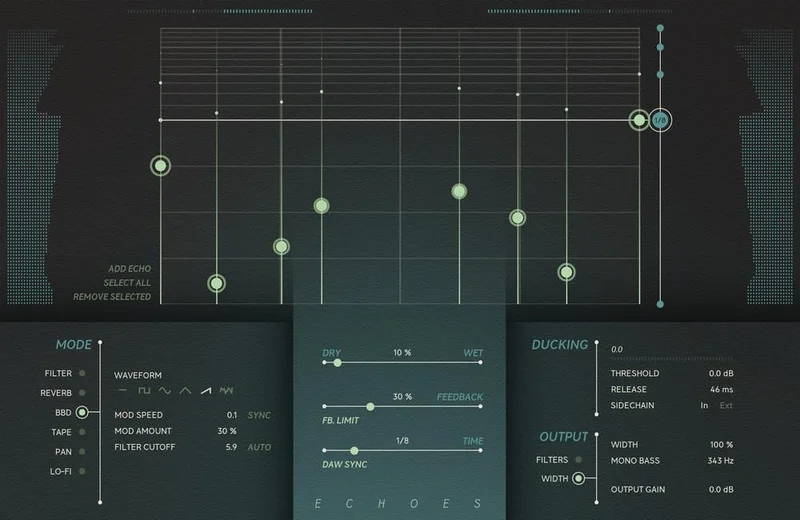
We think that’s the right read. The X and Y axes give you a visual representation of the taps in the stereo field. You see where each repeat lands instead of guessing from a knob value.
That matters on a stereo delay. Rhythmic ping-pong patterns are hard to dial in by ear alone, and a picture shortens the job.
The Tap Display in Practice
Say you’ve got a dry vocal sitting dead centre and you want the first echo to land left and the second to land right and slightly behind. You drag taps around the display and watch the stereo field fill in.
That’s satisfying. It beats nudging a pan knob and hoping.
Where Tap Placement Gets Annoying
Here’s the catch. Owners report that fine-tuning tap placement is fiddly, because there’s no obvious snap feature.
If you want a tap to land on an exact rhythmic position, you’re eyeballing it. Frustrating when you’re matching a groove.
It’s not a dealbreaker. But it’s the first thing you’ll notice if you’re a precision person.
Filter Mode: The Vocal Workhorse
Filter mode is a normal delay with filtered feedback. That’s the plain description, and it’s the right starting point for most vocal sessions.
The developer calls it perfect for vocals. We agree with the direction. Filtered feedback means each repeat gets progressively duller, so the echoes tuck behind the lead instead of competing with it.
Picture a chorus vocal that needs a quarter-note throw on the last word of each line. Set a synced time, roll the filter down so the repeats lose their top end, and the delay sits behind the singer.
Owners report that Echoes sounds clean when it needs to be. This mode is where that shows up.
Reverb Mode: Echo Taps Pretending to Be a Room
Reverb mode uses echo taps to provide an algorithmic reverb effect. It’s a clever idea: build a wash out of the delay engine itself.
The developer says it’s great for synths and guitars. Owners list Reverb among the definite highlights for adding character.
Try it on a plucky synth lead. The taps smear into a diffuse tail that doesn’t read as a stock reverb, so it sits in its own space in the mix.
Is it a replacement for a dedicated reverb? No. It’s a delay that borrows reverb tricks, and that’s the point.
BBD Mode: 1970s Stompbox Grit
BBD mode uses Bucket Brigade Device technology, with the aliasing artifacts that come with it. The developer says it produces warm-sounding effects from 1970s stompboxes.
“Warm” here means the repeats lose high-frequency detail and pick up a slight smear and grain as they decay. Each echo gets a bit more degraded than the last.
Owners put BBD among the highlights. We love this mode for guitars and for any source that sounds too polished.
Push the feedback and the artifacts pile up. That’s ugly in the best way.
Tape Mode: Drive, Dirt and Wobble
Tape mode is based on tape echo machines. You get control of drive, dirt and wobble.
The developer calls it a classic sound on vocals. We’d agree, with one tweak: keep the wobble low on lead vocals unless the track wants seasick pitch movement.
Here’s a scene. You’ve got a thin acoustic guitar loop that feels sterile. Switch to Tape, add a touch of drive and dirt, and let a little wobble in. The repeats gain saturation and gentle pitch drift, and the loop stops sounding like a sample.
Owners also list Tape among the standout modes. Easy to see why.
Pan Mode: Movement for Static Sounds
Pan mode widens mono sources and adds movement to static sounds. The developer says it’s excellent for sustained keyboards.
Take a mono Rhodes chord that just sits there. Pan mode throws the repeats across the stereo field and gives it motion without needing a separate autopanner.
It’s a smart mode for mono sources you want to open up. It won’t replace a dedicated widener, but it solves a specific problem neatly.
Lo-fi Mode: Bit Crushing Plus a Synth Filter
Lo-fi mode combines bit crushing with a modeled synth 4-pole filter. The developer says it’s excellent for getting creative.
That’s the mode for beats that need to sound broken on purpose. Crush the repeats, then sweep the 4-pole filter to carve the grit into something rhythmic.
It’s not subtle. Hard pass if you only want transparent delays, but you’d just stay in Filter mode.
Ducking: Keeping the Delay Out of the Way
The built-in ducking feature has a threshold adjustment. When the dry signal is loud, the delay pulls back. When the singer stops, the repeats bloom.
The developer says this prevents vocals from being obscured by delay. Owners agree, saying it lets the delay effect stay in check without drowning out vocals or other solo elements.
This is the feature that justifies a delay on a lead vocal in a dense mix. You get big throws without the muddy overlap on the phrase.
Set the threshold so the repeats duck while the singer is mid-line. Then listen to them swell in the gaps.
The Output Section: Width, Low-End Control, Filtering
The Output section lets you widen the stereo image, collapse low frequencies to mono, or filter the echoes.
The mono-collapse on the lows is the underrated one. Wide delays with stereo bass can make a mix feel loose and cost you headroom in the low end. Collapsing the lows keeps the foundation tight.
Filtering the echoes in the Output section gives you a second place to shape the tail beyond the mode-specific filter. Handy for dialling in clarity.
Owners report that Echoes really shines in the higher frequencies. They describe impressive clarity and definition retained even at higher feedback settings or longer delay times.
Presets and the Browser
Echoes ships with presets designed to cover most delay needs in productions. The preset browser has useful tags and search functionality, and it’s an excellent one.
You can find a starting point fast. Tagged categories and search beat scrolling a flat list.
The Wet/Dry Annoyance
One frustration: owners report you can’t lock the wet/dry mix when browsing between presets.
So you audition a preset, and the mix level jumps around. It’s irritating when you’re trying to compare tails at a consistent level.
It’s a small thing. It’s also a thing you’ll hit every session.
CPU Behaviour
Echoes uses minimal CPU, even with multiple instances. That’s a real advantage on a vocal bus or a big session with delays on several tracks.
You can stack instances without nursing your buffer size. For a plugin with this much modelling, that’s a relief.
The AAX DSP format isn’t currently in active development. If you rely on DSP-based Pro Tools hardware, that’s a limit.
Does It Pay Its Way at $149?
Here’s the value case. For $149, you get six distinct delay flavours, ducking, a visual tap display and a stereo Output section in one plugin that barely touches your CPU.
That replaces several single-purpose delays. If you currently own a clean digital delay, a tape emulation and a lo-fi effect, Echoes could consolidate them.
What’s missing at that price? The ability to combine modes. Owners report you can only choose one delay mode at a time, which prevents blending features from different algorithms.
You also need a Softube account and an iLok account. That’s extra setup if you don’t already use iLok.
When is a cheaper or free delay enough? If you only ever need a simple synced slapback, your DAW’s stock delay does that. Paying for Echoes only makes sense when you’ll use the character modes.
When is paying more justified? If you want maximum tonal range and a larger palette, users compare Valhalla Delay as the bigger-range option. We’ll cover that next.
Compared to the Alternatives
Owners and reviewers compare Echoes to a few named delays.
Valhalla Delay: users report it has a larger range of tones and sounds more lively in the feedback. If feedback character is your priority, that’s the one to audition.
Wavesfactory Echocat: users report it’s on par with Echoes in sound and modulation possibilities but offers more options. If you want the extra options, look there.
EchoBoy and Arturia Plate-140 also come up as comparisons to Echoes. We’d audition them side by side if you can.
Where Echoes wins is the combination of the visual tap display, ducking and low CPU use. It’s a focused, readable tool.
Who Should Buy This
✅ Buy if you want several delay characters (clean, tape, BBD, lo-fi) in one low-CPU plugin.
✅ Buy if you process vocals and need ducking so the echoes stay out of the lyric.
✅ Buy if you like seeing your stereo taps on a display instead of guessing from knobs.
❌ Skip if you need to stack multiple delay algorithms inside one instance.
❌ Skip if you need exact, snap-to-grid tap placement and hate fiddly dragging.
❌ Skip if you don’t want a Softube account plus an iLok account just to authorise a plugin.
Specs & Technical Details
| Spec | Detail |
|---|---|
| Developer | Softube |
| Price | $149 |
| Plugin Format | VST / VST3 / AU / AAX (64-bit) |
| OS Support | macOS Monterey 12, Ventura 13, Sonoma 14; Windows 10 (64-bit) and Windows 11 |
| Activation | Softube account and iLok account; internet access for installers and licence management |
| CPU Usage | Light, minimal even with multiple instances |
| Sample Rates | 44.1, 48, 88.2, 96, 176.4, 192 kHz (mono and stereo) |
| Trial Available | N/A |
| Version Reviewed | N/A |
Score Breakdown
| Category | Score | Notes |
|---|---|---|
| Sound Quality | 4.5/5 | Clean when needed, rich when pushed; strong high-frequency clarity at high feedback |
| Value for Money | 4.3/5 | Six modes, ducking and a visual tap display replace several single-purpose delays |
| Ease of Use | 4.0/5 | Unusual interface that's easy to read, held back by fiddly tap placement and the unlockable wet/dry |
| Features | 4.4/5 | Ducking, Output section and feedback limiter are strong; one mode at a time is a limit |
| CPU Efficiency | 4.8/5 | Minimal CPU load even with multiple instances |
| Overall | 4.4/5 | A versatile, light, readable delay with workflow quirks |
Alternatives to Consider
Valhalla Delay
Users report it offers a larger range of tones and sounds more lively in the feedback. Pick it if feedback character is the thing you chase.
Wavesfactory Echocat
Users report it’s on par with Echoes in sound and modulation possibilities but offers more options. Pick it if you want extra options on top of that sound.
EchoBoy
It’s a common comparison to Echoes. Audition it next to Echoes if you’re deciding between established multi-mode delays.
The Verdict: Buy It, Mind the Quirks
Buy Echoes at $149 if you want a flexible, low-CPU delay with a display that actually helps you place taps. The ducking alone will save vocal mixes, and the BBD and Tape modes add real character.
It’s the wrong pick if you need to blend modes in one instance or if iLok authorisation is a deal-breaker for you.
For most producers who track vocals and synths, it earns a slot. Keep your expectations on the workflow friction, and you’ll be fine.
Related reviews: Dispersion
Frequently Asked Questions
How many delay modes does Echoes have?
Echoes has six delay modes: Filter, Reverb, BBD, Tape, Pan and Lo-fi. Only one mode can be active at a time. You can't combine algorithms in a single instance.
Does Echoes need an iLok?
You need both a Softube account and an iLok account to use Echoes. You also need internet access for downloading installers and managing licences. Plan for that setup before you buy.
What plugin formats and systems does Echoes support?
Echoes works as a 64-bit VST, VST3, AU or AAX plugin. It runs on macOS Monterey 12, Ventura 13 or Sonoma 14, and on Windows 10 (64-bit) or Windows 11. AAX DSP is not currently in active development.
Is Echoes heavy on CPU?
No. Echoes has minimal CPU usage, even with multiple instances. That makes it practical for stacking on several tracks in a large session.
Can I stop vocals getting buried by the delay?
Yes. Echoes has a built-in ducking feature with a threshold adjustment that lowers the delay while the dry signal plays. Owners say it keeps the effect in check without drowning out vocals or other solo elements.