
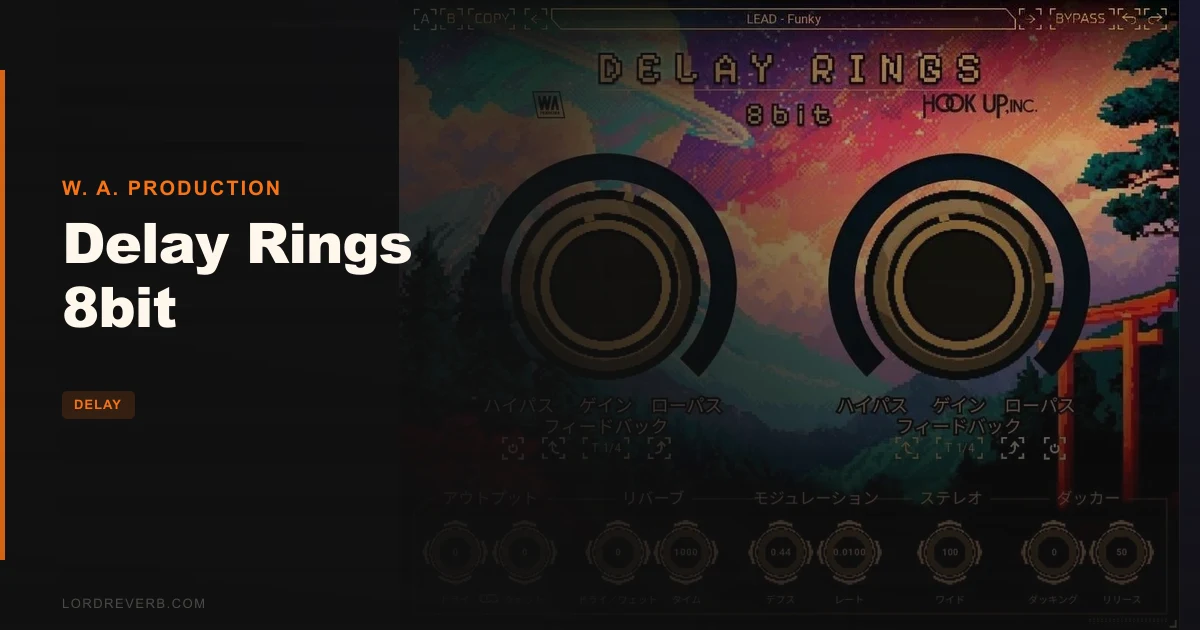
Delay Rings 8bit is a dual-engine spatial delay plugin from W. A. Production that layers a deliberately fizzy, bit-crushed 8-bit character over circular, orbiting echo patterns in the stereo field, priced at $15.60. It's built for electronic producers, sound designers, and anyone who wants their delays to feel like a moving thing in the mix rather than a simple repeating echo.
Picture this: you've got a synth lead sitting flat in the center of your mix, and your usual go-to delay is doing its job but it's boring. It sits behind the source signal and does nothing you couldn't predict. You want that lead to feel like it's travelling. You want echoes that come from different positions, that circle around the listener, that have a little grit in the top end.
That's exactly the moment Delay Rings 8bit was made for. At $15.60, the entry cost is low enough that this is a risk worth taking if spatial, characterful delay is something your sessions are missing.
What's Inside The Plugin
Two independent delay engines sit at the core. Each one has its own Feedback, Gain, and direction control, letting you set Ring 1 moving clockwise while Ring 2 spins counterclockwise. Delay length options cover straight, dotted, and triplet divisions per ring, and each ring can be switched off entirely to simplify your pattern.
Beyond the delay itself, you get High-Pass and Low-Pass filters to sculpt the trails, a modulation section with Depth and Rate controls, and a reverb module with Dry/Wet and Time knobs. A Stereo Width control handles spatial placement for both delay and reverb together.
The auto-ducker automatically pulls delay volume back when fresh input arrives, with adjustable Release settings. AB comparison, copy/paste, undo/redo, and pop-free bypass round out the feature set. Factory presets are sorted into instrument banks and genre effects. A PDF manual and tutorial video are included.
Where It Fits In Your Workflow
Drop it on a send channel and route your lead vocal, synth arp, or top-line melody to it. That's the natural home. The dual-ring setup rewards send processing because you can let the effect breathe without it dominating the dry signal.
The auto-ducker is a clever addition here. If you're working on a dense electronic track and you need delays to fill space between phrases without cluttering the downbeats, engage the ducker and dial in the Release to taste. You get movement without mess.
The 8-bit character means this isn't the tool you reach for when you need a clean, transparent echo on acoustic guitar or piano. The developer is honest about that positioning: this is a vintage-flavoured, spatially active delay. Push it on a dry funk guitar and you'll fight the fizz. Use it on a synthesiser pad or a processed vocal and that same fizz starts to feel like texture.
The reverb module gives you something extra without sending you to a separate plugin, though producers who want exact reverb tail timing will wish it offered millisecond control. It works, but it's supplemental, not surgical.
What It's Genuinely Good At
The orbital movement in the stereo field is the headline and it delivers. Set Ring 1 on a dotted eighth moving clockwise and Ring 2 on a triplet quarter moving counterclockwise. Even at subtle Feedback and Gain settings, the result is a delay that feels alive. It doesn't just repeat. It moves.
Owners describe the sound as absolutely magical with top-notch programming, and reviewers confirm the vintage character is delivered in a way that makes sense for the name. The bit-crushed top end sits somewhere between a classic 8-bit sampler and an early gaming console. It's gritty but not harsh, fizzy but not broken.
The presets are sorted intelligently. Want to understand what the plugin can do before you start dialling in from scratch? Load a genre bank and you'll understand the range quickly. For a plugin at this price, that's a satisfying onboarding experience.
The vector-based resizable interface is a genuine win for anyone working on a large monitor. The ring visualisation makes spatial delay behaviour legible in a way that most text-based delay plugins can't match. You can see where the echoes are going. That's brilliant for fast workflow decisions.
The Rough Edges
The concentric dial interface is annoying. Multiple users report it triggering unintended parameter changes, particularly when trying to target a specific control inside a ring. If you're someone who likes to tweak quickly during playback, you'll find yourself accidentally moving the wrong parameter more than once. That's a workflow cost you should know about upfront.
The GUI contrast is a real problem. Low contrast between background and labels makes reading the interface frustrating, especially in a darker studio environment or on a laptop screen. You shouldn't have to squint at a plugin to find out which knob does what.
The reverb lacks millisecond timing. If you need to dial in a reverb pre-delay or a tail length to a specific value, it won't give you that precision. For standard electronic production use that's rarely critical, but it's a limit worth naming.
For characterful feature delays, Delay Rings delivers; for standard delay tasks, dedicated tools offer a better fit.
Who This Is Really For
- ✅ Buy if you produce electronic music and want spatial, moving delays with built-in character and grit
- ✅ Buy if you work with synthesisers, processed vocals, or sound design where 8-bit texture adds rather than distracts
- ✅ Buy if the $15.60 entry point means a niche creative tool carries no real financial risk
- ❌ Skip if you need a clean, transparent, day-to-day workhorse delay for acoustic instruments or standard mixing tasks
- ❌ Skip if imprecise reverb timing or a finicky mouse interface will derail your sessions
- ❌ Skip if GUI readability is non-negotiable for you, since the contrast issues are unresolved
Specs & Technical Details
| Developer | W. A. Production |
| Price | $15.60 |
| Plugin Format | N/A |
| OS Support | Mac / Windows |
| Activation | N/A |
| CPU Usage | Light (developer-confirmed CPU-friendly) |
| Trial Available | N/A |
| Version Reviewed | N/A |
Score Breakdown
| Category | Score | Notes |
|---|---|---|
| Sound Quality | 4.5/5 | Fizzy, orbital 8-bit character is delivered with genuine personality |
| Value for Money | 4.5/5 | At this price, the dual-ring engine and preset library are hard to argue with |
| Ease of Use | 3.0/5 | Concentric dial interface and low GUI contrast drag the experience down |
| Features | 4.0/5 | Auto-ducker, modulation, reverb, and AB comparison cover meaningful ground |
| CPU Efficiency | 4.5/5 | Developer-confirmed CPU-friendly, well-suited for dense sessions |
| Overall | 4.1/5 | A clever, characterful delay that earns its place on the right track type |
Alternatives to Consider
Valhalla Delay is the standard reference if you want a better UI experience for standard delay tasks. It won't give you the 8-bit orbital character that Delay Rings delivers, but it handles everyday delay duties more cleanly and its interface never fights you back.
Echowaves by ZAK Sounds and QDelay by Tilr are both mentioned in this category. Neither is covered in depth here, but if you're comparison-shopping around the same price range, they're worth pulling up alongside Delay Rings 8bit before you commit.
The original Delay Rings (non-8bit version) is referenced as the flagship engine predecessor. If the bit-crushed character isn't what your productions need but the dual-ring spatial concept appeals to you, the original version may be worth checking first.
The Verdict On Delay Rings 8bit
At $15.60, this is a love-it-or-ignore-it plugin. If your sessions involve synthesisers, electronic textures, or processed vocals where you want spatial movement and a bit of vintage grit built into the delay itself, Delay Rings 8bit delivers that in a way that's genuinely satisfying to use once you're past the interface friction.
The dual-ring orbital engine is the whole point. Set the rings moving in opposite directions, engage the auto-ducker, and what comes back from your send channel feels alive in a way that standard linear delays don't replicate.
The GUI contrast issues are real and annoying. The concentric dial control is clumsy. The reverb module is supplemental, not precise. Those are facts, not deal-breakers, but they're the reason the score sits at 4.1 rather than higher.
If you need a clean mixing delay or a tool that works equally well on acoustic and electronic material, look at Valhalla Delay instead. But if you want your synth echoes to circle the room and carry a little 8-bit grit in the tail, this is an underrated tool at a price that removes almost every excuse not to try it.
Frequently Asked Questions
What does the 8-bit character in Delay Rings 8bit actually sound like?
The developer describes it as crispy, bit-crushed top end reminiscent of classic 8-bit samplers and vintage gaming console audio. Users report it as fizzy rather than harsh, adding texture to electronic sounds without destroying the source signal. It's a flavour that works best on synthesisers and processed sources, not on clean acoustic recordings.
Can you use Delay Rings 8bit for standard, clean delay tasks?
You can, but it's not what the plugin is optimised for. The 8-bit character is built into the engine and reviewers note it's better suited to characterful feature delays than to transparent background delay work. If clean, standard delay is your priority, the developer's own tool positioning points toward other options being a better fit.
What does the auto-ducker do and when would you use it?
The auto-ducker automatically reduces the delay output volume when new input signal arrives, then brings it back up when the signal stops. It's ideal for dense mixes where delay tails would otherwise clash with the next phrase. The Release control lets you set how quickly the delay returns after the input drops, giving you control over how obvious the ducking effect is.
Does the dual-ring system mean you get two completely independent delays?
Yes. Each ring has its own Feedback, Gain, delay length (straight, dotted, or triplet), and direction control. You can run Ring 1 as a dotted eighth clockwise and Ring 2 as a triplet quarter counterclockwise, or switch either ring off entirely. Each ring behaves as its own delay channel feeding into the shared stereo field.