If you already own SPARKLE 1, the SPARKLE 2 upgrade is worth it at $29, as long as you want more styles and phrases and don’t need to take the MIDI with you. Owners call the upgrade price relatively good value. The catch is a list of workflow limits that the new features don’t fix.
Quick Verdict
We land at 3.8 out of 5. SPARKLE 2 is a strong sketching tool with a big new phrase library, 30 Stomp Boxes and 60 Finisher FX Modes. At $29 for existing SPARKLE 1 owners, it’s a fair buy if you write in the box and need ideas fast.
It’s not a replacement for a real guitarist. Owners describe the tone as somewhat artificial, better as a placeholder than a final mix.
What You Are Upgrading To
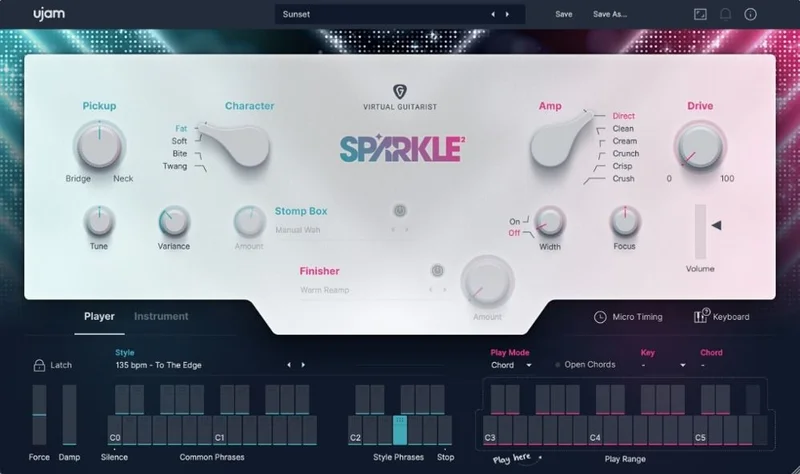
SPARKLE 2 is UJAM’s session specialist for chords, octaves and single-note electric guitar riffs. The developer pitches it for anything from funk licks to distorted indie sounds.
Here’s what changes versus SPARKLE 1. You get more than 30 Styles and 350 Phrases, an Instrument mode with freshly recorded samples and phrases, and an Open Chords feature for extra variety.
The tone side grows too. There are 30 Stomp Box emulations, 60 Finisher FX Modes, and hand-picked vintage amps and speaker cabinets.
It’s an 8 GB library delivered as a downloadable installer. One perpetual license, one user.
Who Qualifies
This is an upgrade product, so it’s meant for people who already own SPARKLE 1. If that’s you, the upgrade price applies.
If you don’t own SPARKLE 1, the upgrade isn’t built for you.
Check your system before you click buy. You need macOS 10.15 Catalina or later (Intel or M1 Apple Silicon, 64-bit only) or Windows 10 or later (64-bit only). It wants at least 8 GB of RAM and 8 GB of free disk space.
You also need a display of at least 1280 x 768px and an internet connection. Authorization runs through the UJAM App, or through your email and password inside the plugin.
How Does the Instrument Mode Play?
Instrument mode is where SPARKLE 2 starts. It uses freshly recorded samples and phrases, captured with a customized vintage guitar fitted with single-coil pickups.
Single-coil pickups give you a thin, bright, snappy attack. Think chime rather than thickness. That suits pop rhythm parts, funk licks and clean indie strums.
Picture this. You’ve got a four-chord loop and an empty guitar track. You hold down a chord, trigger a phrase, and a rhythm part appears in seconds. That’s the whole pitch.
It’s fast. For demos, it’s wonderful.
The developer says its frustration-free design guarantees faster, easier and better results. We’d soften that. Owners say the new styles and phrases feel natural to play, which is the part that matters. Speed is real. “Better” depends on what you compare it against.
Open Chords
Open Chords adds extra variety to what you can voice. If every part you’ve made with SPARKLE 1 leans on the same barre shapes, this gives your arrangements a different texture.
The practical benefit is simple. Open voicings ring differently against a vocal than closed ones do. You’ll hear the difference when you drop a chorus into the arrangement and the guitar stops fighting the lead line.
What Do the 30+ Styles Cover?
The developer says the styles cover 60s grit, 70s disco, 80s glam, 90s brit pop, 00s indie and contemporary electronic pop. That’s a wide span for one plugin.
It’s a stylistic buffet, not a deep dive into any one decade. You get the broad strokes of each era rather than a specialist’s nuance.
Say you’re scoring a quick indie demo and want a jangly 00s feel. You pick the style, trigger phrases, then lean on the Stomp Box for grit. That workflow is clean and quick.
The 350 phrases give each style a lot of movement. The developer calls it instant gratification, and for once the marketing line fits the experience. You don’t have to program anything to hear something usable.
How Good Are the 350 Phrases?
Phrases are the core of the product. Owners say they feel natural to play, and that matches the pitch of a session guitarist in a box.
Here’s where it frays. Owners report that phrases longer than one bar don’t follow existing chord progressions as needed. If you’re writing a progression that changes every two beats, you’ll notice.
That’s annoying. A phrase that ignores your chord changes isn’t a session player, it’s a loop.
The practical workaround is to stick with one-bar phrases when your harmony moves fast. Save the longer phrases for static vamps where one chord rides for a full bar or more.
Drag-and-Drop Editing
Drag-and-drop in V2 sounds strong according to owners. You grab a phrase and pull it into your DAW as MIDI, which is the fastest way to build an arrangement.
It has limits, though. MIDI drag-and-drop runs into trouble with phrases longer than one bar.
Owners also report that some exported MIDI phrases contain unwanted long empty endings. You’ll drop a clip on the timeline and find it’s twice the length it should be. Trim it by hand.
And there’s a bigger mismatch. Owners report that dragged phrases sometimes differ from playback mode. What you hear in the plugin isn’t always what lands in your session.
That’s frustrating. Check every dragged clip against the plugin’s own playback before you commit.
What Do the Stomp Boxes Actually Do?
There are 30 Stomp Box emulations, and they sit before the amp. That’s the key point. They’re pre-amp, so the amp and speaker sections dynamically react to them.
In plain terms: hit a drive pedal harder and the amp stage breaks up differently. That’s how a real pedalboard behaves, and it’s why pre-amp placement matters.
Picture a clean funk chop that sounds a bit thin. Add a compressor-style Stomp Box ahead of the amp and the notes level out. Push a drive box and the same riff turns gritty at the top.
The developer lists 30 different stomp box combinations as available. Owners call the stomp box a cool feature. We’d agree on the concept. Pre-amp effects that interact with the amp are the right design.
What Are the Finisher FX Modes?
Finisher FX handles the post-amp side. There are 60 Finisher FX Modes, delivered as 60 multi-FX chains that include ambiences.
Post-amp effects are the polish. Reverbs, delays and modulation sit after the amp and speaker, so they shape the space around the guitar rather than the guitar’s own breakup.
A scene you’ll hit: the guitar sounds fine solo but sits dry against a lush pad. Pick a Finisher chain with an ambience and the part tucks behind the vocal. You won’t need a separate reverb plugin on the track.
Sixty chains is plenty. Owners call the Finisher a cool feature alongside the stomp box and drag-and-drop.
How Is the Amp and Cabinet Section?
SPARKLE 2 includes emulations of hand-picked vintage amps and speaker cabinets, plus in-built effect and tonal control. The developer says it ensures classy tone and vibrant character.
Marketing language, so let’s translate. Vintage amps tend to break up softly and roll off the highs earlier than modern designs. That gives a rounder, less brittle top end.
We’d treat “classy” as the developer’s word, not ours. What owners say is blunter. The tone is somewhat artificial, better suited as a placeholder than a final mix.
That’s the honest read. It’s great for getting an idea down and hearing a production take shape. For the record you release, you may want to replace it.
Where Does It Fall Short?
The limits are real, and they cluster around control.
Humanizer and swing are strongly limited. Owners report limited pattern customization and finicky MIDI triggering. If you want loose, pushed-and-pulled timing, you won’t get much from the built-in tools.
There’s no MIDI out. SPARKLE 2 lacks MIDI out functionality, which means you can’t send the performance to another instrument. If you wanted to route the notes into your own guitar sampler, you can’t.
Pitch range is another one. Limited pitch range is reported as a limitation of UJAM products generally.
Put it together and the picture is clear. It’s a quick generator with a narrow set of controls. Great for speed. Not great for tweaking.
The Value Case
At $29 for the upgrade, the numbers favor existing owners. Owners call the discounted upgrade price relatively good value, and we’d back that.
You get 350 phrases, 30+ styles, 30 Stomp Boxes and 60 Finisher FX Modes on a perpetual license. No subscription. That’s a lot of content for a top-up.
The question is whether the new content solves a problem you actually have. If SPARKLE 1 already covers your sketching needs, you’re paying for extra variety. If you keep running out of styles, it’s a clear yes.
Weigh the limits too. The workflow quirks don’t disappear with the upgrade.
Who Should Skip It
Skip it if you need MIDI out. There isn’t any, and no amount of new content changes that.
Skip it if you want tight control over timing. Humanizer and swing are strongly limited, and pattern customization is thin.
Skip it if you want a finished-record guitar tone. The tone is somewhat artificial, and owners treat it as a placeholder.
Skip it if you write fast chord changes with long phrases. They don’t follow existing progressions as needed.
Hold off, too, if SPARKLE 1 already does what you need. More styles isn’t a reason by itself.
The Verdict
We say buy it if you own SPARKLE 1 and write quick demos. The upgrade is cheap at $29, and the library growth is real.
We say skip it if you want control, MIDI out or a tone you can ship unchanged. It won’t give you those.
Score: 3.8 out of 5. A good sketchpad that stops short of being a tool you’d build a record on.
Specs & Technical Details
| Spec | Detail |
|---|---|
| Developer | UJAM |
| Price | $29 |
| Plugin Format | VST2 / VST3 / AU2 / AAX |
| OS Support | macOS 10.15 Catalina and later (Intel and M1 Apple Silicon, 64-bit only) / Windows 10 and later (64-bit only) |
| Activation | UJAM App, or email and password within the plugin |
| CPU Usage | N/A |
| Trial Available | N/A |
| Version Reviewed | SPARKLE 2 |
Score Breakdown
| Category | Score | Notes |
|---|---|---|
| Sound Quality | 3.5/5 | Vintage amp and cab emulations, but owners hear a somewhat artificial tone |
| Value for Money | 4.0/5 | Owners call the discounted upgrade price relatively good value |
| Ease of Use | 4.0/5 | Drag-and-drop and ready phrases, held back by finicky MIDI triggering |
| Features | 3.5/5 | Big content growth, but no MIDI out and thin pattern customization |
| Overall | 3.8/5 | Strong sketching tool with real workflow limits |
Alternatives to Consider
Native Instruments Session Guitarist Mint
It offers more usable MIDI functionality, including MIDI out. Pick it if you want to take the performance elsewhere, which SPARKLE 2 can’t do.
AAS String Studio VS3
It offers a brighter palette of options for chord-following workflows. Look here if your harmony changes quickly and phrases need to track it.
GS Strum 2
Same story as above: a brighter palette of options for chord-following workflows. It’s worth a listen if SPARKLE’s phrase behavior keeps tripping you up.
Final Call: Buy or Skip?
Buy it if you own SPARKLE 1 and live in demos. At $29 it’s an easy yes for more styles, more phrases and a proper effects section.
Skip it if you need MIDI out, tight timing control or a guitar you’ll leave in the final mix. For you, this is the wrong tool.
Here’s the one-line version: a fast idea machine that won’t let you steer.
Related reviews: Alienize · Bloom KSHMR Crossgrade from any Full Bloom product
Frequently Asked Questions
Is the SPARKLE 2 upgrade from SPARKLE 1 worth it?
For SPARKLE 1 owners who want more variety, yes. You get more than 30 Styles, 350 Phrases, 30 Stomp Boxes and 60 Finisher FX Modes for $29. Owners call the upgrade price relatively good value, though the workflow limits remain.
Does SPARKLE 2 have MIDI out?
No. SPARKLE 2 lacks MIDI out functionality. You can drag and drop phrases as MIDI, but longer phrases have limits and some exports carry empty endings.
What do I need to run SPARKLE 2?
You need macOS 10.15 Catalina or later, or Windows 10 or later, both 64-bit only. It requires 8 GB of RAM, 8 GB of free disk space and an internet connection. It supports VST2, VST3, AU2 and AAX.
Can SPARKLE 2 replace a real guitarist on a finished record?
Probably not. Owners report a somewhat artificial tone that suits placeholder parts better than final mixes. It's strongest for sketching and demos.