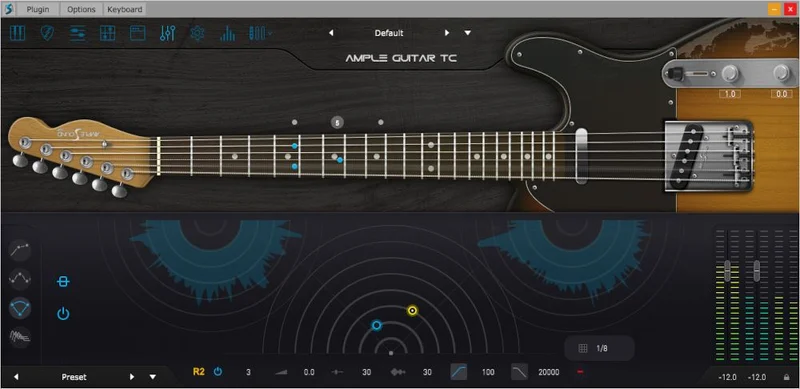
Ample Guitar TC is the right tool if you're trying to write a Telecaster part for a country, funk, or indie track without hiring a session guitarist or retuning a physical guitar for the fifth time this week. It's a virtual instrument plugin built around a Fender Telecaster John English Masterbuilt semi-hollow, and at $149 it makes a credible case for living in your template. Whether it makes sense for your template depends on the work you're asking it to do and how much time you're willing to spend learning its system.
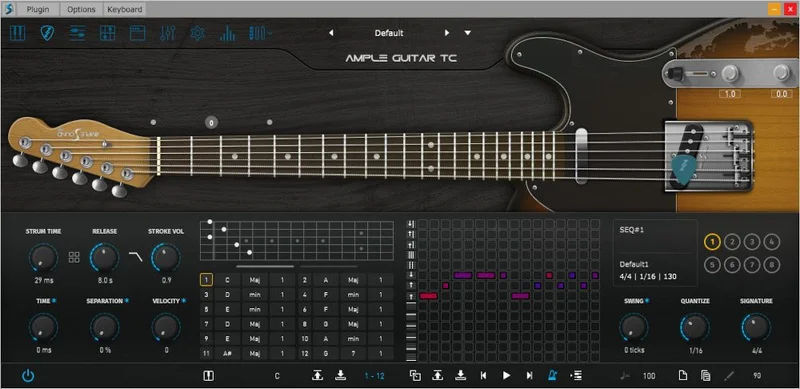
The feature set is deep: 9 articulations, a Strummer module with 28 playing styles, Tab Reader 4 that imports Guitar Pro files up to GP8, Riffer 4 for MIDI editing, and a built-in amp sim drawn from Roland JC120, Fender, Marshall, and Mesa/Boogie models. That's a lot of infrastructure. Some of it is brilliant. Some of it has real bugs. And the tone, while genuinely useful, isn't the warmest Telecaster sound you'll find at any price.
This review is for producers who need a Telecaster in the box and want to know exactly what they're getting into at $149.
Where This Guitar Belongs
The Telecaster is one of the most genre-specific guitars ever built. Bright, twangy, with a glassy bridge pickup character that cuts through dense mixes without asking permission. Ample Guitar TC leans into that identity hard.
Country is the obvious home. If you're building a track around chicken-pickin' patterns, clean rhythm parts, or the kind of single-note lead that sits just above the snare in the mix, this plugin has the articulations and the sample content to do it convincingly. The sustain, legato, and palm mute articulations cover the vocabulary of the style.
Funk is a genuinely strong fit. Load up the Strummer module, dial in a 16th-note pattern with ghost strums, and you're in the right territory quickly. The 28 playing styles per chord give you enough variation to keep a part from sounding mechanical over a full arrangement.
Indie and alternative work too, particularly for clean rhythm parts. The semi-hollow body of the source guitar adds a slight air to the sample content that works in open-chord progressions and arpeggio-based writing. If you're building something in the vein of post-punk or jangle pop, this plugin will sit comfortably in those textures.
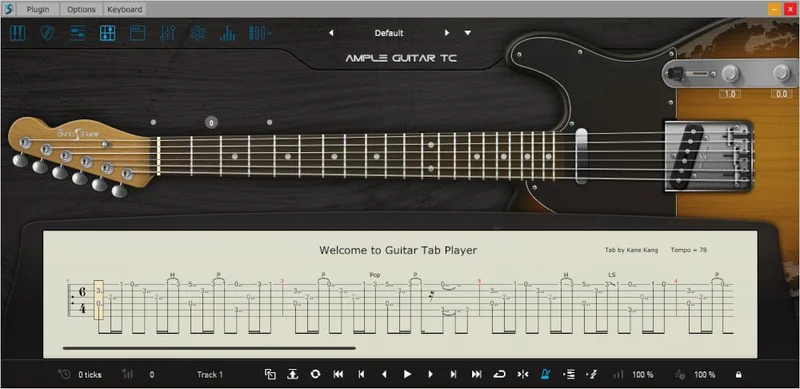
The Tab Reader 4 feature is worth flagging here specifically. If you have Guitar Pro files from a collaborator, a session player, or a transcription library, the plugin imports GP3 through GP8 with fingering and articulations intact. For producers who work with real guitarist notation as a reference, that workflow is genuinely satisfying.
The built-in amp sim covers Roland JC120 for clean and funk work, and Marshall and Mesa/Boogie models for anything that needs gain or grit. Having 8 microphone options per cabinet with stereo and mono mic control means you can shape the recorded tone without leaving the plugin. That's a real time-saver when you're trying to dial in a sound quickly.
Where It Doesn't Belong
Lead guitar is where the cracks show. Owners report that the tone can sound clinical rather than warm on single-note lead lines. That's not a flaw in the sampling; it's a characteristic of the source instrument and the way the plugin renders it. If you need a Telecaster lead sound with the kind of organic softness that makes a phrase feel like it breathes, this plugin will frustrate you.
Orange Tree Samples guitars have a warmer, more physically responsive quality on lead parts that this plugin doesn't match. If leads are your priority, that's worth knowing before you spend $149.
High-gain and heavy applications are also the wrong context. Ample Sound makes the Ample Metal Eclipse for that job, and it shows. The TC's sample content and amp options aren't built for sustained distortion or drop-tuned riffing.
And if you need a wide range of pickup configurations for different tonal characters, the TC has fewer options than other Ample Sound models, including the Ample Guitar SC. Users report that this makes it genuinely harder to find the specific tonal character that makes a Telecaster a Telecaster. That's an annoying gap for a plugin built around such a tonally specific instrument.
The Sample Library Up Close
5.1 GB of sample content is a solid foundation. The library splits into Finger and Pick libraries, which is an intelligent division. Fingerstyle playing has a softer, rounder attack; pick playing has the sharper transient and more defined edge that defines the Telecaster's classic sound. Having both in separate libraries means you can match the articulation style to the part you're writing.
The 9 articulations cover the most-used techniques: sustain, legato, harmonics, palm mute, and others. For country and funk work, sustain and palm mute are the two you'll reach for constantly. The legato articulation handles hammer-ons and pull-offs for lead and fill lines.
Separate neck and bridge sample libraries are included. The bridge pickup is brighter and more cutting; the neck pickup is rounder and sits further back in a mix. Switching between them inside the plugin changes the tonal character without requiring you to change anything in your signal chain. That's a small thing, but it matters when you're trying to find where a part sits.
Polyphonic legato is in here too. Chording with legato articulations applied across multiple strings is something that exposes the limits of a lot of virtual guitar plugins. The TC handles it, though the note-sustaining bug (more on that below) can make chord work unreliable in some hosts.
Alternate tunings and capo logic are built into the engine. If the song you're building is in a non-standard tuning or uses a capo at the 2nd or 4th fret, you don't have to detune your MIDI or build workarounds. The plugin handles the transposition internally. That's a clever piece of design that makes the instrument feel more like a real guitar and less like a sample library.
Riffer 4: The MIDI Editor Built for Guitar
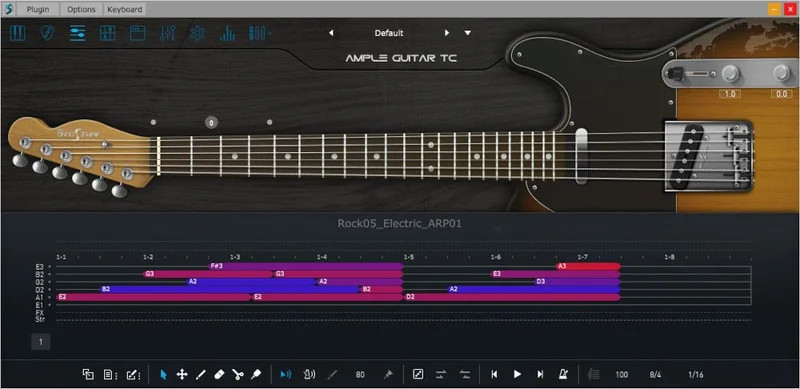
Standard MIDI editors were designed for keyboards. They work for guitar if you ignore everything about how guitar actually plays. Riffer 4 is Ample Sound's answer to that problem, and it's one of the strongest reasons to consider this plugin over a cheaper alternative.
The Dual View Modes let you switch between Piano Roll and Guitar Tab views in real time. If you think in tabs, work in the tab view. If you're more comfortable with piano roll, stay there. The two views show the same data; it's a display preference, not two separate modes.
The String Visualization System displays strings inside the Piano Roll, which solves a real problem. When you're programming a guitar part in a standard piano roll, there's no way to see which string a note is being played on. With the String Visualization System active, you can see the string assignment alongside the note, which helps you check whether the voicing is physically playable on a real guitar. That matters for realism.
Technique Editing is the section that takes the longest to learn but delivers the most once you understand it. You can program fingering, articulation, legato, and expression directly in the editor without touching key switches. No key switch mapping. No separate MIDI channel per articulation. You set the technique in the editor, and the plugin plays back accordingly.
The MIDI CC and Velocity Editors show and edit multiple MIDI CC lanes simultaneously. One-click CC curve presets provide fast automation options if you need expression curves, vibrato depth, or pickup transitions automated over a phrase.
The Strum Note feature is worth explaining in detail. When you program a strummed chord in standard MIDI, every note in the chord is a separate MIDI event. If you want to edit the chord, you edit each note individually. Strum Note treats all the sub-notes in a chord as a single object. Move it, copy it, transpose it, all the notes move together. For chord-heavy arrangements, this is the difference between a session that takes two hours and one that takes twenty minutes.
Full MIDI Import/Export Compatibility maintains identical playback results when you move files between sessions or share with collaborators. That's a workflow detail that sounds obvious but isn't always reliable in virtual instrument plugins.
Tab Reader 4: Guitar Pro Integration
This is the feature that owners consistently flag as the most surprising. Importing Guitar Pro files from GP3 through GP8 with fingering and articulations preserved is not a common capability in virtual guitar instruments. If you've been sent a GP file from a session guitarist or downloaded a transcription, Tab Reader 4 turns it into a playable MIDI performance inside the plugin without you manually rebuilding every note and articulation.
The key word is "preserved." Articulations in the GP file, bends, slides, hammer-ons, translate into the TC's own articulation system on import. You don't get a flat MIDI reduction with no technique information. You get a version that plays back with the phrasing the original file contained.
This is a satisfying workflow. You import a country rhythm part from a GP8 file, it loads with the strumming direction and chord voicings intact, and you're arranging around it inside five minutes. That kind of speed is what justifies the price for producers who work quickly and need a guitar part to sound right on the first listen.
The limit here is what it always is with tablature imports: the source file has to be good. If the GP file has incorrect fingering or misassigned articulations, the plugin imports those errors faithfully. Garbage in, garbage out. But that's a tab quality problem, not a plugin problem.
The Strummer Module
28 playing styles per chord. That's the number. Some virtual guitar strummers offer 6 or 8 patterns. 28 means you can find something that fits a specific feel rather than settling for the nearest available option.
The styles cover different rhythmic densities, strum directions, ghost note placements, and attack characters. For funk, that range is what you need. The difference between a strum that feels like a 16th-note pocket and one that feels rushed is in the attack timing and the ghost note weighting, and having 28 options gives you enough range to find the one that locks in with your kick and snare.
MIDI export from the Strummer is included. If you build a chord progression in the Strummer module and want to edit the resulting MIDI in your DAW's own piano roll, export it and work on it there. That's not a limitation; it's a reasonable exit ramp from the plugin's internal workflow when you need something the editor doesn't directly support.
The Strum Note system described above applies here. Each chord in the Strummer is an editable object, not a pile of individual MIDI notes. That's the right design for chord-based writing.
The Amp Simulation and Effects
Four amp models: Roland JC120, Fender, Marshall, and Mesa/Boogie. That covers clean, mid-gain, and high-gain territory without leaving the plugin. 8 microphone options per cabinet with stereo and mono mic control means you're not locked to a single recorded perspective on the amp.
Moving a mic from the centre of the cone to the edge changes the top-end character: more presence and clarity at the centre, more warmth and roundness at the edge. With 8 microphone options per cabinet, you can position the virtual mic placement to match what a part needs in the mix. For a country rhythm part that needs to cut through a full band arrangement, centre-capsule positioning on the Fender model is a reasonable starting point. For a warmer indie chord part, pulling toward the edge softens the attack.
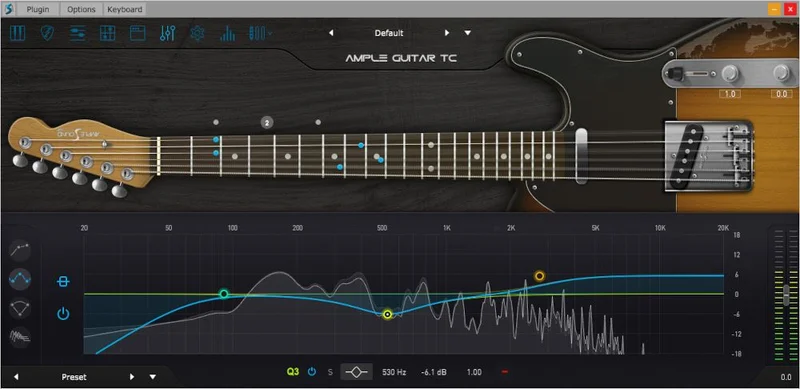
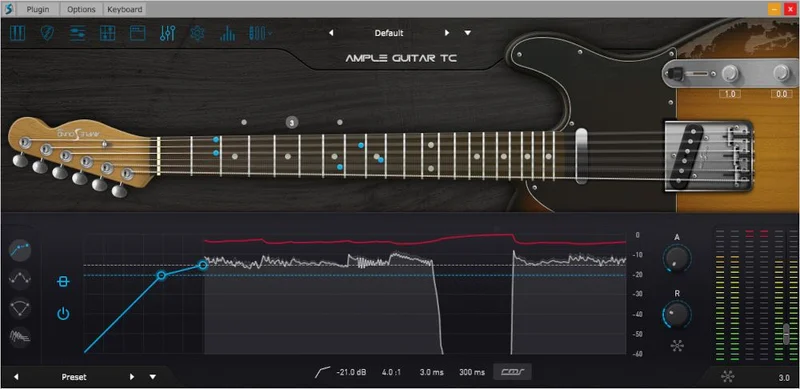
The onboard FX suite adds an 8-band EQ, dual compressor, 6-tap echo, and IR reverb. These aren't there to replace your outboard or bus processing, but they're genuinely usable for shaping the tone before it leaves the plugin. The IR reverb in particular can place the guitar in a room character that makes it feel like a recorded performance rather than a sample library.
All presets have been redesigned and paired with Riffer demos. That's a genuinely useful starting point for understanding what the plugin is capable of and how the amp and FX settings interact with different playing styles.
How To Use It Well
Start with the preset demos before you try to build from scratch. The redesigned presets come with Riffer demos attached, so you can hear how the amp, mic, and EQ settings interact with an actual part. Use those as reference points for the tone you're building toward.
If you're using it in Logic Pro X, watch your chord voicings. Users report that playing more than 4 notes in a chord can cause notes to sustain on their own and spike the audio meters. Keep chord voicings at 4 notes or fewer until you've confirmed your session is stable. It's an annoying workaround, but it's the difference between a session that runs smoothly and one that suddenly peaks at 0dBFS for no visible reason.
When you switch presets, you may hit a latency issue. The fix owners report is adjusting the start setting to 50ms. Set that before you start a tracking session rather than after the problem appears.
Use the Tab view in Riffer 4 if you think about guitar parts as physical finger positions rather than note names. Switching to the Guitar Tab view makes it immediately clear whether a voicing is playable on a real neck, which matters if you're writing parts that a real guitarist might perform live later.
The Strummer's 28 playing styles are sorted by density and character. If you're building a funk part, work from the 16th-note-density styles and adjust from there. For country, the alternating bass styles give you the thumb-and-strum motion that defines the genre's rhythmic feel without having to program each bass note manually.
Gain stage carefully before the amp simulation. The TC responds to input level in the amp model the way a physical amp would: push it harder and the top end turns gritty, back it off and it cleans up. That's not a bug. Use it as a tonal control, not a volume control.
Against the Field
The SC offers more pickup options per model, which gives it a wider tonal palette. If tonal variety matters more to you than the specific Telecaster character, the SC is worth comparing directly.
Orange Tree Samples guitars provide warmer, more authentic feel for lead parts when the TC's clinical tone becomes a sticking point. The warmth and physical responsiveness of Orange Tree's modelling is different in character. It costs more to build out a comparable feature set, but the organic quality on lead parts is something the TC doesn't match at any setting.
Ample Guitar VC is Ample Sound's heavier-tones model. If your writing runs toward hard rock or alternative with more gain than the TC is designed for, the VC is the right tool. The TC will never convincingly do what the VC was built to do, regardless of which Mesa/Boogie amp setting you choose.
Ample Metal Eclipse covers high-gain. No configuration of the TC turns it into a metal guitar plugin. The Eclipse is there for that.
The Bugs You Should Know About
The note-sustaining issue in Logic Pro X is real and reproducible. Play more than 4 notes in a chord, and notes can sustain past their intended duration, pushing audio meters into the red with no input from you. It's one of those bugs that feels impossible until it happens to you in the middle of a mix session.
Keep chord voicings at 4 notes or fewer as a working rule. It's not a theoretical concern. It's a documented owner report, and it's worth protecting yourself against before you're two hours into a session.
The preset-switching latency is less dramatic but more regular. When you switch presets, there's a latency hit that can interrupt playback or cause timing drift in real-time use. Adjusting the start setting to 50ms resolves this, but you have to know the fix exists. It's the kind of issue that makes a first-time user think the plugin is broken before they find the solution buried in a forum thread.
The steep learning curve is a real limit, not a marketing caveat. Riffer 4's Technique Editing workflow, the Strum Note system, the Tab Reader import process, these take time to understand. Users report needing a significant time investment before the plugin works as fast as the feature list implies it will. If you need a guitar sound by the end of this session, the TC will likely frustrate you on day one.
Value for Money
At $149, the TC is mid-range for a dedicated virtual guitar instrument with this depth of content. The 5.1 GB library, the Tab Reader 4 integration, Riffer 4's technique editing, and the built-in amp simulation with 8 mic positions are a substantial feature set for the price.
The question is whether you'll use the depth. If you're building country, funk, or indie arrangements regularly and need a Telecaster sound that holds up over long sessions with many parts, the investment makes sense. The workflow tools, specifically Riffer 4 and Tab Reader 4, pay back time over multiple projects.
If you need a Telecaster for one track, once, the learning curve makes this a poor investment. The time cost of getting fluent with the system is real. A simpler plugin at a lower price point would serve you better for occasional use.
The bugs add a hidden cost. Tracking down the 50ms start setting fix and managing the 4-note chord limit aren't expensive in money, but they cost session time and mental energy. That's part of the total price, and it's worth factoring in honestly.
What you're paying for, really, is the Tab Reader 4 and Riffer 4 ecosystem. The sample library is good, the amp sim is useful, but those two features are the ones that separate this plugin from a simpler Telecaster rompler. If you need them, $149 is fair. If you don't, there are simpler options.
The Verdict
Ample Guitar TC is a capable, feature-heavy Telecaster plugin with real workflow advantages and real workflow frustrations. The sample content is solid for country, funk, and indie work. The Riffer 4 and Tab Reader 4 integration is clever and genuinely time-saving once you've learned the system. The Strummer's 28 playing styles cover the chord-based application the instrument was designed for.
But the note-sustaining bug is ugly. The clinical lead tone is a genuine limitation. The fewer pickup options compared to other Ample Sound models mean you're working with a narrower tonal range than the price implies you should have. And the learning curve is steep enough that your first week with this plugin might feel like a mistake before it starts feeling like a tool.
Buy it if you write country, funk, or indie regularly and need a Telecaster that can handle both chord-based strumming and tablature-imported performances in the same session. The workflow depth rewards producers who live in those genres full-time.
Skip it if you need warm lead tones, a wide pickup variety, or a guitar plugin you can be fluent in within a single afternoon. Those needs belong somewhere else.
Specs & Technical Details
| Developer | Ample Sound |
| Price | $149 |
| Plugin Format | VST / AU / AAX |
| OS Support | Mac / Windows |
| Activation | N/A |
| CPU Usage | N/A |
| Trial Available | N/A |
| Version Reviewed | N/A |
Score Breakdown
| Category | Score | Notes |
|---|---|---|
| Sound Quality | 3.5/5 | Convincing for rhythm and chord parts; clinical on lead |
| Value for Money | 3.5/5 | Fair for dedicated country/funk producers; too deep for occasional use |
| Ease of Use | 2.5/5 | Steep learning curve; bugs add friction in early sessions |
| Features | 4.0/5 | Tab Reader 4, Riffer 4, and 28 Strummer styles are genuinely strong |
| CPU Efficiency | N/A | Not tested |
| Overall | 3.5/5 | Strong workflow tools with real bugs and tonal limits that matter depending on your use case |
Alternatives to Consider
Ample Guitar SC is worth comparing if tonal variety is a priority. It offers more pickup options per model than the TC, which gives you a wider range of tonal characters from a single plugin. If you're not locked to the Telecaster specifically and want more flexibility in a similar price range, the SC is worth checking directly on the Ample Sound site.
Orange Tree Samples guitars are the alternative if lead guitar is central to your work. The warmth and organic feel of Orange Tree's sample content on single-note lines is something the TC's clinical render doesn't match. The tradeoff is a different feature ecosystem; Orange Tree and Riffer 4 are not the same kind of tool. But if your priority is a lead guitar sound that feels like a real instrument rather than a programmed performance, Orange Tree's catalogue is worth your time.
Ample Guitar VC covers heavier tones within the Ample Sound range. If your writing sits in hard rock or alternative with significant gain, the VC is built for that work in a way the TC is not. Same engine, same workflow logic, different source material and amp character.
If you write country full-time and want everything in one plugin, the TC has no direct rival at this price that bundles Tab Reader, Riffer 4, and a Telecaster-specific sample library together. That combination is the TC's strongest argument, and it's a real one.
The choice comes down to this: buy the TC for the workflow and the specific Telecaster identity. Buy Orange Tree if you need warmth and organic lead tone more than feature depth. Buy the SC if you want the Ample Sound system with more tonal options. None of those is a wrong answer. They serve different priorities.
Frequently Asked Questions
What genres is Ample Guitar TC best suited for?
Country, funk, and indie are where the TC is most convincing. The bright, twangy character of the Telecaster source instrument and the Strummer module's 28 playing styles make chord-based parts in those genres work well. The plugin is less suited to warm lead work or high-gain applications.
Does Ample Guitar TC work in Logic Pro X?
Yes, but there's a known issue to manage. Users report that playing more than 4 notes in a chord can cause notes to sustain unexpectedly, pushing audio meters into the red. Keeping chord voicings at 4 notes or fewer mitigates this issue. There's also a preset-switching latency issue that's resolved by setting the start setting to 50ms.
What is Tab Reader 4 and do I need it?
Tab Reader 4 imports Guitar Pro files from GP3 through GP8 with fingering and articulations preserved, translating them into the TC's own articulation system.
How does Ample Guitar TC compare to Ample Guitar SC?
The SC offers more pickup options per model than the TC, giving it a wider tonal range. The TC is built around a specific Telecaster character with a sample library tuned to that instrument's brightness and twang. If you need the Telecaster identity specifically, the TC is the right choice. If you want more tonal variety, the SC is worth comparing.
Is the learning curve really that steep?
Users report a steep learning curve for the MIDI editing and strumming workflows, with Riffer 4's Technique Editing and the Strum Note system requiring significant time investment before they feel intuitive. The payoff is real once it does, but expecting to be productive on day one is likely to leave you frustrated.
Can Ample Guitar TC handle lead guitar parts convincingly?
It handles lead articulations technically, with sustain and legato both included. But owners report that the tone sounds clinical rather than warm on single-note lead lines, which limits its usefulness for expressive lead work. If leads are central to what you're building, Orange Tree Samples guitars are the more commonly recommended alternative for that specific application.