If you already own any full Bloom product, the crossgrade to Bloom KSHMR is worth it, and at $29 it's one of the more straightforward upgrade decisions in the virtual instrument world right now. You're not starting over. You're moving sideways into a completely different cultural palette: 112 percussion samples recorded across India and South Asia, over 250 KSHMR-curated presets, and a sequencer engine that already knows your BPM the moment you load it.
This review is for existing Bloom owners deciding whether to crossgrade. If you don't own a full Bloom product yet, there's a separate full-version listing to check first.
Quick verdict: Bloom KSHMR earns its crossgrade price by giving you a content library you genuinely can't build yourself without flying to South Asia and hiring session players. The 112 tablas, dhols, bansuri flutes, sitars, rababs, ouds and vocal loops were recorded with analog gear on location, not synthesised or sampled off a royalty-free pack. The sequencer and effects engine you already know from Bloom carry over intact. The one caveat that matters: if you're on Logic Pro 11.2 or below, multiple users have reported crashes and MIDI sync errors that Excite Audio has not yet fully resolved. That's not a deal-breaker for Ableton, FL Studio, Pro Tools or Cubase users, but it's a real problem if Logic is your home. Score: 4.2/5. Price at crossgrade: $29.
What You Are Upgrading To
Bloom KSHMR is a dedicated South Asian and Bollywood-inspired virtual instrument built on the same Bloom engine you're already using. The upgrade swaps the content library entirely: instead of whatever banks your current Bloom version shipped with, you get KSHMR's curated set of 112 percussion samples and over 250 presets centred on Indian and South Asian instrumentation.
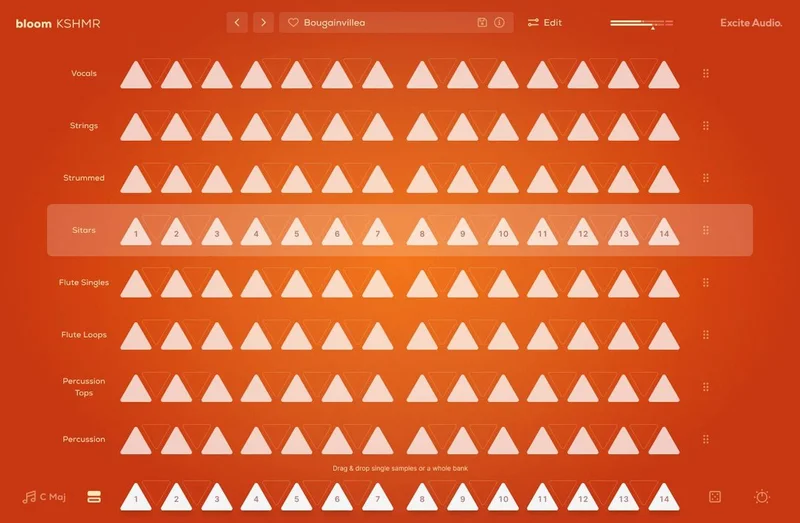
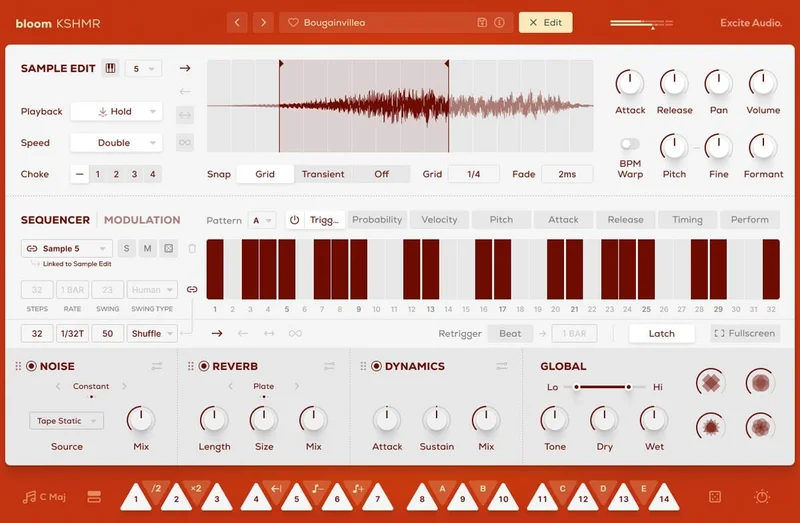
The interface architecture stays the same. There's still a Main Page for performance and a deeper Edit Page for sequencing, sculpting and importing your own samples. What changes is everything inside those pages.
On the sound side, you're getting tablas and dhols for percussion, bansuri flutes and vocal loops for melodic and atmospheric material, sitars, rababs and ouds for stringed textures, and Bollywood-style drum circles for the kind of layered orchestral hits that don't exist in most Western-facing sample libraries. The developer says every sound was recorded with high-end analog gear and captured with live instrumentalists across India and the wider South Asian region. KSHMR says he curated every sound personally.
The four macros are redesigned for this version: Lo-Fi, Tube, Width and Space. Those replace whatever macros shipped with your original Bloom product. The effects chain (Noise, Reverb, Dynamics) and the Lo-Cut/Hi-Cut filters are structurally identical to base Bloom, but the 15 noise types, three reverb modes and the dynamics controls now sit inside a content context built around organic, acoustically-recorded material.
Version 1.2 added sample import. That's live in the crossgrade version, and it matters: you can drag and drop your own audio files onto any of the 14 sample keys, replacing the factory content while keeping the sequencer, macros and effects in place.
Who Qualifies
The crossgrade is available to anyone who owns any full Bloom product. That's the only condition stated on the product page.
You don't need to own a specific version or tier of Bloom. If you have a full Bloom licence, you qualify. The crossgrade price applies at checkout, and you'll need an internet connection to authorise the software after purchase.
If you're unsure whether your Bloom product counts as a "full" product, check your Plugin Boutique account before buying. The page is clear that this is a crossgrade, not an upgrade path for demo or lite licences.
System requirements carry over from the base Bloom spec: macOS 10.15 or higher with 64-bit compatibility, Windows 7 or higher with 64-bit compatibility, and a recommended buffer size of 512 samples or above. Plugin formats cover VST, VST3, AU and AAX, plus Standalone. Supported DAWs include Ableton Live, FL Studio, Pro Tools, Logic Pro, Cubase, Nuendo, Reaper and Reason.
The Content Library in Detail
Percussion: Tablas, Dhols, and Drum Circles
The 112 percussion samples are the backbone of the library, and they're organised into 8 banks with easy-to-find categories on the Main Page. Load a bank and you've got 14 sample keys ready to trigger individual sounds.
Tablas and dhols sit at the lighter and heavier ends of the Indian percussion spectrum. Tablas are the nuanced, finger-played hand drums you hear threading through classical and film music. Dhols are louder, two-sided barrel drums built for wedding processions and Bhangra. Both are here, and the developer says they were recorded using analog gear on location.
The drum circles are the attention-grabber for anyone working in cinematic or trailer music. Bollywood-style orchestral percussion hits are genuinely hard to find in most Western sample libraries, and the layered energy of a full circle is something no single drum machine patch is going to fake convincingly.
All 112 samples sync to your host BPM. That's not a "smart tempo" approximation: the samples are mapped to the sequencer engine and lock to your project immediately. Reviewers consistently flag this as one of the strongest parts of the workflow.
Melodic Instruments: Flutes, Strings, and Vocals
The bansuri flute is a North Indian bamboo flute with a breathy, expressive tone that sits very differently from Western orchestral flute samples. Bloom KSHMR includes both loops and one-shots. Load a loop, chop it on the Edit Page using start and end markers with snap to grid, and you're already in different creative territory from whatever your current preset library offers.
Sitars, rababs and ouds cover the stringed side. Sitars are Indian; rababs are Central Asian, common in Afghan and Hindustani classical music; ouds are Middle Eastern lutes. The fact that the library spans this geographic range rather than flattening everything into a generic "Indian sounds" category is worth acknowledging. These are distinct instruments with distinct tonal characters.
The vocal loops are described as authentic and expressive. They're royalty-free, which removes the clearance headache if you're working on commercial releases.
The 250 Presets
Over 250 presets, built by KSHMR and Excite Audio's sound designers, give you a fast entry point into the library without needing to build patches from scratch. Reviewers describe the preset selection as covering a wide range of moods and production styles.
The presets are organised by category inside the 8 banks. You can audition them from the Main Page and load one in a single click. That speed matters when you're in a session and want to try five different textures in thirty seconds without breaking flow.
That said, some producers report the phrase-based approach works best as an inspiration tool rather than a final-part workflow. If you prefer to hand-sequence every hit from individual one-shots, you'll spend more time on the Edit Page than in the preset browser. That's not a flaw, just a workflow reality worth knowing before you buy.
The Main Page: Performance Workflow
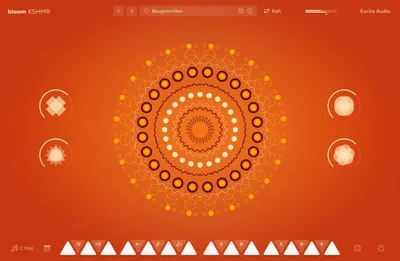
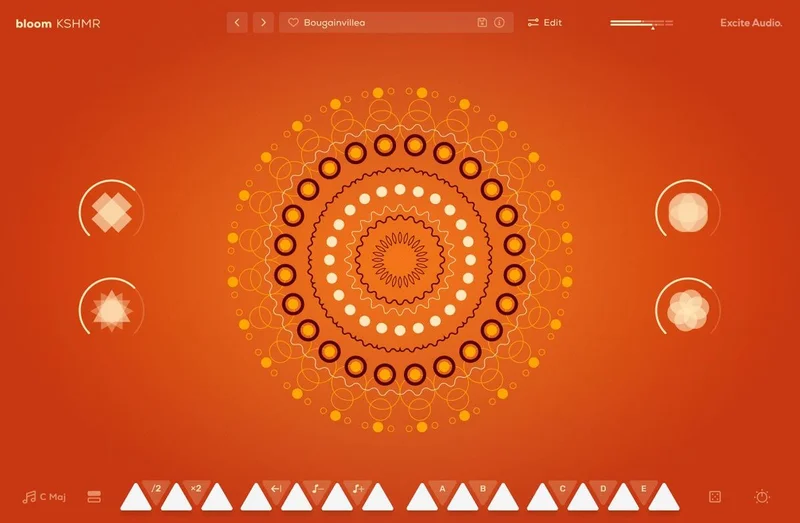
The Main Page is where you spend most of your time if you're triggering live or sketching ideas fast. White notes trigger individual sounds. Black notes launch phrases or adjust properties. It's a layout that experienced Bloom users will recognise immediately.
The 5 factory modifiers (Half-time, Double-Time, Reverse, Octave Down, Octave Up) live here too, along with 5 custom modifier slots (A through E) for triggering sequences you've built on the Edit Page. Those modifier keys turn a fairly static sample-trigger layout into something genuinely flexible for live performance or real-time arrangement.
The Sample Randomise function is worth exploring. Load a bank, hit randomise, and you get a new combination of sounds across the 14 keys. It's a fast way to break out of your own habits when you keep reaching for the same tabla pattern.
The 4 macros sit prominently on the Main Page: Lo-Fi, Tube, Width and Space. Each one is a multi-parameter control designed by KSHMR. Lo-Fi colours the signal with harmonic degradation. Tube adds saturation. Width broadens the stereo image. Space adds depth, most likely using the reverb engine underneath. Turn one up while a phrase is playing and the character of the sound shifts immediately. That's where Bloom KSHMR earns its description as a performance instrument, not just a sample player.
One frustrating UI behaviour that users flag: when you close and reopen the plugin, it resets to the Main Page regardless of what you were doing. If you had the Edit Page open with a specific sample loaded and parameters dialled in, you'll have to navigate back every time. Annoying. Not a workflow-breaker, but it's the kind of thing you notice in a long session.
The Edit Page: Sculpting and Sequencing
Sample Edit Controls
The Edit Page is where Bloom KSHMR moves beyond a preset browser. Each sample has its own set of controls: playback direction (Forwards, Backwards, Pendulum, Loop), playback modes (Hold, Latch, Relative), playback speed (Normal, Double, Half), and a full set of envelope controls for attack, release, pan and volume.
Start and end markers with snap to grid and snap to transient give you surgical control over which part of a loop fires. If you want just the attack of a dhol hit without the full decay, you can isolate it here. The formant and pitch warp controls extend the pitch editing beyond simple transposition: formant shifting lets you change pitch without changing character in the same way, and pitch warp adds time-stretch behaviour.
Four choke groups manage sample interaction. Assign two sounds to the same choke group and triggering one cuts off the other. That's exactly what you need for open/closed hi-hat behaviour in a tabla or dhol kit, and it works the same way here.
Sample crossfade smooths the transition between loop start and end points. Push it up if you're looping a sample with a hard click at the boundary. The difference between a clean loop and a clicking one often comes down to 5 to 10 milliseconds of crossfade.
The Bloom Sequencer
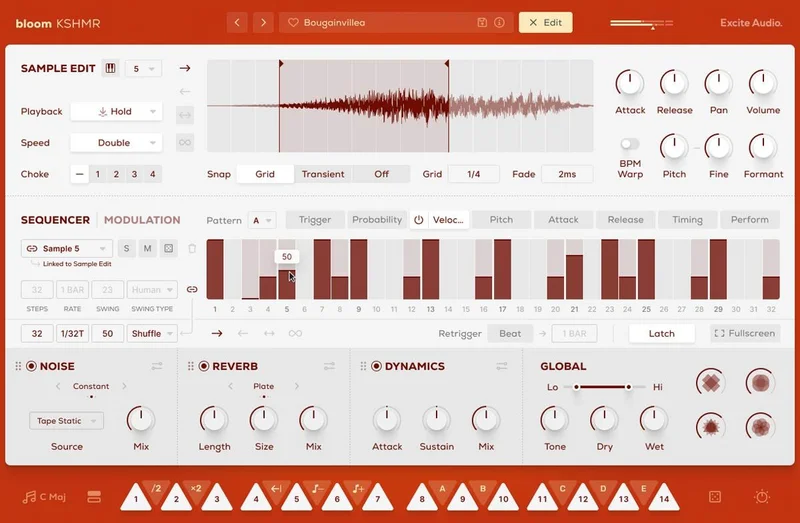
The sequencer is the part of Bloom KSHMR that separates it from a standard sample player. It's built for triggering and layering one-shots and looping sequences, not for traditional step-sequencer note entry.
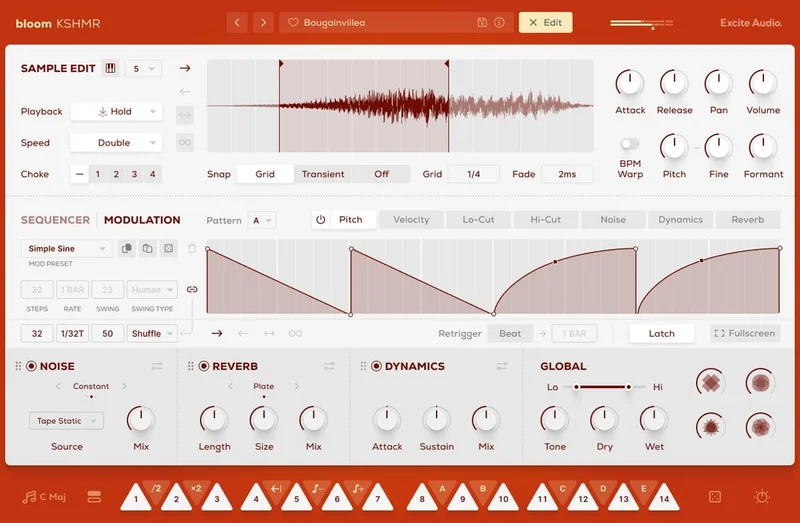
In the sequencer's modulation section, you can automate Reverb, Dynamics, Lo-Cut, Hi-Cut, Pitch and Volume per step. That means every step in your sequence can have its own filter position, reverb send and pitch offset. Load a bansuri loop, sequence a pitch automation across 8 steps, add reverb that blooms on beats 2 and 4: you're now building something that a loop player can't replicate.
Global and track-level controls include Step Rate, Sync, Swing, Steps count, Latch and Beat Retrigger. Swing at the track level means you can offset one layer of percussion against another without touching your DAW's grid. That's a clever design choice for building the slightly-off-grid feel that makes South Asian rhythmic patterns work against a Western 4/4 grid.
Probability and Velocity controls per step add the humanisation layer. Set a step to 60% probability and it fires roughly three times in five. Push attack and release on specific steps to make some hits punch harder and decay shorter. These are the controls that make a programmed sequence stop sounding programmed.
KSHMR's own quote from the product page is worth repeating here: "You can chop any section of every loop, pitch it, add different effects, combine it with other sounds, and very quickly the results start to become enormous." That's an accurate description of the sequencer's ceiling.
Importing Your Own Samples
Version 1.2 added drag-and-drop sample import, and it's one of the more underrated features in the whole package. You can import up to 112 of your own samples, replacing any of the factory sounds on the 14 keys. The samples can be swapped at any time.
The practical use case: you've built a session with Bloom KSHMR's sequencer and effects chain, and you want to swap in a custom kick drum from your own library. Drag it onto the relevant key. The sequencer pattern, macro assignments and FX chain stay intact. You're essentially using KSHMR's production framework as the chassis for your own sound.
That's a genuinely clever feature, and it pushes Bloom KSHMR past "preset-based instrument" into something closer to a full production tool.
The Effects Section
Noise
The Noise effect is not just a lo-fi aesthetic switch. There are 15 types: Vinyl Crackle, Cassette, Tape Static, Crowd Noise, White Noise, Amp Hiss and more. The three modes (Constant, Dynamic, Ducked) change how the noise sits against the signal.
Constant is always-on. Dynamic ties the noise level to the signal's envelope, so it breathes with the sample. Ducked inverts that: noise is present in the gaps and pulls back when the signal hits. That last mode is underrated for adding presence to one-shots without drowning them in constant grain.
Control over Level, Envelope Threshold, Release and Tone means you can sculpt exactly how much crackle sits above or below the signal. Try Tape Static in Dynamic mode on a sitar loop, with Tone rolled back to reduce high-end grain. That's a specific sound that took previously took a chain of multiple plugins to build.
Reverb
Three reverb modes: Plate, Hall and Spring. Each one has its own character, and they're rearrangeable in the effects chain, which matters.
Plate is the bright, fast-decay reverb that works on percussion and voice. Hall is the long, diffuse room. Spring is the mechanical coil reverb that introduces a particular kind of tonal wobble. On a tabla, Spring at low Mix creates a very specific vintage Indian film sound that's worth exploring.
The reverb parameters go deeper than a send knob: Length, Size, Mix, Pre-Delay, Duck, Lo-Cut, Hi-Cut, Input and Output. Duck specifically reduces the reverb tail when the dry signal fires, keeping the attack of each hit clean while the tail breathes in the space after. For percussion-heavy material like this library, that's a useful default to know.
Dynamics
The Dynamics processor is a combined transient shaper, gate and compressor. Attack and Sustain controls shape the transient, Gate cleans up noise between hits, and Comp brings up the low-level detail. Input and Output gain staging gives you clean level management before and after processing.
For the drum circles and dhols, pushing Comp while holding Attack tight can bring a punchy, forward energy to what might otherwise sit wide and diffuse in a mix. These are the controls that determine whether a sample sits in the mix or sits on top of it.
The Logic Pro Problem
This section deserves its own heading. There are reported crashes, audio sync errors and freezes in Logic Pro 11.2 and below. Multiple users have flagged this on public forums, and the support response from Excite Audio and Boutique Support has been described as inadequate in terms of clarifying the issue or providing a timeline for a fix.
If Logic Pro is your primary DAW, we'd say check the current state of this issue before buying. Search for "Bloom KSHMR Logic Pro" in current forum threads and see whether a fix has landed since this review was written. At the time of writing, this is an unresolved problem.
If you're in Ableton, FL Studio, Pro Tools, Cubase, Nuendo, Reaper or Reason, there are no equivalent reports. The issue appears specific to Logic Pro.
That's a frustrating situation. A plugin with 4.8/5 across 79 reviews should not have a DAW-specific crash problem sitting unaddressed. It's the one thing that stops us calling this a straightforward recommend for every Bloom owner.
The Value Case
At $29 for the crossgrade, Bloom KSHMR is priced well below the cost of finding, clearing and integrating a comparable set of South Asian samples from other sources. The 112 percussion samples are royalty-free. The 250+ presets are production-ready. The sequencer and effects chain you already know from base Bloom carry the workflow.
The question isn't whether the content is good. Reviewers consistently say it is. The question is whether this specific content fits your production style.
If you're making music that intersects with South Asian, Bollywood, world music or cinematic production, the crossgrade is a simple yes. The breadth of instrumentation (tablas, dhols, drum circles, bansuri, sitars, rababs, ouds, vocals) across 8 organised banks covers more ground than most producers will exhaust.
If your work has no intersection with this cultural palette, the library will sit unused regardless of its quality. No amount of clever sequencing turns a sitar into a 909 kick. Know your use case before you click buy.
For producers who do work in this space, the sample import feature extends the value further. You're not buying a static library. You're buying a production framework with 112 slots you can fill with your own material while keeping the sequencer and FX architecture in place.
Who Should Skip It
Skip it if Logic Pro 11.2 or below is your only DAW and a fix hasn't been confirmed yet. That crash problem is real, and paying for something that destabilises your sessions is a bad trade at any price.
Skip it if you prefer to build sequences entirely from scratch, step by step, without a phrase-based starting point. Some producers report that the phrase workflow is better suited to rapid inspiration than to final-part delivery. If you want to hand-program every hit from individual one-shots and don't want presets in the signal chain, this isn't the tool for that workflow.
Skip it if South Asian and Bollywood instrumentation has no place in your current or planned work. The library is focused. That's a strength, but only if the focus aligns with where you're going.
And skip it if you don't already own a full Bloom product. The crossgrade pricing and licence only apply to existing Bloom owners. Everyone else should look at the full-version listing.
Who Should Absolutely Buy It
Buy it if you make cinematic, trailer, Bollywood, world fusion or global bass music and you don't already have a serious South Asian sample source in your toolkit. The alternative is either paying significantly more for a competing library or licensing individual samples piece by piece.
Buy it if you want to add cultural texture to otherwise Western-facing productions. Film composers and beatmakers working in hybrid genres will find the drum circles and stringed instruments sit cleanly alongside programmed electronic elements once the sequencer is locked to BPM.
Buy it if you already love the Bloom interface and just want to see what it does with a completely different musical tradition. The learning curve is close to zero. You know the page layout. You know the macro logic. The content is what's new.
At $29 for an existing Bloom owner, the crossgrade is a low-risk decision for anyone whose music touches this cultural space even occasionally.
Try It Yourself
If a trial is available, try these three things before you commit. First, load the drum circle bank and push the Space macro up past noon. Check whether the stereo width and reverb tail sit naturally in your mix bus or fight with your existing elements at that depth. Second, navigate to the Edit Page, load a bansuri loop, and set the start and end markers to isolate just the middle third of the phrase. Try the Pendulum playback direction. That's where the instrument gets genuinely weird in a useful way. Third, try dragging one of your own samples onto a key and running the Sequencer with the factory modulation still active. See whether the framework holds around your content or fights it.
The Verdict
Bloom KSHMR is a focused, well-built instrument that delivers on its specific promise: authentic South Asian and Bollywood-inspired sounds, royalty-free, sequenced intelligently, and priced accessibly for existing Bloom owners at $29.
The Logic Pro crash issue is a real problem that Excite Audio needs to resolve properly. The UI page-reset is annoying. And if phrase-based workflows don't match how you work, the preset-heavy approach will feel limiting.
But for producers who want this palette and work in a compatible DAW, the crossgrade is a genuine bargain. The sitar and rabab recordings alone justify the upgrade. The bansuri loops are the kind of material you'd previously have to track live or license expensively. And the ability to import your own samples into KSHMR's production framework makes this more than a content dump.
We'd buy it. With the Logic Pro asterisk attached until that issue has a confirmed fix.
Specs & Technical Details
| Developer | Excite Audio |
| Price | $29 |
| Plugin Format | VST / VST3 / AU / AAX / Standalone |
| OS Support | macOS 10.15+ (Intel and Apple Silicon) / Windows 7+ |
| Activation | Internet connection required for authorisation |
| CPU Usage | N/A (not published by developer) |
| Trial Available | N/A |
| Version Reviewed | 1.2 (sample import added) |
| Compatibility | 64-bit only on both macOS and Windows |
| Recommended Buffer Size | 512 samples or higher |
| Supported DAWs | Ableton Live, Pro Tools, Logic Pro, FL Studio, Cubase, Nuendo, Reaper, Reason |
Score Breakdown
| Category | Score | Notes |
|---|---|---|
| Sound Quality | 4.5/5 | Analog-recorded, on-location samples with genuine instrumental variety |
| Value for Money | 4.5/5 | Crossgrade price is hard to argue with given the depth of the library |
| Ease of Use | 4.0/5 | Intuitive for existing Bloom users; UI page-reset is irritating in edit-heavy sessions |
| Features | 4.0/5 | Sequencer, macros, sample import and 15 noise types cover serious production ground |
| CPU Efficiency | 3.5/5 | No published specs; blind on older systems, recommended buffer of 512 suggests moderate load |
| Overall | 4.2/5 | Strong library at a fair crossgrade price, held back only by the Logic Pro crash issue |
Alternatives to Consider
If Bloom KSHMR isn't the right fit, two alternatives cover some of the same ground.
Native Instruments' Balinese Gamelan or similar Komplete Kontrol world libraries are worth exploring if you want a broader catalogue of global instrumentation across a single platform. Native Instruments Komplete review The NI ecosystem gives you a wider geographic spread, though you won't get the same South Asian specificity or KSHMR's Bollywood-oriented curation.
Output's Exhaust or Signal cover hybrid organic-electronic production if what you're really chasing is texture and sequenced percussion rather than culturally specific instrumentation. Output Signal review Neither is an Indian music library, but both offer sequenced one-shot workflows that share Bloom's phrase-based logic.
For anyone after a free starting point, best free ethnic sample packs covers royalty-free options across South Asian and Middle Eastern instrumentation, though without the sequencer engine that makes Bloom KSHMR worth its price.
If you're undecided between the crossgrade and purchasing Bloom from scratch without a prior licence, Excite Audio Bloom full version review covers the base product in detail.
Bloom KSHMR sits in a specific niche. Nothing in the mid-price virtual instrument market does exactly what it does with this cultural palette at this price point. If the niche fits your work, the alternatives are a longer, more expensive road.
The buy recommendation is simple: if you own a full Bloom product, work in a DAW that isn't Logic Pro 11.2 or below, and your music touches South Asian or Bollywood-adjacent territory even occasionally, crossgrade now. The content is brilliant, the workflow is already familiar, and $29 is a low-risk ask for what you're getting. If Logic Pro is your only DAW, wait for a confirmed compatibility fix first. That's not pessimism. It's the honest call.
Frequently Asked Questions
Do I need to own a specific version of Bloom to qualify for the crossgrade?
The product page states the crossgrade is available to owners of any full Bloom product. It doesn't specify a minimum version or tier. Check your Plugin Boutique account to confirm your existing licence qualifies before purchasing.
Is there a compatibility issue with Logic Pro?
Yes. Multiple users have reported crashes, audio sync errors and freezes specifically in Logic Pro 11.2 and below. The issue has not been confirmed as fully resolved by Excite Audio at the time of writing. If Logic is your primary DAW, search current forums for the latest status before buying.
Can I import my own samples into Bloom KSHMR?
Yes. Version 1.2 added drag-and-drop sample import. You can load up to 112 custom samples onto the instrument's keys, replacing any of the factory content. Your samples can be swapped at any time, and the sequencer, macros and effects chain stay active around them.
Are all the samples royalty-free?
Yes. All 112 percussion samples and the content used in the 250+ presets are royalty-free. You can use them in commercial releases without clearance issues.
What DAWs does Bloom KSHMR support?
Supported DAWs include Ableton Live, Pro Tools, FL Studio, Cubase, Nuendo, Reaper and Reason. Logic Pro is listed as supported, but see the compatibility note above regarding crashes in version 11.2 and below. Plugin formats cover VST, VST3, AU, AAX and Standalone.
Is the phrase-based sequencer suitable for producers who prefer to program their own patterns?
It depends on your approach. Reviewers report the phrase-based workflow works well for fast inspiration and composition sketching, but producers who prefer to hand-sequence every hit from individual one-shots may find the preset-led structure limiting. The Edit Page gives substantial control over individual samples, choke groups and step sequencing, so custom programming is possible, just not the fastest path to it.