Is a plugin you play with a mouse a real instrument or a party trick? It’s a real instrument, and a good one, but only if sci-fi scoring is your job or your obsession.
At $59, Alienize is built for composers who need alien ambience, theremin-style swoops and metallic hits that follow picture. If you make general pop, hip-hop or EDM, we’d tell you to skip it. If you score space films, play it live over footage, or sketch cues in a hurry, keep reading.
Quick verdict
We score Alienize 3.8 out of 5. The mouse-driven performance idea is clever and well executed, and the CPU load is light. The sound palette is narrow and the Textures section is shallow. For $59, it’s a strong niche buy for sci-fi work and a poor general-purpose synth.
Does it actually deliver on the mouse idea?
The skeptic’s doubt is simple. Mouse control sounds like a gimmick, the sort of thing that demos well for ninety seconds and then gathers dust.
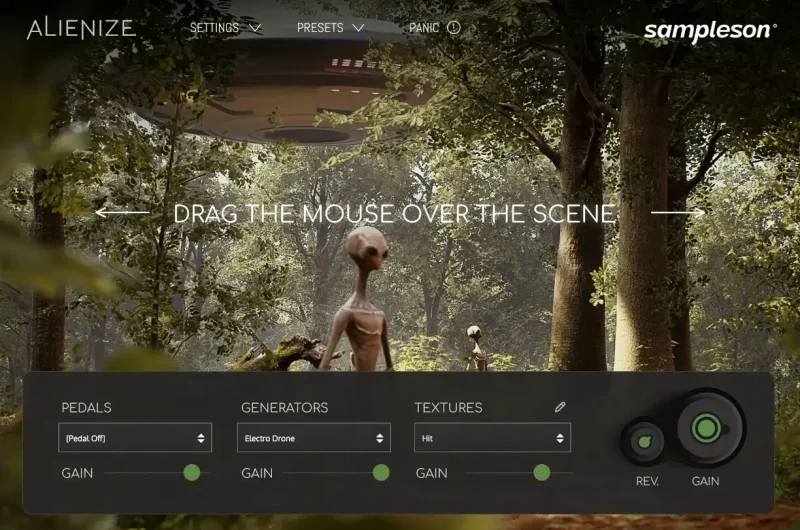
Sampleson built Alienize around that exact idea, and it holds up. The plugin reads your cursor position on screen and uses it to generate and shape sound in real time.
Owners describe the mouse modulation as very nicely implemented and intuitive, especially for syncing crescendo-style sound design to visuals. That matches how the tool is built. Your hand is already on the mouse. The sound follows it.
The promise is a cinematic instrument for sci-fi scoring, and the developer calls it a revolutionary way to craft underscore, melodies and soundscapes. We’d drop “revolutionary”. The idea is smart, but it’s still a focused instrument and not a new way to make all music.
It runs as VST3, AU and standalone. No AAX.
What’s inside: 41 modules and four engines
Alienize holds 41 sound modules. They sit across five categories: Ambient, Arps, Drones, Melodic and Textures.
Four synthesis engines sit under the hood: Granular, Wavetable, Oscillator and Sampling. You don’t pick an engine and build a patch from scratch. You pick a module, and the module decides how to use the engines.
That’s a design choice worth understanding before you buy. This isn’t Serum. You won’t be drawing wavetables. You’ll be choosing a sound character and then performing it.
There are also 120 presets, organised with useful tags. In a library this size, tags matter. Searching a cinematic instrument by “drone” or “arp” beats scrolling a flat list.
Where it shines: gesture as performance
Every one of the 41 modules has its own gesture behavior. That’s the heart of the instrument, and it’s the reason the mouse idea doesn’t wear thin.
The Theremin module is the clearest example. Pitch is set by left-right cursor position. Slide across the screen and the pitch glides with you.
It’s silly. It’s also satisfying.
Picture the scene. You’ve got a ship drifting toward a dead planet on screen. Load the Theremin, park the cursor at the left, and slowly drag right as the camera pushes in. The pitch climbs with the shot. You didn’t draw automation. You played it.
That’s the pitch for the whole plugin, and it works.
Playing against picture
Alienize can play gestures over a movie to create synchronization on the fly. For a composer spotting a cue, that’s a fast way to get a first pass down.
You hit record, watch the footage, and move the mouse as the scene demands. Then you tidy up in the DAW afterward. For sketching, we love this approach.
Live performance and DAW automation
Mouse position is published as an automatable parameter in your DAW. That means your gestures can be recorded as automation lanes and edited later.
That detail matters more than it sounds. A gimmick would trap your performance inside the plugin. Alienize hands it to your DAW, where you can reshape it.
You can also map parameters to CC and control them from a controller. If you hate the mouse, or want a hardware fader on a drone, that’s your way out. Owners report the interface is completely scalable and easy to use, which helps when you’re working on a laptop screen or a big monitor.
A tour of the module families
The module list reads like a sci-fi prop department. Some highlights show how wide the idea runs, and where it gets thin.
Ambient and Drones
Alien zones, A.I Drone, Electro Drone, Bass Drone and Sheppard tones live here. These are the beds under a scene.
Sheppard tones are the endlessly rising or falling illusion that film composers love for tension. Having one ready, with mouse control over it, saves you building the trick by hand.
Drones are where Alienize feels most at home. Long, slow sounds suit a slow, deliberate hand on the mouse.
Arps and melodic modules
The Arp variants and Retro Bass Arp give you rhythmic movement. Simple Pad, Simple Flute, Simple Viola, Cellos Pizz and Tuned Bass Drum cover the melodic and tonal end.
Note the word “Simple” in those names. It’s honest. These aren’t deep orchestral instruments. They’re quick, playable colours.
Don’t expect a full string library. Expect a few sketch-quality voices that sit nicely beside the alien material.
Mouse Blips, Booms and speech
Mouse Blips and Mouse Booms turn clicks and movements into short hits and low impacts. Alien Speech gives you babbling, vocal-ish alien chatter, and Bug Flying gives you buzzing insect movement.
These are the fun ones. Picture a creature scuttling across a bulkhead. Drag the cursor in a jittery path and the Bug Flying module buzzes with it.
Silly? Yes. Useful for a low-budget space horror? Absolutely.
Hits, metals and percussion
The impact and texture side is deep in names: Arc, Rubbing, Water, Bronze, Rust, Copper, Siren, Woods, Frame, Smash, Hit, String, Iron, Swoosh, Metal, Ufo, Percussive, Vibration, Plastic and Rattle.
That’s a lot of material for scraping, striking and rattling. It’s the toolbox for spaceship hulls, alien machinery and impacts.
Owners report plenty of suitably retro sci-fi character. That fits the module names. This is classic sci-fi sound, not modern hybrid trailer design.
Where it falls short
Here’s where we stop being kind.
The sound palette is narrow
Owners say the sound palette is perhaps not the most diverse. We agree, and it’s a real limit.
Forty-one modules sounds like variety. But many sit in the same retro sci-fi lane. If you want a dark orchestral hybrid, a lush ambient pad or a modern bass design, this isn’t the plugin.
It does one thing. It does that one thing with personality.
Textures runs shallow
Owners report limited access to how the Textures function works. The plugin isn’t very deep, and Textures is where you feel it most.
That’s annoying. Textures is exactly the area where a sound designer wants to dig in and shape the grain. Here you mostly accept what the module gives you.
If you love tweaking, you’ll hit the ceiling fast.
No AAX
Alienize doesn’t support AAX. That shuts out Pro Tools workflows.
For a plugin aimed at people scoring to picture, that stings. Plenty of post-production rooms run Pro Tools. If yours does, you can still use the standalone app, but the DAW-automation story, one of its best features, doesn’t reach you.
Hard pass for a Pro Tools-only studio.
Too specialised
Alienize is specialised for cinematic sci-fi scoring. It may not suit general music production.
We’d call that honest and not a flaw, but you should buy it knowing it. This isn’t a plugin you’ll reach for on every session. It’s a spice, not a staple.
How it feels to use day to day
Open it, pick a module, move the mouse. That’s the whole workflow, and the speed is the appeal.
The interface looks great, and owners say it’s really easy to use. It scales to any size, so you can run it big on a high-resolution display or small on a laptop.
There’s no deep menu diving. You don’t build signal flow. You load a module and play.
That simplicity is both the charm and the ceiling. You’ll get a usable sound in seconds, which composers on deadline love. You’ll also run out of things to tweak sooner than you’d like.
CPU and install footprint
Alienize has low CPU usage and needs roughly 200MB of storage. That’s easy to live with.
You can stack a few instances across a cue without watching your meter climb. For a scoring template that already carries heavy orchestral libraries, a light plugin like this is welcome.
Who should buy it, and who shouldn’t
Buy it if you score sci-fi, horror or space-set media. Buy it if you want to perform gestures against picture and capture them as DAW automation.
Buy it if you teach or demo, too. Watching someone play a theremin sound with a mouse over a film clip lands instantly with a room.
Skip it if you need broad sound design. Skip it if you live in Pro Tools. Skip it if deep parameter tweaking is your thing.
And skip it if you only want a generic synth. Plenty of tools do that job with more depth.
Is the price fair?
At $59, Alienize is a fair buy for the right person and a waste for the wrong one.
You’re paying for 41 modules, 120 tagged presets and a gesture system that works. The low CPU load and small install help the value too.
But value depends on fit. If you’ll use the mouse-driven approach on real cues, $59 pays back quickly in speed. If you’ll load it twice and forget it, it’s money wasted.
Be honest about which person you are before you click buy.
Specs & Technical Details
| Spec | Detail |
|---|---|
| Developer | Sampleson |
| Price | $59 |
| Plugin Format | VST3 / AU (no AAX), plus standalone |
| OS Support | N/A |
| Activation | N/A |
| CPU Usage | Light |
| Trial Available | N/A |
| Version Reviewed | N/A |
Score Breakdown
| Category | Score | Notes |
|---|---|---|
| Sound Quality | 3.5/5 | Strong retro sci-fi character, but the palette is narrow |
| Value for Money | 3.5/5 | Fair for sci-fi scorers, poor for general producers |
| Ease of Use | 4.5/5 | Scalable interface, load a module and play |
| Features | 4.0/5 | 41 modules, DAW-automatable mouse position, CC mapping |
| CPU Efficiency | 4.5/5 | Low CPU load and about 200MB on disk |
| Overall | 3.8/5 | A clever, focused sci-fi instrument held back by a narrow palette and no AAX |
Our recommendation
Alienize is a smart, specific tool, and we like it more than we expected to.
Buy it at $59 if you score sci-fi and want to play gestures against picture. Skip it if you need Pro Tools support or broad sound design.
Wave the mouse, get the cue down, and move on. That’s the whole point.
Related reviews: SPARKLE 2 Upgrade from SPARKLE 1 · Ample Guitar WF Review
Frequently Asked Questions
Does Alienize work in Pro Tools?
No. Alienize doesn't support AAX, so it won't load as a Pro Tools plugin. It ships as VST3 and AU, plus a standalone app. A Pro Tools-only studio should skip it.
How does the mouse control work in Alienize?
The plugin reads your cursor position on screen and uses it to generate and shape sound in real time. Each of the 41 modules has its own gesture behavior. In the Theremin module, for example, left-right cursor position sets the pitch.
Can I record my mouse movements as DAW automation?
Yes. Alienize publishes mouse position as an automatable parameter in your DAW, so your gestures can be captured and edited as automation. You can also map parameters to CC and control them from a hardware controller.
Is Alienize heavy on CPU?
No. Alienize has low CPU usage and needs roughly 200MB of storage. You can run several instances without your meter climbing much.
Is Alienize good for general music production?
Not really. It's specialised for cinematic sci-fi scoring, and owners say the sound palette isn't very diverse. If you want a broad, deep synth for everyday production, a general-purpose instrument will serve you better.