If you own BEAM and you're wondering whether the CUBE Crossgrade from BEAM is worth it, the short answer is yes, but only if you make evolving, ambient, or hybrid textural music and you want a single instrument that handles sampling, synthesis, morphing, and effects in one visual workspace. At $129, this is a focused upgrade for a specific kind of producer, not a general-purpose tool for everyone on BEAM.
What you're getting is a substantial jump in depth. CUBE adds the vector orbit system, 8-way sound blending, 1,000+ sampled instruments, 500+ designer presets, 13 FX modules, and a full modulation matrix. That's not a minor version bump. It's a different instrument built on the same DNA.
But there are real limits here. The FX chain operates globally across all layers, not per-sound. There's no granular engine. And on older hardware, the CPU load will push you toward bouncing rather than real-time performance. If those limits matter for how you work, hold off. If they don't, this is one of the more satisfying crossgrades available in the ambient and experimental space right now.
What You're Actually Stepping Into
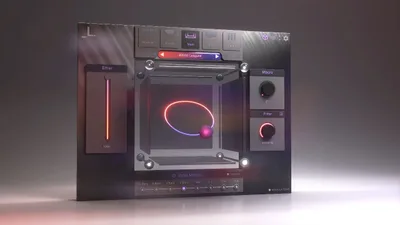
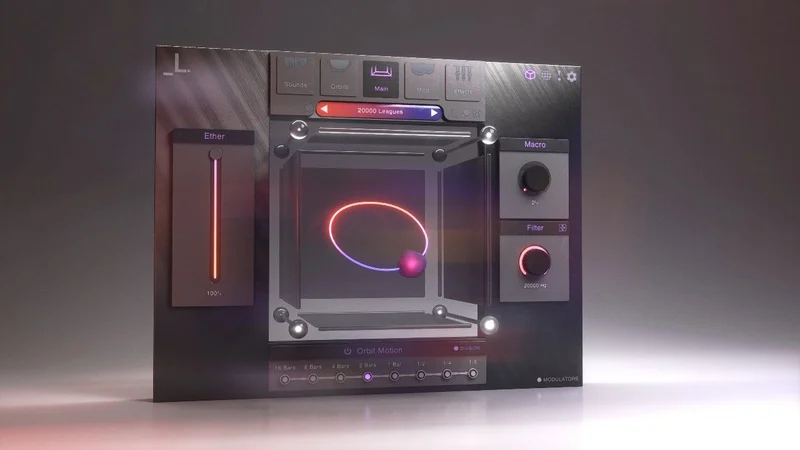
CUBE is a sampler and vector synth plugin for Mac and Windows. The core concept is the vector orbit system: a 3D interface that blends up to 8 sounds simultaneously using 40+ preset orbit paths, or custom paths you draw yourself.
That 3D blending isn't just visual window dressing. Set up 8 different sources, strings from the acoustic library, a pad from the analog synths section, a bit of percussion texture, and let an orbit path fade between them continuously. The result is a sound that evolves on its own, without automation, without clip envelopes, without external LFOs doing the heavy lifting.
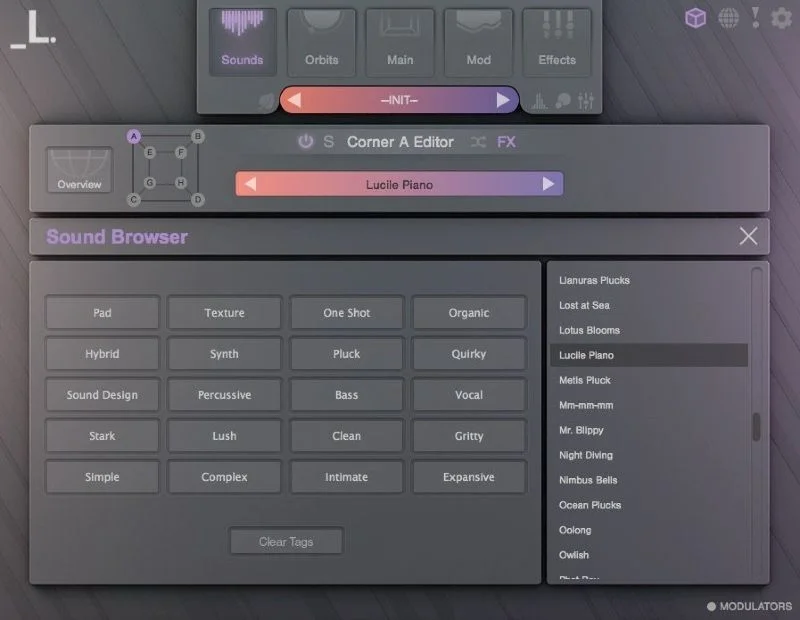
The 100+ sound sources span analog synths, pads, percussion, strings, and keys. Lunacy built the library with a consistent aesthetic in mind, so the sounds sit together without the jarring tonal mismatch you get when pulling samples from five different packs.
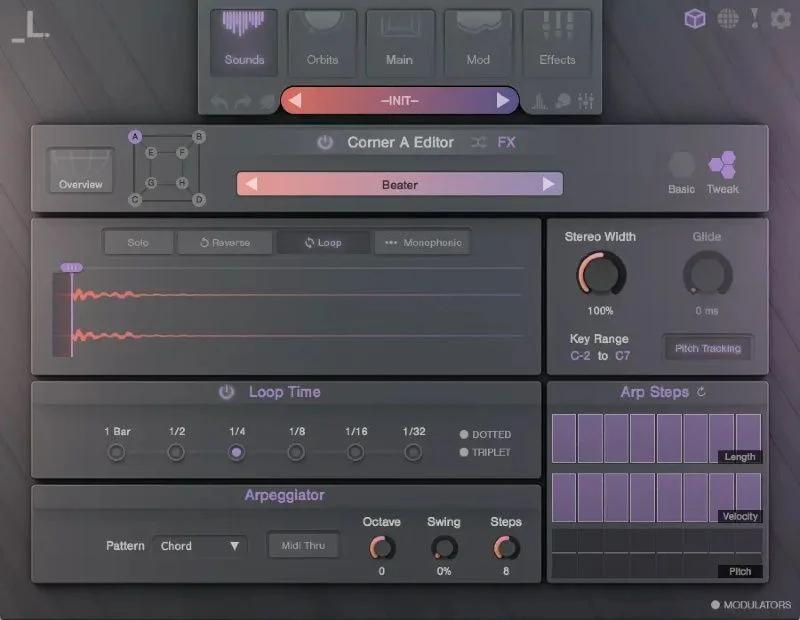
Beyond the vector engine, each of the 8 layers has its own sample editor. That means per-layer arpeggiator, filters, envelopes, step sequencers, reverse, monophonic mode, glide, pan, and tuning. That's serious control at the individual sound level, which makes the global-FX limitation sting a little more by contrast (more on that in a moment).
The synthesis side isn't a full subtractive synth. This is a sampler with deep sample manipulation tools. You're reversing, looping, arpeggiate-ing, detuning, and sequencing steps, not drawing oscillator shapes from scratch. Know that going in, and CUBE makes sense. Expect a full synth engine and you'll be confused.
Who Qualifies for the Crossgrade
This is a crossgrade from BEAM. You need to own BEAM to qualify. That's the starting point.
Beyond ownership, the crossgrade is designed for Mac users on macOS 10.15 or later (Intel or M1 Apple Silicon, 64-bit only) and Windows users on Windows 7 or later (64-bit only). Both require a stable internet connection for downloading and activation.
If you're on the Rent to Own plan or accessing through Beatport Studio, the connection requirement is ongoing: internet validation every 3 days. If your studio setup involves an air-gapped machine, that's a problem. Check your workflow before you buy.
System minimums are 4 GB RAM with 8 GB recommended, plus 2 GB of free drive space for installation. On lower-spec machines, the CPU demand can reach the point where real-time playback stutters, particularly with complex orbit patches using multiple reverb-heavy layers.
The Vector Orbit System: Where CUBE Earns Its Price
This is the feature that makes CUBE different from every other sampler at a similar price. The vector orbit system isn't just a crossfader with a third dimension. It's a programmable blend path through 8 sound sources in 3D space, running on its own timeline, animating your patch without any external automation.
You load a source into each of the 8 slots. You pick an orbit path, one of 40+ presets or one you draw yourself. Then CUBE traces that path through your 8 sounds, fading and blending between them as it moves. The rate, the shape, and the blend depth are all adjustable.
Open a session on a track that needs three minutes of slowly shifting ambient bed. Load two string textures, a filtered pad, some breathy noise, and a low synth tone. Set a slow elliptical orbit and let it run. What comes out is something you couldn't have drawn in an automation lane in the same amount of time, and it'll be subtly different every pass unless you freeze it.
That's where the randomization feature becomes a genuine workflow tool, not just a novelty. Owners report that randomization yields good results consistently, which is rare. Most randomize functions in synths return something useless 80% of the time. The fact that Lunacy's preset library has a consistent aesthetic means the random combinations stay within a coherent tonal range rather than landing in chaos.
The 40+ preset orbit paths cover everything from tight back-and-forth swings between 2 sources to sprawling paths that gradually touch all 8. And the custom orbit creation means you're not limited to what Lunacy ships. If you want a path that dwells on sources 3 and 7 and barely touches the others, build it. The visual interface makes that less painful than it sounds.
The Sample Editors: Per-Layer Depth
Each of the 8 slots has its own sample editor, and that's where CUBE gets genuinely deep. Per-layer, you can run an arpeggiator with its own rate and pattern, dial in a step sequencer for rhythmic gating or melodic variation, set independent filter and envelope shapes, engage reverse mode, switch to monophonic with glide, adjust pan and tuning, 8 sample editors with these controls per layer.
That's a lot of independent control per voice. If you're building a patch where the string layer arpeggiate upward while the pad below holds a sustained note and the percussion hit triggers in a step-sequenced rhythm, all of that is possible without leaving CUBE or touching your DAW's piano roll.
The tuning and pan controls per layer mean you can build patches with internal width and movement. Push a breathy sound slightly sharp and wide, keep the low string narrow and centered, let the percussion sit slightly left. The spatial picture comes alive before you've touched a single FX parameter.
This is a constraint for detailed layered work. For more precise layered design, it's a workflow limit.
The Modulation Matrix: 16 Slots and What They Cover
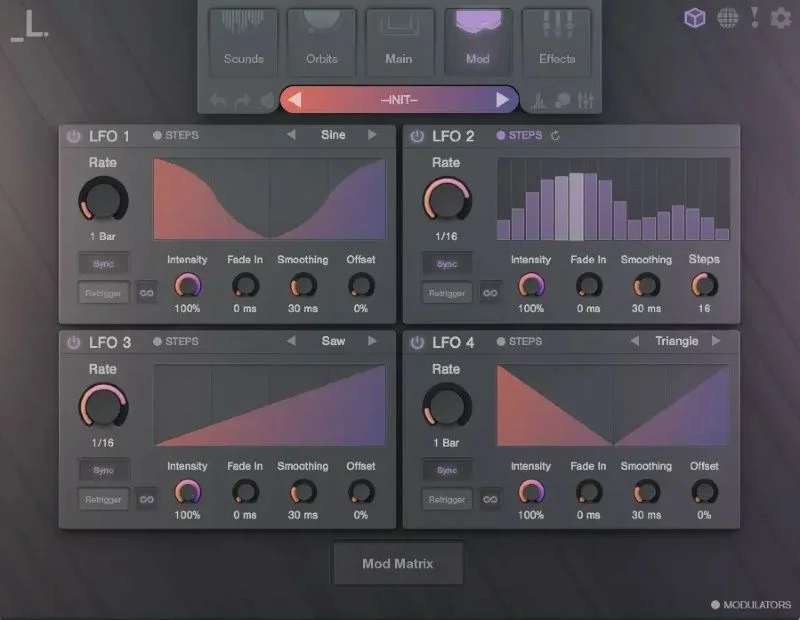
The modulation matrix gives you 16 slots to route sources to destinations across the plugin. Combined with 4 LFOs and a macro control, the internal modulation options are broad.
You can assign an LFO to filter cutoff on a specific layer, route macro control to orbit speed, tie velocity to the reverb wet level at the global stage, and stack several of those simultaneously. The 16-slot limit is generous enough that most patches won't exhaust it, but complex performance setups with multiple modulation chains could get close.
The macro control is worth noting specifically. If you're performing live or recording automation in your DAW, having a single macro that moves multiple parameters at once means one knob turn shifts the character of the whole patch. Assign it to the orbit rate, the filter cutoff across two layers, and the reverb size together. One smooth move takes the patch from tight and present to wide and distant.
CUBE lacks granular synthesis capabilities. Granular synthesis would let you scrub through the samples in a time-stretching mode, creating smeared, pitched clouds from any source. Without it, the evolving ambient sounds CUBE targets are built from vector blending and LFO movement, not from granular processing. That's a different texture, and it's a gap if granular is your preferred tool for that aesthetic.
The FX Suite: 13 Modules, One Stage
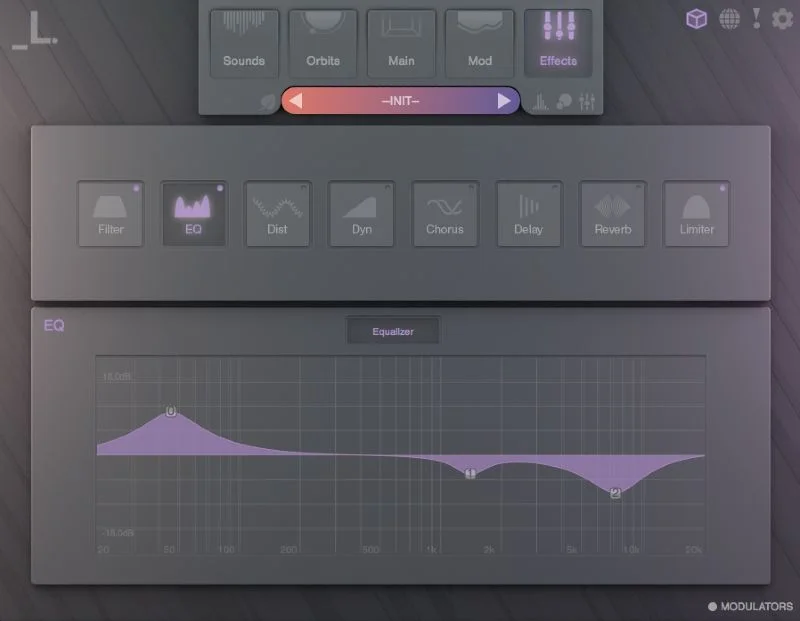
Thirteen effects modules is a strong number. Visual EQ, saturation, waveshaping distortion, bitcrusher, compressor, chorus, phaser, delay, algorithmic reverb, convolution reverb, limiter, filters. That covers the full processing chain from tonal shaping to dynamics to space to colour.
The algorithmic reverb and convolution reverb existing as separate modules is a clever choice. Algorithmic gives you fast, adjustable tail shapes. Convolution gives you realistic space. Run them in combination and the depth of the reverb on a string pad can shift between something clinical and something genuinely spatial.
The waveshaping distortion can add gritty high end while filling out the low midrange. The bitcrusher at high bit depth can deliver subtle digital edge without full lo-fi destruction. The saturation adds harmonic richness by lifting the 2nd and 3rd harmonics, addressing thin-sounding sources.
FX are assignable only via global controls rather than per individual sound layer, which means all effects process the entire mix of your 8 layers simultaneously.
Some producers will never care. If you're building a single evolving ambient texture and processing the whole thing as one organism, global FX is exactly what you want. If you're stacking layers with different tonal characters that need individual treatment, you'll be working around it.
Eco-Mode and CPU Reality
Lunacy built Eco-Mode specifically to address the CPU overhead. It minimises RAM usage and reduces CPU load, which means you can run more instances or work on older hardware without the session grinding.
CPU usage can be demanding. The OpenGL-powered graphics engine, the vector orbit system running in real time, 8 simultaneous sample layers with per-layer processing, and 13 FX modules add up to a non-trivial load.
On older systems, audio bouncing may be required.
The Content Library: 1,000+ Instruments and What They Sound Like
The library is what most owners buy CUBE for. Over 1,000 sampled instruments and 500+ presets, all built with the same aesthetic direction. That consistency is genuinely valuable and it's something you can't replicate by pulling samples from generic libraries.
The 100+ sound sources hit analog synths, pads, percussion, strings, and keys. Those categories are broad but Lunacy's approach is specifically tuned to hybrid and cinematic textures. These aren't General MIDI piano patches or bread-and-butter leads. The pads have movement baked in. The strings have edge. The percussion sits in that hybrid zone between acoustic and processed.
The expandable content adds to this: Air for hybrid winds, Threads for experimental strings, Rumble for synth bass and percussion. Those optional packs extend the library without fragmenting its aesthetic. They feel designed to coexist with the core content rather than introducing a tonal shift.
You can also bring in your own audio as WAV or SFZ files and mix them with the existing sources. Load a vocal chop you recorded, drop it into one of the 8 vector slots, and blend it into a Lunacy string pad using the orbit system. That's a satisfying bridge between the locked library and your own material.
The randomization function works directly with the preset library. Hit randomize and CUBE pulls a new combination of sources, orbit path, and settings. Owners report this returns good results more reliably than you'd expect. It's a clever way to escape the preset loop where you scroll the same 20 patches repeatedly without committing to one.
The Value Case: What $129 Actually Gets You
At $129 as a crossgrade from BEAM, you're paying for the step-up from whatever BEAM offered to the full CUBE feature set. That includes the vector orbit system, the full library, the modulation matrix, the 13 FX modules, and the sample editor depth across all 8 layers.
The honest value question is whether CUBE's specific strengths match your actual production. If your ambient and hybrid work currently involves loading 4 or 5 separate instruments, running them through external effects chains, and manually automating crossfades between them, CUBE consolidates that into one interface. That consolidation has real workflow value. Time spent managing 5 instruments and their automation is time not spent making decisions.
If you're after a general-purpose synth or a workhorse bread-and-butter instrument, $129 is poor value. CUBE is built for one aesthetic lane. It does that lane brilliantly. It doesn't try to be everything.
The global-FX limitation and the absent granular engine mean that more advanced hybrid producers may still need external tools alongside CUBE. Factor that into the total cost picture if your work demands per-layer processing. What CUBE delivers at this price is strong. What it doesn't deliver matters depending on how you work.
Who Should Skip It
If you make music that needs surgical per-layer processing, skip CUBE. The global FX is not going to change, and working around it means bouncing layers separately, which defeats the instrument's real-time appeal.
If granular synthesis is your primary tool for ambient and experimental work, CUBE won't satisfy that need. The orbit system creates evolution through blending, not through granular time-smearing. Those are genuinely different textures and one doesn't replace the other.
If your machine is running below the recommended 8 GB RAM and you're on an older CPU, the CPU demand will frustrate you. Eco-Mode helps but it's not a full fix. Live performance use on spec-limited hardware is especially risky.
Some users describe CUBE as style over substance. That's not entirely fair, but it's not entirely wrong either. The 3D interface and visual orbit system are genuinely cool to look at. If your music doesn't need evolving, blended, hybrid textures, the substance underneath won't matter to you. The FX suite won't replace a dedicated processing chain. The synthesis isn't deep enough to satisfy sound designers who need raw material from scratch.
And if you don't own BEAM, this crossgrade isn't your entry point anyway.
The Verdict
CUBE Crossgrade from BEAM is a clever, visually engaging, and sonically coherent instrument for producers who make ambient, hybrid, and evolving textural music. At $129, the library alone would justify the upgrade for many BEAM owners. The vector orbit system on top of that is something genuinely clever that few plugins offer.
The global FX limitation is real and annoying. No granular engine is a gap in this market. CPU demand is honest-to-goodness high.
But for the right producer in the right genre, those limits don't block the most satisfying use case: loading 8 beautiful sources, drawing an orbit path, and watching a three-minute texture emerge that you couldn't have written by hand. That's what CUBE does better than anything at this price, and that's what earns the score.
If you make ambient, cinematic, or hybrid music and you own BEAM, this is a straightforward yes. If you're a general-purpose synth user looking for new territory, look elsewhere first.
Specs & Technical Details
| Developer | Lunacy |
| Price | $129 |
| Plugin Format | Mac: VST3 / AU / AAX / Standalone; Windows: VST3 / AAX / Standalone |
| OS Support | Mac (macOS 10.15+, Intel / M1, 64-bit) / Windows (Win 7+, 64-bit) |
| Activation | Internet connection required; Rent to Own / Beatport Studio users require validation every 3 days |
| CPU Usage | Heavy (Eco-Mode available to reduce load) |
| Trial Available | N/A |
| Version Reviewed | N/A |
Score Breakdown
| Category | Score | Notes |
|---|---|---|
| Sound Quality | 4.5/5 | Consistent, high-quality library with a coherent aesthetic across all 100+ sources |
| Value for Money | 3.5/5 | Strong for ambient and hybrid producers; poor value if you need a general-purpose synth |
| Ease of Use | 3.5/5 | Visual interface helps, but the orbit and modulation systems have a real learning curve |
| Features | 4.0/5 | Vector orbit, 13 FX, 16-slot mod matrix, and per-layer editors are deep; global-only FX hurts |
| CPU Efficiency | 3.0/5 | Demanding on older systems; Eco-Mode helps but bouncing is part of the workflow for some users |
| Overall | 4.0/5 | A brilliant instrument for one specific type of producer, with real limits beyond that lane |
Alternatives to Consider
Output Portal takes a different approach, focusing on real-time effects processing rather than a sample library and vector blending system. If your priority is mangling existing audio with effects rather than building new textures from a curated library, Portal sits closer to what you need. The two tools aren't direct competitors but they overlap for producers who want evolving, processed sounds from their existing material.
Audiomodern Opacity leans heavily toward randomization and generative sounds. If the randomization feature in CUBE is what excites you most and the full library and vector system feel like more than you need, Opacity's generative focus is more concentrated in that direction. It's a narrower tool built around that specific workflow rather than a full hybrid instrument.
Bitwig's XY instrument offers similar morphing mechanics with unrestricted content versus the basic sampler approach. The tradeoff is that you're responsible for sourcing the content, and the aesthetic coherence that makes CUBE's presets work together by default isn't guaranteed. If you want maximum flexibility and you don't need the Lunacy library, the XY instrument gives you the morphing concept without the content lock-in. If the library is the draw, it won't replace CUBE.
Frequently Asked Questions
Do I need to own BEAM to get the CUBE Crossgrade?
Yes. This is a crossgrade specifically from BEAM. You need to own BEAM to qualify for the crossgrade pricing. If you don't own BEAM, you'll need a different entry point to CUBE, such as the standard purchase rather than the crossgrade version.
Can I use my own samples in CUBE?
Yes. CUBE supports user audio via WAV or SFZ sample files, which you can load into any of the 8 vector slots and blend with the existing library sources. That means you can drop a vocal chop, a field recording, or a custom one-shot into the orbit system alongside Lunacy's sampled instruments. It's a genuinely useful bridge between the locked library and your own material.
Is CUBE CPU-heavy enough to be a problem in a real session?
It can be. Owners on older systems report regular audio bouncing as part of their CUBE workflow, particularly with complex orbit patches using multiple reverb-heavy layers. Lunacy includes Eco-Mode to reduce load, and that helps. On modern hardware with 8 GB or more of RAM, single instances and small numbers of active patches should be manageable. Running 8 or 10 instances in a dense session is where things get difficult regardless of your machine spec.
Can you apply different reverb or distortion settings to individual layers inside CUBE?
No. The 13 FX modules in CUBE operate at the global output stage and process all active layers together. Per-layer FX routing isn't supported. If you need layer 1 to have a short room reverb and layer 3 to have a long hall reverb, you'd need to bounce those layers to separate audio tracks and process them externally in your DAW. It's a real workflow limit that owners flag consistently.
What genres is CUBE most suited to?
Owners and reviewers consistently point to ambient, evolving, and hybrid cinematic music as CUBE's natural home. The vector orbit system and the library aesthetic are built around slowly shifting textures, layered soundscapes, and hybrid instrument blends rather than punchy leads, standard pop chords, or bread-and-butter rhythm programming. If those aren't your genres, the core value proposition of CUBE is less relevant to your work.