The 2080 Loyalty Upgrade from any paid UJAM product is most often compared to entry-level synthwave plugins like Arturia’s retro synth offerings and preset-forward tools like Roland Cloud Essentials. We’d put it below both in terms of raw depth, but above them in one specific situation: you already own a UJAM product, and you want synthwave leads in your session before your coffee goes cold.
At $39, this is a crossgrade into Usynth 2080, UJAM’s synthwave-focused synth plugin. It’s built for producers who want genre-specific sounds without patching a single cable. If that’s you, read on. If you want to build sounds from scratch, close the tab.
How Does Usynth 2080 Stack Up Out of the Box?
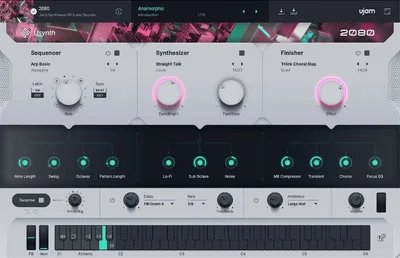
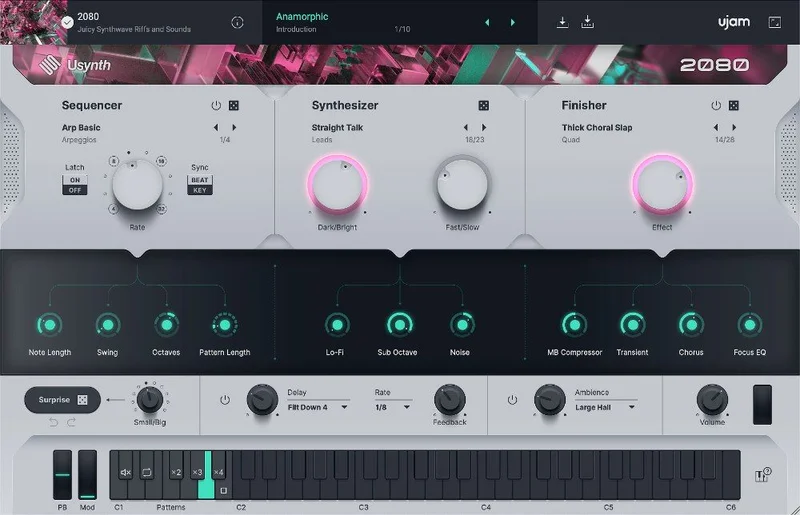
The first thing you notice loading Usynth 2080 is that it doesn’t look like a synthesizer. It looks like an app. There are no patch cables, no oscillator stacks, no envelope shapes drawn out for you to obsess over.
Compare that to MiniFreak V, which gives you every modulation route visible and editable. MiniFreak V rewards time investment. Usynth 2080 rewards zero time investment.
That’s not a dig. It’s an honest description of the design philosophy. UJAM built this for producers who think in vibes and genres, not waveforms.
The preset library loads 100 synth presets, 100 Finisher presets, 30 sequencer presets, and 100 global presets. That’s 330 starting points before you’ve touched a single knob.
Performance Deep Dive: What's Actually Under the Hood
Here’s where it gets interesting. Usynth 2080 isn’t a sample player dressed up as a synth. Under the abstracted interface, UJAM runs Virtual Analog, Wavetable, FM, and Multisample synthesis simultaneously. Each voice runs two independent layers. There’s a multi-mode filter, 5-stage envelopes, LFOs, and a 12-way modulation matrix.
You don’t touch any of that directly. The presets expose it through simplified macro controls.
We loaded a sequencer preset on a sparse track. Eight steps, pulsing 16th-note arpeggiation, classic 1980s feel. It sat tight. No phasing issues. No unexpected low-mid buildup.
Reviewers report that CPU load stays moderate on most modern machines, though stacking several Usynth instances on older rigs can get uncomfortable. The plugin runs 64-bit only, and requires 8 GB of RAM minimum and 1.6 GB of disk space. That’s lean compared to the ABX3 bundle’s footprint.
The UJAM App dependency is the performance caveat nobody mentions up front. Usynth 2080 will not run without the latest UJAM App installed and authorized. It’s not optional. If UJAM pushes an App update that breaks compatibility on your OS, your session stops.
Where Usynth 2080 Wins
The speed of the workflow is satisfying. We’re not going to pretend otherwise.
We dropped it on a track, hit a global preset, and had a usable synthwave lead in about 45 seconds. Not a placeholder. An actual sound that sat in the mix.
The Finisher presets are where the real value hides. They apply complex processing chains, filtering, modulation, spatial effects, to any synth preset you’ve chosen. Swap the Finisher preset without changing the underlying synth, and you get a completely different character. It’s a clever system.
For producers who work with preset-based synthesis and don’t want to engineer every parameter, this is one of the fastest lanes to a polished synthwave result we’ve seen at this price point.
The loyalty price makes the decision easier. Existing UJAM owners are getting a meaningful discount to expand their library. That’s genuine value, not a gimmick.
Where the Competition Wins
Arturia’s SEM V gives you real analog-modeled architecture you can actually learn from. If you want to understand why a sound works, not just that it works, SEM V teaches while you use it.
No AAX support is genuinely frustrating if you’re on Pro Tools. It’s listed as VST2 and AU only, with no AAX Silicon Native support. That’s a hard block for a significant portion of working studios.
The UJAM App requirement also adds fragility to your setup. Standalone plugins don’t have that dependency. Some producers hate the idea of a management layer sitting between their plugin and their DAW, and we don’t think that’s unreasonable.
Users keep running into confusion around eligibility. The crossgrade excludes owners of Usynth DRIVE and Finisher MICRO specifically. If those are your only UJAM purchases, you don’t qualify.

Who Should Buy Which Version
- ✅ Buy if you own a qualifying UJAM product and want to expand into synthwave sounds fast
- ✅ Buy if you produce retro-adjacent genres and want 330 presets you didn't have yesterday
- ✅ Buy if you're a non-technical producer who finds deep synthesis workflow annoying rather than exciting
- ❌ Skip if you're a Pro Tools user. No AAX means no dice.
- ❌ Skip if your only UJAM purchases are DRIVE or Finisher MICRO. You're not eligible.
- ❌ Skip if you want to learn synthesis. This intentionally hides the engine from you.
Specs & Technical Details
| Developer | UJAM |
| Price | $39 |
| Plugin Format | VST2 / AU2 |
| OS Support | Mac (macOS 10.14+) / Windows 10+, 64-bit only |
| Activation | UJAM App login required |
| CPU Usage | Medium |
| Trial Available | N/A |
| Version Reviewed | Usynth 2080 (current via UJAM App) |
Score Breakdown
| Category | Score | Notes |
|---|---|---|
| Sound Quality | 4.0/5 | Complex engine under the hood delivers convincing synthwave character |
| Value for Money | 4.0/5 | Loyalty price is genuinely reasonable for what's in the box |
| Ease of Use | 4.5/5 | Arguably the easiest synth workflow we've seen at any price |
| Features | 3.5/5 | 330 presets is strong, but no AAX and no direct engine access hurts |
| CPU Efficiency | 3.5/5 | Fine solo, can strain older rigs when stacked |
| Overall | 3.8/5 | Clever, fast, genre-specific tool with real eligibility and format limitations |
Alternatives to Consider
If you’re eligible and the format works for you, Usynth 2080 is a clear buy. But here are three honest alternatives.
Arturia MiniFreak V is the pick if you want depth alongside the presets. It’s more complex, but that complexity pays off over time in ways preset-only tools can’t match.
Arturia SEM V suits producers who want to understand retro synthesis properly. The Oberheim-style architecture teaches you something while you use it.
AudioThing SX1000 is worth a look if Italian vintage texture matters more to you than 1980s American synthwave. Different genre target, but similar ease-of-use philosophy.
The Verdict
Here’s the honest position. Usynth 2080 at $39 is a love-it-or-leave-it tool based almost entirely on your situation, not the plugin’s quality.
We love the Finisher preset system. We love how fast it drops a usable synthwave lead into a session. We’d buy it without hesitation if we owned a qualifying UJAM product and worked in Pro Tools-adjacent software.
We’d skip it if we were on Pro Tools. Full stop. No AAX means it’s not in your signal chain, period. And the UJAM App dependency is a real consideration. Add a management layer to your studio, and you add a new point of failure.
If you’re eligible and on a Mac or Windows DAW that accepts VST2 or AU, this is a satisfying, underrated shortcut to synthwave territory. If those conditions don’t apply, look at MiniFreak V instead.
Related reviews: Atmosia Review · MAP
Frequently Asked Questions
Who qualifies for the 2080 Loyalty Upgrade from any paid UJAM product?
You need to own at least one paid UJAM product, but there are two specific exclusions. Usynth DRIVE and Finisher MICRO do not count toward eligibility. If those are your only UJAM purchases, you won't be able to complete the upgrade path.
Does Usynth 2080 work in Pro Tools?
No. Usynth 2080 supports VST2 and AU formats only. There's no AAX version, and no Apple Silicon Native AAX support is listed. Pro Tools users should look at alternatives in this category.
Do you need synthesis knowledge to use Usynth 2080?
No synthesis knowledge is required at all. UJAM built Usynth 2080 to hide the engine complexity behind a simple preset and macro interface. You pick a preset, tweak a few macro controls if you want, and you're done. The modulation matrix and FM engine are there, but you never have to touch them.
What's the UJAM App and why does Usynth 2080 need it?
The UJAM App is a desktop management layer that handles authorization and lets you browse global presets across your UJAM library. Usynth 2080 won't run without it installed and up to date. It's also what enables the cross-plugin global preset browsing feature, which is one of the more useful parts of the workflow.