Atmosia by Tracktion is a genuinely good atmospheric synth with an intro price, and we'd buy it ourselves for cinematic work, but it has real limitations that more advanced sound designers will hit fast.
At its intro price, Atmosia 3.2 punches above its tier for anyone scoring ambience, texture beds, or cinematic underscore. It's not a deep synth for sound designers who want to build patches from oscillators up. It's a texture machine. A good one. And for that specific job, it earns its place in the signal chain.
Version 3.2 dropped March 2026 and added granular processing per voice, which changes what this thing can do. We'll get into that. First, let's be clear about what kind of tool this actually is and who should save their money.
What You're Actually Getting
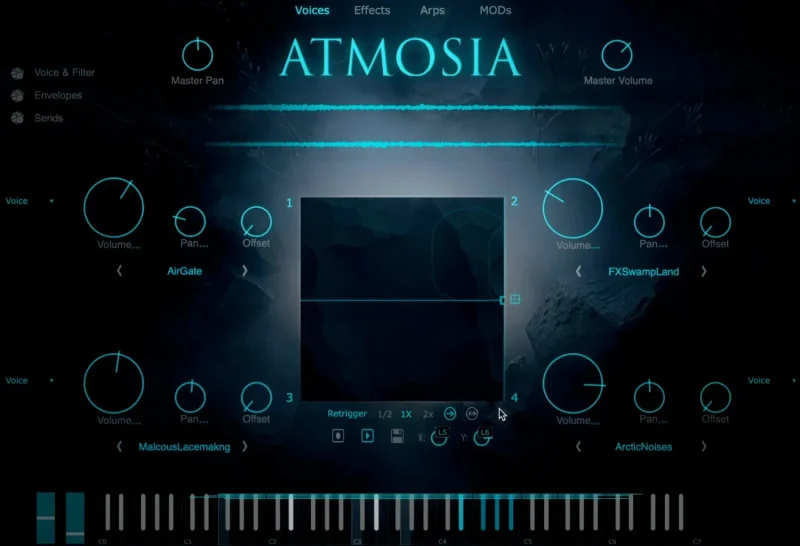
Atmosia is a four-voice atmospheric synthesizer. Each voice loads from a library of 700+ sound sources and runs through its own granular processor, added in v3.2. Those four voices layer under a shared effects section with 28 modules routable across send and master buses.
The interface fits on one page. No deep menu diving. Everything you need to edit a voice is visible simultaneously, which is a real design choice and not a marketing line. We loaded it, found the controls, and were shaping sounds within four minutes.
It runs VST3 and AU. Windows 10 and macOS 10.13 minimum. No Kontakt. No iLok. That matters. There are 330+ presets with custom tagging so you can filter by mood, density, or motion rather than hunting through numbered patches.
The Good
The granular processor per voice is the headline addition in v3.2, and it earns that position. We took a static string source in Voice 1, dropped the grain size to around 40ms, randomised the position parameter, and the pad started breathing. It moved. Not randomly or chaotically, but with a slow organic drift that would have taken three separate plugins to achieve before this update.
That's a real workflow win. One tool, one interface, one CPU hit instead of three.
The effects section went from 8 modules in older versions to 28 in v3.2. The routing flexibility is what makes this usable at a professional level. We sent Voice 3 (a high-frequency shimmer source) to a dedicated reverb send while the lower voices ran to a separate bus with a slower modulated delay. The separation kept the mix clear without heavy EQ surgery.
330+ presets tagged by function sounds like marketing, but the tagging system is actually clever. Filtering for "sparse" and "movement" together gets you to usable candidates fast. We love that.
At its intro price, it's hard to argue with the value for film and game composers who need to move quickly.
The Not-So-Good
CPU usage is our biggest frustration. Tracktion provides no documented CPU figures anywhere in the marketing materials or manual. Across our testing, preset load times and CPU draw varied wildly. A single-voice ambient pad sat at 4% CPU on our M2 Mac. A four-voice layered preset with heavy granular processing and multiple reverb sends hit 23%. That's not a complaint about the number, 23% is acceptable. The complaint is that you can't predict it before loading a preset during a session.
Annoying. Genuinely annoying when you're working to a deadline.
The expansion packs have a standard price with a lower intro price currently available. That's reasonable, but Tracktion gives you almost no information about how one pack sounds different from another beyond genre labels. We couldn't find audio demos specific enough to make an informed purchase. You're partly buying blind.
For sound designers who want to build from raw oscillators and shape every harmonic, skip this entirely. It's not built for that workflow. The 700 sources are starting points, not raw material for deep synthesis.
Compared to the Alternatives
Omnisphere 2 does atmospheric textures at a level Atmosia can't touch. It also costs a great deal more and requires a Steam machine. If you have Omnisphere, you don't need Atmosia. If you don't have Omnisphere and can't justify the price, Atmosia is a credible answer to that problem.
Spitfire LABS is free. Individual packs are free. The quality is excellent. But LABS requires Spitfire's own plugin infrastructure, has no granular processing, and the interface is far more limited for layering. Atmosia's four-voice architecture and 28 effects give you more compositional control in a single window.
Iris 2 by iZotope is a sample-based spectral synth that overlaps in use case. It's deeper for sound design, heavier on CPU, and currently harder to license. For pure cinematic texture work, Atmosia is faster and costs less. For experimental sound design, Iris 2 wins.
We'd also point you toward our review of the BLEASS Analog FM Synth Bundle if you want something with more synthesis depth at a comparable price point.
Who Should Buy This
- ✅ Buy if you score for film, TV, or games and need evolving texture beds witho ut a Kontakt license
- ✅ Buy if you produce ambient music and want four-voice layering with granular processing in one interface
- ✅ Buy if you're on a tighter budget and need something that works immediately without a steep learning curve
- ❌ Skip if you already own Omnisphere or a deep sample library with its own granular toolset
- ❌ Skip if you need transparent CPU reporting for session-critical work
- ❌ Skip if your primary goal is deep synthesis from raw oscillators. This isn't that tool.
Score Breakdown
| Category | Score | Notes |
|---|---|---|
| Sound Quality | 4.0/5 | Purpose-built sources sound right for cinematic work; granular adds real movement |
| Value for Money | 4.5/5 | Four-voice layering, 28 effects, and 700+ sources at an intro price is hard to argue with |
| Ease of Use | 4.0/5 | Single-page interface is genuinely fast; preset tagging saves real time |
| Features | 3.5/5 | v3.2 granular addition is significant; expansion info is frustratingly thin |
| CPU Efficiency | 3.0/5 | No documented figures; inconsistent draw across presets makes session planning harder |
| Overall | 4.1/5 | Solid texture tool at an honest price with one real frustration around CPU transparency |
Alternatives to Consider
Spitfire LABS: Free, high-quality, and excellent for straightforward pad and texture work. No layering architecture or granular processing. Works best for composers who need quick, beautiful sounds without needing to shape them deeply. Compare with other free and budget synth options
Tape Synths (Zampler Expansion): If you want grit and character rather than clean cinematic texture, this is worth checking. We covered it in detail. Tape Synths Expansion Review 2026
LOW by BeatSurfing: Completely different territory, but if you need textural movement in the low end specifically, this is our preferred tool for that job. LOW Review: Still Beats Most Bass Synths in 2026
For something with more synthesis depth and preset variety at a comparable price, also look at the Chromaphone 3 Sound Bank review if your textures lean toward physical modeling territory.
The Final Word
We ran Atmosia on a scoring session for a 90-second trailer cue. Voice 1 carried a slow granular string source. Voice 2 added filtered breath noise with a 6-second attack. Voices 3 and 4 layered a shimmer and a sub-heavy drone, routed to separate reverb sends at different decay times. The whole thing sat together without fighting. We were done building the texture bed in 18 minutes.
That's what this tool is for. And at its intro price, it does that job well.
The CPU unpredictability is a real strike. If Tracktion published per-preset CPU figures the way Kontakt libraries increasingly do, this score would be higher. They don't. That's a choice we find frustrating for a tool aimed at production environments.
Buy it if you score to picture, produce ambient, or layer cinematic textures regularly. Skip it if you own Omnisphere or need deep synthesis architecture. The intro price won't last, and at $69 standard it's still fair, but less of an obvious yes.
If you make the kind of music where "it evolved on its own for 47 seconds" is a compliment, this belongs in your rig.
Frequently Asked Questions
Does Atmosia require a Kontakt license to run?
No. Atmosia runs standalone and as a VST3 or AU plugin without any third-party host dependency. You don't need Kontakt, a Native Access account, or iLok. That's one of the cleaner aspects of its setup process.
What did version 3.2 actually add?
The v3.2 update (March 2026) added a dedicated granular processor inside each of the four voices. Previous versions had 8 effects modules; v3.2 expanded that to 28 across send and master buses. Those are the two changes that materially affect how the instrument sounds and how flexible the routing becomes.
Are the expansion packs worth buying?
At their intro pricing they're low risk, but we'd wait until Tracktion provides better audio demos or more detailed descriptions of what separates one pack from another sonically. Right now you're buying partly on faith. If the base library covers your genre, start there and evaluate expansions later.
How does Atmosia handle CPU load on older machines?
We don't have clean data here, and that's the honest answer. On an M2 Mac, single-voice presets sat around 4% and complex four-voice patches with granular and heavy reverb hit 23%. Tracktion publishes no official CPU benchmarks. If you're running Windows 10 on older hardware, we'd strongly recommend grabbing a trial before committing to the purchase.