
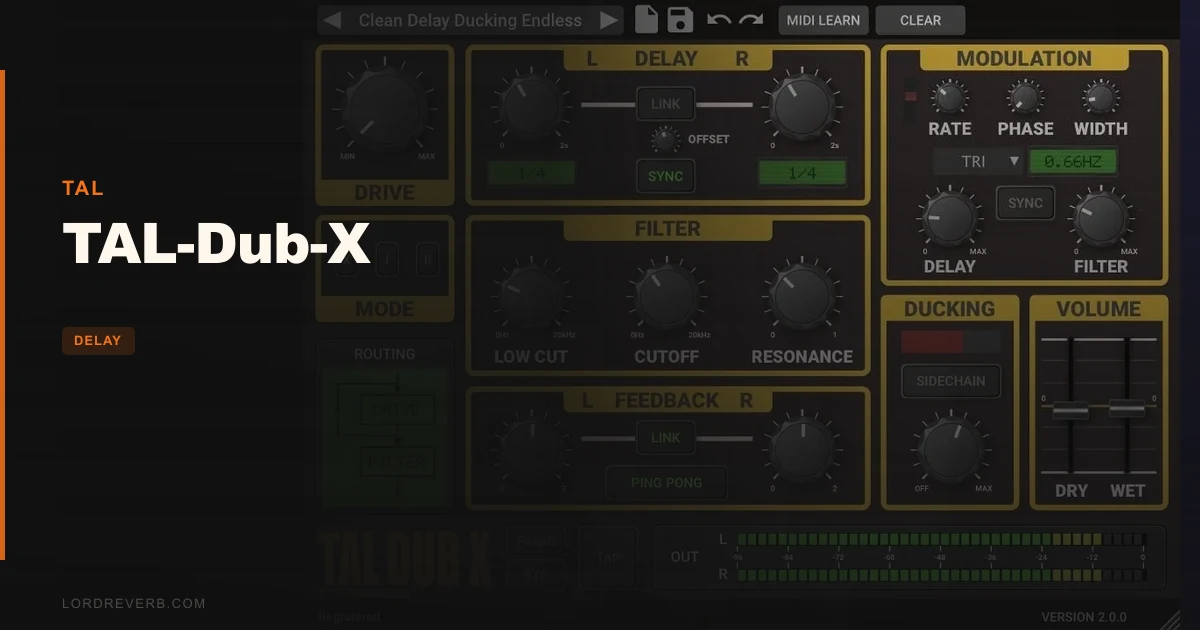
The specific doubt every buyer has about TAL-Dub-X is this: why pay for something TAL has been giving away for a decade? The honest answer is that you're paying for AAX support, 64-bit Mac compatibility, a more complete saturation stage, and a proper resizable GUI. If none of those things matter to your setup, you probably don't need it. If even one of them does, $29 is a fast decision.
TAL-Dub-X is built for producers who want their delays to have a personality. It's not a Swiss-army delay. It's not trying to cover every use case. It's a character delay that leans hard into grit, resonance, and that bubbling, spacious quality that defines classic dub production. Who's it for? Dub, reggae, lo-fi, and experimental producers. Anyone running Pro Tools who wanted the original TAL-Dub sound and couldn't get there in AAX. At $29, it doesn't need to be a perfect plugin. It just needs to do its specific thing well.
Does It Actually Deliver the Dub Sound?
TAL Software built this as a direct remake of TAL-Dub, one of their most used freeware plugins. They're not pretending it's an emulation of a specific hardware unit. That's a smart position. It means they can tune the sound entirely around what the plugin is supposed to do rather than what a vintage box actually measured.
What TAL-Dub-X actually does is push delays through a saturation stage and a resonant low-pass filter. That combination is the whole product. When you dial up the Drive, the repeats thicken and slightly distort. When you raise the filter resonance, the feedback starts to self-oscillate in a way that feels alive. That's the sound you're paying for.
Does it deliver? Yes, for that specific job. We ran a dry snare hit through it with feedback at 65%, Drive at about 2 o'clock, and the resonant filter rolled off around 3kHz. The result was a cascading, increasingly warm repeat that sat way behind the original hit without muddying it. That's exactly what dub delay is supposed to do.
It's not a clean delay. It's not supposed to be. TAL say this outright on the product page. If you want pristine, transparent echoes, you need a different tool entirely.
Where TAL-Dub-X Actually Shines
The Saturation Stage
The Drive knob is the heart of this plugin. It's not just a colour control bolted onto the output. The saturation sits inside the feedback loop, which means every repeat gets progressively dirtier as the feedback builds. At low Drive settings, you get subtle warmth. At high settings, the repeats start to compress and distort in a way that sounds genuinely organic.
We sent a clean electric piano chord through it with a dotted eighth delay at 120 BPM. With Drive at 9 o'clock, the echo was present but polite. Pushing Drive to 3 o'clock turned the repeats into a gritty, almost fuzz-drenched trail. That's a huge range from one knob. It's one of those controls where the whole feel of the plugin shifts with small movements.
The saturation isn't the most complex algorithm we've heard. It doesn't have multiple modes or harmonic shaping. But it does what it needs to do for the genre.
The Resonant Low-Pass Filter
The high-quality resonant low-pass filter is the second defining element. You can sweep the cutoff to darken the delay tail progressively through each repeat. The resonance control adds a peak at the cutoff frequency that, when pushed, creates that characteristic dub filter sweep sound.
There's also a high-pass filter. We've found it useful for stopping the low end of delay repeats from building up and clouding the sub. Cut below 120Hz on the high-pass and the delay sits much cleaner in a dense mix without losing its character up top.
The POST filter routing option is worth mentioning. Switching the filter to POST changes where in the signal chain the filter sits relative to the feedback loop, giving you a different tonal behaviour on the repeats. It's a small detail that gives you two flavours without adding a second filter.
Modern Compatibility
AAX support is the big practical win here. The original freeware TAL-Dub plugins don't run in Pro Tools. TAL-Dub-X does, with AAX up to Pro Tools 10.3.6 or higher. For any producer whose primary DAW is Pro Tools, this is the entire justification for the purchase.
Apple Silicon support via Universal Binary 2 also matters in 2026. Native M1 and M2 performance is meaningfully better than Rosetta 2 translation. It runs light. We didn't notice it on our CPU meter, even with multiple instances.
Tempo Sync, TAP, and Ping-Pong
Delay time goes up to 2 seconds, with host tempo sync and a TAP button for live feel. Ping-pong mode bounces repeats left and right, which opens up wide stereo delay effects without needing to stack two instances. It's basic but functional.
MIDI Learn and MIDI mapping support mean you can automate any parameter from a controller or your DAW's automation lanes. For live performance, being able to sweep the filter cutoff or feedback in real time is genuinely useful. The Accurate Meter keeps an eye on levels so you don't accidentally push the output hot.
Where It Falls Short
The LFO is frustrating. TAL-Dub-X includes a stereo triangle LFO for modulating delay time and filter resonance. In theory, that's great. A modulated delay time creates a chorus-like warble on the repeats. A modulated filter resonance gives the tail a breathing quality.
In practice, the LFO is locked to a triangle wave. One shape. No rate sync to tempo. No depth envelope. Users report this as the most annoying limitation, and we agree. A triangle LFO on delay time can sound lovely, but the inability to sync it to the session BPM or switch waveforms significantly restricts how far you can push the modulation effects.
The feature set beyond the core voice is also thin. No stereo width control beyond ping-pong. No tape-style wow and flutter. No separate diffusion or pre-delay control. Compared to what paid delay plugins at similar price points offer in 2026, the feature list looks spare.
For producers who already have the free TAL-Dub 2 or TAL-Dub 3, the jump here is modest. The AAX support and resizable GUI are real improvements. The sound character is an evolution, not a reinvention. If you're not on Pro Tools and your current TAL-Dub freeware instance runs fine in your DAW, the argument for upgrading is weak.
How It Stacks Up Against Real Alternatives
The most obvious comparison is Boz Digital Labs Imperial Delay. Imperial Delay gives you more control over the feedback character and has a wider feature set. It wins on versatility. TAL-Dub-X wins on raw character. If you want a delay you can use across genres, Imperial is the stronger tool. If you specifically want that dub resonance sound, TAL-Dub-X is more direct.
Against Antelope Audio Halo Delay, there's almost no contest on features. Halo runs deeper on every axis. The question is cost and focus. TAL-Dub-X is a specialist. Halo is a full-range delay. If you already have a workhorse delay in your signal chain and you're adding TAL-Dub-X for a specific texture, that's fine. If TAL-Dub-X would be your only delay plugin, that's a problem.
EchoBoy Jr. also comes up in conversations around character delays. It has wider modulation options and more routing flexibility. TAL-Dub-X hits a narrower target harder.
Is $29 a Fair Ask?
For what it is, yes. $29 for a plugin that does a specific thing well, runs natively on Apple Silicon, supports AAX in Pro Tools, and has been stable through multiple versions is a fair exchange. We'd buy it for a dub or reggae project without hesitation.
We'd skip it if we needed a general-purpose delay, if we were already using free TAL-Dub on a non-Pro Tools DAW without compatibility issues, or if we wanted serious modulation depth. But none of those are reasons the plugin fails. They're reasons it's not the right tool for those jobs.
Specs & Technical Details
| Developer | TAL Software |
| Price | $29 |
| Plugin Format | VST / VST3 / AU / AAX |
| OS Support | Mac (10.9+, 64-bit, Universal Binary 2) / Windows (7+, 64-bit) |
| Activation | License file (TAL account) |
| CPU Usage | Light |
| Trial Available | No |
| Version Reviewed | TAL-Dub-X v2.0.0 |
Score Breakdown
| Category | Score | Notes |
|---|---|---|
| Sound Quality | 4.0/5 | Saturation and resonant filter combo genuinely delivers on its promise |
| Value for Money | 3.5/5 | Fair for Pro Tools users; hard to justify if free TAL-Dub already works for you |
| Ease of Use | 4.0/5 | Straightforward layout, resizable GUI, MIDI Learn makes automation painless |
| Features | 3.0/5 | Thin beyond the core voice; LFO is a single shape with no tempo sync |
| CPU Efficiency | 4.5/5 | Barely registers on the meter; stack multiple instances without worry |
| Overall | 3.5/5 | A focused specialist that earns its keep in the right context |
Alternatives to Consider
If you want more modulation depth and routing control at a similar price, Imperial Delay by Boz Digital Labs is worth a hard look. It trades some raw character for versatility, which makes it the better everyday delay.
For producers who want to understand the full delay plugin landscape before committing to anything, our delay plugins guide covers the whole category. It'll help you figure out whether a character delay like TAL-Dub-X or a more transparent option fits your workflow better.
If you're on a tight budget and building a full signal chain from scratch, our broader coverage of Halo Delay by Antelope Audio is worth reading before you decide TAL-Dub-X is your ceiling. Halo runs deeper on almost every feature, though it targets a different price bracket.
Also worth noting for those considering multi-effect modulation plugins alongside a delay: Motion Fractal from Excite Audio pairs well if you want more complex movement in your effects chain.
TAL-Dub-X is the kind of plugin that earns a permanent slot in a specific producer's template and sits ignored in everyone else's. Dub producers, reggae engineers, lo-fi beatmakers who want repeats with weight and grit: buy it. The saturation loop alone is worth the price of admission, and running it natively in Pro Tools or on an M-series Mac without Rosetta overhead is a genuine quality-of-life win. Everyone else should load the free TAL-Dub 3 first, see if it scratches the itch, and only upgrade if AAX support or the improved saturation stage is a real need in your sessions. A focused plugin at a fair price, doing a specific job well. That's the whole story.
Frequently Asked Questions
Is TAL-Dub-X worth it if I already use the free TAL-Dub plugins?
It depends entirely on your setup. If you're on Pro Tools and need AAX support, yes, absolutely. If you're on an M1 or M2 Mac and running the free version through Rosetta 2, the native Universal Binary 2 build is a real upgrade. If neither of those applies and the freeware version works fine in your DAW, the case for paying is weak. The sound character is an evolution, not a complete overhaul.
Does TAL-Dub-X work on Apple Silicon Macs?
Yes. TAL built it as a Universal Binary 2 plugin, which means it runs natively on M1, M2, and M3 Macs without needing Rosetta 2 translation. Native performance means lower latency and better CPU efficiency, which matters when you're running multiple instances across a session.
Can I automate the filter cutoff and feedback in my DAW?
Yes. TAL-Dub-X includes MIDI Learn and full MIDI mapping support, so any parameter can be assigned to a controller or automated from your DAW's automation lanes. MIDI automation over filter sweeps is one of the most satisfying ways to use this plugin, giving you the classic dub echo effect of riding the filter on playback.
What plugin formats does TAL-Dub-X support?
It supports VST, VST3, AU (Audio Unit), and AAX. AAX requires Pro Tools 10.3.6 or higher. On Mac, you get all four formats. On Windows, you get VST, VST3, and AAX. Both platforms require a 64-bit operating system.
Is TAL-Dub-X good for genres outside of dub and reggae?
It can work in lo-fi hip-hop, psychedelic rock, ambient, and experimental electronic music. Anywhere you want delay repeats with grit, warmth, and a filtered, slightly deteriorating character fits the plugin's voice. What it's not suited for is clean, transparent echo in pop or contemporary R&B, where you need pristine repeats that don't add their own texture to the signal.