
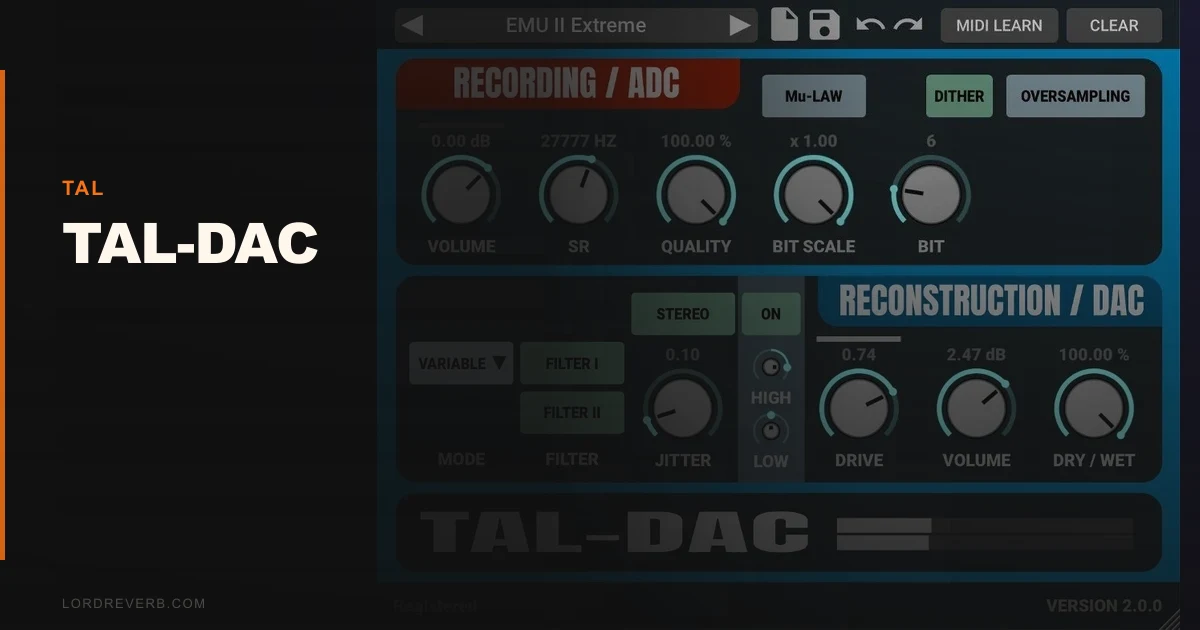
If you're wondering whether TAL-DAC is just another bit-crusher dressed up with vintage branding, the answer is no: it's one of the most accurate free lo-fi tools available, and it earns that claim through four distinct reconstruction algorithms that actually model how specific sampler hardware converted audio, not just how bit-depth reduction sounds in general.
We've spent time running drums, synth pads, and full mix buses through it. The difference between its linear mode and its S1000/sinc mode isn't cosmetic. You hear it immediately in how the high frequencies reconstruct. One sounds like a cheap digital recorder. The other sounds like you recorded through an Akai S1000, and that specificity is what separates TAL-DAC from the pile.
This is built for producers who want lo-fi to mean something, not just "make it sound old." If you're making boom bap, lo-fi beats, vintage-leaning electronic music, or you want drum buses that feel like they came off a sampler, TAL-DAC belongs in your signal chain.
Does It Actually Deliver on the Vintage DAC Promise?
TAL Software built TAL-DAC to emulate the conversion characteristics of 80s and early 90s samplers and digital audio devices. The core mechanism is sample rate and bit-depth reduction, but the real work happens in how the plugin reconstructs the signal afterward.
You get four reconstruction modes: hold, variable, linear, and S1000/sinc. Each one models a different approach to digital-to-analog conversion. Hold mode creates the aliased, stepped staircase sound of early digital hardware. S1000/sinc gets closest to actual Akai S1000 character, with a particular rolloff above 10kHz that's recognizable if you've spent time with that machine.
Version 2.0, released August 2022, added M1, M2, and M3 Apple Silicon native support. It runs in VST3, AU, and AAX formats. The 5.0/5.0 user rating on KVR isn't hype. For a free plugin, it genuinely delivers what it promises.
Where TAL-DAC Shines
The reconstruction algorithm range is the strongest argument for using this over generic bit-crushers. We put a dry drum loop through all four modes at 11025Hz sample rate and 12-bit depth. The difference is not subtle.
Hold mode destroyed the hi-hats in a satisfying, lo-fi way, aliasing them into a grainy shimmer. Switching to S1000/sinc at the same settings, the hats came back with more definition, but a clear 12kHz shelf rolled off in a way that sounded like hardware, not a filter. That's the detail that makes this useful for serious lo-fi production techniques.
The recording stage soft clipper is underrated. Before the signal even hits the conversion stage, you can push the input into soft saturation. We ran a clean 808 through it at +4dB of input gain before the bit reduction. The result was a natural-sounding clip that added harmonic density without the harsh edge of a hard clipper. It made the subsequent bit-crushing sound warmer, in the sense that it added 2nd and 3rd order harmonics before quantization noise entered the picture.
The 8x oversampling option for non-linear components keeps aliasing artifacts controlled when you want grit without full chaos. It costs more CPU, but the cleaner headroom is worth it on full sessions.
Where TAL-DAC Falls Short
No preset system. That's a real problem when you've dialed in a specific combination of sample rate, bit depth, reconstruction mode, and jitter that nails a sound, and then you close the session.
Write it down manually, or it's gone. For a plugin this parameter-sensitive, that's frustrating in a way that feels like an oversight.
The clock jitter parameter is also a gap. Jitter adds timing irregularities that mimic the imprecision of aging hardware clocks. The stereo jitter mode takes this further, introducing slight channel-to-channel timing differences. Both can sound brilliant. But there's almost no documentation on what values correspond to what behavior. We spent more time guessing than we should have. The range isn't labeled with reference points, so you're flying blind between "barely audible" and "something's wrong."
The UI gives you no visual feedback on frequency response or harmonic content as you adjust parameters. Compared to something like Decimort 2 review, which shows you what's happening to the spectrum, TAL-DAC asks you to trust your ears entirely. That's fine philosophically. It slows down the workflow practically.
How It Stacks Up Against the Competition
Plogue ChipCrusher is the more authentic option if you're targeting specific chip hardware sounds. It models actual sound chips from vintage computers and consoles by name. If you need a Game Boy sound or a specific arcade chip character, ChipCrusher wins. If you want sampler DAC behavior, TAL-DAC is more focused and more accurate for that specific application. Check the manufacturer's site for current ChipCrusher pricing.
Toneboosters Time Machine covers overlapping territory with added tape and vinyl emulation layered on top of its digital degradation. It's a wider tool. TAL-DAC is a sharper one. For pure DAC emulation, we'd take TAL-DAC's reconstruction algorithm approach over Time Machine's broader but shallower digital section.
Decimort 2 from D16 Group is the most direct competitor and arguably more plugin alternatives for lo-fi production capable at extreme settings. It's also heavier on CPU. TAL-DAC runs light. On a session with 40 instances of bit-reduction across individual drum hits, that gap matters.
Is the Price Fair?
TAL-DAC is free. Direct download from the TAL Software website, no activation required, no iLok, no account needed.
At that price, the absence of a preset system and the undocumented jitter parameter are annoyances, not dealbreakers. We would pay more for it if TAL added preset save/load and labeled the jitter range properly. At no cost, the value question answers itself.
The only honest caveat: free sometimes means "you'll outgrow it." For producers who need tight session recall and deep documentation, a paid tool like Decimort 2 may save time that's worth more than the cost difference.
Score Breakdown
| Category | Score | Notes |
|---|---|---|
| Sound Quality | 4.5/5 | Reconstruction algorithms are genuinely accurate to hardware sources |
| Value for Money | 5.0/5 | It's free with no activation |
| Ease of Use | 3.0/5 | No presets, undocumented jitter, minimal visual feedback |
| Features | 3.5/5 | Strong core feature set, missing preset management |
| CPU Efficiency | 4.5/5 | Runs light without oversampling; manageable with it |
| Overall | 4.2/5 | Best free lo-fi DAC emulation available, held back by workflow gaps |
Alternatives to Consider
Decimort 2 by D16 Group is the paid benchmark for bit-crushing accuracy. It adds spectrum visualization, a full preset library, and more detailed aliasing control. It runs heavier on CPU, and you'll pay for it. Worth it if session recall and visual feedback matter to your workflow. See our Decimort 2 review for the full breakdown.
Plogue ChipCrusher goes deeper on specific hardware chip emulation. If your reference isn't a sampler but a console sound chip or an arcade board, ChipCrusher is the more specific tool. TAL-DAC wins for sampler-type DAC emulation specifically. Check our best lo-fi plugins roundup for both in context.
RC-20 Retro Color by XLN Audio layers vinyl, tape, and noise on top of its digital degradation. It's a broader lo-fi texture tool. TAL-DAC is more surgical. If you want one knob to make something sound vintage and don't need algorithm specificity, RC-20 is easier. If you want accurate sampler character, it isn't. Read more in our RC-20 vs TAL-DAC comparison piece.
The clock jitter section alone is worth the download. Dialing it to around 30% on a clean hip-hop drum loop, we heard a subtle pitch instability in the snare tail that sounded unmistakably like a beaten-up SP-1200. Not a filter. Not added noise. The actual wobble of imprecise conversion hardware. That one moment is why TAL-DAC stays in our template sessions.
Download it. It's free, it runs lean, and the S1000/sinc mode will change how you think about lo-fi processing. Skip it only if you need preset recall and visual frequency feedback, in which case budget for Decimort 2 instead.
Frequently Asked Questions
Is TAL-DAC really free?
Yes. TAL-DAC is a free download from the TAL Software website. There's no activation, no iLok, no account required. You download it, install it, and it works. TAL offers a donation option if you want to support the developer, which we'd encourage if you use it regularly.
What's the difference between TAL-DAC's reconstruction modes?
Hold mode creates a stepped, aliased staircase effect closest to the harshest early digital hardware. Variable and linear modes offer progressively smoother reconstruction with different aliasing profiles. S1000/sinc closely models the Akai S1000 DAC behavior, with a characteristic high-frequency rolloff above 10kHz that's distinct from generic filtering. The mode choice changes the character of the degradation, not just the intensity.
How does TAL-DAC compare to a standard bit-crusher?
A standard bit-crusher applies bit-depth reduction with uniform quantization noise and leaves reconstruction to a simple algorithm. TAL-DAC models the full conversion chain: the recording stage with soft clipping, the sample rate and bit-depth reduction, and the reconstruction method. The result is hardware-specific character rather than generic digital grit. It's a narrower tool but a more accurate one for sampler-style sounds.
Does TAL-DAC work on Apple Silicon Macs?
Yes. Version 2.0 added native Apple Silicon support for M1, M2, and M3 chips. It runs in AU, VST3, and AAX formats. We tested it on an M2-based machine without any compatibility issues or performance problems, even with 8x oversampling enabled across multiple instances.