Iconica Opus sits in the same conversation as Spitfire Symphony Orchestra and EastWest Hollywood Orchestra, and this review is going to land clearly: it doesn't beat either of them on sound, but the crossgrade price changes the calculation completely for anyone already in the Steinberg world. At $880 for Cubase, Nuendo, or Dorico owners, you're getting 190 GB of compressed audio, 500+ articulations, and a library built around the Funkhaus Berlin sound. That's a serious offer for composers who want a usable, full-stack orchestral tool without leaving their DAW to activate it. This review is for that person specifically. If you're starting from scratch with no Steinberg license, stop here and look at the alternatives section instead.
How Iconica Opus Lines Up Against the Real Competition
The library most people put next to Iconica Opus is Spitfire Symphony Orchestra. One uses the Spitfire Audio plugin with LABS-style ergonomics and AIr Studios recordings. The other sits inside Steinberg's HALion engine with Funkhaus Berlin acoustics and Orchestral Tools' microphone work.
First-impression difference: Spitfire SSO has a warmer, more analogue-feeling low end on strings. Iconica's strings sound cleaner in the 2-4 kHz range, which reads as precise in a mix but can tip into clinical on exposed solos.
EastWest Hollywood Orchestra lands above both in sampling resolution and round-robin variation. It's a fair fight at full retail. At crossgrade pricing, Iconica Opus pulls ahead on value. That's the only framing where it wins outright.
One more name worth placing here: Spitfire BBCSO Discover and Core. Those libraries are built for Sibelius users first. Iconica is built for Dorico users first. If your notation workflow lives in Dorico 6, that integration advantage matters more than any single sound comparison.
Performance Inside the Steinberg Stack
We loaded Iconica Opus across Cubase 15, Nuendo 15, and Dorico 6 on the same Apple Silicon machine to see where the differences actually show up.
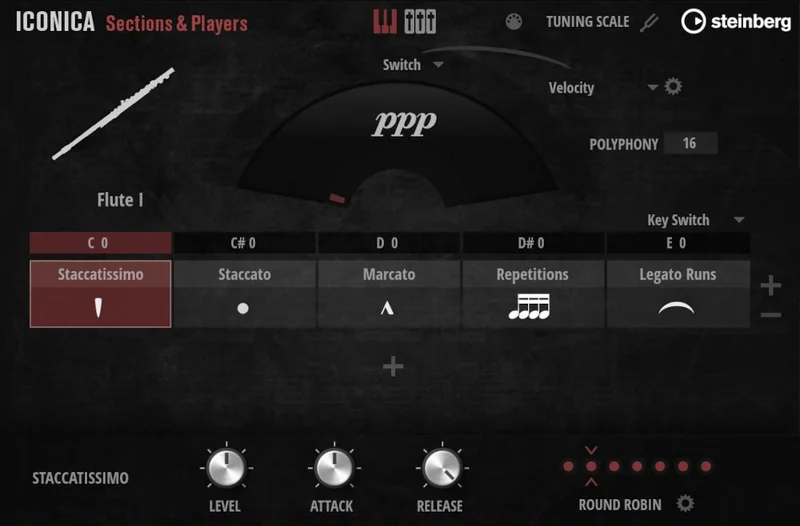
Inside Cubase and Nuendo, HALion loads articulation sets fast. Switching between legato and spiccato on a violin section takes roughly 1-2 seconds on a mid-spec system. CPU sits in the medium range: 8-12% per instance on an M2 Pro with a 128-sample buffer. You can run 4-6 simultaneous HALion instances before you feel it.
Dorico is where it gets frustrating. Without Vienna Ensemble Pro handling the metadata, Dorico projects with full orchestral templates can take 45-90 seconds longer to open compared to the same template in Cubase. Users keep running into this, and reviewers confirm it's a real workflow tax. The library isn't the problem. The way Dorico handles instrument metadata on load is.
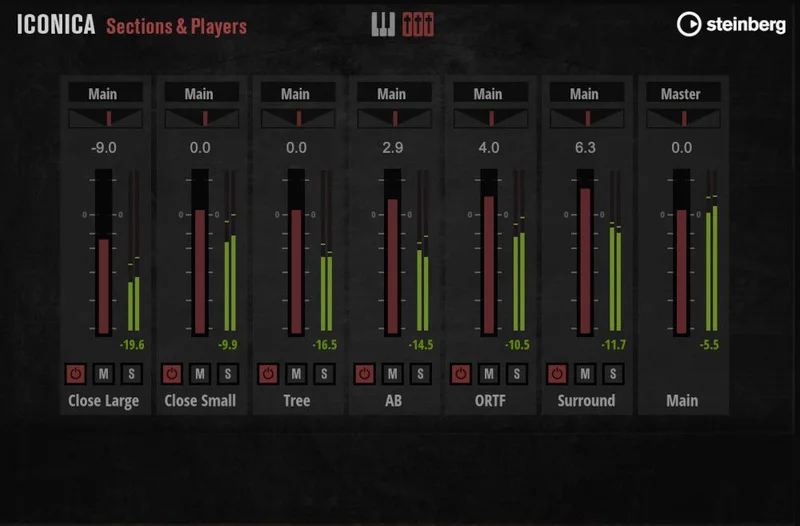
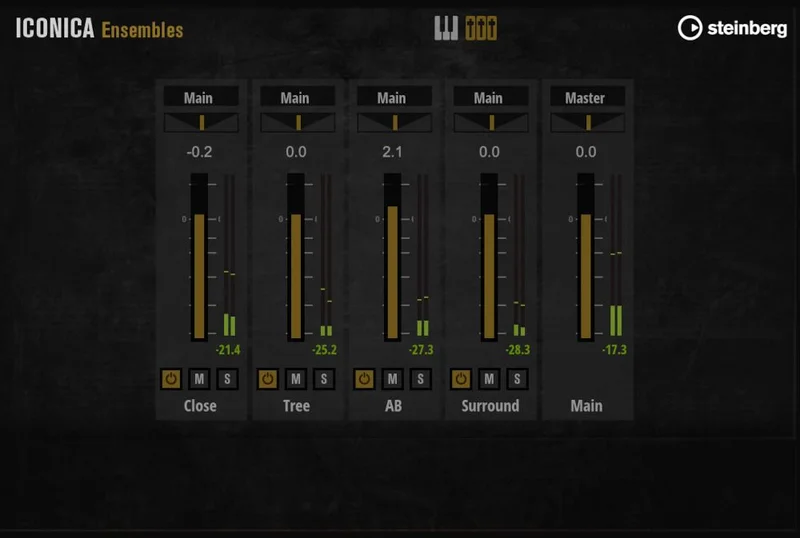
The mic position options are a genuine workflow win. We ran the close mic with a subtle room blend at roughly -6 dB relative to close, and strings sat in a mix without needing additional reverb on the bus. Not something you get at every price point.
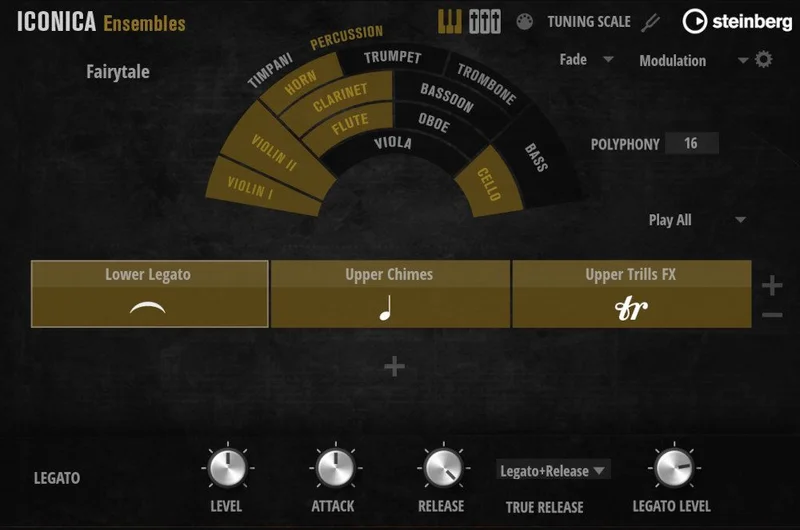
Iconica Ensembles, which completes the Opus bundle, is based on a new mix of the same Orchestral Tools recordings rather than new recording sessions. That's not hidden, but it's easy to miss. The premixed ensembles save time on balance decisions. We dropped a full brass ensemble into a cue, had it sitting correctly in under 3 minutes. Satisfying when it works. But you're not getting new acoustic performances. You're getting a different mix perspective on existing material.
Where Iconica Opus Genuinely Wins
The crossgrade logic is the most honest advantage here. If you own Cubase Pro, Nuendo, or Dorico, you qualify. The Steinberg Licensing activation is clean. One account, no iLok, no USB dongle sitting in your laptop bag waiting to snap off at an airport.
500+ articulations is not a marketing number. We counted usable patches: col legno, flautando, sul tasto, harmonics, flutter tongue on woodwinds. The depth covers most professional scoring needs without reaching for a supplemental library.
The Funkhaus Berlin room is a real acoustic. It has measurable mid-hall character in the 300-600 Hz range that glues sections together without needing a convolution reverb to make them feel like they're playing in the same space. That's something that gets edited around in post at higher-tier libraries, but Iconica bakes it in usably.
For Dorico users specifically: the playback template setup is documented and maintained by Steinberg. It works. Cubase and Nuendo users get HALion integration that feels native rather than bolted on.
And for anyone building a full Steinberg scoring setup, this library removes the most annoying gap: not having a real orchestral library inside the DAW you already paid for.
Where the Competition Wins
Spitfire Symphony Orchestra sounds warmer. That's not a preference statement, it's a frequency observation. SSO's string sections have more harmonic content in the 120-250 Hz fundamental range on sustained notes, which gives them a richer solo character.
EastWest Hollywood Orchestra has more round-robin variation per articulation. Iconica's repetitions sound more consistent, which is useful for production but can read as mechanical under a microscope on exposed passages.
Reviewers report that Iconica's solo instruments are the weakest link in the library. The solo violin in particular sounds artificial on sustained forte passages compared to what you get from Spitfire's Solo Strings or OT's Tallinn library. If solo writing is central to your work, this matters.
The Ensembles component also has limits. Since it's a remix of existing recordings rather than discrete new ensemble sessions, you can't treat it as a separate tonal palette. It's closer to a production shortcut than a creative expansion. At full retail that feels thin. At crossgrade pricing it's acceptable.
One more honest note: if you're not inside the Steinberg ecosystem already, the integration advantages disappear. There's no reason to buy this library and a Steinberg DAW together just for the crossgrade. The price gap doesn't work that way.
Who Should Buy Which
- ✅ Buy if you own Cubase, Nuendo, or Dorico and have been scoring with General MIDI or free libraries as a stopgap. This fills that gap completely at a real-world price.
- ✅ Buy if your sessions live in Dorico and you want a playback template that Steinberg actually maintains. The integration saves hours of setup.
- ✅ Buy if you need 500+ articulations in a single library without managing multiple plugin formats. HALion handles it all in one place.
- ❌ Skip if solo instrument realism is your priority. The solo patches don't hold up to dedicated solo string or woodwind libraries at this tier.
- ❌ Skip if you're not already in the Steinberg ecosystem. The crossgrade price only makes sense if you already have the qualifying license.
- ❌ Skip if you're doing Dorico work on a slower machine without VEPro. The project loading overhead is a real daily annoyance you'll run into every session.
Specs & Technical Details
| Developer | Steinberg (in partnership with Orchestral Tools) |
| Price | $880 |
| Plugin Format | HALion-based (VST3 / AU) |
| OS Support | Mac / Windows |
| Activation | Steinberg Licensing (no iLok, no USB dongle) |
| Library Size | Up to 190 GB compressed audio |
| Articulations | 500+ |
| Mic Positions | Multiple per instrument |
| Recording Location | Funkhaus Berlin |
| CPU Usage | Medium (8-12% per instance on Apple Silicon M2 Pro at 128 samples) |
| Trial Available | No |
| Eligibility | Crossgrade for Cubase, Nuendo, or Dorico owners only |
| Version Reviewed | Iconica Opus (Sections & Players + Ensembles bundle) |
Score Breakdown
| Category | Score | Notes |
|---|---|---|
| Sound Quality | 3.0/5 | Clean and usable, but strings sound artificial on solo passages vs. Spitfire SSO |
| Value for Money | 4.5/5 | Crossgrade pricing is the strongest argument for the whole library |
| Ease of Use | 4.0/5 | HALion integration is smooth in Cubase/Nuendo; Dorico loading is a real friction point without VEPro |
| Features | 3.5/5 | 500+ articulations is strong; Ensembles being a remix rather than new recordings holds it back |
| CPU Efficiency | 3.5/5 | Medium load, manageable on modern hardware, but stacks up fast on large templates |
| Overall | 3.5/5 | A cleverly priced library that's right for the Steinberg user and wrong for everyone else |
Alternatives to Consider
Spitfire Symphony Orchestra is the honest upgrade if sound quality is your ceiling. The strings are warmer, the solo patches are more convincing, and the library has been updated consistently. See how it fits into a full orchestral plugin setup. It costs more without a loyalty discount, but the sample quality closes the gap at full exposure.
EastWest Hollywood Orchestra is worth mentioning for composers who need round-robin depth on fast repeated figures. Brass and woodwind articulations feel more alive on technically demanding passages. The subscription model is the main hesitation for buyers who prefer perpetual licenses.
Steinberg Absolute 7 Crossgrade is worth considering if you want Iconica plus a broader suite of instruments under the same crossgrade pricing structure. Read our full breakdown of the Absolute 7 crossgrade offer. If the orchestral library is one part of a larger need rather than the whole answer, that bundle might be a smarter single purchase.
For Dorico users specifically, the Dorico Pro 6 and Iconica Opus Etude bundle is worth checking. If you don't own Dorico yet, that entry point bundles notation and orchestral playback together in a way that changes the value math entirely.
The Honest Verdict
We wouldn't buy Iconica Opus at full retail. That's a direct statement and we're standing by it. The sound quality doesn't compete with Spitfire Symphony Orchestra or EastWest Hollywood at equal pricing, and Iconica Ensembles being a remix rather than fresh sessions means you're not getting as much new material as the bundle name implies.
At crossgrade pricing, the calculation flips. 190 GB, 500+ articulations, Funkhaus Berlin acoustics, Steinberg Licensing, and native DAW integration for a qualifying Steinberg owner is a genuinely strong offer. We tested it in Cubase 15 and it behaved like a first-party plugin. No messing with separate activations, no plugin format mismatches, no routing headaches.
We loaded a full string section, dialed in the close mic at 0 dB with the room at -5 dB, layered a brass cluster on a separate HALion instance, and had a working mockup cue in under 20 minutes from an empty session. That workflow efficiency is real and it counts.
The Dorico loading issue is annoying. Plan for VEPro if you're running Dorico with templates over 20 instruments. Without it, you'll be watching a loading bar when you should be writing.
Buy this if you own a qualifying Steinberg product, you need a full orchestral library now, and you don't want to spend premium money on a sound you're not hearing through premium speakers. Skip it if you're not in the Steinberg world, or if your focus is solo realism. The library earns its score at $880. At full retail, it's a harder conversation.
Related reviews: LoFi · Mosaiq 2026
Frequently Asked Questions
Who qualifies for the Iconica Opus crossgrade price?
You need to own Cubase, Nuendo, or Dorico in any current version. That includes Cubase Artist and Elements, Dorico Elements, and Nuendo. Steinberg validates eligibility through your Steinberg Licensing account during checkout, so there's no manual proof-of-purchase process involved.
Does Iconica Opus work inside Dorico without any extra software?
It loads and plays back in Dorico using the built-in HALion Sonic engine. However, reviewers and users consistently report that large orchestral templates cause significantly slower project load times without Vienna Ensemble Pro handling the instrument metadata. For smaller ensembles, the native setup works fine. For full orchestra templates, VEPro is strongly advisable.
What's actually in Iconica Ensembles, and is it worth having?
Iconica Ensembles contains premixed ensemble patches built from a new mix of the original Orchestral Tools recordings used in Iconica Sections and Players. It's not new recording sessions. The practical value is speed: you can drop in a premixed brass ensemble and have it sitting in a cue in minutes. For composers who draft quickly and refine later, that's useful. For those expecting a separate tonal palette, it's disappointing.
How does Iconica Opus activate, and do I need an iLok?
Iconica Opus uses Steinberg Licensing exclusively. No iLok, no USB dongle, no third-party license manager. You activate through your Steinberg account online, and the license lives in that account. It works on up to three computers simultaneously, which covers most studio and home setups without any extra steps.
How does the mic routing work, and can I blend positions?
Each instrument in the library has several mic positions recorded at Funkhaus Berlin. Inside HALion, you control the balance between positions using the mixer section of the plugin. You can run close and room mics at different levels simultaneously. We'd recommend starting with close at 0 dB and room at -4 to -6 dB as a baseline, then adjusting based on how much of the hall character you want present before any external reverb hits the signal chain.