Soul Town by DopeSONIX gives you a focused collection of 22 vintage soul instruments built specifically for Detroit 60s and Motown-style production, and at $80 it's one of the more direct routes to that sound without digging through sample packs.
You're in a session at 2am, you've got a chord progression that wants a Rhodes, a Motown-style string pad behind it, and maybe a little brass stab to close the phrase. You don't want to spend an hour auditioning six different plugins. That's the exact moment Soul Town was built for. One plugin, everything from the electric piano to the brass and strings, loaded and ready.
This review is for producers who write soul, R&B, hip-hop with live-instrument textures, or lo-fi tracks with a vintage lean. If that's your world, Soul Town deserves a closer look. If you're in Pro Tools, stop here: it won't load.
What's Actually Inside the Box
Soul Town is not a general-purpose rompler. It's a focused snapshot of the instruments that made Detroit soul and Motown records sound the way they did. The 22 instruments include MKI and MKII electric pianos, a B-series electric organ, Detroit soul string patches, vintage bass patches, and Memphis Brass and Horns.
That's a specific palette. Deliberately narrow. And honestly? That's a strength, not a gap.
There's also a virtual vinyl patch. It carries nearly 100 vinyl crackles and mechanical noises, which is a genuinely clever addition for lo-fi and boom-bap producers who'd otherwise be hunting through sample libraries just for texture. The fact that it lives inside the same plugin means you don't need a separate noise layer loaded on another track.
What Soul Town is not: a multi-genre workstation. It won't cover modern synth leads, orchestral libraries, or contemporary R&B pads. If you need those, this isn't your main instrument plugin. It's also not a Pro Tools plugin. That's a hard limit, not a workaround situation.
Where It Actually Sits in a Session
Load Soul Town on an instrument track in your DAW, pull up the MIDI file browser, and you've got 100 pre-built MIDI patterns designed specifically for these 22 instruments. Chord progressions, solos, basslines. That's an underrated workflow win for producers who sketch ideas fast.
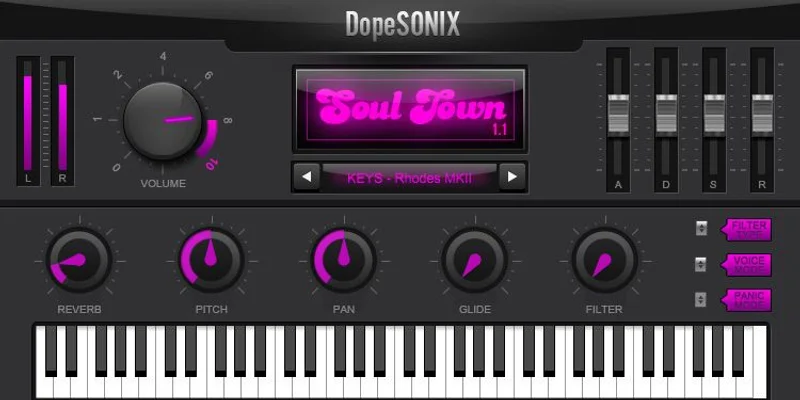
Say you're building a soul beat from scratch. You drop a bassline MIDI file onto the vintage bass patch, a chord MIDI file onto the MKI electric piano, and you've got a sketch in four minutes. From there you dial in the ADSR to shape the attack and release to taste, run the Hi/Lo Pass Filter to carve out space, and push the analogue-style reverb to sit the piano behind the mix.
The built-in controls cover the basics well. Pitch, pan, glide, gain, full ADSR, Hi/Lo Pass Filter, and a stereo output level meter. That's enough to shape each instrument without reaching for a separate EQ or filter plugin on every track. The analogue-style reverb is a convenience, not a studio-grade processor, but for quick demos and sketch sessions it saves time.
Poly, Mono and Legato modes are available. For the B-series organ and string patches, Poly is where you'll spend most of your time. Switch to Mono or Legato for bass and lead lines and the glide control starts earning its place.
Velocity layers go up to five, so the electric pianos and brass patches respond differently to harder playing, and you get some genuine expressiveness if you're playing in live with a controller.
Controller compatibility is wide. Maschine, Behringer, Novation, M-Audio, Arturia, Line 6, Alesis, Korg and Akai are all listed as compatible. That covers most studios and bedroom setups.
Who This Is For: Three Buyer Types
The Beat-Maker and Hip-Hop Producer
You chop samples and you've been wanting to add live-sounding soul instruments without paying for a full rompler or subscribing to a sample service. Soul Town fits that gap. The MIDI files mean you're not starting from a blank piano roll, and the vinyl crackle patch layers straight onto a drum bus for instant lo-fi texture.
The low CPU load matters here. If your session is already running Kontakt, a few effects chains, and a sample player, you don't want another plugin eating headroom. The developer says Soul Town has ultra-low CPU usage.
Buy it? Yes, if you work in Logic, Ableton, FL Studio, or any VST/AU host. Just check your DAW first.
The Working Soul and R&B Producer
You're writing tracks that need to sound like they belong to a specific era. The Memphis Brass and Horns and Detroit string patches are the instruments owners talk about most positively, and the MKI/MKII electric pianos sit right in the pocket for authentic vintage textures. The developer describes the string patches as emulating Motown string sections, and that's a fair target for this kind of library.
The workflow with the included MIDI files is where you'll spend most of your time. Owners report easy navigation and responsive parameters, which matters when you're working fast under a deadline.
One frustrating caveat: if your session workflow ends in Pro Tools, Soul Town won't follow you there. That's a real problem for anyone working with commercial studios or mixing engineers who run AAX.
Buy it if your DAW is VST or AU compatible. Skip it if Pro Tools is in your chain.
The Beginner Producer Finding Their Genre
You're learning soul and R&B production and you want a plugin that gives you the right sounds without a steep learning curve. Soul Town's interface has been consistently described by owners as clean, simple to navigate, and quick to dial in. The MIDI files are a genuine learning tool. Drop them into the piano roll and study the voicings, the bassline construction, the brass stab placement.
At $80, the barrier is low. It won't blow up your RAM. It doesn't demand a powerful machine. Mac needs 2 GB RAM and 610 MB disk space; Windows only needs 1 GB RAM.
One honest warning: the clavinet has been reported as a weak point, and the xylophone has been called toy-like by at least one reviewer. If you need those sounds specifically, Soul Town might disappoint. But if the core electric piano, bass, brass, and strings are what you're after, the beginner gets a lot of mileage here.
Buy it. Just don't expect every single patch to hit the same standard.
The Trade-Offs You Should Know About
The highlights are real. Twenty-two instruments in one plugin, a clean interface, low CPU, fast loading, and 100 MIDI files is a solid package for $80. The core vintage sounds, the electric pianos and strings especially, have been consistently well-received by owners.
But the problems are also real, and they're not small.
Reaper users: there are reported crashes and hanging notes when you restart a project. That's not a minor annoyance. A plugin that causes hanging notes on project restart is actively disruptive to your session. If Reaper is your DAW, hold off until you've confirmed this is resolved in the current version.
Pro Tools is a full stop. No AAX. No workaround. If any part of your workflow touches Pro Tools, Soul Town is off the table.
Bass patch loading has been reported as problematic by at least one reviewer. That's frustrating when bass is one of the core use cases for a soul instrument library.
The clavinet and xylophone are weak spots. If you load this up expecting a convincing clavinet to sit in a funk groove the way a dedicated instrument would, you'll be disappointed. Those two sounds feel like they were included to fill the instrument count rather than because they're genuinely studio-ready.
Version 1.2 carries a 4.2 out of 5 rating from 225 ratings on Plugin Boutique. That's solid, not outstanding. It tells you the core of the plugin works for most people, with a pocket of users who ran into real issues.
The Interface and Day-to-Day Workflow
Owners describe the interface as aesthetically pleasing, and that matters when you're spending hours in a session. Simple navigation, responsive controls. You're not hunting through nested menus to find a reverb send.
The stereo output level meter is a practical touch. You can watch your gain staging without switching to a meter plugin. Clip your output on a soft virtual piano and the mix goes sideways fast, so having a meter baked in keeps you honest.
Full ADSR means you shape the envelope of each instrument independently. For the strings, pull the attack up and let them swell in. For the electric pianos, a sharper attack and a tighter release keeps them punchy in the midrange. The Hi/Lo Pass Filter handles the basic frequency shaping on the way out.
The glide control in Mono and Legato mode gives the bass patches some movement between notes. Dial it short for tight soul bass slides, or push it further for an exaggerated vintage synth feel. That's a satisfying control to have within the plugin itself.
Manual MIDI programming and USB/MIDI controller input both work. If you play in live, you get the velocity response from the up-to-five layers. If you programme, you draw in your own velocities in the piano roll.
The Real Verdict
Soul Town is a clever, focused plugin that does most of what it promises for a specific kind of producer. The electric pianos, strings, and brass hit the target. The MIDI files are genuinely useful. The CPU load is light and the interface stays out of your way.
But the Pro Tools gap is a dealbreaker for a chunk of working studios. The Reaper instability is a real risk. And a handful of instruments, the clavinet and xylophone in particular, don't earn their place in the patch list.
If you write soul, Motown-influenced R&B, or lo-fi hip-hop in a VST or AU host, Soul Town at $80 is a practical buy. You'll love the electric pianos. You'll wish the clavinet was better. That's a trade-off most users seem happy to make.
If you're in Pro Tools, Reaper, or you need a clavinet that can hold its own in a full mix, put the money elsewhere.
Specs & Technical Details
| Developer | DopeSONIX |
| Price | $80 |
| Plugin Format | VST (32/64-bit) / AU (64-bit) |
| OS Support | Mac (OS X 10.4 and above, including Monterey and Apple Silicon) / Windows (7, 8, 10) |
| Activation | N/A |
| CPU Usage | Light (developer-reported ultra-low CPU usage) |
| Trial Available | N/A |
| Version Reviewed | 1.2 |
| Instruments Included | 22 |
| MIDI Files Included | 100 |
| Velocity Layers | Up to 5 |
| Disk Space Required | 610 MB (Mac and Windows) |
| RAM Required | 2 GB (Mac) / 1 GB (Windows) |
| Pro Tools Compatible | No |
Score Breakdown
| Category | Score | Notes |
|---|---|---|
| Sound Quality | 3.5/5 | Electric pianos and strings are strong; clavinet and xylophone fall short |
| Value for Money | 4.0/5 | 22 instruments, 100 MIDI files, and a vinyl patch is a fair return at this price |
| Ease of Use | 4.5/5 | Clean interface, simple navigation, and included MIDI files lower the learning curve |
| Features | 3.5/5 | Full ADSR, filter, reverb and glide cover the basics; no Pro Tools support and Reaper instability are real gaps |
| CPU Efficiency | 4.5/5 | Developer reports ultra-low CPU; fits into heavy sessions without competing for headroom |
| Overall | 3.8/5 | A solid vintage soul toolkit with genuine weak spots that matter depending on your setup |
Soul Town earns its place in a soul or hip-hop producer's VST folder. It won't replace a dedicated electric piano plugin for the producer who needs deep control over one instrument, but it covers the whole vintage soul palette quickly and lightly. The MIDI files alone save hours. The Reaper and Pro Tools issues are the reason the score stops where it does.
If your DAW is compatible and your genre fits, this is a satisfying purchase. If it's not, it's an annoying one to return to.
Frequently Asked Questions
Is Soul Town compatible with Pro Tools?
No. Soul Town is available in VST and AU formats only and does not support AAX, which is the format required by Pro Tools. If Pro Tools is your primary DAW, Soul Town won't load. You'll need to use a VST or AU compatible host.
Does Soul Town work on Apple Silicon Macs?
Yes. DopeSONIX has confirmed Apple Silicon support, and Soul Town is compatible with Monterey and above. The Mac version requires OS X 10.4 or higher, 2 GB RAM, and 610 MB of disk space. Check that your AU-compatible DAW is also running natively or via Rosetta before purchasing.
What MIDI files are included with Soul Town, and how do you use them?
Soul Town includes 100 MIDI files covering chord progressions, solos, and basslines, all designed to work across the 22 instruments in the collection. You drop the MIDI files onto an instrument track in your DAW, assign the Soul Town patch you want, and the pattern plays immediately. It's a fast way to sketch ideas or study how authentic soul arrangements are constructed.