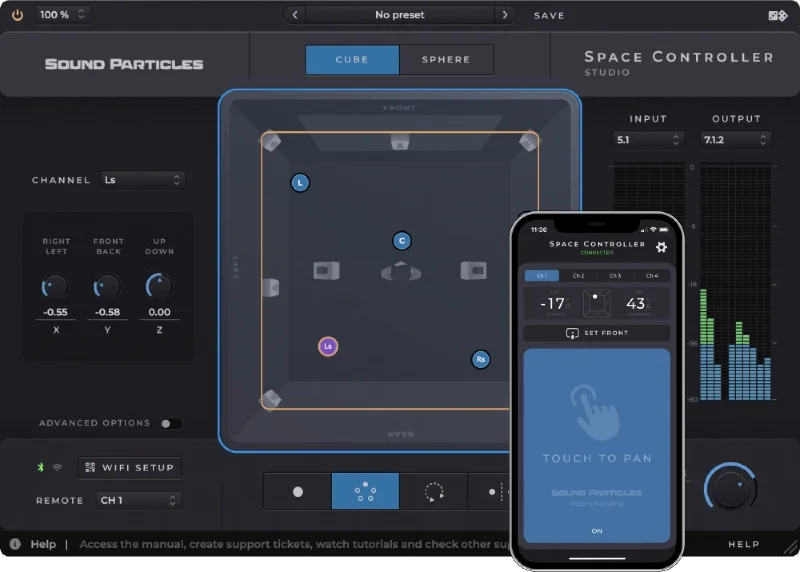
Space Controller Studio is a spatial audio panning plugin that pairs with a smartphone app, letting you physically point your phone to place sounds in immersive formats from stereo to Dolby Atmos 22.2, and we came away from a Dolby Atmos session with it genuinely impressed by the workflow, with a few real frustrations to flag before you commit at $399.
Here's the session where it clicked. We had a 7.1.4 dialogue stem with an overhead crowd swell that needed to arc from front-left to rear-right over about six seconds. With a mouse, that automation pass takes three attempts minimum, and it always feels like you're drawing coordinates rather than placing sound. We loaded Space Controller Studio on the bus, paired the phone over Wi-Fi, and physically swept our arm across the room. The panner followed. The automation recorded. Done in one take.
That moment either sells you on this concept or it doesn't. If it does, read on. If you're thinking "my mouse does fine," this review will save you the spend.
Space Controller Studio is built for immersive audio professionals at $399. Home studio producers mixing stereo or basic 5.1 should look at the Standard tier instead.
What It Is (and What It's Not)
Space Controller Studio is a plugin plus a mobile app. The plugin loads in your DAW as VST3, AU, or AAX. The app, which weighs 3.5 MB and requires iOS 14.0 or later, reads your phone's motion sensors and streams X, Y, and Z positioning data to the plugin via Wi-Fi or Bluetooth.
The phone becomes your panning controller. You point it at the ceiling, the sound goes up. You swing it right, the sound goes right. Sound Particles calls the underlying tracking technology patent-pending, and we have no reason to doubt it's proprietary.
What it's not: a reverb, a spatializer, or a room simulator. It doesn't add any audio processing. It's a panner and a controller, full stop. If you're looking for something that also shapes the spatial character of your sound, check out Baby Audio Spaced Out Review or Clearmountain's Spaces Review for that territory.
It also doesn't support custom speaker layouts. If your mixing stage uses a non-standard configuration, that's a hard wall right now.
Living With It
Setup is straightforward. Install the plugin, download the iOS app, connect to the same Wi-Fi network, and the two find each other. Bluetooth is also available in the Studio tier, which matters when your mixing stage has network restrictions. That dual-connectivity option alone justifies the Studio upgrade over Standard for professional facilities.
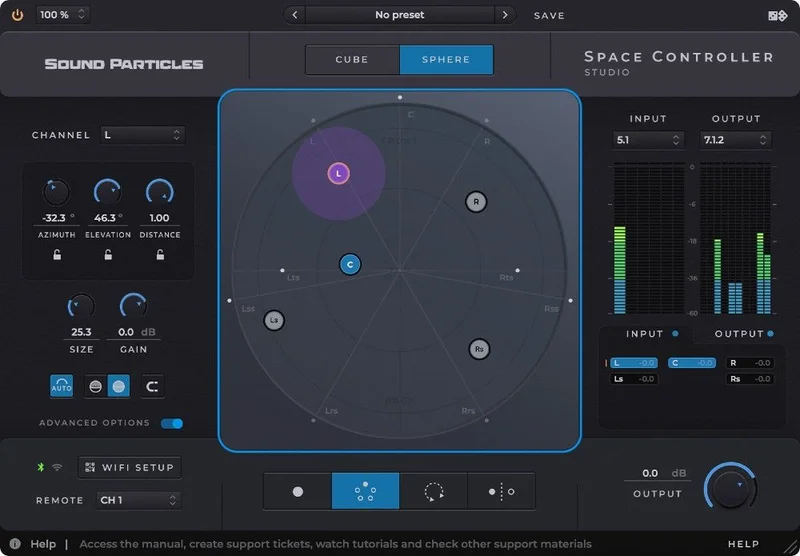
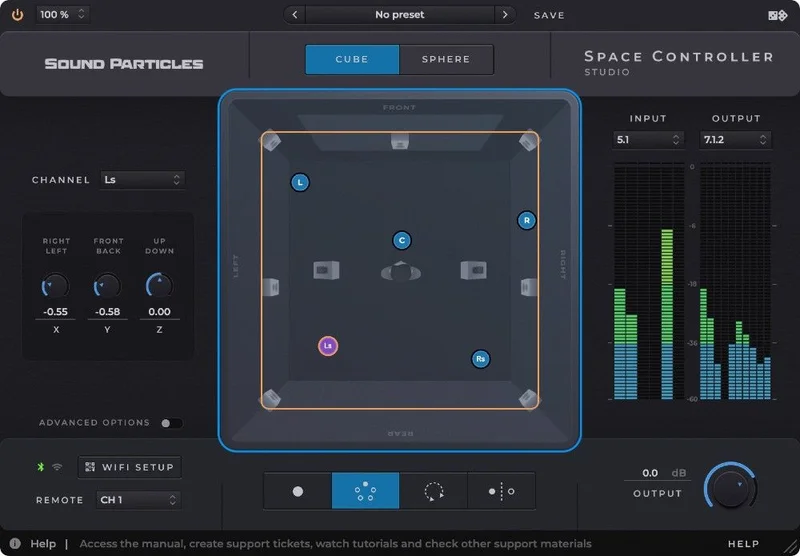
The plugin interface shows Top and Rear views so you always know where your source is sitting in the field. Switching between Cube and Sphere modes changes how coordinates are expressed, and both feel logical once you've spent twenty minutes with each. We preferred Sphere for Atmos work. Cube felt more natural for Ambisonics.
Four modes cover most scenarios. Mono places a single source. Dual controls two independently. Rotation moves the entire sound field. Symmetric Mode handles width control on stems like a 5.1 recording, which is genuinely clever for mid-bus processing. We used Symmetric on a 5.1 music stem and pulled the sides in slightly during a dialogue-heavy scene. Clean, fast, satisfying.
The Lock function lets you hold any individual position axis while moving others freely. We locked the height axis during a front-to-rear sweep to keep helicopter sound effects from drifting vertically. It worked exactly as intended. No complaints there.
The 128 communication links in the Studio tier matters for complex sessions. We didn't hit the ceiling. Standard users might, which is another reason the Studio tier exists.
Reviewers report that latency over Bluetooth can introduce a slight lag between physical movement and plugin response, particularly on busier networks. We'd recommend Wi-Fi for critical automation recording. Bluetooth is fine for monitoring passes.
The Trade-Offs
The core trade-off is physicality versus precision. Pointing a phone at a speaker is wonderfully intuitive for broad gestures, sweeping pans, and automation passes that feel spatial rather than mathematical. But if you need to place a source at exactly 37 degrees elevation and hold it there while recording a line of dialogue, a mouse with typed coordinates beats a hand gesture every time. The Lock function helps, but it doesn't fully close that gap.
The format support is broad. Stereo, binaural, LCRS, 5.1, 7.1, Dolby Atmos up to 22.2, Ambisonics to sixth order, and a long list of specific configurations including 9.1.8 and 11.1.8. For a single plugin, that's a serious list. What it doesn't do is let you define a custom speaker array. If you're running an experimental 3D installation with a bespoke layout, you're not supported.
The LFE channel control is a nice touch. Not every spatial panner gives you that directly. The Dolby Atmos Objects copy-and-paste automation feature is a workflow win we didn't expect to appreciate as much as we did. It's one of those small things that saves real time across a long session.
The KVR ranking sits at 14,541 overall with no published user reviews we could find. That's not a death sentence, but it does mean we're working with limited real-world cross-reference data. Take that for what it is.
Against the Field
The honest answer is that direct competitors in this exact niche are few. Traditional joystick controllers give you physical control but no immersive format awareness built in. Mouse-based panners in Nuendo or Pro Tools give precision but no gestural feel. Space Controller sits between those two worlds and mostly succeeds.
For producers doing mostly stereo width work, a dedicated stereo widener plugin costs a fraction of this and does that job better. Space Controller Studio is not the right tool for stereo-only work. We'd point those users toward dedicated stereo width plugins and save the budget.
For Ambisonics-focused composers, the sixth-order support is competitive with dedicated Ambisonics panners from established spatial audio toolkits. The smartphone workflow is genuinely different and worth auditing against your current setup.
For Dolby Atmos mixing engineers, this sits alongside dedicated hardware controllers. The Wi-Fi/Bluetooth software approach costs less than hardware and takes up no physical desk space. That's a real advantage in a compact facility.
The Real Verdict
Space Controller Studio earns its $399 if you're regularly working in immersive formats and you've felt the friction of placing 3D sound with a mouse. The phone-pointing workflow is clever and it actually works. The format coverage is exhaustive. The Bluetooth plus Wi-Fi dual connectivity is professional-grade.
It's wrong for you if your work is 90% stereo, if you need custom speaker layouts, or if the lack of independent editorial reviews makes you nervous about a new tool in a critical workflow. Those are legitimate concerns. The Standard tier would suit a home studio producer exploring surround for the first time.
Immersive post-production engineers: this one's worth the demo.
Specs & Technical Details
| Developer | Sound Particles |
| Price | $399 |
| Plugin Format | VST3 / AU / AAX Native |
| OS Support | Mac (macOS 10.12+, Intel and Apple Silicon) / Windows (Windows 10 SP1+) |
| Activation | N/A (not disclosed in available data) |
| CPU Usage | Light to medium (minimum 2-core CPU; recommended 4-core, 8GB RAM) |
| Trial Available | N/A |
| Version Reviewed | N/A |
| Mobile App Size | 3.5 MB / iOS 14.0 or later |
| Connectivity | Wi-Fi + Bluetooth (Studio tier) |
| Max Format Support | Dolby Atmos 22.2 / Ambisonics 6th order / Surround up to 9.1 |
| Communication Links | 128 |
Score Breakdown
| Category | Score | Notes |
|---|---|---|
| Sound Quality | 4.0/5 | No audio processing artifacts; transparent panning with no added colour |
| Value for Money | 3.5/5 | Justified for immersive professionals; overpriced for stereo-only workflows |
| Ease of Use | 4.0/5 | Phone pairing is fast; four modes and Cube/Sphere switching have a short learning curve |
| Features | 4.5/5 | Format breadth is genuinely impressive; custom speaker layouts missing |
| CPU Efficiency | 4.0/5 | Recommended specs are modest; no CPU-hungry signal processing happening |
| Overall | 4.0/5 | A clever, well-built tool that solves a real problem for immersive audio engineers |
Alternatives to Consider
If the spatial character of your sound matters as much as placement, Baby Audio Spaced Out handles atmospheric width and texture in a way Space Controller Studio doesn't attempt.
For engineers building depth through time-based tools rather than panning, the Delay Plugins Guide covers how to achieve spatial depth with delay and can complement a panning-focused workflow like this one.
If you're working in a mixing stage that also needs room simulation, Clearmountain's Spaces combines reverb and spatial character in a way that pairs naturally with a dedicated panner like Space Controller Studio.
For composers building immersive synth textures who want spatial movement baked into sound design rather than applied at the panning stage, Spacelab is worth looking at before committing to a panning controller workflow.
The bottom line: Space Controller Studio does one thing that nothing else does quite as well. Point your phone. Place your sound. If that workflow matches your sessions, $399 is defensible. If your sessions don't regularly put you in Atmos or Ambisonics territory, it isn't.
Frequently Asked Questions
Does Space Controller Studio work with all DAWs?
It loads as VST3, AU, or AAX, which covers the major DAWs on both Mac and Windows. Pro Tools, Logic Pro, Nuendo, Reaper, and Ableton Live all support at least one of those formats. The AU format is Mac-only, so Windows users should reach for VST3 or AAX depending on their DAW.
What's the difference between Space Controller Standard and Space Controller Studio?
Studio adds Wi-Fi and Bluetooth connectivity, supports professional mixing stage environments, and expands the number of communication links to 128. It also covers more audio formats. Standard is built for home studio use and covers a narrower format range. If you're working in a professional facility or regularly running complex immersive sessions, Studio is the appropriate tier.
Can I use an Android phone with the Space Controller app?
The app is currently iOS-only, requiring iOS 14.0 or later. Android users can't run the app as of the time of this review. Sound Particles does note iPod touch compatibility for users who want a dedicated controller device without using their main phone.
Is Space Controller Studio suitable for Dolby Atmos music production?
Yes. It supports Dolby Atmos object-based panning and includes a copy-and-paste automation feature for Atmos Objects, which streamlines session work in compatible DAWs. Format support extends to 22.2, well beyond the 7.1.4 beds most music producers work in. For Atmos music mixing, the gestural phone workflow is a real improvement over mouse-based panning on height channels.