
You’re right to wonder whether $27 buys you something Ableton’s Auto Pan can’t, and the answer is yes, but only if you want the MK8 sweep specifically and can stomach the licensing system that comes with it.
V-Pan is a Vari-Pan emulation. That’s a narrow job. It does that job with real character, then wraps it in a 500MB download, about 4GB of installed files and a copy-protection scheme that plenty of owners hate.
We’d point it at Rhodes devotees, keyboard players and sound designers who chase vibrato-pan movement. Everyone else has cheaper, lighter options.
Does It Actually Deliver the Vari-Pan Sound?
Rhodes built V-Pan to bring the Vari-Pan circuit from its flagship MK8 piano into your DAW. The company says it introduced the vibrato stereo panning effect on suitcase pianos in the 1970s. That heritage is the whole pitch.
The plugin is modelled directly from the MK8 hardware circuit. It isn’t a generic auto-pan with a vintage skin.
So the promise is specific: the movement of that circuit, on any source. The developer suggests keyboards, synths, guitars, vocals and FX sounds.
Does it deliver? For the sweep itself, owners say yes. Some report panning textures they couldn’t get out of Ableton’s Auto Pan, and they describe the sound as warmer than digital alternatives once the Slew and Smooth options are dialled in.
That’s their experience, not ours. But it matches what the control set is built to do.
The catch is everything around the sound. We’ll get to that.
How Does the Panning Engine Work?
At its core, V-Pan moves a signal between left and right on a modulated waveform. Plenty of plugins do that. The difference here is the circuit being modelled and how much control you get over the shape of the movement.
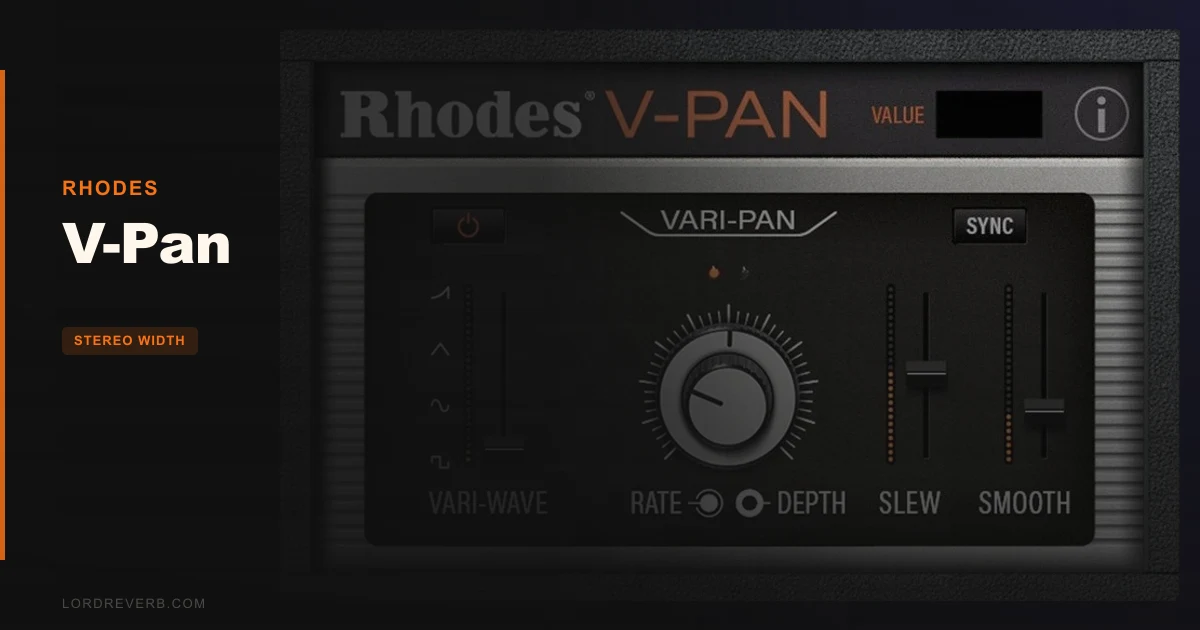
The Rate Control
Rate runs from super-slow to audio rates. That range matters more than it sounds.
At the slow end you get a lazy drift across the stereo field, the classic suitcase-piano wobble. Crank it up into audio rates and the panning stops being movement and starts being timbre. You’re into synth and ring mod-like territory.
Put it on a sustained pad and push the rate past the point where you can follow individual sweeps. The pad grows a metallic, buzzing edge. It’s ridiculous fun for sound design.
One caveat from owner reports: high-rate modulation capability is reduced compared with some digital alternatives. If audio-rate panning is your main goal, you’ll want to audition before you commit.
The Depth Control
Depth is described as deep, and that’s the right way to think about it. Low settings give you a subtle shimmer that widens a part without drawing attention. Full depth throws the signal hard left, then hard right.
Subtle is where this earns its keep on a mix. Keep depth low on an electric piano and the part breathes without announcing itself.
Full depth is a special effect. Use it on a fill or a transition, not on a part that has to hold the chorus together.
Waveform, Slew and Smooth
V-Pan offers a continuously variable waveform, so you aren’t stuck with a sine or a triangle. You morph between shapes.
Then there are two controls that set this apart from a basic auto-pan: Waveform Slew and Waveform Smooth. Slew shapes the panning waveshape. Smooth customises it.
In practice, you sculpt how abrupt or rounded each pan transition feels. Sharper settings produce a more obvious, almost stepped movement. Softer settings turn each sweep into a gentle, rounded arc.
Owners credit these two knobs for the warmer, smoother result versus digital alternatives. We’d call them the reason to buy.
Without them, V-Pan would be a pretty skin on an ordinary tool. With them, you shape the motion itself.
BPM Sync
The plugin includes a BPM sync function, so the sweep can lock to your session tempo. Switch it on for rhythmic panning that follows the groove.
Leave it off for free-running drift, which suits slow pads and ambient layers better. Both modes have a place.
LEDs and the Readout
Left and right panning LEDs show you where the signal sits at any moment. A parameter value readout displays the numbers as you adjust.
It’s a small thing, but we love it. Panning is hard to judge by ear when the rate is slow, and a light that flips left or right tells you straight away what the circuit is doing.
The readout saves you from guessing at values when you’re matching settings between sessions.
Where Does It Shine?
Three strengths stand out, and all of them come from how the plugin is built.
First, the circuit modelling. Direct modelling of the MK8 hardware is the headline. If you want that particular motion, you’re getting it from the source design, not an approximation.
Second, the shaping tools. Slew and Smooth give you control over the panning waveshape that many plain auto-pans lack. Owners describe the results as warmer than digital alternatives.
Third, the range of use. Rate stretches from glacial drift to audio-rate modulation, so one plugin covers tape-style wobble and synthetic ring-mod texture.
Put it on a clean guitar and set a slow rate with low depth. The part sways without ever feeling processed.
Now put it on a vocal double. Keep depth modest and let the sweep give the second layer a life of its own. That’s underrated.
One tip from the developer: wear headphones. The full panning effect only really lands when each ear gets its own side of the sweep, and speakers in an untreated room smear it.
Owners also report that V-Pan is easy to use and that it sounds good. Those two points rarely arrive together.
Where Does It Fall Short?
We’ll be blunt. The sound isn’t the problem. The packaging is.
The Codemeter DRM
V-Pan uses Codemeter DRM copy protection. Users report that it installs Codemeter and Gorilla Manager without clear warning. They also report that the licensing software runs continuously in the background.
That’s annoying. It’s the kind of surprise you don’t want from a $27 panner.
Worse, users report authorization failures, and some say the plugin stopped working after DRM removal. A tool that can lock you out of a session is a risk, not a convenience.
You need an internet connection for authorization too. If you work offline, check that before buying.
The Footprint
The download is about 500MB, and the install takes roughly 4GB. For a single panning effect, that’s excessive.
Users say as much. It’s a lot of disk for a plugin whose entire job is moving a signal between two channels.
Windows users need at least 8GB of RAM and 1.2GB of disk space, plus a display of 1280 x 960 with a resizable UI. The numbers are modest on paper, but the installed size on Mac is what stings.
Compatibility Gaps
Rhodes software currently doesn’t work with GarageBand on Macs with Intel processors. If that’s your DAW and your machine, stop reading here.
Users also report crashes in certain hosts. Reason 12 without Rosetta is the named example.
Supported formats are VST2, VST3, AU and AAX on Mac, with both Rosetta and native support, and VST2, VST3 and AAX on Windows. Mac OS runs from Big Sur (11) through Sonoma (14), and Windows 10 and 11 are supported. Check your host against that list before you pay.
Reduced High-Rate Modulation
Compared with some digital alternatives, V-Pan’s high-rate modulation capability is reduced. The audio-rate mode is real, but it isn’t the strongest in its class.
If ring-mod-style panning is the only reason you’re here, a dedicated modulation tool may serve you better.
How Does It Stack Up Against the Alternatives?
The honest framing: V-Pan competes less on features than on character, and it carries more baggage than anything it competes with.
| Plugin | Strongest point | Weakest point |
|---|---|---|
| V-Pan | MK8 Vari-Pan circuit model with Slew and Smooth shaping | Codemeter DRM and a roughly 4GB install |
| Cableguys Pancake | Panning tool without Codemeter DRM | Doesn't model the MK8 circuit |
| A1StereoControl | Another route that avoids Codemeter DRM | No Vari-Pan heritage |
| Ableton Auto Pan | Already in your DAW, simple digital panning | Owners report it can't reach V-Pan's textures |
| Apple Auto Pan | Built-in and simple | Basic digital option with fewer shaping tools |
Which wins when? If you want the specific MK8 sweep and the warmth owners describe, V-Pan wins. Nothing else in this list models that circuit.
If you want reliable, lightweight panning with no licensing drama, Pancake or A1StereoControl win. Both are named by users as ways to dodge Codemeter.
If you just need a quick left-right wobble and you already own the DAW, the built-in Auto Pan from Ableton or Apple wins on cost. It won’t match V-Pan’s character, but it won’t install anything either.
Pick the alternative that matches your actual problem, not the one with the nicest story.
Is the Price Fair?
At $27, the sticker is low. The real cost is hidden.
You’re paying for a circuit model and two excellent shaping controls. Then you pay again in disk space, background processes and the small risk of an authorization failure.
For a Rhodes fan or a sound designer, the price is fair. For someone who needs a pan, it’s the wrong trade.
Specs & Technical Details
| Spec | Detail |
|---|---|
| Developer | Rhodes |
| Price | $27 |
| Plugin Format | VST2 / VST3 / AU / AAX (Mac); VST2 / VST3 / AAX (Windows) |
| OS Support | Mac OS Big Sur (11) to Sonoma (14), Intel and Apple Silicon; Windows 10 and 11 |
| Activation | Codemeter DRM, internet connection required |
| CPU Usage | N/A |
| Trial Available | N/A |
| Version Reviewed | N/A |
Score Breakdown
| Category | Score | Notes |
|---|---|---|
| Sound Quality | 3.8/5 | MK8 circuit model, owners praise the warmth |
| Value for Money | 2.5/5 | Low sticker, but heavy hidden costs |
| Ease of Use | 3.5/5 | Owners report it's easy, LEDs and readout help |
| Features | 3.0/5 | Slew and Smooth are strong, high-rate modulation is reduced |
| CPU Efficiency | N/A | Not specified |
| Overall | 2.8/5 | Great character, held back by DRM, install size and compatibility |
What Are the Alternatives to Consider?
Cableguys Pancake
A panning tool that avoids Codemeter DRM. Choose it if you want reliable panning and your priority is a clean install.
A1StereoControl
Another way to skip Codemeter. It suits users who care more about avoiding background licensing software than about the MK8 sound.
Ableton Auto Pan
Already in your DAW and simple to use. Owners say V-Pan reaches textures it can’t, but for plain left-right movement it costs nothing extra.
Should You Buy V-Pan?
Buy it if the MK8 sweep is the sound you’re after. Pay $27, accept the Codemeter install, and use the Slew and Smooth controls to shape something the stock pans can’t.
Skip it if you work in GarageBand on an Intel Mac, hate background licensing software, or have a small drive. The panning is lovely. The baggage is a lot.
Hard pass for casual users. Worth it for Rhodes devotees.
Frequently Asked Questions
Is V-Pan worth $27?
It is for Rhodes fans and sound designers who want the MK8 Vari-Pan motion and the Slew and Smooth shaping. It isn't for anyone who just needs a basic pan, because built-in tools do that for nothing.
What does V-Pan actually do?
It emulates the Vari-Pan circuit from the Rhodes MK8 piano, moving a signal between left and right. The developer says it works on keyboards, synths, guitars, vocals and FX sounds.
Does V-Pan use Codemeter DRM?
Yes. Users report that Codemeter and Gorilla Manager install without clear warning and that the licensing software runs in the background. An internet connection is required for authorization.
How much disk space does V-Pan need?
The download is about 500MB and the installed size is roughly 4GB. Windows users also need at least 1.2GB of disk space and 8GB of RAM.
Does V-Pan work in GarageBand?
Not on Macs with Intel processors. Rhodes software currently doesn't work with GarageBand on Intel Macs, so check your machine before buying.
Which plugin formats does V-Pan support?
Mac gets VST2, VST3, AU and AAX, with Rosetta and native support. Windows gets VST2, VST3 and AAX.
What are the best alternatives to V-Pan?
Cableguys Pancake and A1StereoControl are named by users as ways to avoid Codemeter DRM. Ableton Auto Pan and Apple Auto Pan are simpler, built-in digital options.