
StereoSavage 2 Elements gets compared most often to Waves Abbey Road TG Mastering and Melda StereoProcessor, and that comparison is where this review is going to settle: it's a capable, well-metered stereo imager at $29 that wins some battles and clearly loses others. If you need a straightforward width-and-rotation tool with honest metering baked in, it's worth your attention. If you're after multiband processing or deep modulation routing, the Elements version isn't that.
Quick Verdict
StereoSavage 2 Elements earns a 3.5 out of 5. At $29 it does its core job well: width, rotation, and mono-compatibility checking in a single, readable panel. The metering alone makes it a legitimate grab for producers who don't own a dedicated stereo scope. But the cut-down feature set is genuinely frustrating if you've seen what the full StereoSavage 2 can do, and FL Studio users need to know about the audio cut-out bugs before handing over any money.
How It Compares Out of the Box
Pull up Waves Abbey Road TG Mastering next to StereoSavage 2 Elements and the difference in scope is obvious. Users rate the TG higher for mastering finished mixes and describe it as sounding more natural on dense, full-range material. StereoSavage 2 Elements isn't really trying to be a mastering chain, though. It's a focused stereo utility.
Melda StereoProcessor and bx_master both surface in the same conversations, usually as "did you consider these?" alternatives. Melda brings its own metering and more modulation depth. bx_master leans toward the mix-bus crowd.
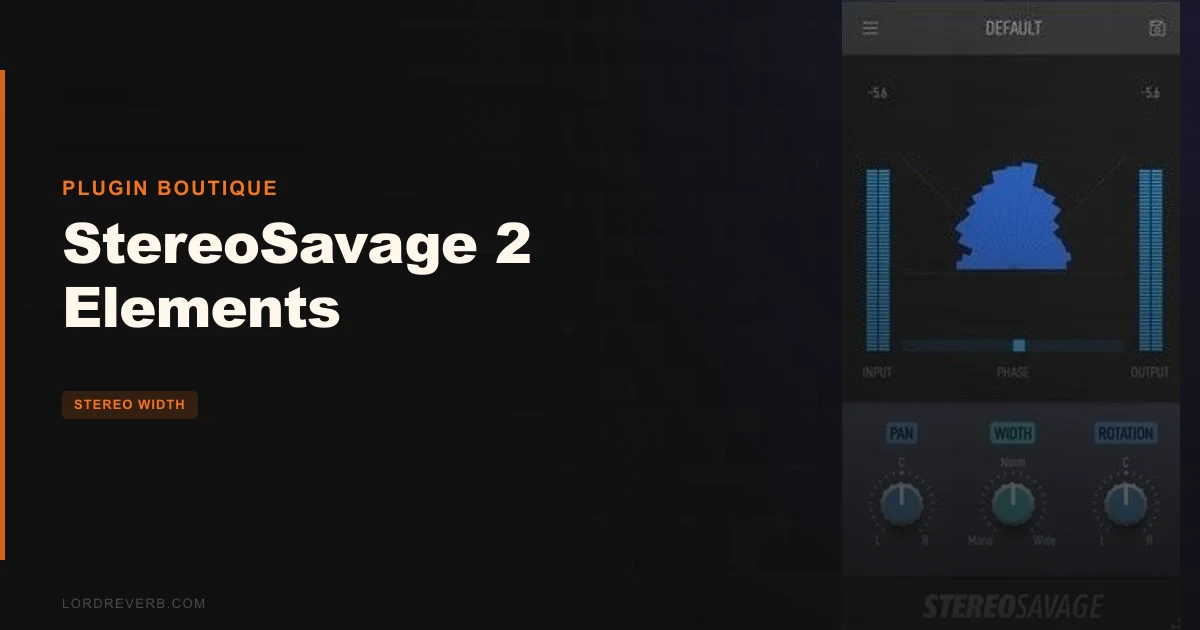
What StereoSavage 2 Elements has that neither of them is famous for at entry-level price points: a modern goniometer implementation and a phase correlation meter sitting right there in the centre panel, no separate metering plugin required. That's the differentiator owners keep coming back to. You're not hunting through menus for your stereo scope. It's in the interface.
First impression? The UI is clean. Controls are labelled, the metering reads fast, and nothing fights for your attention. It's a focused tool.
Inside the Centre Panel: Width, Pan, and Rotation
The three main controls live in the centre panel. Width is what you expect: pull it back to narrow a wide stereo source, push it out to spread a mono-ish signal. Pan works as it does anywhere. Neither surprises you.
Rotation is the one that earns its place. It pans the centre signal while leaving the sides exactly where they are. Run a drum loop with reverb through it and you can move the dry kit left and right while the reverb tail stays stationary. That's a genuinely clever bit of signal routing, and owners are right to call it natural-sounding. Standard panning moves the whole image. Rotation moves the middle of it. The difference is audible, and it's satisfying in a way that a pan knob never is.
If you're working on a dense electronic track and the lead sits awkwardly centred, try small rotation amounts. The lead drifts without the reverb following it. That kind of control over placement without losing your spatial information is worth something, especially on a bus.
The LFO lets you automate one of these parameters over time. One. Not two or three at once. If you want the width modulating while the rotation sweeps, that's not happening here. It's frustrating given how musical the rotation effect is. The creative possibilities narrow fast.
Metering: The Honest Selling Point
Here's what separates StereoSavage 2 Elements from cheaper width knobs buried in channel strips: the metering is real and readable.
The goniometer in the centre panel shows out-of-phase signals below a 45-degree line. Watch it while you push the width on a stereo source. You'll see immediately when you've gone too far. Phase problems don't sneak past you because you're looking at them in real time.
The phase correlation meter runs as a horizontal bar at the bottom of the centre panel. A reading toward -1 means your signal is moving toward full out-of-phase mono cancellation. You want to stay positive. Having this visible while you adjust width or rotation means you're making decisions with information, not guessing.
Input and output level meters flank the processing section. Gain stage properly through this thing. Push the input too hot and you lose the ability to compare processed and unprocessed at the same perceived volume. The meters stop that from becoming an invisible problem.
Owners describe this metering combination as a differentiator versus competing stereo imagers, and they're right. It's the kind of feature that sounds boring until you're at 2am checking why your mix collapses in mono. Then you love it.
Bass Bypass and Mono Compatibility
The Bass Bypass option excludes low-end from the width processing entirely. Kick, bass, and sub content stay centred and mono-compatible while everything above gets the full treatment. That matters for streaming and club systems where low-frequency phase issues translate directly into lost low end.
Automatic bass mono summing handles this the same way: low frequencies get collapsed to mono regardless of what the Width control is doing. It's a sensible default for anyone producing in genres where the low end needs to be solid on every system.
Set your width wide, hit the Mono button in the output section, and listen for dropouts or thin low end. Then engage Bass Bypass and check again. You'll hear the difference if the source was wide below 200Hz. That's a fast, repeatable check you can build into your bounce process.
For mastering work or any time you're handing files to someone else, running that mono check with the Mono button is a smart habit. The button is right there. There's no excuse not to use it.
Performance Deep Dive
StereoSavage 2 Elements runs on Mac from macOS 10.11 onward, covering both Intel and Apple Silicon natively. Windows support starts at Windows 8, 64-bit only. On Mac you get AU, VST, and AAX. On Windows it's VST and AAX. AAX requires Pro Tools 10.3.6 or later on both platforms.
What owners do report, and this is important: severe audio cut-out bugs in FL Studio. That's not a minor glitch. Audio cutting out during a session is a workflow-killer, and if FL Studio is your DAW, that should be the thing that decides whether you buy this or wait for a fix.
In Pro Tools and other DAWs there's no pattern of reported crashes or instability in the owner feedback. The FL Studio issue appears to be specific, not general.
Owners also report that the plugin shines on pop-style vocal effects. Push the width on a vocal double, use rotation to offset the centre from dead-ahead, check phase with the goniometer. That workflow is clean. What it's not: a complete vocal toolkit. If you need pitch correction, compression, or saturation in the same plugin, look elsewhere.
Where It Wins
The rotation effect is the clearest win. No stereo imager at this price point from the commonly compared alternatives does rotation the same way. Moving the centre signal while the sides stay put is genuinely useful and sounds natural rather than artificial.
The integrated metering is the second win. Goniometer plus phase correlation meter plus input/output levels, all in one panel, at $29. That's an underrated package. Plenty of producers pay separately for a metering plugin that does less.
Bass Bypass is the third. It solves a real, common problem without requiring you to split your signal chain or add a crossover elsewhere. Set it and your low end stays mono. Done.
The UI is clean and fast to read. No learning curve. You'll have the controls dialled in within ten minutes of loading it for the first time.
Where the Competition Wins
Waves Abbey Road TG Mastering wins on finished mix processing. Users who've compared them directly say the TG sounds more natural on dense, full-range mastering material. If that's your primary use case, the comparison isn't close.
The full StereoSavage 2 wins against its own Elements version by a lot. Multiband processing, Detune, Delay, Reflect, and Split modules: none of those are in Elements. Reviewers who know the full version feel the limitation. If you buy Elements and then discover you need multiband stereo control, you're either upgrading or buying something else.
Melda StereoProcessor and bx_master offer deeper modulation options. The LFO restriction in Elements, one parameter at a time, is where rivals with more flexible routing pull ahead for sound design and creative work.
Who Should Buy Which
- ✅ Buy if you need a stereo imager with real metering built in and don't own a goniometer or phase correlator.
- ✅ Buy if rotation-style panning is part of your production toolkit and you want to do it properly without building a Haas-effect workaround.
- ✅ Buy if you're working mostly in Pro Tools or a DAW other than FL Studio and want a clean, fast stereo utility.
- ❌ Skip if FL Studio is your main DAW. The audio cut-out bugs are a serious risk right now.
- ❌ Skip if you need multiband stereo control. Elements doesn't have it. The full StereoSavage 2 does.
- ❌ Skip if you want complex LFO routing across multiple parameters simultaneously. One parameter at a time is the hard limit here.
Specs & Technical Details
| Developer | Plugin Boutique |
| Price | $29 |
| Plugin Format | AU / VST / AAX (Mac); VST / AAX (Windows) |
| OS Support | macOS 10.11+ (Intel & Apple Silicon), Windows 8+ (64-bit) |
| Activation | N/A |
| CPU Usage | N/A |
| Trial Available | N/A |
| Version Reviewed | N/A |
Score Breakdown
| Category | Score | Notes |
|---|---|---|
| Sound Quality | 3.5/5 | Rotation effect sounds natural; width processing is clean but not exceptional |
| Value for Money | 4.0/5 | Metering, rotation, and bass bypass together at this price point is a fair deal |
| Ease of Use | 4.5/5 | Clean UI, fast to read, minimal learning curve |
| Features | 3.0/5 | Elements strips out multiband and core modules; LFO limited to one parameter |
| CPU Efficiency | N/A | No data available from reported owner experience |
| Overall | 3.5/5 | Solid focused utility with real metering, held back by feature restrictions and an FL Studio bug |
Alternatives to Consider
If you need stereo imaging that holds up on fully mixed material, Waves Abbey Road TG Mastering is the one owners reach for when StereoSavage 2 Elements falls short. Users describe it as more natural on dense mixes.
Melda StereoProcessor covers similar width and imaging territory but with more modulation flexibility. If the LFO restriction in Elements is the thing that's going to annoy you most, Melda's version of the tool is worth comparing directly.
bx_master from Brainworx shows up in the same conversations and skews toward the mix-bus and mastering crowd. Worth looking at if your use case is final-stage stereo adjustment rather than track-level imaging.
And if the feature limitations of Elements are the issue, the obvious next step is the full StereoSavage 2 with multiband, Detune, Delay, Reflect, and Split modules included.
The Verdict
StereoSavage 2 Elements is a well-built stereo utility that gets the fundamentals right: the rotation control is clever, the metering is honest, and the Bass Bypass saves you a routing headache every session. At $29 it's not asking for much.
But the Elements tag carries real costs. You lose multiband, you lose Detune, Delay, Reflect, and Split, and you're stuck modulating one LFO target at a time. For creative sound design work, that last one is the annoying one. And if you produce in FL Studio, the audio cut-out bugs make this a hard recommendation to write right now.
For a pop producer or electronic musician working in Pro Tools or Ableton who wants width control and a readable stereo scope in a single plugin, this is a smart, lean buy. For everyone else, the limitations make it a maybe, not a yes.
Frequently Asked Questions
What is the difference between StereoSavage 2 Elements and the full StereoSavage 2?
Elements is a cut-down version that includes width, pan, rotation, bass bypass, and metering controls. The full StereoSavage 2 adds multiband processing plus Detune, Delay, Reflect, and Split modules. If you need any of those additional modules, Elements won't cover it.
Does StereoSavage 2 Elements work on Apple Silicon Macs?
Yes. It supports both Intel and Apple Silicon natively on macOS 10.11 and later. AU, VST, and AAX formats are all available on Mac.
Is StereoSavage 2 Elements safe to use in FL Studio?
Owners have reported severe audio cut-out bugs specifically in FL Studio. Until that issue is publicly addressed or patched, FL Studio users should treat it as a risk rather than a reliable daily tool.
What does the Rotation control actually do?
Rotation pans the centre signal of a stereo track while leaving the side information in place. This produces a different result from standard panning, which moves the entire image. On a drum loop with reverb, you can move the dry kit position while the reverb stays stationary, which sounds far more natural than a simple pan.
How does Bass Bypass work and when should you use it?
Bass Bypass excludes low-frequency content from the width processing so your low end stays centred and mono-compatible. Use it any time you're widening a mix bus or a stereo group that contains kick, bass, or sub content. It stops low-end phase issues from collapsing the bottom of your mix on mono playback systems.
How does StereoSavage 2 Elements compare to Waves Abbey Road TG Mastering for mastering work?
Users who've compared them directly rank the TG Mastering higher for processing finished mixes, citing a more natural sound on dense full-range material. StereoSavage 2 Elements is more at home on individual tracks or buses during mixing than on a final stereo master.