
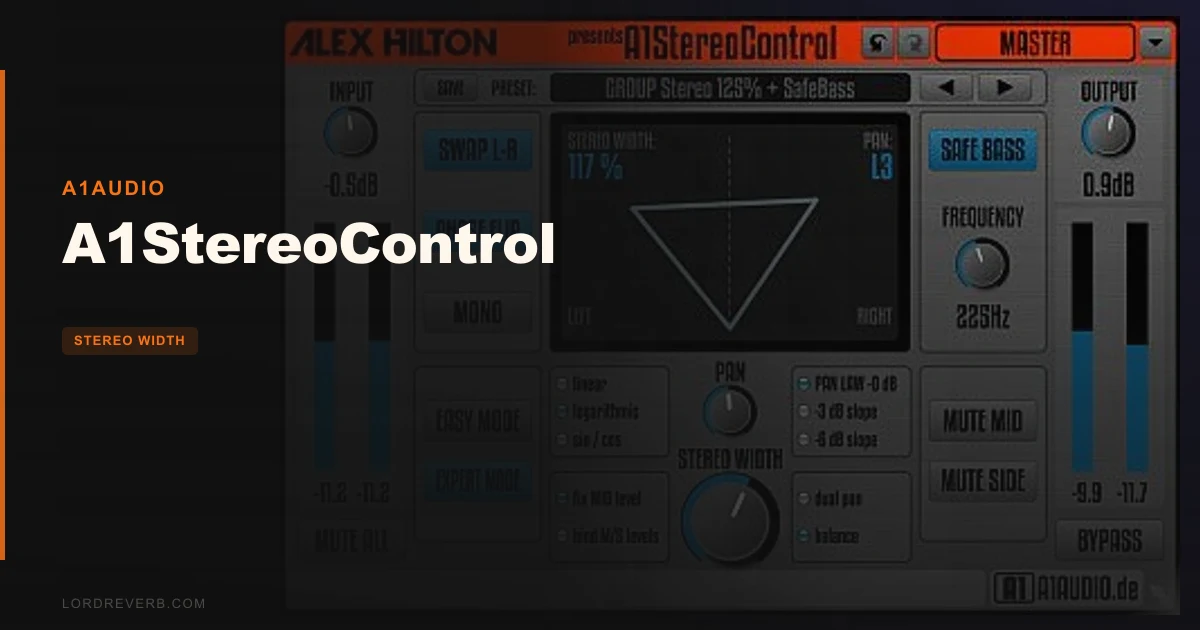
A1StereoControl keeps getting compared to Waves S1 Imager, and this review lands firmly in favour of A1StereoControl. The consensus from owners who’ve used both is consistent: the free plugin from A1Audio competes directly with the paid one, and in some respects beats it. That’s a statement worth unpacking.
Quick verdict: A1StereoControl scores 4.5 out of 5. It’s free, it’s mastering-grade, and the Safe Bass algorithm alone justifies loading it on your master bus. The caveats are real but narrow: it won’t touch mono tracks, and if you’re on Logic Pro X, check compatibility before you commit to it in a session. For everyone else, this belongs in your signal chain.
How It Compares Out of the Box
The most common comparison is Waves S1 Imager, a paid plugin that’s been a studio staple for years. Owners who’ve run both describe A1StereoControl as the superior tool. That’s not a small claim.
Against free stereo widener plugins, the main free alternatives have obvious gaps. Basslane handles bass isolation but it’s Windows-only, which rules it out for half the room. NUGEN Audio Monofilter and MeldaProduction MAutoStereoFix both cost money. A1StereoControl is cross-platform, free, and built for mastering-level work.
First impression out of the box: the interface is plain. GUI criticism has come up from users, and honestly? It shows. The design looks like it was built to work, not to impress. But what’s underneath is clever and genuinely well-engineered.
Performance Deep Dive
The core control is a single stereo width knob running from 0 to 200%. That range covers everything: pull it below 100% to collapse a wide mix toward mono, push it past 100% to expand. Simple framing, real flexibility.
The Safe Bass algorithm is where A1StereoControl earns its mastering-grade reputation. You set a frequency threshold, and everything below that gets summed to mono. This mirrors what an elliptical equaliser does, the same tool found in broadcast mastering chains. Your kick and bass stay centred and solid. Your stereo material above the threshold stays wide. Owners report the widening sounds natural without stretching, and that center integrity holds even at maximum width settings, which matters for mono playback on phones and club systems.
Linear phase processing is included for mastering use. Zero latency operation keeps it usable across the whole session without compensation headaches.
Expert Mode adds pan law options at 0dB, -3dB, and -6dB, with linear, logarithmic, and sin/cos pan curves. Advanced Panning and dual panning modes expand placement beyond simple balance. There’s more here than the single knob suggests. One CPU complaint surfaced from 2018, an idle consumption report, though no recent owners have flagged it.
Where It Wins
The Safe Bass feature is the headline win. Getting bass mono-compatibility right without a separate plugin, without an M/S EQ, without reaching for a different tool: that’s satisfying. You load one plugin, set your crossover frequency, and your low end is protected. The developer describes it as achieving results similar to professional elliptical EQs. Owners back that up.
Zero latency and linear phase in the same plugin is a combination that paid tools often split across two products or two modes. Here it’s built in.
The 865 kB download is almost nothing. It runs on Windows from XP forward, and Mac from OS X 10.6 up. Format support includes AAX and RTAS for Pro Tools users alongside the standard options. And it’s free, which makes every comparison with paid alternatives slightly ridiculous.
Owner reports of multi-year reliability and mastering-grade performance aren’t nothing. That’s a track record.
Where the Competition Wins
Honest concessions: Waves S1 has a more polished interface and better DAW-wide compatibility. If you’re in Logic Pro X on Mac, A1StereoControl has reported issues. That’s a real problem if Logic is your home. Don’t ignore it.
Basslane is simpler if all you need is bass isolation, though its Windows-only limitation is a dealbreaker for Mac users. MeldaProduction MAutoStereoFix and NUGEN’s Monofilter come with more comprehensive documentation and tutorial support. The learning curve on A1StereoControl’s Expert Mode isn’t steep exactly, but the available guides are thin. You’ll figure out pan laws if you already know what pan laws do. If you don’t, you’re finding that information elsewhere.
The GUI is ugly. That’s not a dealbreaker, but it’s annoying when you’re staring at it for hours in a mastering session.
Who Should Buy Which
- ✅ Buy if you need transparent stereo width control on your master bus and don’t want to pay for it
- ✅ Buy if you work in Pro Tools and want RTAS/AAX support in a free widener with Safe Bass built in
- ✅ Buy if you’re already comfortable with M/S processing concepts and want Expert Mode pan law control
- ❌ Skip if your whole session runs on mono tracks, it simply won’t load on them
- ❌ Skip if you’re on Logic Pro X on Mac, check the current compatibility status before you try to depend on this
- ❌ Skip if you’re a beginner who needs hand-holding documentation, the tutorial library here is thin
Specs & Technical Details
| Developer | A1Audio |
| Price | Free |
| Plugin Format | VST / AAX / RTAS |
| OS Support | Mac OS X 10.6+ / Windows XP, Vista, 7, 8 (32/64-bit) |
| Activation | N/A |
| CPU Usage | Light (one idle-consumption report from 2018; no recent flags) |
| Trial Available | N/A (free) |
| Version Reviewed | 1.1.1 |
Score Breakdown
| Category | Score | Notes |
|---|---|---|
| Sound Quality | 4.5/5 | Natural widening with no stretch; Safe Bass protects mono integrity reliably |
| Value for Money | 5.0/5 | Free, with mastering-grade feature set that paid alternatives charge for |
| Ease of Use | 3.5/5 | Single knob is simple; Expert Mode and pan law options need prior knowledge |
| Features | 4.5/5 | Safe Bass, Expert Mode, Advanced Panning, zero latency, linear phase, a lot for the price |
| CPU Efficiency | 4.0/5 | Generally light; one unresolved idle-consumption report prevents a clean score |
| Overall | 4.5/5 | Underrated, free, and mastering-capable, minor DAW compatibility caveats apply |
Alternatives to Consider
Waves S1 Imager is the paid plugin A1StereoControl gets compared to most. It’s got a polished interface and strong DAW support. If Logic Pro X compatibility is a concern and budget isn’t, S1 is the safe choice. Check our Waves S1 Imager review for the full breakdown.
MeldaProduction MAutoStereoFix is worth a look if you want more comprehensive stereo management tools and better documentation. It costs money, but the learning resources are much stronger. See our best stereo width plugins roundup for a direct comparison.
Basslane handles the bass-isolation side well if you’re Windows-only and just need mono bass without the full width-control feature set. It’s limited in scope but focused. We’ve covered it in our free mixing plugins guide alongside other zero-cost tools worth knowing.
For a broader look at the spatial audio plugins category, there are paid and free options worth stacking against A1StereoControl depending on your specific workflow.
A1StereoControl is free. It’s been running reliably for multiple years across real sessions. Owners prefer it to Waves S1 outright. The Safe Bass algorithm alone would cost you something in any competing paid product.
Load it on your master bus, set your Safe Bass crossover somewhere between 100Hz and 200Hz depending on how heavy your low end sits, and push the width until the stereo image feels immersive without losing center weight. That’s the workflow. It takes about two minutes to dial in.
If you’re on Logic Pro X, verify compatibility before you build a session around it. If you’re on mono tracks only, skip it entirely. For everyone else: this is the underrated free plugin that belongs in every stereo chain, and the fact that it competes with paid alternatives isn’t a surprise to anyone who’s actually loaded it.
Frequently Asked Questions
Is A1StereoControl actually free?
Yes, completely free. There's no paid tier, no trial expiry, and no licence activation required. The download is 865 kB and installs quickly. It supports AAX and RTAS formats for Pro Tools.
What does the Safe Bass feature do?
Safe Bass centres all frequencies below a user-set threshold into mono. You choose the cutoff point, and everything below it gets summed, protecting your low end from phase issues and ensuring mono playback compatibility on speakers and systems that fold the stereo signal. The developer says it achieves results similar to professional elliptical equalisers.
Can I use A1StereoControl on a mono track?
No. The plugin works on stereo tracks only. If you're working with a mono source, you'd need to convert it to a stereo track first within your DAW. This is the plugin's most concrete functional limit.
Are there Logic Pro X compatibility issues I should know about?
Yes, users have reported compatibility problems with Logic Pro X on Mac. If Logic is your main DAW, verify compatibility before use in a production environment. On other DAWs and Windows, reliability reports are consistently positive.