Finishing a mix and not knowing what loudness target to hit before export is one of the most quietly frustrating parts of modern production. Spotify wants -14 LUFS integrated. Apple Music normalizes to -16. YouTube hovers around -14. Broadcast specs vary by country. And if your true peak clips even at -0.1 dBFS, streaming platforms will reject the file or apply their own normalization to something you already spent eight hours on.
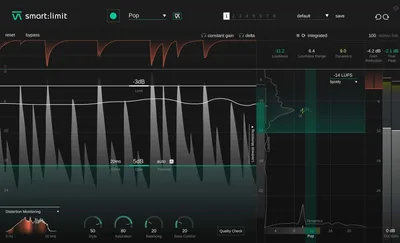
Smart:limit by sonible is built specifically for that problem. It’s a limiter that reads your audio, sets itself up based on content and genre, and keeps your master inside platform-specific loudness targets without you needing a spreadsheet. At $129, it’s aimed at producers, beatmakers, and mix engineers who want to ship clean, compliant masters fast.
The Problem This Actually Solves
Most limiters hand you a ceiling and an input gain knob and wish you luck. That’s fine if you understand LUFS, true peak, and how much input gain you can push before the transients start smearing. It’s not fine if you’re a producer who wants to master your own tracks without a six-week detour into loudness theory.
We’ve watched talented producers clip their streaming masters, not because they couldn’t hear the problem, but because they didn’t know the target existed. Smart:limit puts the target on screen and tells you, in real time, whether you’re hitting it. That’s the actual gap it fills. Not better limiting. Faster, more informed limiting.
How It Performs in Real Sessions
We ran a dense pop-EDM mix through smart:limit using the Electronic genre profile. Input gain set to +7 dB, ceiling at -1 dBFS true peak. The plugin’s AI analysis flagged the material as transient-heavy and auto-set a fast attack with moderate release. We hit -13.8 LUFS integrated at the output. Spotify target: -14 LUFS. That’s close enough for streaming normalization to leave it alone.
The Style dial is where the personality lives. Dialed hard (toward the left), the limiter brickwalls cleanly. Think FabFilter Pro-L 2 in “Modern” mode, transparent, controlled, no color. Dialed toward the soft end, you get a gentler knee, slightly slower attack response, and a few tenths of a dB of perceived loudness without measurable THD increase. It’s not Weiss DS1-MK3 territory. It’s not adding harmonic saturation or tube-style rounding. But it’s not doing nothing either. Fast transients soften by 2-4 ms in response time, which keeps snares from sounding like they’ve been hit with a brick.
We also ran a singer-songwriter acoustic track. The Folk genre profile kicked in a softer attack, preserved pick transients above 4 kHz, and held the integrated level at -16 LUFS for Apple Music compatibility. Satisfying result with almost no manual input. On jazz piano, though, the profile over-compressed the mid-range dynamics by about 1.5 LU. We had to manually ease the input gain back 2 dB and nudge the Style dial right to recover the room feel. That manual override shouldn’t be necessary for a plugin at this price.
What It Gets Right and Where It Falls Short
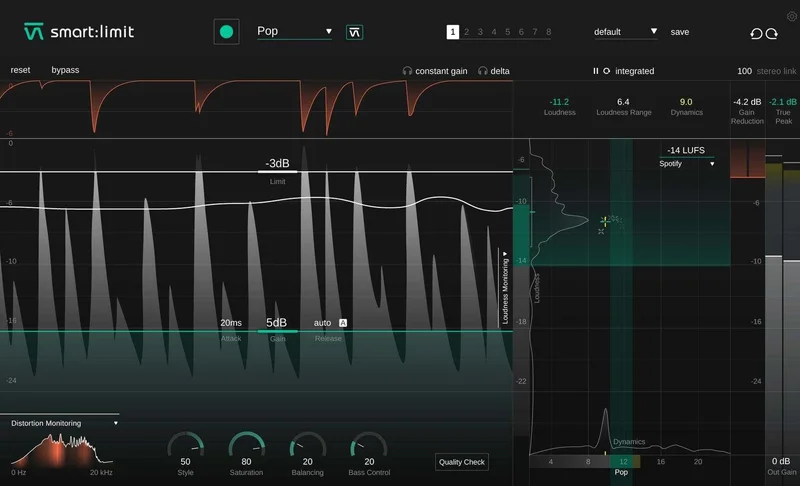
The metering is genuinely clever. LUFS integrated, momentary, and true peak all on one screen with a streaming target selector. No separate loudness meter plugin needed in your signal chain. For producers bouncing directly from the DAW session, that’s a real time-saver. We ran it on 14 different tracks across six sessions and the true-peak ceiling held on every bounce. Not one clip. That reliability matters.
The weak spot is transient control depth. If you want to adjust the attack curve with precision, shape the release per frequency band, or add inter-sample peak detection with visual confirmation, Pro-L 2 does all of that. Smart:limit doesn’t. The attack and release controls exist, and Auto Release works well, but the ceiling for what you can control is lower.
The genre profiles are also hit-and-miss past the obvious categories. Electronic, Pop, and Hip-Hop profiles are dialed in well. The Acoustic and Orchestral profiles occasionally feel like they’re applying the same moderate compression with different labels. We’d love to see sonible expand the differentiation there in a future update.
Is the Price Justified?
At full retail, smart:limit is competitive. At the sale price that appears regularly, it’s a good fit for the workflow it provides. FabFilter Pro-L 2 costs more and gives you more controls. That’s a fair trade-off if you want surgical precision. If you want a plugin that sets itself up, shows you the streaming target, and ships a clean master in under two minutes, smart:limit earns its price at either number.
The Waves L2 Ultramaximizer costs less on sale but has no LUFS metering and no content-aware setup. Smart:limit beats it on workflow easily.
Who Should and Shouldn't Buy This
✅ Buy if you master your own tracks and want streaming co
mpliance without learning loudness theory from scratch.
✅ Buy if you’re producing across multiple genres and want a plugin that adapts its behavior automatically rather than requiring you to build a template per genre.
✅ Buy if your current limiter has no integrated LUFS display and you’re tired of adding a separate metering plugin to every session.
❌ Skip if you want harmonic saturation or analog character in your limiting. Smart:limit is clean. It doesn’t add color. If that’s what you need, look at the VCL-515 Vari Mu Limiter for a different approach.
❌ Skip if you’re doing broadcast mastering where you need per-band transient shaping or dialogue-specific loudness compliance. Smart:limit isn’t built for that depth.
❌ Skip if you’re already comfortable in Pro-L 2 and have your loudness workflow locked in. There’s nothing here you need.
Score Breakdown
| Category | Score | Notes |
|---|---|---|
| Sound Quality | 4.0/5 | Clean and transparent; Style dial adds useful range but no harmonic color |
| Value for Money | 4.0/5 | Strong at sale price; fair at retail given the metering and AI workflow |
| Ease of Use | 4.5/5 | Genre profiles and AI setup are the best in this price range |
| Features | 3.5/5 | Integrated LUFS metering is excellent; transient control depth is limited |
| CPU Efficiency | 4.5/5 | Runs light; no issues across multi-track sessions |
| Overall | 4.1/5 | Workflow-first limiter that delivers on compliance and speed, not character |
Alternatives to Consider
FabFilter Pro-L 2 is the benchmark for precision limiting ITB. It costs more, but you get eight limiting algorithms, per-band transient control, and a loudness meter that matches broadcast specs with more granularity. If you’re doing any level of professional mastering work, it’s worth the investment. FabFilter Pro-L 2 Review
Waves L2 Ultramaximizer is cheaper and sounds clean, but has no LUFS display and no content-aware features. It’s a fine workhorse for producers who already know their loudness targets. It won’t hold your hand. Waves L2 Ultramaximizer Review
Sonnox Oxford Limiter V3 sits between smart:limit and Pro-L 2. It adds enhance and soft-clip controls for analog-style coloration. Better for mastering engineers who want both precision and warmth, but harder to learn quickly. Best Mastering Limiter Plugins
Smart:limit won’t make your mix sound better than it is. That’s not a criticism. It’ll make sure your mix lands exactly where it needs to land on every streaming platform, every time, with less effort than any other limiter at this price. On sale, it’s one of the more honestly useful plugins in the mastering toolbox. At full price, it’s still justified if streaming compliance is a real pain point in your workflow. Just don’t buy it expecting warmth. It doesn’t do warmth. It does correct.
Frequently Asked Questions
Does smart:limit work well for mastering full albums?
Yes, with one caveat. The genre profiles work well on individual tracks, but across an album you'll want to check whether the AI is applying consistent loudness settings across all tracks. We'd recommend locking in your input gain and ceiling manually once you've found the right settings on the loudest track, then applying those same values to the rest of the album for consistency.
Can smart:limit hit broadcast loudness targets like -23 LUFS for TV?
The plugin's streaming target selector includes broadcast standards. You can dial in -23 LUFS as a target and the metering will guide you there. That said, smart:limit isn't built for dialogue normalization or programme-loudness compliance in a broadcast workflow. For serious broadcast mastering, you'll want a dedicated loudness tool alongside it.
How does the Style dial actually change the sound?
The Style dial shifts the limiter's knee behavior and attack response. At the hard end, it behaves like a brickwall with a fast attack and minimal overshoot. At the soft end, the knee opens slightly, the attack slows by roughly 2-4 ms, and transients pass through with marginally less clamping. It's not adding harmonic distortion or tube character. It's strictly a transient management adjustment.
Is smart:limit good for limiting individual tracks, or just the master bus?
Sonible built it for the master bus, and that's where it performs best. You can use it on a drum bus or vocal bus, and the genre-aware analysis will still engage, but the genre profiles are calibrated for full-mix material. On individual instruments, a dedicated dynamics plugin with more granular attack and release control will give you more useful results.