
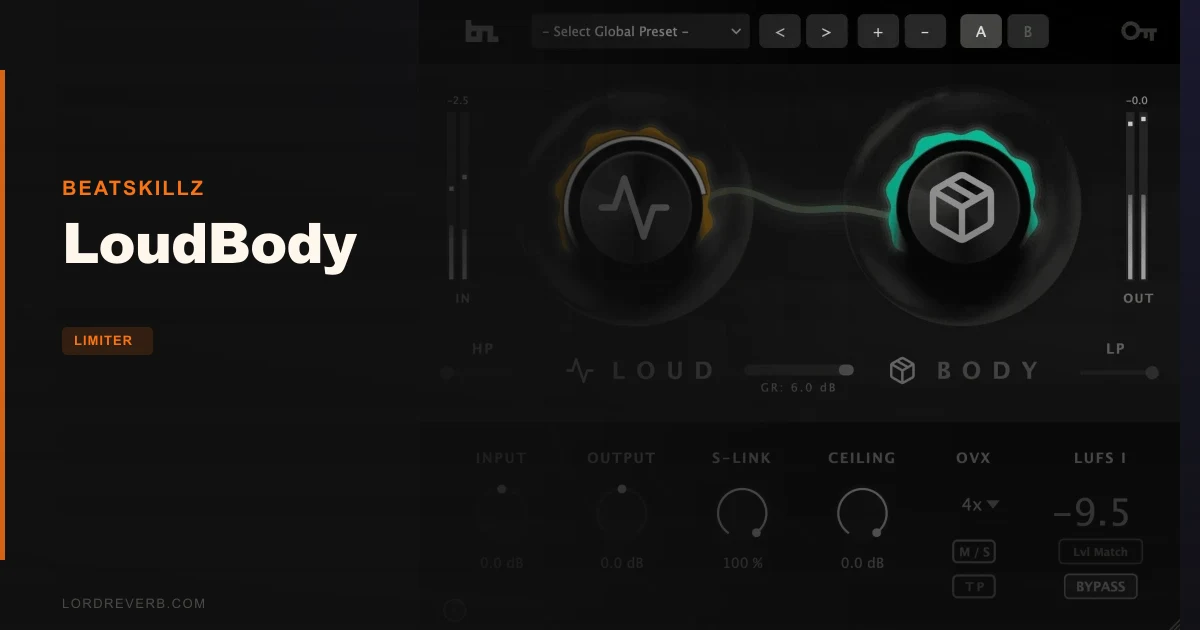
If you've been comparing limiters and LoudBody keeps appearing next to Waves L4 and iZotope Ozone in the same breath, here's where this review lands: LoudBody wins on organic character and two-knob speed, costs $79 as a one-time buy, and is worth serious consideration for any producer who wants a streaming-ready master without a subscription. For fast, musical limiting with M/S control built in, it earns its place at the end of the chain.
BeatSkillz built LoudBody around a hybrid adaptive limiting engine: peak limiting blended with controlled soft-clipping. That combination is the whole pitch. Set your ceiling, push the LOUD knob, shape the character with BODY, and you're done. Owners call it more organic than the Waves L4.
This review is for producers finishing their own records, beatmakers bouncing stems for placement, and home-studio engineers who want professional LUFS metering without paying monthly. If you're running a commercial mastering facility where every session is a different genre and a different brief, you might want something with more granular control. But if that's not you, keep reading.
How It Compares Out of the Box
The first comparison people reach for is the Waves L4. LoudBody's approach is built around an adaptive algorithm that blends peak limiting with soft-clipping. Owners report it sounds more organic than the L4, and that it works equally well on busses and individual tracks.
iZotope Ozone comes up for oversampling effectiveness and control options. LoudBody gives you two primary knobs, M/S processing, and up to 16x oversampling. Owners report 16x oversampling sounds richer than competitor oversampling, which is a subjective claim with no independent measurement behind it yet.
Users mention DMG as the more expensive alternative. LoudBody's pitch is speed and musicality at a one-time price of $79.
In short, this is a finisher, not a forensic tool. The workflow is direct, and the metering shows LUFS-I and True Peak dBTP readings.
Performance Deep Dive
The LOUD Knob and Adaptive Algorithm
The LOUD knob is the primary loudness control. It drives the adaptive algorithm that decides how to blend peak limiting with soft-clipping in real time. You don't set a ratio or an attack. The algorithm adjusts. That's either a relief or a frustration depending on how much you want to control the transient response manually.
Push the LOUD knob into territory where a fixed-ratio limiter would start pumping, and owners report LoudBody holds together. The developer says the adaptive approach prevents harshness. There are no independent measurements behind it, but owners report competitive loudness without audible pumping.
The ceiling control runs from 0dB down to -3dB. That covers the ceiling settings most streaming work calls for. If you want to push the ceiling lower than -3dBTP for any reason, you can't. That's a real limit. It's not catastrophic for streaming work, but it's worth knowing before you buy.
The BODY Knob and Harmonic Character
BODY runs from 0% to 100%. At 0%, the character is transparent. At 100%, it gets aggressive in the harmonic content.
The BODY knob is also what separates LoudBody from a straight brickwall. It's the character control. If you want pure transparent limiting with zero color, you'll set it to 0% and you'll have it. The fact that the range goes to 100% is what makes it useful for drums and aggressive electronic music where a bit of harmonic push keeps the energy alive.
M/S Processing
M/S mode is one of the more clever features at this price point. Independent mid and side control lets you push the center of the mix harder while keeping the sides from collapsing. That's the practical value: you can push loudness without narrowing the image.
Owners report that M/S processing preserves stereo width even at competitive levels. The developer says the stereo image stays intact when pushed hard. For electronic music with wide pads and a focused kick and bass in the mid channel, this matters a lot. Your mix doesn't narrow when it gets loud.
The Stereo Link (S-Link) control runs from 0% to 100% and determines how much the left and right channels influence each other. At 100%, fully linked. At 0%, they act independently. Experiment with lower values on mixes that have hard-panned elements you want to preserve through reduction.
True Peak Limiting and EBU R128 Metering
True Peak limiting is set at -0.3dBTP. That's the compensation figure BeatSkillz chose, and the ceiling control sits alongside it.
EBU R128 metering shows integrated LUFS-I and True Peak dBTP readings on the same interface. The developer says you can target -14 LUFS for Spotify or -16 LUFS for Apple Music with 0.1 dB precision. You read the integrated LUFS-I and adjust the LOUD knob until you hit your target.
True Peak mode, according to the developer, prevents codec distortion on streaming platforms. This is the standard benefit of True Peak limiting over sample-peak limiting: intersample peaks that cause distortion during codec encoding get caught. At $79 for a one-time purchase, having True Peak metering and limiting together in the same plugin is genuinely good value.
Oversampling Options
LoudBody offers 4x, 8x, or 16x oversampling. Higher oversampling reduces aliasing artifacts, which matters when soft-clipping is involved. The developer says LoudBody eliminates digital aliasing and keeps masters pristine at extreme settings.
Owners report 16x oversampling sounds richer than competitor oversampling. Whether it's measurably different from Ozone's oversampling hasn't been independently confirmed. No published figures exist for LoudBody's CPU performance, which is an annoying gap when you're making a purchasing decision. Test it on your own system before committing to 16x as your default.
Automatic Gain Matching and A/B Comparison
Automatic Gain Matching is the feature that makes honest comparison possible. When you bypass a limiter without gain matching, the louder processed signal always sounds better to your ears. That's not a quality judgment, it's psychoacoustics. Automatic Gain Matching compensates for the loudness difference so you're actually hearing the effect of the processing rather than the effect of the volume increase.
This is brilliant for dialing in BODY. Push BODY to 60%, match the gain, and compare. You'll hear what the harmonic character is actually adding instead of being fooled by the extra apparent loudness. It's one of those workflow features that sounds small but changes how you work.
Preset Library
100 presets across four categories: Streaming Optimized, Electronic and EDM, Acoustic and Organic, and Creative FX. The categories are organized around use case, which is more useful than generic names like "Preset 01" through "Preset 100."
Streaming Optimized presets are the obvious starting point for anyone finishing a track for distribution. They'll get your LOUD and BODY settings into a reasonable range for a genre and let you adjust from there. Treat them as starting points, not endpoints. Every mix is different and a preset that works on a dense EDM track will do something weird to a sparse acoustic guitar piece.
The Creative FX category is interesting for non-mastering use. Owners report LoudBody works well on busses and individual tracks. Using a mastering limiter on a drum bus with a Creative FX preset and the BODY knob raised is a legitimate saturation-plus-limiting technique. Worth trying before you reach for a separate saturation plugin.
Input, Output, and Mix Controls
Input, output, and mix controls are independently adjustable. The mix control opens up parallel limiting: blend the dry signal with the processed signal. Parallel limiting is underrated as a technique. Run the LOUD knob hot, bring the mix control back, and you keep the transient attack of the dry signal while getting the loudness of the limited signal.
On a drum bus, this is the approach to try first. Your kick and snare transients survive. The overall level goes up. You get density without losing the punch that makes the arrangement breathe.
Where It Wins
Speed is the clearest win. Two primary controls, 100 presets in four categories, and LUFS-I and True Peak metering on one interface. You can go from raw mix to a streaming-ready master quickly with the two-knob workflow.
The M/S mode at this price point is a real advantage. Dedicated M/S processing with independent mid and side control isn't a given in a limiter at $79. It's the feature that makes the difference on wide electronic mixes where linked stereo limiting collapses the image.
Owners put it ahead of the Waves L4 for organic character, and report that it can be pushed hard without the mix starting to pump.
The one-time purchase model with a lifetime license is a legitimate selling point in 2026, when subscription fatigue is real. Three machine installs. No recurring fees.
Sub-bass handling is the developer's specific claim: 808s staying punchy through heavy limiting. That's a developer statement rather than an owner report, so test it on your own low end.
Where the Competition Wins
iZotope Ozone comes up for control options and oversampling. LoudBody's controls don't include attack or release, because the adaptive algorithm makes those decisions for you. That's the tradeoff: speed and musicality versus making those calls yourself.
Independent data is where LoudBody is thin. It has no published third-party reviews or independent A/B comparisons yet. Owners report positive results, but if you buy on verified third-party measurements, that gap matters.
Users mention DMG as the more expensive alternative. The -3dB minimum on LoudBody's ceiling control is a real limit to weigh against that.
LoudBody doesn't have public CPU benchmarks, so at 16x oversampling you're guessing about system impact until you test it yourself.
Who Should Buy Which
- ✅ Buy LoudBody if you finish your own masters in-the-box and want fast, musical results at a one-time price.
- ✅ Buy LoudBody if you work in hip-hop, trap, or electronic music where sub-bass punch and stereo width at competitive loudness are the priorities.
- ✅ Buy LoudBody if subscription fatigue has made you skeptical of per-month pricing for a tool you'll use on every session.
- ❌ Skip LoudBody if you need manual attack and release control or frequency-specific limiting.
- ❌ Skip LoudBody if your mastering workflow requires setting the ceiling below -3dBTP. The plugin can't go there.
- ❌ Skip LoudBody if you're buying purely on third-party verified data. The independent measurement record doesn't exist yet.
Specs & Technical Details
| Developer | BeatSkillz |
| Price | $79 |
| Plugin Format | VST3 / AU / AAX |
| OS Support | Mac / Windows |
| Activation | N/A |
| CPU Usage | N/A (no published figures) |
| Trial Available | N/A |
| Version Reviewed | N/A |
Score Breakdown
| Category | Score | Notes |
|---|---|---|
| Sound Quality | 4.5/5 | Organic character and M/S width preservation at competitive LUFS are consistently reported strengths |
| Value for Money | 4.5/5 | One-time purchase with M/S, True Peak, and LUFS metering included is strong value |
| Ease of Use | 4.5/5 | Two-knob workflow with 100 presets reaches usable results quickly |
| Features | 4.0/5 | M/S mode and oversampling options are strong; no manual attack or release control |
| CPU Efficiency | N/A | No published CPU figures |
| Overall | 4.2/5 | A fast, musical finisher with good value, real M/S capability, and a ceiling control limit that's the main thing to know before buying |
Alternatives to Consider
If LoudBody's adaptive approach is too hands-off for your workflow, iZotope Ozone limiter review is the comparison to read, since users set it against LoudBody for oversampling effectiveness and control options.
Waves L4 review is the direct comparison. Owners who've compared both say LoudBody sounds more organic. If the L4 is working for you, there's no urgent reason to switch.
If your concern is specifically about low-end control and you're producing in genres where the sub-bass is the mix, best limiters for hip hop and trap covers the options in detail. LoudBody makes the case for itself in that context based on owner reports about 808 punch retention, but it's worth seeing the full field before committing.
For producers who want the deepest surgical control regardless of price, DMG limiters guide is worth reading. Users mention DMG as the more expensive alternative.
The Verdict
LoudBody is a genuinely fast, musically-minded limiter that handles the two things that matter most in streaming-era mastering: competitive loudness without pumping, and stereo image preservation under heavy limiting. The M/S mode works. The BODY knob is a clever way to dial in harmonic character without a separate saturation stage. The two-knob workflow is fast in a way that removes friction from the end of the session.
You should know the real limits before buying. The ceiling control doesn't go below -3dB. There are no published CPU benchmarks. And there's no independent third-party measurement record yet. Those aren't dealbreakers at $79 on a one-time purchase, but they're the honest picture.
The comparison to Waves L4 is where LoudBody earns the most attention. If you're using the L4 right now and want something more organic, LoudBody's adaptive hybrid engine is worth trying. If you're not having that problem, the case for switching is thinner.
For Ozone users: LoudBody gives you two primary knobs rather than a deep control set, so know which one you actually want.
The final word is this: if you want a one-time-purchase limiter that sounds organic, preserves stereo width in M/S mode, and gets you to -14 LUFS for Spotify without a fight, LoudBody is the right call. If you want published third-party measurements, surgical transient control, or a ceiling below -3dBTP, it's the wrong tool for that session.
Frequently Asked Questions
Is LoudBody good enough for professional mastering?
For in-the-box self-mastering and finishing tracks for streaming distribution, yes. Owners report competitive loudness results with preserved stereo width and low-end punch. For commercial mastering facilities that need precise transient shaping and frequency-specific limiting per session, a tool with more granular control will serve you better. LoudBody is built for speed and musical output, not forensic-level adjustment.
What's the difference between the LOUD and BODY knobs?
LOUD controls overall loudness by driving the adaptive algorithm that blends peak limiting and soft-clipping. BODY controls harmonic character: at 0% it's transparent, at 100% it's aggressive with added harmonic content. LOUD gets you to your target LUFS. BODY shapes how the signal sounds at that loudness. Use them together: set LOUD for your streaming target, then adjust BODY to add or remove harmonic texture.
How do I target -14 LUFS for Spotify with LoudBody?
Use the integrated LUFS-I metering displayed on the plugin interface. Play your track in full and watch the LUFS-I reading. Adjust the LOUD knob until your integrated reading settles at -14 LUFS-I. The developer says you can hit that target with 0.1 dB precision using the metering. Keep an eye on the dBTP reading alongside the LUFS-I value.
Can I use LoudBody on individual tracks and busses, not just the master?
Yes. Owners specifically report that LoudBody works well on busses and individual tracks, not just the master bus. Using it on a drum bus with the BODY knob raised can serve as a combined saturation and limiting stage. The Creative FX presets are a sensible place to start if you're using it somewhere other than the master fader.
How does the M/S mode work and when should I use it?
M/S mode processes the mid signal and the side signal independently. The mid channel carries the center of the mix: kick, bass, lead vocal, mono elements. The side channel carries the stereo width: pads, room, anything panned out. Independent processing means you can push the center harder without the sides collapsing. Use M/S mode on mixes with wide stereo content where linked stereo limiting would narrow the image at competitive loudness levels. It's especially useful in electronic music and pop production where wide pads and a tight mono low end coexist.