The McDSP EC-300 Echo Collection Native v7 is a solid, characterful delay plugin that earns its place in a serious signal chain, but only if you know what you're actually buying it for.
We were mid-session on a psych rock record. Guitars already tracked, sitting in the mix well enough. The lead needed something between a clean slapback and a full tape echo. Not lush shimmer. Not a pristine digital repeat. Something that felt like a machine had touched it.
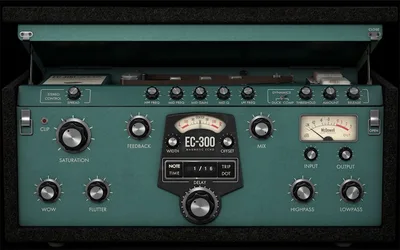
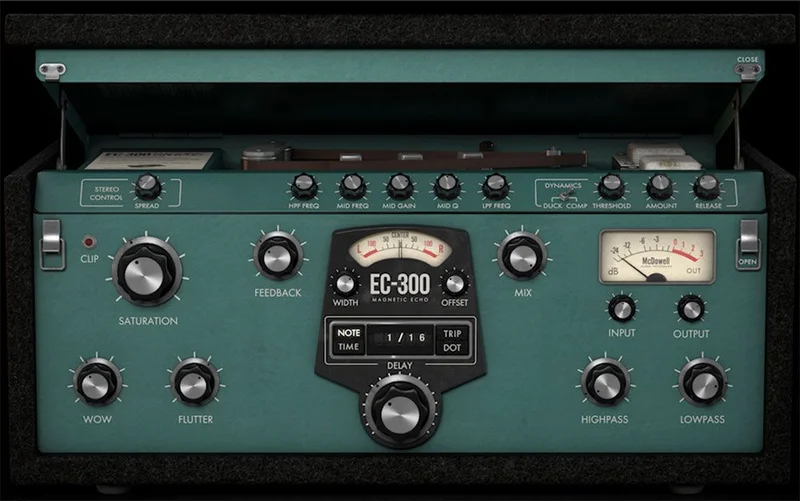
We pulled up the EC-300. Went straight to the Magnetic engine. Within about four minutes we had a 220ms single repeat with just enough wow and flutter dialed in to feel organic. The guitar sat back without disappearing. That's the version of this plugin that justifies the purchase.
This review is for producers working across rock, electronic, pop, and post-production who want three different delay characters in one plugin at a price that doesn't require a conversation with your accountant.
First Impressions: Familiar Layout, Dense Preset List
Installation is standard. License activation runs through McDSP's iLok-compatible system, with v7 giving you two activations per license. That's a small win for anyone who works across a studio machine and a laptop.
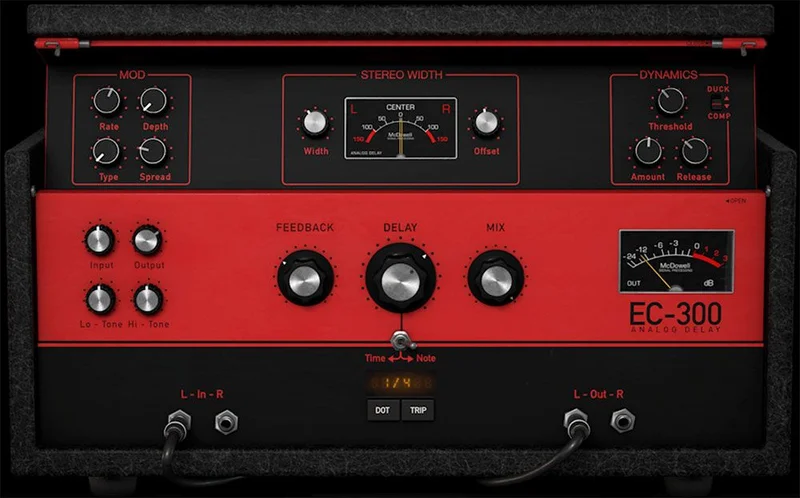
Opening the plugin for the first time, the UI is functional but it's not pretty. Dark grey panels, knobs that feel lifted from 2014. Compared to opening Soundtoys EchoBoy or Valhalla Delay for the first time, there's no wow moment.
What there is: immediate clarity about what the three engines do. Magnetic, Digital, and Analog are clearly separated. The preset browser with 1,500+ options in v7 is genuinely overwhelming at first, but the category filtering gets you to a useful starting point fast.
We loaded a Magnetic tape preset, hit play, and understood the plugin's personality within thirty seconds. That's a good sign.
Getting It Into a Real Workflow
The EC-300 runs in AAX Native, AU, and VST3 only in v7. If you're on VST, that's a hard stop. McDSP dropped VST support in this version. Annoying for anyone still on a VST-only host, though most serious DAWs support VST3 now.
We tested across Logic Pro and Pro Tools. No crashes. Preset recall was consistent between sessions. That's baseline stuff, but it matters.
In a send/return configuration on a drum bus, the Digital engine with ping-pong mode handled a wide, rhythmic repeat cleanly. We set the feedback to 35%, the mix to 18% on the send, and the stereo spread filled space without competing with the overheads. It sat well.
Where we hit friction: the dual-engine mode. Running two delay lines simultaneously is a great idea on paper. In practice, the routing isn't as intuitive as we'd like. It took us longer than it should have to understand the signal flow between the two engines. A clearer visual routing diagram in the UI would fix this.
The SIM section, which covers Synthetic Impulse Models for flange, chorus, and echo effects, is a creative tool. It's not a replacement for a dedicated chorus plugin. Think of it as a delay-based texture shaper. We used it on a synth pad and got a movement that felt like a flanger running at a slow rate through a tape machine. Satisfying result. Weird process to get there.
What It's Genuinely Good At
The Magnetic engine is the reason to buy this plugin. We're being direct about that.
We ran a snare room mic through it with a 145ms delay, wow set to around 15%, flutter at 8%, and the saturation control nudged up to add a subtle 2nd harmonic push. The repeat didn't sound like a repeat. It sounded like the room had a personality. That's the hardest thing to fake in a delay plugin and McDSP does it well.
Compare that to UAD's EP-34 Echoplex emulation. The EP-34 sounds brilliant but requires UAD hardware or a UAD Spark subscription. The EC-300 Magnetic engine gets you 70 to 80 percent of that character ITB with no additional hardware. At $149, that ratio is hard to beat.
The Analog engine handles lower-fi, circuit-colored repeats. We used it on a DI bass with a long feedback trail and it glued into the low end without muddying the fundamental. That's not easy for a delay plugin to do without a highpass filter trick.
CPU load in v7 is light enough. We ran four instances across a session, mixing Magnetic and Digital engines, and saw no meaningful CPU spike on an M2 MacBook Pro. McDSP's optimization work in v7 is real, not just marketing copy.
The 75+ SIMs add genuine variety. They're not all equally useful, but the tape-based chorus SIMs stand out for anyone doing lo-fi production work. Check the Delay Plugins Guide best delay plugins guide for context on how SIM-style effects compare to dedicated modulation plugins.
The Rough Edges
The UI is the honest weak point. It works. It communicates. But it hasn't kept pace with how good plugin design has gotten since Valhalla and Soundtoys raised the bar.
The dual-engine signal routing, as mentioned, needs a rethink. We've used complex multi-head delay plugins that make the routing obvious. This doesn't.
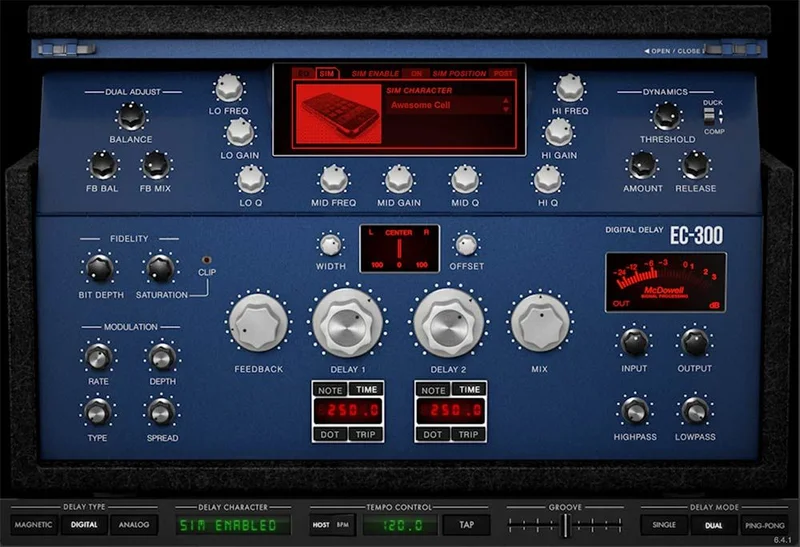
The SIM effects are interesting but thin when used as standalone chorus or flange replacements. We wouldn't
drop a dedicated modulation plugin for this. It’s a bonus texture tool, not a replacement.
Dropping VST support in v7 will frustrate some users upgrading from v6. The plugin itself is better in v7. The format change is a real inconvenience for specific setups. If you're on VST3-compatible hosts (Ableton, Cubase, FL Studio, Reaper, Studio One all qualify), you're fine. Check your DAW before upgrading.
We also wish the preset browser had more tagging. 1,500+ presets is great until you're searching for "dark tape slapback" and scrolling through categories that don't quite describe what you're hearing.
Who This Is Really For
- ✅ Buy if you want tape and analog delay character ITB without paying for UAD hardware or a UAD Spark subscription
- ✅ Buy if you work across multiple DAWs that support AAX, AU, or VST3 and want one delay plugin that sounds different across three engine types
- ✅ Buy if you're doing post-production sound design and need creative SIM-based effects alongside traditional delay
- ❌ Skip if you're on a VST-only host. v7 won't load.
- ❌ Skip if you want a modern, visually intuitive UI. This isn't Valhalla Delay.
- ❌ Skip if you already own Soundtoys EchoBoy and a good tape emulation delay. The overlap is high enough that the $149 might not add much to your specific setup. See our Halo Delay review for a modern alternative with better UI design.
Score Breakdown
| Category | Score | Notes |
|---|---|---|
| Sound Quality | 4.3/5 | Magnetic engine delivers real tape character; Digital is clean and precise |
| Value for Money | 4.5/5 | $149 for three distinct engines and 1,500+ presets is a strong deal |
| Ease of Use | 3.5/5 | Preset browser works; dual-engine routing is frustratingly unclear |
| Features | 4.0/5 | 75+ SIMs, three engines, ping-pong, dual mode, saturation controls |
| CPU Efficiency | 4.3/5 | v7 optimizations are real; four instances caused no meaningful load spike |
| Overall | 4.2/5 | Earns its price if the Magnetic engine is what you need |
Alternatives to Consider
Soundtoys EchoBoy: Better UI, more musical feel on the tape and analog emulations, but costs more and doesn't include the breadth of SIM effects. If you do a lot of vocal delay work, EchoBoy might win on sheer dial-in speed. See the best delay plugins guide for a full breakdown.
Valhalla Delay: lighter CPU load, better UI design, and Valhalla's signature clean sound. It won't give you the saturation and wow/flutter character of EC-300's Magnetic engine, but for clean, creative delay work it's hard to beat. Check our Halo Delay review and alternatives for more options in this bracket.
UAD EP-34 Echoplex: If you're already on UAD hardware or a Spark subscription, the EP-34 is the tape echo reference. Sounds brilliant. But it costs more and locks you into UAD's ecosystem. The EC-300 gets you meaningfully close without the hardware dependency.
At $149 with three genuinely different-sounding engines, the EC-300 Echo Collection Native v7 is a buy for most producers. The caveat is specific: if VST support matters to your setup, v7 breaks that. And if you're chasing a modern, visually polished plugin experience, you'll feel the age of this UI every session. But if you put on headphones, load the Magnetic engine, dial wow to 12% and flutter to 6%, and press play on a guitar track, the argument for buying it makes itself.
Frequently Asked Questions
What's new in EC-300 Echo Collection Native v7 compared to v6?
v7 adds over 1,500 new presets, CPU efficiency improvements, and expands the license to two activations per purchase. The significant trade-off is that VST support is dropped in v7. You'll need AAX Native, AU, or VST3 compatibility in your DAW. The upgrade from v6 costs less than the full price.
Does EC-300 Native v7 work without iLok hardware?
McDSP supports iLok License Manager, which includes software-based iLok authorization without requiring a physical dongle. You get two activations per license. Check McDSP's current licensing terms for any changes to their activation policy.
How does the Magnetic engine compare to the UAD EP-34 Echoplex?
The UAD EP-34 is the benchmark for tape echo emulation and it sounds slightly more detailed in the saturation response. The EC-300 Magnetic engine gets you 70 to 80 percent of that character without requiring UAD hardware or a subscription. For most production work, the difference is small enough that the price gap makes the EC-300 the smarter buy.
What are the SIM effects in the EC-300 and are they worth using?
SIM stands for Synthetic Impulse Model. The EC-300 includes over 75 SIMs that generate flange, chorus, and echo textures using delay-based processing. They work best as creative texture tools on synths, pads, and room mics. They're not replacements for dedicated modulation plugins, but the tape-based chorus SIMs in particular are genuinely useful for lo-fi and experimental production.